
הקדמה
The TCNEWCL HDMI Splitter 1 in 4 Out is designed to duplicate one HDMI audio and video signal input to four HDMI output displays simultaneously. This device supports resolutions up to 4Kx2K at 30Hz and is backward compatible with 1080p, 720p, or lower resolutions. It also supports 3D Blue-Ray and deep colors (8/10/12 bit). Supported audio formats include DTS-HD, Dolby-trueHD, DTS, and DTS7.1. The splitter is constructed from durable metal, offering resistance to compression and falls, and features a compact design for easy placement.
פֿעיִקייטן
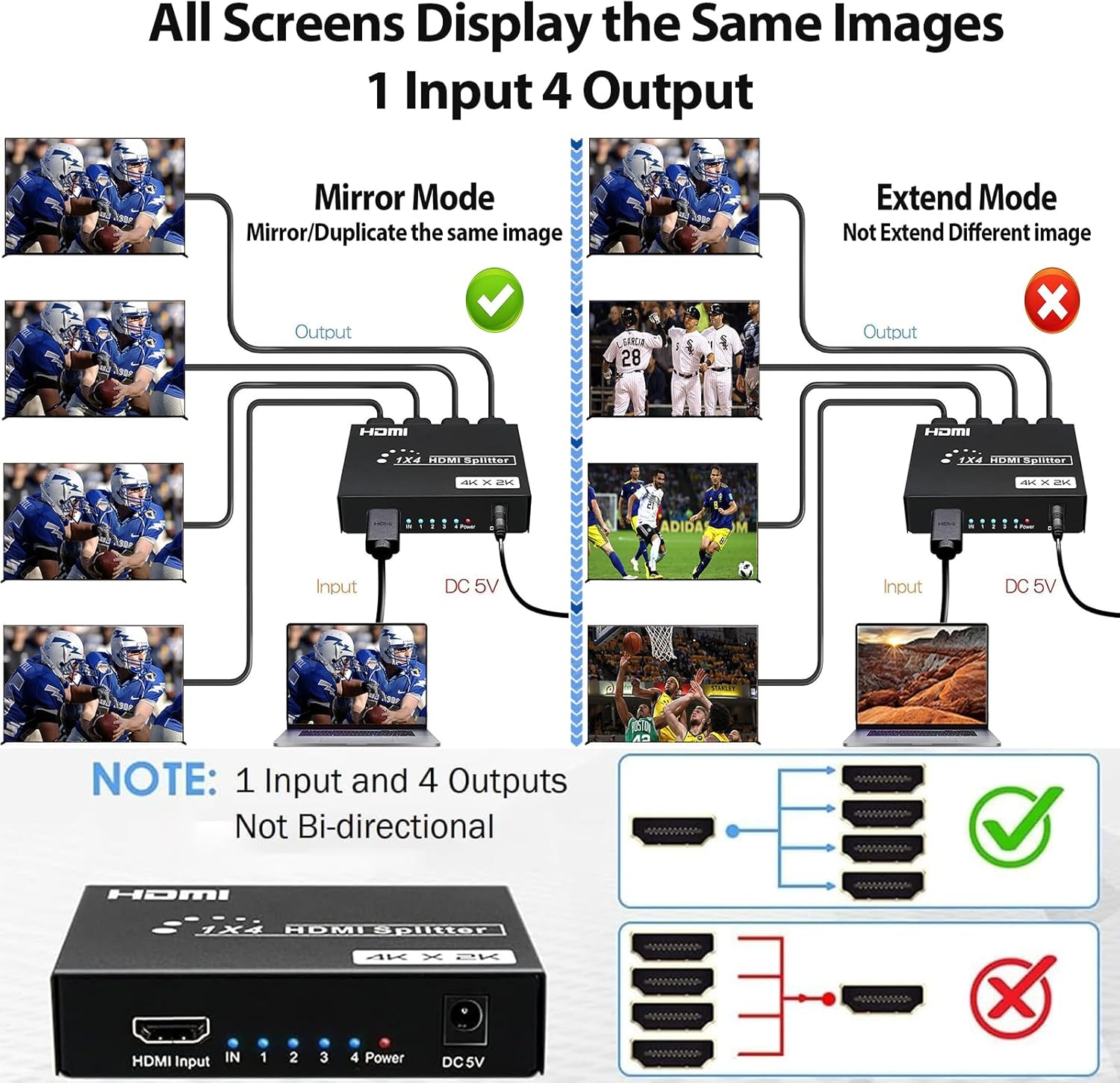
- 1 Input to 4 Outputs: Duplicates one HDMI source to four displays. Note: This device supports mirror/duplicate mode only and does not support extended display mode. All four monitors will display the same image.
- הויך האַכלאָטע שטיצן: Supports maximum resolution up to 4Kx2K @ 30Hz.
- צוריק קאַמפּאַטאַבילאַטי: Compatible with 1080p, 720p, and lower resolutions.
- Advanced Color & Audio: Supports deep colors (8/10/12 bit) and audio formats like DTS-HD, Dolby-trueHD, DTS, DTS7.1.
- Long Distance Transmission: Supports HDMI 1.4 cables (AWG 26 standard) up to 10m (32.8 feet) for input and up to 20m (65.6 feet) for output, providing a maximum stable transmission distance of up to 100 feet.
- דוראַבאַל קאַנסטראַקשאַן: Made of strong metal material, resistant to compression and falls.
- צאַפּן און שפּיל: Easy to use with no complex setup required.
פּראָדוקט איבערview
The HDMI splitter features one HDMI input port, four HDMI output ports, and a DC 5V power input. LED indicators show the status of each connection.


סעטאַפּ אינסטרוקציעס
- פאַרבינדן מאַכט: Plug the provided DC 5V power adapter into the splitter's power port and then into a power outlet.
- פאַרבינדן אַרייַנשרייַב מקור: Connect your HDMI source device (e.g., TV box, computer, laptop, PS4) to the HDMI INPUT port on the splitter using an HDMI cable (not included).
- Connect Output Displays: Connect up to four HDMI displays (e.g., monitors, projectors, TVs) to the HDMI OUTPUT ports (1-4) on the splitter using HDMI cables (not included).
- מאַכט אויף: Ensure all devices are powered on. The splitter will automatically detect the input and distribute the signal.
For a visual guide on connecting the splitter, please refer to the video below:
אַפּערייטינג ינסטראַקשאַנז
The TCNEWCL HDMI Splitter operates in a mirror/duplicate mode. This means that the single HDMI input signal will be replicated and sent to all connected output displays. All connected displays will show the exact same content.
- שפּיגל מאָדע: The splitter is designed to mirror or duplicate the input signal. It does not support extending the display to show different content on each screen.
- רעזאָלוציע און רעפרעש קורס: The splitter will output the highest common resolution and refresh rate supported by all connected displays and the input source, up to 4K@30Hz.
- אַודיאָ שטיצן: Audio signals are passed through to all connected displays, supporting various formats including DTS-HD and Dolby-trueHD.
For a demonstration of the splitter's capabilities, including its 4Kx2K @30Hz output, please watch the video below:
ספּעסאַפאַקיישאַנז
| אַטריביוט | ווערט |
|---|---|
| מאָדעל נומער | HS414T |
| סאָרט | TCNEWCL |
| קאָליר | שוואַרץ |
| קאַנעקטער טיפּ | HDMI |
| נומער פון פּאָרץ | 5 (1 Input, 4 Output) |
| קאַמפּאַטאַבאַל דעוויסעס | Gaming Console, TV Box, Computer, Laptop, Monitor, Projector, TV |
| מאַקסימום האַכלאָטע | 4Kx2K @ 30Hz |
| שטיצט אַודיאָ | DTS-HD, Dolby-trueHD, DTS, DTS7.1 |
| Input Cable Length (Max) | 10m (32.8 feet) with AWG 26 HDMI 1.4 cable |
| Output Cable Length (Max) | 20m (65.6 feet) with AWG 26 HDMI 1.4 cable |
| Total Transmission Distance (Max) | 100 פֿיס |
טראָובלעשאָאָטינג
- קיין בילד/סיגנאַל:
- Ensure all HDMI cables are securely connected to both the splitter and the displays/source.
- Verify the power adapter is correctly connected and the splitter's power indicator is on.
- Check if the input source device is powered on and outputting a signal.
- Try using shorter or higher quality HDMI cables, especially for longer distances or higher resolutions.
- Ensure your display is set to the correct HDMI input channel.
- פליקערנדיק/נישט-סטאַביל בילד:
- This can often be resolved by using higher quality HDMI cables or shorter cable lengths.
- Ensure the resolution and refresh rate of your source device are compatible with all connected displays and the splitter (max 4K@30Hz).
- קוק פֿאַר קיין ינטערפיראַנס פון אנדערע עלעקטראָניש דעוויסעס.
- קיין אַודיאָ:
- Verify that the audio settings on your source device are correctly configured for HDMI output.
- Ensure your displays' audio is not muted or set to a very low volume.
- קאָנטראָלירט די HDMI קאַבל קאַנעקשאַנז.
וישאַלט
To ensure the longevity and optimal performance of your HDMI splitter, follow these maintenance guidelines:
- רייניקונג: Use a soft, dry cloth to clean the device. Do not use liquid cleaners or aerosol sprays.
- ווענטילאַטיאָן: זיכער מאַכן אַז די דעווייס איז געשטעלט אין אַ גוט ווענטילירטן אָרט צו פאַרמייַדן איבערהיצונג. פאַרשטאָפּט נישט די ווענטילאַציע לעכער.
- סטאָרידזש: When not in use for extended periods, store the splitter in a cool, dry place away from direct sunlight and extreme temperatures.
- האַנדלינג: Handle the device with care to avoid physical damage. The metal casing provides durability, but excessive force can still cause damage.
וואָראַנטי און שטיצן
This TCNEWCL HDMI Splitter comes with a 1 יאָר וואָראַנטי from the date of purchase. For technical support, warranty claims, or any inquiries, please contact TCNEWCL customer service through the retailer where the product was purchased.