
1. הקדמה
א דאנק פארן קויפןasing the TURBOX Giantpeak Mechanical Feel RGB Gaming Keyboard. This manual provides essential information for setting up, operating, and maintaining your new keyboard. Please read this manual carefully before use to ensure optimal performance and longevity of your device.
2. זיכערקייַט אינפֿאָרמאַציע
- Keep the keyboard away from excessive heat, direct sunlight, and moisture.
- Although the keyboard is spill-resistant, avoid intentionally exposing it to large amounts of liquid. In case of spills, disconnect the keyboard immediately and allow it to dry completely before reconnecting.
- Do not attempt to disassemble or modify the keyboard. This will void the warranty and may cause damage.
- ניצן נאָר מיט קאָמפּאַטיבלע דעוויסעס און מאַכט קוואלן ווי ספּעסיפיעד.
- האַלטן אויס פון דערגרייכן פון קינדער.
3. פּעקל אינהאַלט
ביטע טשעק די פּאַקעט פֿאַר די פאלגענדע זאכן:
- TURBOX Giantpeak Mechanical Feel RGB Gaming Keyboard
- באַניצער מאַנואַל (דעם דאָקומענט)
4. פּראָדוקט איבערview
The TURBOX Giantpeak keyboard is designed for gaming, featuring a mechanical feel, customizable RGB lighting, and macro capabilities. It also includes a convenient mobile device holder.
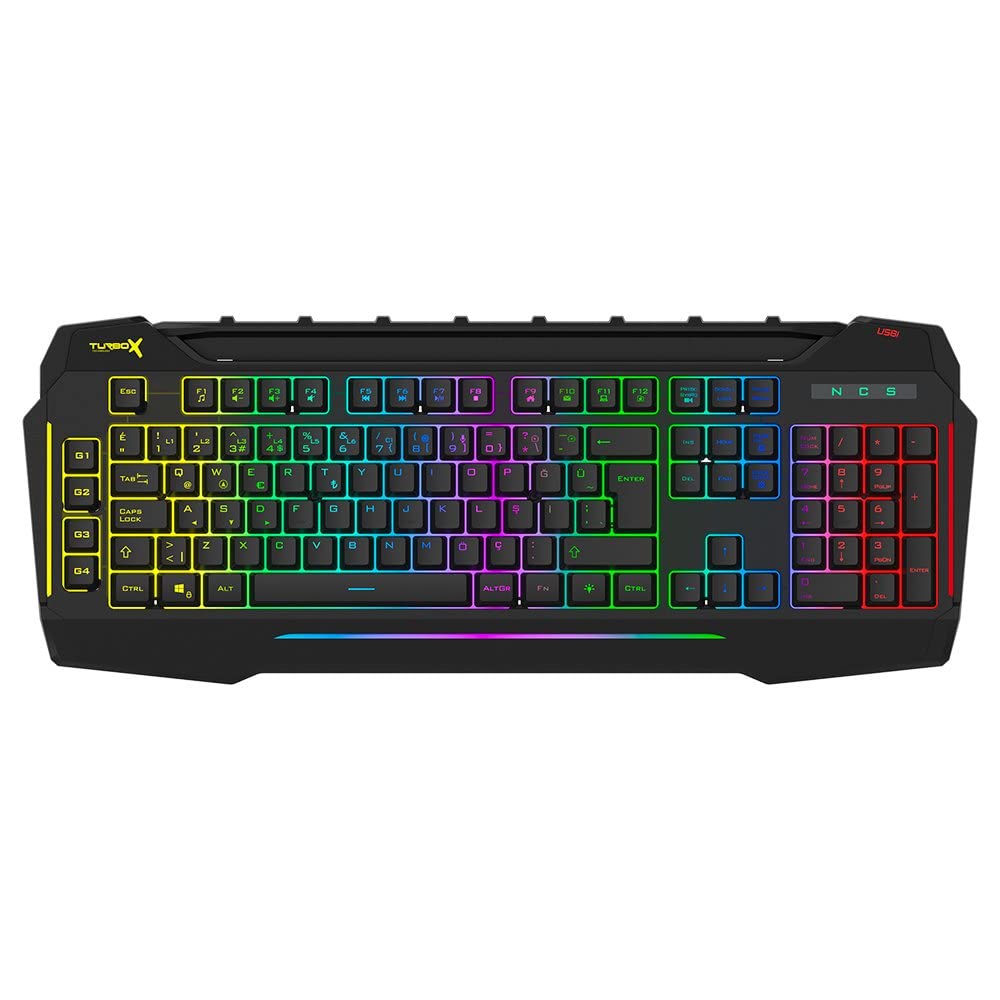
Figure 4.1: TURBOX Giantpeak keyboard with integrated mobile device stand.
This full-size keyboard offers a standard Q layout, providing a comfortable and responsive typing experience for both gaming and general use.

פיגורע 4.2: שפּיץ view of the TURBOX Giantpeak keyboard.
The keyboard features vibrant RGB backlighting that can be customized to various effects, including sound-sensitive modes. Its spill-resistant design provides added durability.

פיגור 4.3: ווינקלדיק view showing RGB lighting.
Dedicated macro keys (G1-G4) are located on the left side, allowing for quick execution of complex commands or sequences.

Figure 4.4: Close-up of programmable G-keys.
The keyboard also includes a full numeric keypad for data entry and additional functions.

Figure 4.5: Numeric keypad detail.
Connectivity is provided via a durable USB cable, ensuring a stable and responsive connection to your computer.

פיגורע 4.6: זייַט view מיט וסב קאַבלע.
5. סעטאַפּ
Follow these steps to set up your TURBOX Giantpeak keyboard:
- ופשליסן די קלאַוויאַטור: פֿאָרזיכטיק אַרויסנעמען די קלאַוויאַטור און אַלע פּאַקאַדזשינג מאַטעריאַלן פֿון דער קעסטל.
- פאַרבינדן צו קאָמפּיוטער: Plug the USB connector of the keyboard into an available USB port on your desktop or laptop computer.
- דרייווער ינסטאַלירונג: Your operating system (Windows, macOS, etc.) should automatically detect and install the necessary drivers. This process may take a few moments.
- באַשטעטיקן פאַנגקשאַנאַליטי: Once drivers are installed, test the keyboard by typing in a text editor or browser to ensure all keys are functioning correctly. The RGB lighting should also illuminate.
6. אַפּערייטינג ינסטרוקטיאָנס
6.1 גרונטלעכע קלאַוויאַטור פונקציעס
The TURBOX Giantpeak keyboard operates like a standard Q-layout keyboard. All standard keys (alphanumeric, function keys, numeric keypad, navigation keys) function as expected.
6.2 RGB לייטינג קאָנטראָל
The keyboard features customizable RGB backlighting with 7 different color options and sound-sensitive modes. Specific key combinations are used to cycle through lighting effects and adjust brightness:
- טוישן לייטינג מאָדע: ניצן די Fn + מעגילע לאַק keys to cycle through various lighting effects.
- סטרויערן ברייטנאַס: ניצן די Fn + Page Up (פאַרגרעסערן) אדער Fn + Page Down (decrease) keys to adjust the brightness level of the backlighting.
- Sound-Sensitive Mode: The keyboard supports sound-sensitive lighting. Refer to specific software or key combinations (if available) for activation. (Note: Specific key combinations for sound-sensitive mode may vary or require software.)
6.3 Macro Programming (G1-G4 Keys)
The TURBOX Giantpeak keyboard includes 4 programmable macro keys (G1, G2, G3, G4) for executing custom commands or sequences. Follow these general steps for macro recording:
- Enter Macro Recording Mode: דרוק די MR key (Macro Record, usually near the G-keys). The keyboard's indicator light may flash to indicate recording mode.
- Select Macro Key: Press one of the G-keys (G1, G2, G3, or G4) where you want to save the macro.
- Record Sequence: Type the sequence of keys you wish to record. This can include multiple keystrokes, delays, and modifier keys.
- Exit Macro Recording Mode: דרוק די MR key again to save the macro and exit recording mode. The indicator light should stop flashing.
- Execute Macro: To use the recorded macro, simply press the assigned G-key.
Note: For advanced macro settings or specific software-based macro management, please check the manufacturer's website for any available utility software.
6.4 Mobile Device Holder
The integrated slot at the top of the keyboard is designed to hold smartphones or small tablets, providing a convenient viewing angle while gaming or working.
7. וישאַלט
To ensure the longevity and performance of your keyboard, follow these maintenance guidelines:
- רייניקונג: ניצט אַ ווייכע, טרוקענע שטאָף צו ווישן די ייבערפלאַך פון דער קלאַוויאַטור. פֿאַר שווערע שמוץ, אַ ביסל טרוקןampווישט דעם שטאָף מיט וואַסער אָדער אַ מילדער רייניקונג לייזונג. פֿאַרמייַדט שטרענגע כעמיקאַלן אָדער אַברייסיוו מאַטעריאַלן.
- באַזייַטיקונג פון שטויב: ניצט קאמפרעסט לופט צו באַזײַטיקן שטויב און שמוץ פון צווישן די קלאַוויאַטורן.
- שפּיל פאַרוואַלטונג: In case of liquid spills, immediately disconnect the keyboard from your computer. Turn it upside down to drain any liquid and allow it to air dry completely for at least 24-48 hours before reconnecting.
- סטאָרידזש: ווען נישט אין באַנוץ פֿאַר לענגערע פּעריאָדן, זאָל מען האַלטן די קלאַוויאַטור אין אַ ריינער, טרוקענער סביבה.
8. טראָובלעשאָאָטינג
If you encounter issues with your TURBOX Giantpeak keyboard, refer to the following common problems and solutions:
| פּראָבלעם | מעגלעך לייזונג |
|---|---|
| די קלאַוויאַטור רעאַגירט נישט. |
|
| RGB lighting is not working or is stuck. |
|
| Macro keys (G1-G4) are not working. |
|
| קנעפלעך זענען קלעפּיק אָדער רעאַגירן נישט. |
|
9. ספּעסאַפאַקיישאַנז
| שטריך | דעטאַל |
|---|---|
| מאָדעל נאָמען | Giantpeak |
| טייל נומער | ID9923266 |
| סאָרט | טורבאָקס |
| קאַנעקטיוויטי טעכנאָלאָגיע | וסב ווייערד |
| קאַמפּאַטאַבאַל דעוויסעס | לאַפּטאַפּ, פּיסי |
| שליסל טיפּ | Mechanical Feel (Membrane) |
| ספּעציעלע פֿעיִקייטן | RGB Lighting, Macro Keys (4), Sound-Sensitive Lighting, Spill-Resistant, Mobile Device Holder |
| נומער פון קיז | 87 (Note: Visuals suggest a full-size layout, this number may refer to a specific key group or variant.) |
| ייַזנוואַרג צובינד | וסב |
| פּעקל דימענשאַנז | 51.2 X 22.2 X 5.2 סענטימעטער |
| פּונקט וואָג | 1 קילאָ |
10. וואָראַנטי און שטיצן
For warranty information and technical support, please refer to the warranty card included with your product or visit the official TURBOX webזייטל. האַלט דיין קויפן באַווייַז פֿאַר קיין וואָראַנטי קליימז.
If you require further assistance, please contact TURBOX customer support through their official channels.