
1. הקדמה
This manual provides instructions for the AITIAO CC2531 Sniffer USB Dongle, a wireless Zigbee analyzer module designed for protocol analysis and Bluetooth adapter functions. It is compatible with CC2531EMK and extends 8 IO ports for various firmware applications. This device is intended for use in industrial and scientific applications for electrical testing and circuit analysis.

פיגורע 1: The AITIAO CC2531 Sniffer USB Dongle (left) and its external antenna (right).
2. פּראָדוקט פֿעיִקייטן
- Extended IO Ports: Features 8 extendable IO ports, allowing compatibility with various firmware for Bluetooth adapter and protocol analyzer functionalities.
- Wireless Sniffer Module: Functions as a CC2531 Sniffer Module USB Dongle, compatible with CC2531EMK for Zigbee protocol analysis.
- אַפּערייטינג אָפטקייַט: Operates within the 2.405-2.485GHz frequency range for protocol analysis.
- Wireless Transmission Rate: Supports a wireless transmission rate of 250 Kbaud.
- נידעריק מאַכט קאַנסאַמשאַן: Consumes less than 20mA during reception and less than 25mA during transmission.
- סאָליד פּלאַן: Dimensions of 41mm x 16mm x 1.6mm for the main module.
3. פּעקל אינהאַלט
דער פּעקל כולל די פאלגענדע זאכן:
- 2 x AITIAO Wireless Zigbee CC2531 Sniffer USB Dongle
- 2 רענטגענ פונדרויסנדיק אַנטענע

פיגורע 2: One AITIAO CC2531 Sniffer USB Dongle with its external antenna connected.
4. סעטאַפּ אינסטרוקציעס
- Attach the External Antenna: Carefully screw the external antenna onto the SMA connector located on the CC2531 Sniffer USB Dongle. Ensure it is finger-tight to establish a secure connection.
- פאַרבינדן צו קאָמפּיוטער: Insert the USB dongle into an available USB port on your desktop computer.
- דרייווער ינסטאַלירונג: Your operating system may automatically install necessary drivers. If not, you may need to manually install drivers for the CC2531 device. Refer to the specific driver documentation for your operating system.
- ווייכווארג ינסטאַלירונג: Install the required software for Zigbee protocol analysis or Bluetooth adapter functionality. This typically involves specific firmware (e.g., Sniffer or BTool) and associated applications. Follow the software provider's installation guidelines.
- באַשטעטיקן דערקענונג: After installation, verify that the device is recognized by your computer and the installed software. Check device manager for proper enumeration.

פיגורע 3: The CC2531 USB Dongle with its external antenna attached, viewעד פון אַ ווינקל.
5. אַפּערייטינג ינסטרוקטיאָנס
The AITIAO CC2531 Sniffer USB Dongle can be configured for different operational modes based on the firmware loaded onto it. Common uses include Zigbee protocol sniffing and acting as a Bluetooth adapter.
5.1. Zigbee Protocol Sniffer Mode
- Load Sniffer Firmware: Ensure the appropriate Zigbee sniffer firmware is loaded onto the CC2531 dongle. This typically requires a programming tool and specific software.
- לאָנטש סניפער ווייכווארג: Open your preferred Zigbee protocol analysis software (e.g., Wireshark with Zigbee dissectors, SmartRF Packet Sniffer).
- אויסקלייַבן דיווייס: Within the software, select the CC2531 dongle as the capture interface.
- קאָנפיגורירן קאַנאַל: Set the desired Zigbee channel for sniffing. The device operates in the 2.405-2.485GHz range.
- אָנהייבן כאַפּן: Initiate packet capture to monitor Zigbee traffic. The software will display captured packets, allowing for detailed analysis of network communication.
5.2. Bluetooth Adapter Mode (BTool)
- Load BTool Firmware: If using the dongle as a Bluetooth adapter, ensure the BTool compatible firmware is loaded.
- Launch BTool Software: Open the BTool application or other compatible Bluetooth Low Energy (BLE) development tools.
- פאַרבינדן צו מיטל: Establish a connection between the software and the CC2531 dongle.
- Perform BLE Operations: Use the software to perform various BLE operations such as scanning for devices, connecting to peripherals, sending/receiving data, and debugging BLE applications.

פיגורע 4: Top view of the CC2531 USB Dongle with its external antenna connected.
6. וישאַלט
- רייניקונג: Use a soft, dry cloth to clean the exterior of the dongle. Avoid using liquid cleaners or solvents.
- סטאָרידזש: האַלט דעם אַפּאַראַט אין אַ קיל, טרוקן אָרט אַוועק פון דירעקט זונשייַן און עקסטרעמע טעמפּעראַטורן.
- האַנדלינג: Handle the dongle and antenna carefully to prevent physical damage to the connectors or circuit board.
- אַנטענע קשר: Periodically check that the external antenna is securely attached.
7. טראָובלעשאָאָטינג
- מיטל ניט דערקענט:
- Ensure the dongle is fully inserted into the USB port.
- פּרוּווט אַ אַנדערש וסב פּאָרט אויף דיין קאָמפּיוטער.
- Check Device Manager (Windows) or System Information (macOS/Linux) to see if the device is listed, even with an error. Reinstall drivers if necessary.
- ריסטאַרט דיין קאָמפּיוטער.
- No Data Capture (Sniffer Mode):
- Verify that the correct sniffer firmware is loaded onto the dongle.
- Confirm that the sniffer software is configured to use the CC2531 device.
- Ensure the correct Zigbee channel is selected in the software, matching the network you intend to monitor.
- Check the proximity to the Zigbee network; signal strength can affect capture.
- Bluetooth Connection Issues (BTool Mode):
- Confirm BTool compatible firmware is loaded.
- Ensure the target Bluetooth device is discoverable and within range.
- קוק איבער פֿאַר שטערונגען פֿון אַנדערע 2.4GHz דעווייסעס.
8. ספּעסאַפאַקיישאַנז
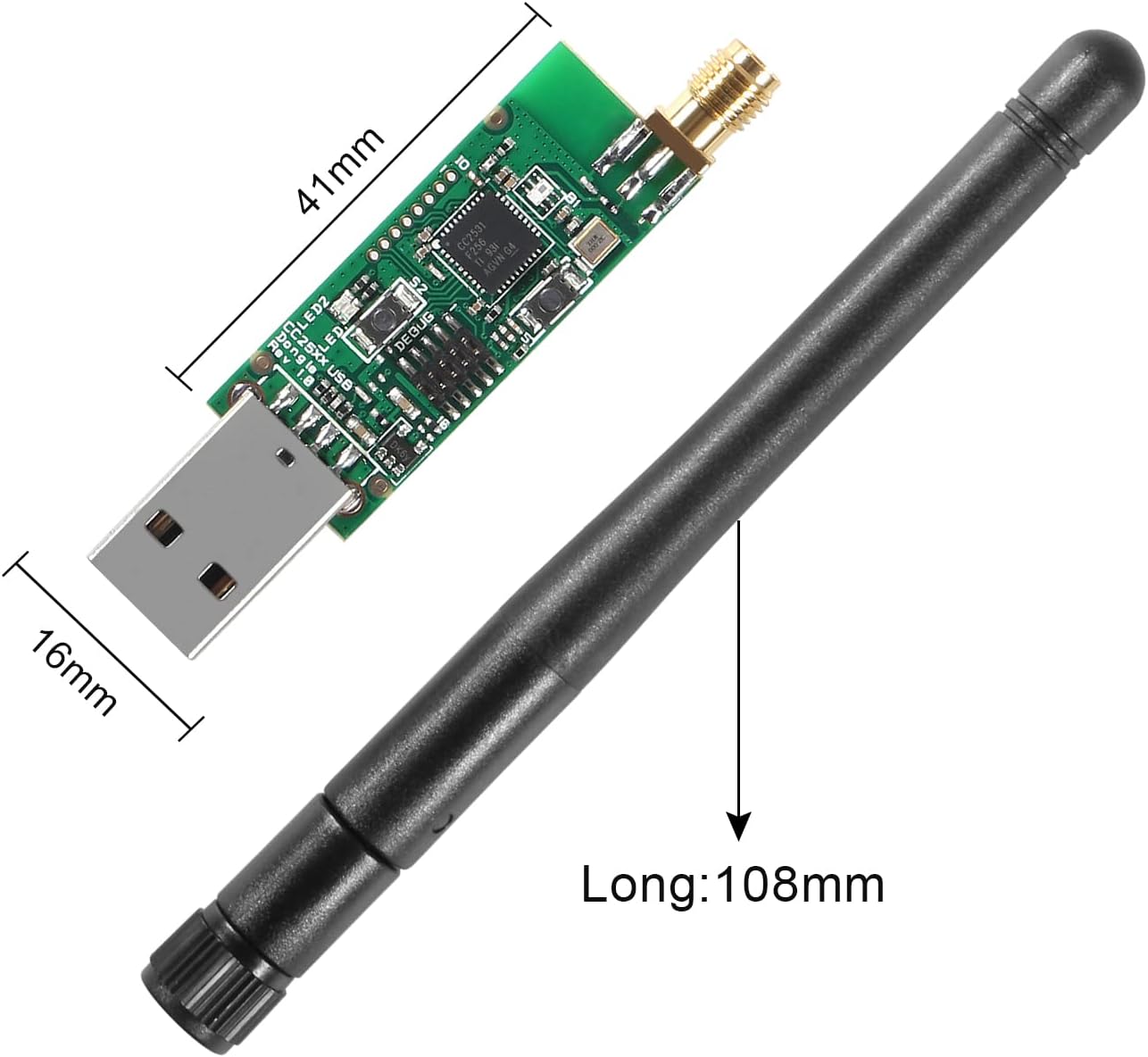
פיגורע 5: Dimensions of the CC2531 USB Dongle (41mm x 16mm) and the external antenna (108mm long).
| שטריך | דעטאַל |
|---|---|
| סאָרט | AITIAO |
| מאָדעל | CC2531 Sniffer USB Dongle |
| ייַזנוואַרג צובינד | וסב, בלועטאָאָטה |
| אַפּערייטינג אָפטקייַט | 2.405-2.485 גהז |
| ווירעלעסס טראַנסמיסיע קורס | 250 Kbaud (250,000 Bits Per Second) |
| מאַכט קאַנסאַמשאַן (באַקומען) | <20mA |
| מאַכט קאַנסאַמשאַן (טראַנסמיסיע) | <25mA |
| פּראָדוקט דימענשאַנז (L x W x H) | 41 מם רענטגענ 16 מם רענטגענ 1.6 מם (1.61 "רענטגענ 0.63" רענטגענ 0.06") |
| קאַמפּאַטאַבאַל דעוויסעס | דעסקטאָפּ קאָמפּיוטערס |
| קאָליר | Black, Silver (referring to components) |
| UPC/GTIN | 701715496361 |
9. וואָראַנטי און שטיצן
For warranty information and technical support, please refer to the documentation provided with your purchase or contact AITIAO customer service directly. Keep your purchase receipt for warranty claims.