
1. פּראָדוקט איבערview
The NC GBS-8100 is a versatile video converter board designed for arcade game systems. It facilitates the conversion of VGA/SVGA/XGA/SXGA signals to CGA, RGBS, CVBS, or S-Video outputs, making it compatible with a wide range of display devices, including older arcade monitors and standard definition televisions. This board features true digital 24-bit A/D conversion for accurate color reproduction and offers user controls for image adjustment.
שליסל פֿעיִקייטן:
- מאַכט אַרייַנשרייַב: DC 5V/2A via 6.3mm connector.
- Input Signal Support: VGA/SVGA/XGA/SXGA resolutions (640x480, 800x600, 1024x768, 1280x1024).
- רעזולטאַט אָפּציעס: CGA (15K), VGA bypass, Video (CVBS), S-Video.
- בילד קאָנטראָל: Supports position and zoom adjustments.
- קאָליר טיפקייַט: True digital 24-bit A/D converter for 16.7-million color conversion.
- OSD מעניו: English On-Screen Display for adjustments.
- באַניצער קאָנטראָלס: Dedicated keys for Output Switch, Image Zoom, Image Position, and Output Adjust.
- קאַמפּאַטאַבילאַטי: Supports NTSC and PAL video standards.
פּעקל אינהאַלט:
- 1x Video Output Converter Board (GBS-8100)
- 1x Power supply wire

Figure 1: The GBS-8100 converter board along with the included power supply wire and a multi-color signal cable.
2. סעטאַפּ און ייַנמאָנטירונג
This section provides instructions for connecting and setting up your GBS-8100 converter board.
2.1. קאָמפּאָנענט לעגיטימאַציע
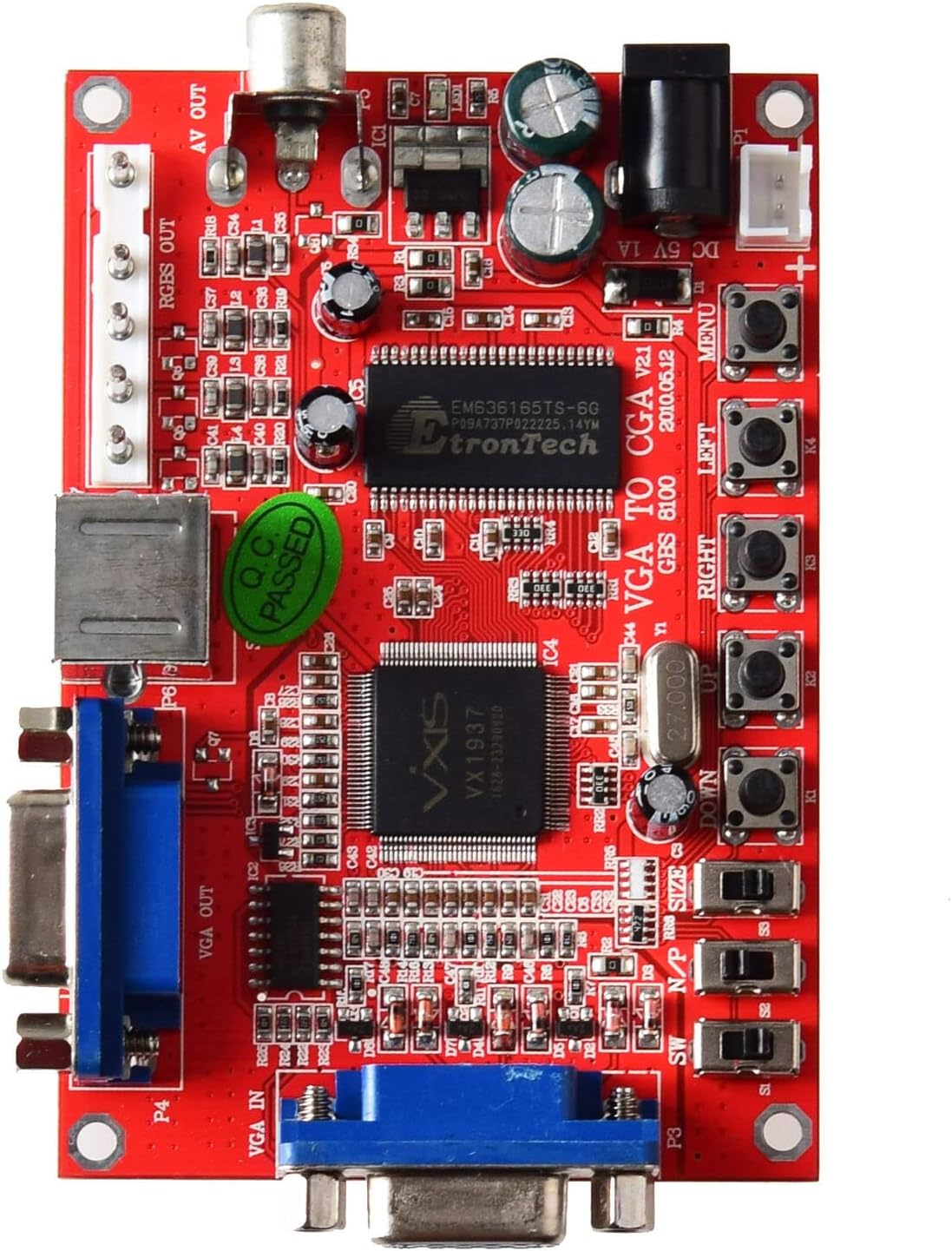
פיגורע 2: שפּיץ view of the GBS-8100 board, highlighting VGA IN, VGA OUT, AV OUT, RGBS OUT, S-Video port, DC 5V input, and control buttons.
- VGA IN (P3): Connect your source device (e.g., PC, game console) with a VGA output here.
- VGA OUT (P4): For VGA bypass, connect a VGA monitor here.
- RGBS/CGA OUT (P7): Connect to an arcade monitor or display that accepts RGBS or CGA signals.
- AV OUT (P5): Connect to a standard definition TV using a composite video cable.
- S-Video OUT (P6): Connect to a TV or display using an S-Video cable.
- DC 5V/2A Input: Connect the included power supply wire here. Ensure the power supply provides 5V DC at 2A.
- קאָנטראָל קנעפּלעך: Buttons for MENU, UP, DOWN, LEFT, RIGHT, Output Switch, Image Zoom, Image Position, Output Adjust.
2.2. קאַנעקשאַן סטעפּס
- מאַכט קשר: Connect the provided power supply wire to the DC 5V/2A input on the GBS-8100 board. Connect the other end to a suitable 5V DC power source (not included, typically a power adapter).
- אַרייַנשרייַב מקור: Connect your VGA source (e.g., PC, arcade JAMMA board with VGA output) to the VGA IN (P3) port on the converter board.
- רעזולטאַט ווייַז:
- פֿאַר CGA/RGBS output: Connect your arcade monitor or display to the RGBS/CGA OUT (P7) פּאָרט.
- פֿאַר Composite Video (AV) output: Connect your TV to the AV OUT (P5) פּאָרט.
- פֿאַר ס-ווידעא output: Connect your TV to the S-Video OUT (P6) פּאָרט.
- פֿאַר VGA Bypass: Connect a VGA monitor to the VGA OUT (P4) פּאָרט.
- אַודיאָ (אפציאָנעל): If your source provides audio via VGA, ensure your display setup can handle it, or use a separate audio solution as this board primarily handles video.

פיגורע 3: נאָענט-אַרויף view of the VGA IN, VGA OUT, and S-Video ports on the GBS-8100 board.
3. אַפּערייטינג ינסטרוקטיאָנס
Once connected, power on the GBS-8100 board and your display. The board will automatically detect the input signal. Use the onboard buttons to navigate the OSD menu and adjust settings.
3.1. אויף-סקרין ווייַז (אָסד) מעניו
דרוק די MENU button to access the OSD. Use the UP און אַראָפּ buttons to navigate through menu options, and לינקס און רעכט buttons to change values or select sub-menus.
3.2. באַניצער קאָנטראָלס
- רעזולטאַט סוויטש: Cycles through available output modes (CGA, Video, S-Video, VGA Bypass).
- בילד פארגרעסער: Adjusts the zoom level of the displayed image.
- Image Position: Adjusts the horizontal and vertical position of the image on the screen.
- רעזולטאַט אַדזשאַסטמאַנט: Fine-tunes specific output parameters.
3.3. Supported Input/Output Resolutions
| קאַטעגאָריע | דעטאַילס |
|---|---|
| Input Signal (Auto Scan) |
|
| רעזולטאַט סיגנאַל |
|
4. וישאַלט
The GBS-8100 converter board is designed for durability and requires minimal maintenance.
- רייניקונג: Use a soft, dry cloth to gently wipe the surface of the board. Avoid using liquid cleaners or solvents, as they may damage the electronic components.
- סוויווע: Operate the board in a clean, dry environment, away from excessive dust, moisture, and extreme temperatures.
- האַנדלינג: Handle the board by its edges to avoid touching components, especially when powered on.
- מאַכט אַוועק: Always disconnect power before making or changing any connections.
5. טראָובלעשאָאָטינג
If you encounter issues with your GBS-8100 converter board, refer to the following common problems and solutions:
| פּראָבלעם | מעגלעך סיבה / לייזונג |
|---|---|
| ניט קיין בילד אויף אַרויסווייַזן. |
|
| דאָס בילד איז פֿאַרדרייט אָדער פֿליקערט. |
|
| OSD menu not appearing or unresponsive. |
|
| קאָלאָרס זענען פאַלש. |
|
6. ספּעסאַפאַקיישאַנז
Detailed technical specifications for the GBS-8100 converter board.
| פּאַראַמעטער | ווערט |
|---|---|
| מאָדעל נומער | גבס-8100 |
| מאַכט צושטעלן אַרייַנשרייַב | DC 5V/2A (6.3mm connector) |
| Input Signal Support | VGA/SVGA/XGA/SXGA (640x480, 800x600, 1024x768, 1280x1024) |
| Input Signal Frequencies |
|
| רעזולטאַט סיגנאַל טייפּס | CGA (15K), VGA (Bypass), Video (CVBS), S-Video |
| Output Signal Resolutions |
|
| קאָליר קאַנווערזשאַן | True digital 24-bit A/D converter (16.7 million colors) |
| OSD שפּראַך | ענגליש |
| דימענסיעס (בעערעך) | 3.94 רענטגענ 3.15 X 1.18 אינטשעס (פּאַקע דימענשאַנז) |
| פּונקט וואָג | 3.52 אונס (0.1 קילאָגראַמס) |
7. וואָראַנטי און שטיצן
This section provides information regarding product warranty and customer support.
7.1. וואָראַנטי אינפֿאָרמאַציע
Specific warranty details for the NC GBS-8100 converter board are typically provided at the point of purchase or within the product packaging. Please refer to your purchase receipt or contact the seller for precise warranty terms and conditions. Generally, electronic components may come with a limited manufacturer's warranty covering defects in materials and workmanship.
7.2. קונה שטיצן
For technical assistance, troubleshooting beyond this manual, or inquiries regarding your product, please contact the seller or manufacturer directly. Contact information can often be found on the product packaging, the seller's webוועבזייטל, אדער אייער קויפן דאקומענטאציע.
פֿאַר אַלגעמיינע פֿראַגעס, קענט איר באַזוכן די NC Store on Amazon.