
1. הקדמה
This manual provides detailed instructions for the installation, operation, and maintenance of your Heaboli HP68 4K Dual Dash Cam. Please read this manual thoroughly before using the device to ensure proper functionality and safety.
The Heaboli HP68 is a high-performance dual dash camera designed to record both the front view and the interior cabin of your vehicle. It features 4K front recording, 1080P rear recording, built-in Wi-Fi, GPS for live speed tracking, Sony Night Vision, HDR technology, and a 24-hour parking monitor.

Figure 1: Heaboli HP68 4K Dual Dash Cam overview.
2. פּעקל אינהאַלט
באַשטעטיקן אַז אַלע זאכן זענען פאַראַן אין דיין פּעקל:
- Heaboli HP68 Dash Cam Unit
- דערציען אַפּאַראַט
- Car Charger (Cigarette Lighter Adapter)
- Magnetic GPS Mount
- באַניצער מאַנואַל
- Memory Card (Included, up to 256GB U3 level recommended)
- Trim Pry Tool
- Cable Fixers (x5)
- עלעקטראָסטאַטיש פילם (x2)
- Double-sided Adhesive (x2)
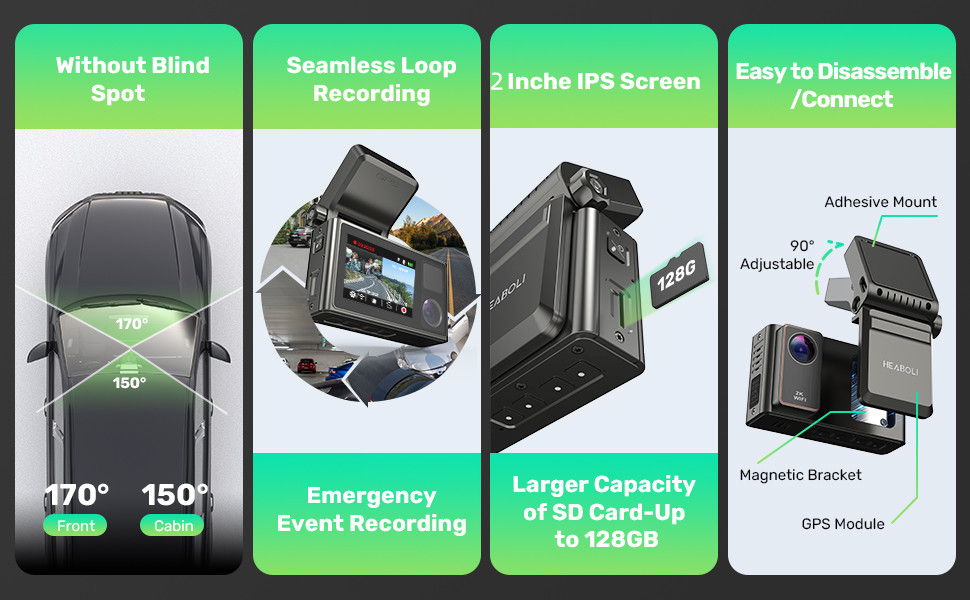
Figure 2: Heaboli HP68 package contents.
3. סעטאַפּ און ייַנמאָנטירונג
- צוגרייטן די ווינדשילד: Clean the area on your windshield where you intend to mount the dash cam. Apply the electrostatic film to the clean area. This helps with adhesion and makes removal easier.
- Attach the Magnetic GPS Bracket: Install the magnetic GPS bracket onto the dash cam unit. Then, firmly attach the GPS mount to the electrostatic film on your windshield. Ensure the front camera has a clear view פון דעם וועג.
- אַרייַנלייגן SD קאָרט: Insert a U3 level Micro SD card (32-256GB recommended) into the designated slot on the dash cam.
- פאַרבינדן מאַכט: Connect the car charger to the Type-C port on the GPS bracket, then plug the other end into your vehicle's cigarette lighter socket. Power should be supplied through the GPS bracket for proper GPS module function.
- Connect Rear Camera (Optional): If using the rear camera, connect its cable to the main dash cam unit and route the cable discreetly to the rear of your vehicle. Mount the rear camera in a suitable location, typically on the rear windshield.
- פֿאָרמאַטירונג סד קאָרט: Once powered on, navigate to the settings menu on the dash cam's 3-inch IPS touch screen and select the option to format the SD card. This ensures optimal performance and compatibility.

Figure 3: Magnetic GPS Bracket connection.

Figure 4: Dash cam mounted on windshield with electrostatic film.
4. אַפּערייטינג ינסטרוקטיאָנס
4.1. אויטאָמאַטישע רעקאָרדינג
The dash cam will automatically power on and begin recording when your vehicle's engine starts. It will stop recording and power off shortly after the engine is turned off.
4.2. שלייף רעקאָרדינג
The device records video in continuous loops. When the SD card is full, the oldest unlocked fileס וועט ווערן איבערגעשריבן דורך נייע רעקארדירונגען. דאס זיכערט א קאנטינעווירלעכע רעקארדירונג אן מאנועלע אריינמישונג.
4.3. G-סענסאר (נויטפאַל רעקאָרדינג)
The built-in G-sensor detects sudden impacts or collisions. When triggered, it automatically locks the current video segment to prevent it from being overwritten during loop recording. These locked videos are stored in a separate folder.
4.4. 24-שעה פּאַרקינג מאָניטאָר
With its built-in 300mAh battery, the dash cam can monitor your vehicle even when parked. If a collision is detected while the car engine and camera are off, the camera will automatically turn on, record a 30-second video, and then power off. These videos are also locked to prevent overwriting.
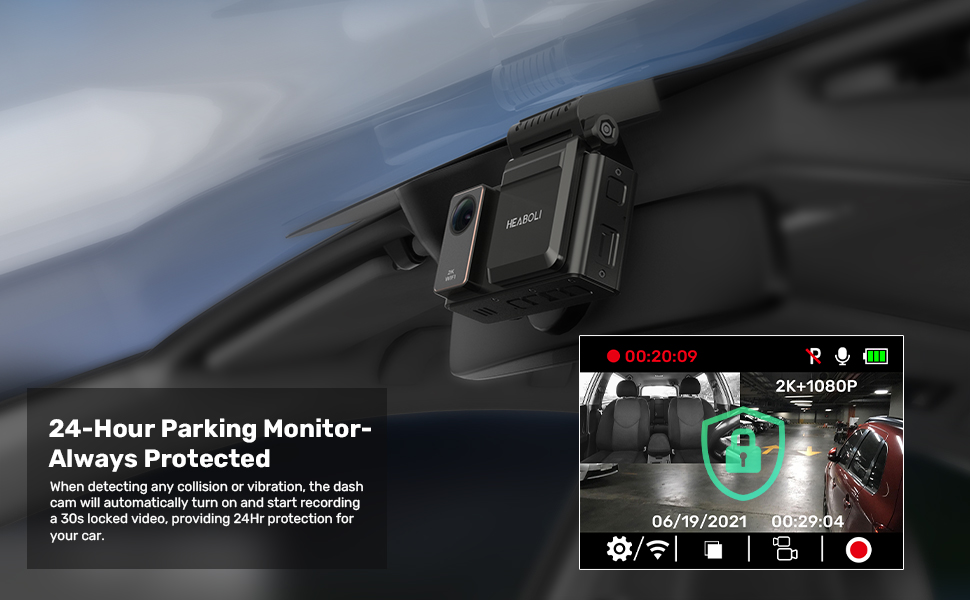
Figure 5: 24-Hour Parking Monitoring in action.
4.5. Wi-Fi Connectivity and Mobile App
The Heaboli HP68 features built-in Wi-Fi for seamless connection to your smartphone via the "Heaboli" mobile app. This app allows you to:
- לעבן view די אַפּאַראַט פיטער.
- טוישן מיטל סעטטינגס.
- Edit and download recorded videos.
- טיילן ווידיאס אויף סאציאלע מידיא.

Figure 6: Wi-Fi connection and app interface.
4.6. דזשי-פי-עס פונקציאָנאַליטעט
The integrated GPS module records your driving route, speed, and vehicle's location. This information is embedded in the video timestamp און קענען זיין viewed on Google Maps during playback via the mobile app or on a computer.

Figure 7: GPS Logger displaying driving route and data.
4.7. Night Vision and HDR Technology
Equipped with a Sony IMX335 sensor and HDR technology, the dash cam provides clear recordings even in low-light conditions, capturing license plates and road signs with enhanced detail and color range.

Figure 8: Sony Night Vision with HDR technology.
5. וישאַלט
- SD קאַרטל וישאַלט: Regularly format your SD card (at least once a month) to prevent data corruption and ensure optimal recording performance.
- רייניקונג: Use a soft, dry cloth to clean the camera lenses and the 3-inch IPS touch screen. Avoid using abrasive cleaners or solvents.
- טעמפּעראַטור: Avoid exposing the dash cam to extreme temperatures for prolonged periods. The recommended working temperature is -4°F to 140°F.
6. טראָובלעשאָאָטינג
| אַרויסגעבן | מעגלעך סיבה | לייזונג |
|---|---|---|
| די דאַש קאַם גייט נישט אָן. | No power supply; faulty car charger. | Check car charger connection; ensure vehicle's power outlet is functional. |
| די אויפנאמע שטעלט זיך אפ אומגעריכט. | SD card full or corrupted; incompatible SD card. | Format SD card; replace with a U3 level, 32-256GB SD card. |
| Wi-Fi פֿאַרבינדונג פּראָבלעמען. | Incorrect app usage; interference. | Ensure correct "Heaboli" app is used; temporarily disable other Wi-Fi connections on your phone. |
| GPS not tracking. | GPS module not powered; poor satellite signal. | Ensure power is supplied via the GPS bracket; move to an open area for better signal. |
| ווידעא קוואַליטעט איז שלעכט. | Dirty lens; incorrect resolution setting. | Clean lenses; check resolution settings in the menu. |
7. ספּעסאַפאַקיישאַנז
- מאָדעל: HP68
- פראָנט אַפּאַראַט האַכלאָטע: 4K (2160p)
- דערציען אַפּאַראַט האַכלאָטע: 1080 פּ
- לענס: פראָנט און דערציען
- פאַרשטעלן: 3-אינטש IPS ריר סקרין
- פעלד פון View: 170 דיגריז
- קאַנעקטיוויטי: ווי-פי
- גפּס: געבויט-אין
- ספּעציעלע פֿעיִקייטן: Night Vision (Sony IMX335 sensor, HDR), Parking Monitor, G-Sensor
- אַרייַנשרייַב: DC 5V2A
- ארבעטן טעמפּעראַטור: -4°F צו 140°F
- סד קאָרט שטיצן: Up to 256GB (U3 level or above recommended)
- באַטערי: 1 Lithium Polymer battery (300mAh, included)
- פּראָדוקט דימענשאַנז: 3.15 X 1.22 X 1.65 אינטשעס
- נומער וואָג: 1.32 פונט
- מאַונטינג טיפּ: מאַגנעטיק בארג
8. וואָראַנטי און שטיצן
For any product inquiries, technical assistance, or warranty claims, please contact Heaboli customer support directly.
- אפיציעלע אימעיל: Support@heaboli.com
ביטע באַהאַלטן אייער קויפן-באַווייַז פֿאַר גאַראַנטיע צוועקן.