
הקדמה
This manual provides detailed instructions for the installation, operation, and maintenance of your DieseRC Wireless Kinetic Light Switch and Receiver. This innovative system allows you to control lighting or other electrical devices wirelessly, without the need for batteries or additional wiring for the switch itself. The kinetic switch generates its own power from the press, offering a convenient and eco-friendly solution for your home or office.
The package includes the Receiver Controller, a Self-Generating Wireless Switch, double-sided tape for mounting, screws for installation, and this product manual.
סעטאַפּ און ינסטאַלירונג
ופנעמער וויירינג
The receiver is designed for easy installation between your power supply and the device you wish to control. Ensure all power is disconnected before proceeding with wiring.

Image: Diagram illustrating the correct wiring of the receiver. The input end connects to the power source (AC 110V-220V) and the output end connects to the light bulb or appliance.
Connect the input wires of the receiver to your AC 85V~250V power source. Connect the output wires of the receiver to the electrical device (e.g., a lamp) you intend to control. The receiver can be easily fixed to a surface using the provided screws.
Pairing the Wireless Switch with the Receiver
The product is typically pre-paired at the factory. If re-pairing is necessary or if you are adding new switches, follow these steps:
- Press and hold the learning button on the receiver for approximately 3-5 seconds. The LED indicator light on the receiver will illuminate.
- While the LED is lit, press the button on the Self-Generating Wireless Switch one time. The LED on the receiver will flash, indicating successful pairing.
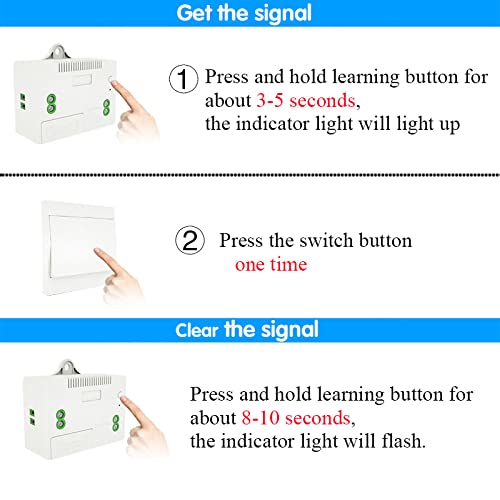
Image: Visual guide showing how to press and hold the learning button on the receiver and then press the wireless switch to pair them.
רעסעטטינג די ופנעמער
To clear all paired wireless switches from the receiver's memory:
- Press and hold the learning button on the receiver for approximately 8-10 seconds. The LED indicator will flash 3 times, confirming the reset.
Note: After resetting, all previously paired wireless switches will no longer control this receiver. You will need to re-pair them if desired.
אַפּערייטינג ינסטראַקשאַנז
יקערדיק אָפּעראַציע
Once paired, simply press the kinetic wireless switch to toggle the connected device (e.g., light) on or off. The switch generates its own power with each press, requiring no batteries.
Multi-Control Functionality
The system supports flexible control configurations:
- One Switch Controls Multiple Receivers: A single wireless switch can be paired with multiple receivers to control several devices simultaneously.
- Multiple Switches Control One Receiver: Up to 5 wireless switches can be paired with a single receiver, allowing control of one device from various locations.

Image: Illustration of multiple control combinations, including one switch controlling multiple receivers and multiple switches controlling one receiver.
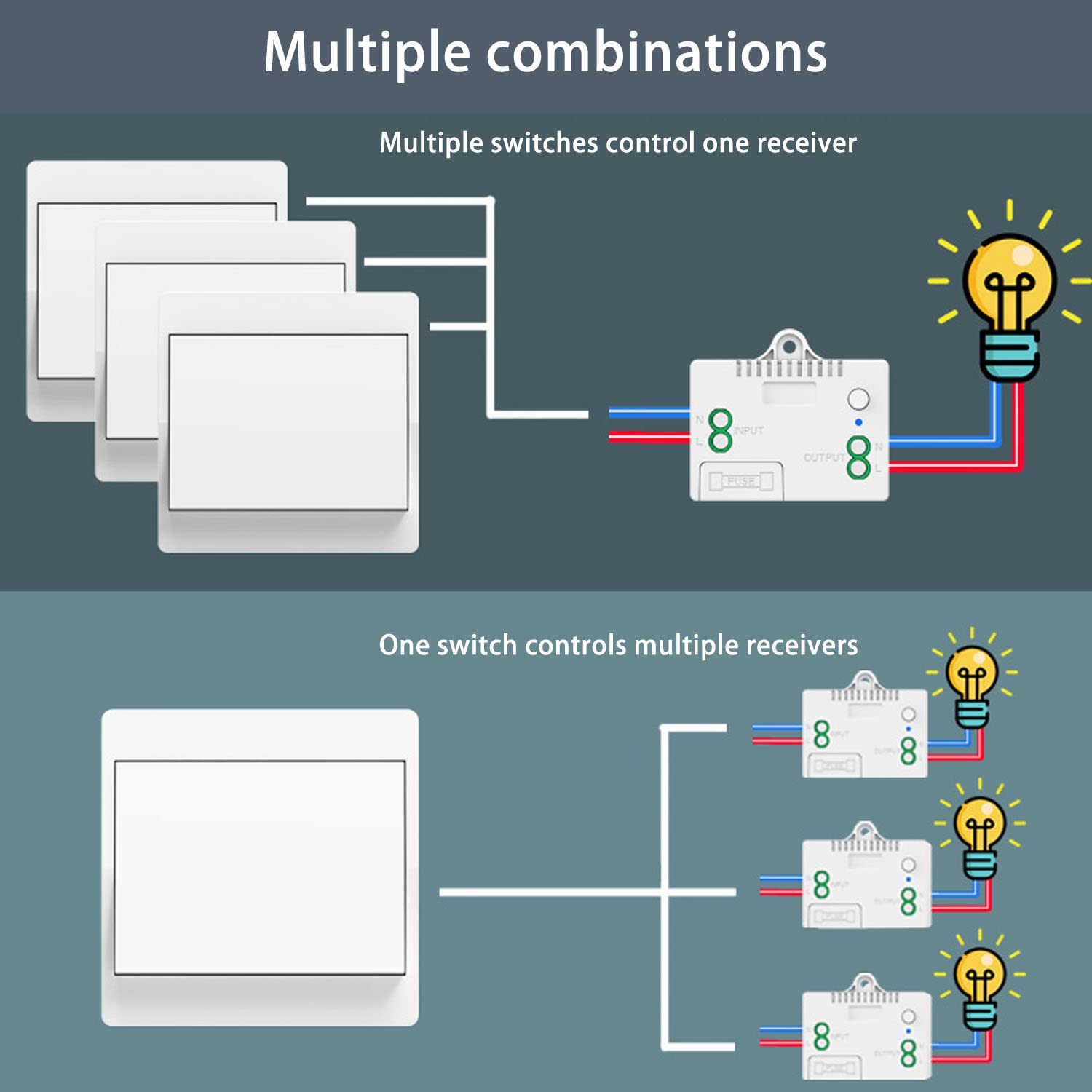
Image: A more detailed diagram showing wiring for one switch controlling multiple receivers and multiple switches controlling one receiver.
אַפּערייטינג קייט
The RF 433MHz signal provides stable and reliable performance. The strong signal can pass through walls, floors, doors, and other obstacles, allowing control within approximately 50 meters indoors.
וישאַלט
Wireless Switch Durability
The self-generating wireless switch is designed for long-term use, with a lifespan of over 200,000 clicks. Its waterproof design allows for safe installation in environments like bathrooms and kitchens, without concerns about electric shock or battery corrosion.
Receiver Fuse Protection
The receiver includes a 10A fuse for self-protection against overloads. In the event of an overload, the fuse will blow to protect the receiver and connected devices. The fuse is easily replaceable if needed.
טראָובלעשאָאָטינג
- סוויטש רעאגירט נישט: Ensure the receiver is powered on and correctly wired. If the switch was recently reset, it needs to be re-paired with the receiver. Follow the pairing instructions in the Setup section.
- אינטערמיטענט קאנטראל: While the signal is strong, extreme distances or multiple thick obstacles might affect performance. Try repositioning the receiver or switch if experiencing consistent issues.
- Device Not Turning On/Off: Check the wiring connections to ensure they are secure. Verify that the connected device is functional and not overloaded. If the receiver is unresponsive, check the internal fuse and replace if blown.
ספּעסאַפאַקיישאַנז
ופנעמער פּאַראַמעטערס
| Voltage | 85 וו ~ 250 וו אַק |
| שטיל קראַנט | <5mA |
| מאַקסימום מאַסע | 1000 וו |
| רף פרעקווענסי | 433 מהז |
| אַפּערייטינג טעמפּעראַטור | -30°C צו +80°C |
| ריסיווינג סענסיטיוויטי | > 97 דבם |
| זכּרון קאַפּאַסיטי | Up to 5 wireless switches |
| RF אָפּערייטינג מאָדע | Superheterodyne ASK wireless reception |
| ריסיווינג קייט | Approximately 50 meters indoors |
| דימענסיעס (L X W X H) | 60 מם X 43 מם X 27 מם |
| שוץ קלאַס | IP40 |
Self-Generating Wireless Switch Parameters
| באַזע גרייס | 86 מם X 86 מם X 13 מם |
| טיפּ | Rocker switch ON/OFF |
| לעבן | 200,000 מאל |
| רף פרעקווענסי | 433 מהז |
| מאַכט טיפּ | Self-generating (kinetic) |
| שוץ קלאַס | IP40 |

Image: Diagram showing the dimensions of both the wireless self-powered switch (86x86x15mm) and the receiver (60x43x27mm).
וואָראַנטי אינפֿאָרמאַציע
DieseRC products are manufactured to high-quality standards. For specific warranty details, please refer to the product packaging or contact DieseRC customer support. Keep your purchase receipt as proof of purchase.
קונה שטיצן
If you encounter any issues or have questions regarding your DieseRC Wireless Kinetic Light Switch and Receiver, please contact our customer support team. We are committed to providing convenient, safe, efficient, and economical remote control devices and solutions.
For assistance, please visit the DieseRC brand store on Amazon or refer to the contact information provided with your product packaging.