
1. הקדמה
This manual provides detailed instructions for the safe and effective use of your Flashpoint Zoom Li-on III R2 TTL On-Camera Flash for Fujifilm cameras. Please read this manual thoroughly before operation to ensure proper functionality and to prevent damage to the unit or injury to yourself.
The Flashpoint Zoom Li-on III R2 is a high-performance speedlight designed for Fujifilm cameras, featuring a powerful 76Ws output, 2.4GHz wireless R2 system, 1/8000s High-Speed Sync (HSS), and a quick manual-TTL switch for versatile lighting control. It is powered by a 7.2V/2600mAh Li-ion battery, providing up to 450 full-power flashes with a rapid 1.5s recycle time.

Image: The Flashpoint Zoom Li-on III R2 TTL On-Camera Flash unit.
2. זיכערקייַט אינפֿאָרמאַציע
- נעמט נישט אויס אדער מאדיפיצירט נישט דעם בליץ איינהייט. הויך וואָלומעןtage קאָמפּאָנענטן זענען פאָרשטעלן.
- האַלט די אַפּאַראַט טרוקן. שטעלט עס נישט אויס צו רעגן אָדער נעץ.
- רירט נישט אָן דעם בליץ-רער נאָכן שיסן, ווײַל עס קען זײַן הייס.
- פֿאַרמײַדט דירעקטע אויגן-אויסשטעל צום בליץ, ספּעציעל פֿון נאָענט, ווײַל דאָס קען שאַטן די זעאונג.
- האַלטן אויס פון דערגרייכן פון קינדער.
- ניצט נאָר די ספּעציפֿיצירטע באַטאַרייע און טשאַרדזשער.
- Ensure the flash is securely mounted to the camera or stand to prevent accidental drops.
3. פּראָדוקט קאַמפּאָונאַנץ
The Flashpoint Zoom Li-on III R2 package typically includes the following items:
- Flashpoint Zoom Li-on III R2 TTL On-Camera Flash Unit
- Li-ion Battery (7.2V/2600mAh)
- באַטערי טשאַרדזשער
- וסב טשאַרדזשינג קאַבלע
- מיני שטייט
- פּראַטעקטיוו קאַסע
- ינסטרוקטיאָן מאַנואַל (דעם דאָקומענט)

Image: Contents of the Flashpoint Zoom Li-on III R2 package, including the flash unit, battery, charger, cable, mini stand, and case.
4. סעטאַפּ
4.1 באַטעריע אינסטאַלאַציע און טשאַרדזשינג
- עפֿנט דעם דעקל פֿון דער באַטעריע־אָפּטיילונג אויף דער בליץ־אַפּאַראַט.
- Insert the 7.2V/2600mAh Li-ion battery, ensuring correct polarity.
- פאַרמאַכן די באַטאַרייע אָפּטייל דעקן סיקיורלי.
- To charge, connect the battery to the charger and plug the charger into a power outlet. The indicator light will show charging status.

Image: Close-up of the Flashpoint Zoom Li-on III R2 showing the battery compartment and the 2600mAh Li-ion battery.
4.2 מאָנטירן דעם בליץ
- Slide the flash's mounting foot into your Fujifilm camera's hot shoe.
- פֿעסט אָנציִען דעם שלאָס קנעפּל אָדער הייבער אויף דער בליץ־אַפּאַראַט צו באַפֿעסטיקן עס פֿעסט אין פּלאַץ.
- Alternatively, mount the flash onto a light stand using the included mini stand or a compatible cold shoe adapter.

Image: The Flashpoint Zoom Li-on III R2 flash mounted on a camera hot shoe.
5. אפערירן דעם בליץ
5.1 Power On/Off and Interface
Press and hold the power button to turn the flash on or off. The backlit matrix LCD provides clear information and settings. Use the multipurpose buttons and dial for navigation and adjustments.
Image: The control panel of the Flashpoint Zoom Li-on III R2, showing the backlit LCD and multipurpose buttons.
5.2 פלאַש מאָדעס
The flash supports various modes for different shooting scenarios:
- TTL (דורך-די-לינז) מאָדע: The flash automatically adjusts its output based on the camera's metering system. Use the Quick Manual-TTL switch for fast transitions.
- מאַנועל (M) מאָדע: Allows you to manually set the flash power output from 1/1 to 1/256.
- מולטי (סטראָבאָסקאָפּיש) מאָדע: שיסט א סעריע שנעלע בליצן בעת איין עקספּאָזיציע צו כאַפּן קייפל באַוועגונגען פון אַ סוביעקט.
- הויך-גיכקייַט סינק (HSS): Enables flash synchronization with shutter speeds up to 1/8000s, useful for overpowering ambient light or using wide apertures in bright conditions.

Image: Visual representation of different flash modes including TTL, Manual, Stroboscopic, and High-Speed Sync (HSS) capabilities.
5.3 בליץ קאָפּ אַדזשאַסטמענט
The flash head offers flexible positioning for bounce flash or direct lighting:
- האָריזאָנטאַל ראָוטיישאַן: The flash head rotates 0 to 330 degrees.
- ווערטיקאַל טילט: The flash head tilts from -7 to 120 degrees.
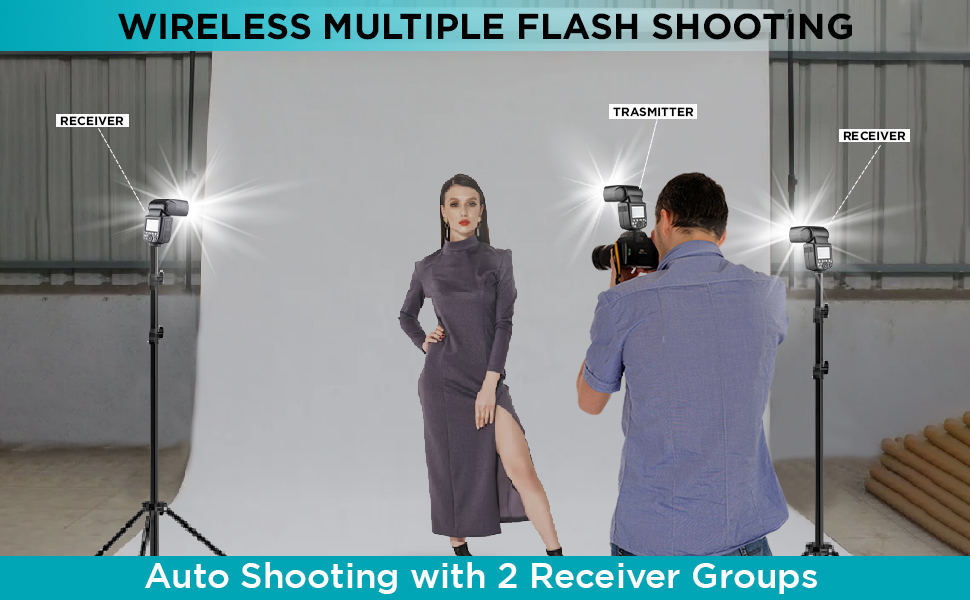
Image: Diagram illustrating the horizontal rotation (330 degrees) and vertical tilt (120 degrees) capabilities of the flash head.
6. Wireless Control (R2 System)
The Flashpoint Zoom Li-on III R2 features a built-in 2.4GHz R2 wireless system, allowing for reliable remote triggering and multi-flash setups.
6.1 Master and Slave Modes
- בעל מאָדע: The flash can act as a master unit to control other Fujifilm compatible flashes with built-in R2 receivers.
- שקלאַף מאָדע: The flash can be triggered wirelessly by a master unit or transmitter, allowing for off-camera lighting.

Image: Illustration of the flash operating in both Master and Slave modes for wireless multi-flash setups.
6.2 ווירעלעסס טראַנסמיסיע
The 2.4GHz wireless transmission offers 32 channels and a range of up to 100 meters, providing robust connectivity for complex lighting arrangements.

Image: Diagram showing the 2.4GHz wireless transmission capabilities of the Flashpoint Zoom Li-on III R2, including channel and range information.
7. וישאַלט
- רייניקט דעם בליץ-איינהייט רעגולער מיט א ווייכן, טרוקענעם שטאָף. ניצט נישט קיין סאָלווענטן אדער שרײַבנדיקע רייניגער.
- Ensure the hot shoe contacts are clean and free of debris for proper communication with the camera.
- Store the flash in its protective case when not in use to prevent dust and damage.
- If storing for extended periods, remove the battery and store it separately in a cool, dry place.
8. טראָובלעשאָאָטינג
| פּראָבלעם | מעגלעך סיבה | לייזונג |
|---|---|---|
| דער בליץ פליסט נישט. | Battery low or depleted; incorrect mode; flash not securely mounted; camera settings incorrect. | Charge or replace battery; check flash mode (TTL/M); ensure flash is fully seated in hot shoe; verify camera flash settings. |
| בליץ אויסגאַבע איז נישט קאָנסיסטענט. | Low battery; environmental interference (wireless); dirty contacts. | Ensure battery is fully charged; change wireless channel; clean hot shoe contacts. |
| ווירעלעס טריגערינג פיילז. | Incorrect channel/group settings; distance too far; obstructions; master/slave not properly set. | Verify matching channel and group settings on all units; reduce distance; ensure clear line of sight; confirm master/slave roles. |
| פלאַש ריסייקלינג צייט איז פּאַמעלעך. | Battery is low; high power output setting. | Recharge battery; use lower power settings if possible. |
9. ספּעסאַפאַקיישאַנז
| שטריך | דעטאַל |
|---|---|
| גייד נומער | 197ft/60m @ISO 100 |
| מאַכט רעזולטאַט | 76 ווס |
| פלאַש מאָדעס | TTL, Manual, Multi (Stroboscopic) |
| הויך-גיכקייט סינק (HSS) | אַרויף צו 1/8000 ס |
| רעסיקלע צייט | בעערעך. 1.5 סעקונדעס |
| גאַנץ מאַכט פלאַשיז | בעערעך. 450 |
| באַטערי | 7.2 וו / 2600 מאַה לי-יאָן |
| ווירעלעסס סיסטעם | 2.4GHz R2 Wireless |
| ווירעלעסס טשאַנאַלז | 32 |
| ווירעלעסס ראַנגע | אַרויף צו 100 מעטער |
| Flash Head Rotation | 0 to 330 degrees (horizontal) |
| בליץ קאָפּ טילט | -7 to 120 degrees (vertical) |
| מאָדעלינג לamp | 2W integrated |
| דימענשאַנז | 9 X 8.3 X 4 אינטשעס |
10. וואָראַנטי און שטיצן
Flashpoint products are designed for reliability and performance. For warranty information and technical support, please refer to the official Flashpoint webזייטל אדער קאָנטאַקט אייער אויטאָריזירטן הענדלער. האַלט אייער קויף קוויטל ווי אַ באַווייַז פון קויפן פֿאַר וואָראַנטי קליימז.
For further assistance, you may visit the Flashpoint store online: Flashpoint Store