
Cabletech URZ0336B
Cabletech URZ0336B DVB-T2 H.265 HEVC Digital Tuner
באַניצער ינסטרוקטיאָן מאַנואַל
1. הקדמה
This manual provides comprehensive instructions for the installation, operation, and maintenance of your Cabletech URZ0336B DVB-T2 H.265 HEVC Digital Tuner. Please read this manual thoroughly before using the device to ensure proper functionality and to prevent damage.
2. זיכערקייַט אינפֿאָרמאַציע
Always observe the following safety precautions to avoid electric shock, fire, or damage to the device:
- דו זאלסט נישט ויסשטעלן די מיטל צו רעגן אָדער נעץ.
- נישט עפענען דעם סיasinז. איבערגעבן אלע סערוויסינג צו קוואַליפֿיצירטע פּערסאָנעל.
- Ensure proper ventilation around the device. Do not block ventilation openings.
- ניצן בלויז די מאַכט אַדאַפּטער סאַפּלייד מיט די מיטל.
- האַלטן די מיטל אַוועק פון היץ קוואלן און דירעקט זונשייַן.
- טרענט אָפּ דעם שטראָם־שטעקן פֿון דער וואַנט־ווענטיל אויב דער אַפּאַראַט וועט נישט געניצט ווערן פֿאַר אַ לאַנגע צײַט.
3. פּעקל אינהאַלט
ביטע טשעק די פּאַקעט פֿאַר די פאלגענדע זאכן:
- Cabletech URZ0336B DVB-T2 H.265 HEVC Digital Tuner
- ווייַט קאָנטראָל
- AAA באַטעריז (2x)
- מאַכט אַדאַפּטער
- באַניצער מאַנואַל (דעם דאָקומענט)
4. פּראָדוקט איבערview
Familiarize yourself with the main components and connections of your Cabletech URZ0336B tuner.
4.1. Device and Remote Control
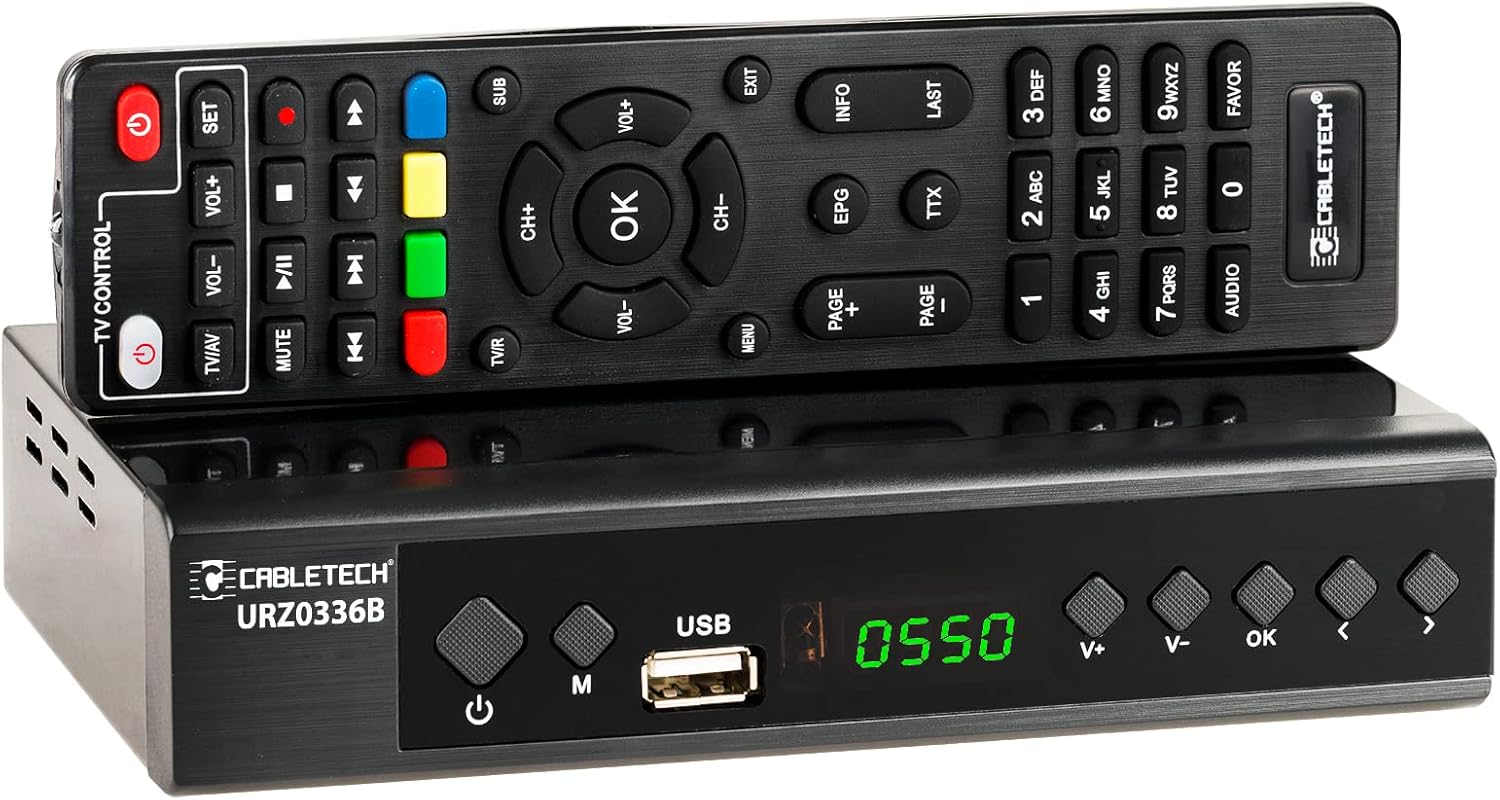
Image: The Cabletech URZ0336B DVB-T2 H.265 HEVC Digital Tuner shown with its accompanying remote control. The tuner is a compact black box, and the remote is also black with various control buttons.
4.2. פראָנט פּאַנעל
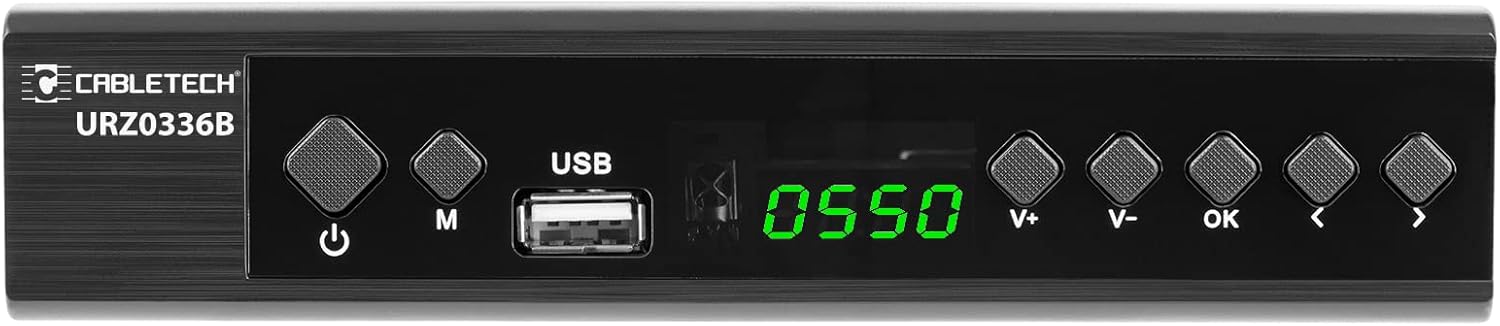
Image: Close-up of the Cabletech URZ0336B front panel, featuring a power button, menu button (M), USB 2.0 port, LED display showing "0550", and navigation/volume buttons (V+, V-, OK, <, >).
- מאַכט קנעפּל: Turns the device on/off or to standby.
- M (מעניו) קנעפּל: אַקסעס די הויפּט מעניו.
- וסב 2.0 פּאָרט: For software updates, PVR recording, and media playback.
- געפֿירט ווייַז: ווײַזט קאַנאַל נומער אָדער צײַט.
- V+/V- Buttons: אַדדזשוסץ באַנד.
- OK קנעפּל: קאַנפערמז סאַלעקשאַנז.
- </> Buttons: Navigates through menus or changes channels.
4.3. דערציען פּאַנעל קאַנעקשאַנז

Image: The rear panel of the Cabletech URZ0336B, showing various input and output ports: ANT IN (IEC socket), COAXIAL, USB, HD OUT (HDMI), SCART, and the power input (110-240V~ 50/60Hz).
- אַנט אין: Connects to your DVB-T/T2 antenna.
- קאָאַקסיאַל: דיגיטאַל אַודיאָ רעזולטאַט.
- וסב: Additional USB 2.0 port for external devices.
- HD אויס (HDMI): פֿאַרבינדט זיך צו אייער טעלעוויזיע פֿאַר הויך-דעפֿיניציע ווידעאָ און אַודיאָ.
- SCART: Connects to older TVs or VCRs.
- מאַכט אַרייַנשרייַב: קאַנעקץ צו די מאַכט אַדאַפּטער.
4.4. ווײַטקאָנטראָל אויסלייג

בילד: דעטאַלירט view of the Cabletech URZ0336B remote control, showing buttons for power, TV/AV, volume, channel, mute, playback controls, EPG, TTX, INFO, numeric keypad, and special function buttons.
The remote control provides full functionality for operating your tuner. Insert 2x AAA batteries into the battery compartment before first use.
5. סעטאַפּ
5.1. Connecting the Tuner
- פאַרבינדן אַנטענע: Connect your DVB-T/T2 antenna cable to the ANT IN port on the rear panel of the tuner.
- פאַרבינדן צו טעלעוויזיע:
- For HD TVs: Connect an HDMI cable from the HD OUT (HDMI) port on the tuner to an HDMI input on your TV.
- For older TVs: Connect a SCART cable from the SCART port on the tuner to the SCART input on your TV.
- פאַרבינדן מאַכט: Connect the power adapter to the tuner's power input and then plug it into a wall outlet.
- אַרייַנלייגן באַטעריז: Open the battery compartment on the remote control and insert 2x AAA batteries, observing polarity.
5.2. First-Time Installation and Channel Scan
- Turn on your TV and select the correct HDMI or SCART input source that the tuner is connected to.
- Power on the Cabletech URZ0336B tuner using the power button on the front panel or remote control.
- The first-time installation wizard should appear on your TV screen. Follow the on-screen prompts.
- Select your preferred language and country.
- Initiate an אָטאַמאַטיק זוך for channels. The tuner will scan for all available DVB-T/T2 channels in your area. This process may take several minutes.
- Once the scan is complete, the tuner will save the found channels and display the first channel.
Note: If you experience poor signal quality, adjust your antenna position or consider using a signal ampליפער.
6. אַפּערייטינג ינסטרוקטיאָנס
6.1. יקערדיק פאַנגקשאַנז
- מאַכט אויף / אַוועק: דרוק די מאַכט קנעפּל אויף די ווייַט קאָנטראָל.
- קאַנאַל טוישן: ניצן די CH + / CH- buttons or the numeric keypad to enter a channel number.
- באַנד קאָנטראָל: ניצן די VOL + / VOL- קנעפּלעך.
- שטום: דרוק די שטום קנעפּל צו צייטווייליג שטיל מאַכן דעם אַודיאָ.
- מעניו: דרוק די MENU button to access the main menu for settings and features.
- אקעי: Confirms selections in menus or displays the channel list.
- אַרויסגאַנג: אַרויסגאַנג דעם קראַנט מעניו אָדער פאַרשטעלן.
6.2. עלעקטראָנישער פּראָגראַם גייד (EPG)
The 7-day EPG provides a schedule of current and upcoming programs.
- דרוק די EPG קנעפּל אויף די ווייַט קאָנטראָל.
- Navigate through channels and program times using the arrow buttons.
- דרוק OK צו view details about a selected program.
6.3. PVR (Program Recording) and Timeshift
Connect a USB storage device (e.g., USB flash drive or external hard drive) to one of the USB 2.0 ports to use PVR and Timeshift functions.
- PVR Recording:
- דרוק די REC button (red circle) on the remote to start immediate recording of the current program. Press האַלטן (square) to end recording.
- Schedule recordings via the EPG: Select a program in the EPG and press OK, then choose the record option.
- צייט שיפט:
- בשעת איר קוקט אויף א פראגראם, דריקט דעם פּויזע button. The tuner will begin recording the live broadcast to the USB device.
- איר קענען דעריבער שפּיל, שנעל פאָרויס, אָדער ריוויינד within the buffered content.
- דרוק האַלטן to exit Timeshift and return to live TV.
6.4. מידיאַ פּלייַבאַקק
The tuner supports playback of various media fileס פון אַ פארבונדענע USB סטאָרידזש מיטל.
- Connect your USB device to a USB port on the tuner.
- Go to the main menu and select "Media" or "USB".
- נאַוויגירן צו דער געוואלט file type (MP3, WMA, JPEG, BMP, AVI) and select the file צו שפּילן.
6.5. Supported Applications
The tuner supports various online applications when connected to the internet via an external MT7601 Wi-Fi adapter (not included).
- וועטער: View local weather forecasts.
- IPTV: Access Internet Protocol Television streams.
- יאָוטובע: Watch videos from YouTube.
- RSS: Read RSS news feeds.
Note: An external MT7601 Wi-Fi adapter is required for internet connectivity and access to these applications.
6.6. עלטערן קאָנטראָל
Set up parental control to restrict access to certain channels or programs based on age ratings.
- Access the "Parental Control" section in the main menu.
- Enter your PIN (default is usually 0000 or 1234, check your device for specifics).
- Configure age restrictions or lock specific channels.
6.7. טייַמער פֿונקציע
The timer function allows you to schedule the tuner to turn on/off at specific times or to switch to a particular channel.
- Navigate to the "Timer" section in the main menu.
- Set the event type (e.g., Power On, Power Off, Record), time, and duration.
7. וישאַלט
7.1. רייניקונג
To clean the device, disconnect it from the power supply and wipe the exterior with a soft, dry cloth. Do not use liquid or aerosol cleaners.
7.2. ווייכווארג אַפּדייט
Software updates can improve performance and add new features. Updates are performed via the USB port.
- אראפקאפיע די לעצטע פירמוואַרע file from the official Cabletech support webפּלאַץ (אויב בנימצא).
- נאָכמאַכן די פירמוואַרע file צום וואָרצל דירעקטאָרי פון אַ USB פלאַש דרייוו.
- Connect the USB flash drive to the tuner's USB port.
- Go to the "System" or "Tools" menu, then select "Software Update" or "Upgrade by USB".
- Follow the on-screen instructions to complete the update. Do not power off the device during the update process.
8. טראָובלעשאָאָטינג
If you encounter issues with your tuner, refer to the following common problems and solutions:
| פּראָבלעם | מעגלעך סיבה | לייזונג |
|---|---|---|
| קיין בילד אָדער געזונט | Incorrect TV input selected; Loose cable connections; Tuner not powered on. | Select correct TV input (HDMI/SCART); Check all cable connections; Ensure tuner is powered on. |
| "קיין סיגנאַל" מעסעדזש | Antenna not connected; Poor antenna signal; No channels scanned. | Connect antenna properly; Adjust antenna position; Perform an automatic channel scan. |
| ווייַט קאָנטראָל נישט ארבעטן | Batteries are dead or inserted incorrectly; Obstruction between remote and tuner. | Replace batteries; Check battery polarity; Remove any obstructions; Point remote directly at the tuner. |
| קען נישט רעקאָרדירן צו USB | USB device not connected or formatted incorrectly; Insufficient storage space. | Ensure USB device is connected; Format USB device to FAT32 or NTFS; Free up space on USB device. |
| No internet access for apps | No MT7601 Wi-Fi adapter connected; Network configuration issues. | Connect a compatible MT7601 Wi-Fi adapter; Check network settings in the tuner's menu. |
9. ספּעסאַפאַקיישאַנז
| שטריך | דעטאַל |
|---|---|
| מאָדעל נומער | URZ0336B |
| קפּו | GX6702S5 |
| אינערלעכער זכּרון | 32 מב |
| באַראַן | 512 MB DDR2 |
| אַנט קאַנעקטער | יעק כאָלעל |
| אָפטקייַט ראַנגע | VHF: 170–230 MHz, UHF: 470–862 MHz |
| דעמאָדולאַטיאָן | QPSK, 16QAM, 64QAM, 256QAM |
| באַנדווידט | 7 מהז, 8 מהז |
| דיקאָודינג | MPEG-1, MPEG-2, MPEG-4, H.264, H.265, AAC, HE-AAC, AC-3, DD+ |
| ינפּוץ / אַוטפּוץ | 2x USB 2.0, HDMI, SCART, COAXIAL |
| אַספּעקט פאַרהעלטעניש | Auto, 16:9 WS, 16:9 PB, 16:9 PS; 4:3 LB, 4:3 PS, 4:3 Full |
| שטיצט פֿאָרמאַטירונגען | MP3, WMA, JPEG, BMP, AVI |
| פאַרשטעלן האַכלאָטע | 480 י, 480 פּ, 576 י, 576 פּ, 720 פּ, 1080 י, 1080 פּ |
| ווידעא האַכלאָטע | 1920 רענטגענ 1080 פּיקסעלס |
| אַודיאָ דיקאָודינג | MPEG-1 LayerI/II, Dolby-Downmix 2-Channel (License), AAC LC, HE-AAC v1/V2, PCM-Downmix, IEC958 SPDIF |
| File סיסטעם | FAT32, NTFS |
| קאַמפּאַטאַבילאַטי | Fully compatible with DVB-T2/DVB-T |
| ווייַט קאָנטראָל | Requires 2x AAA batteries |
| מאַכט קאַנסאַמשאַן | Max. 6 W (Operating), Max. 50/60 Hz (Standby) |
| דימענשאַנז (ב x ה) | 168 מם רענטגענ 36 מם |
| Wi-Fi שטיצן | Requires external MT7601 chip adapter |
| Tuner Bit Depth | 10 ביסל |
10. וואָראַנטי און שטיצן
This product comes with a standard manufacturer's warranty. For specific warranty terms and conditions, please refer to the documentation included with your purchase or contact Cabletech customer support.
For technical assistance, troubleshooting beyond this manual, or warranty claims, please contact your retailer or the official Cabletech support channels.
Ask a question about this manual
Ask about setup, troubleshooting, compatibility, parts, safety, or missing instructions. Manuals+ will review the question and use this page’s manual context to help answer it.