
1. הקדמה
Thank you for choosing the Yansoo Dual Dashcam A88A. This manual provides detailed instructions for the proper installation, operation, and maintenance of your new dashcam. Please read this manual thoroughly before use to ensure optimal performance and safety.
2. פּעקל אינהאַלט
ביטע טשעק די פּאַקעט פֿאַר די פאלגענדע זאכן:
- פראָנט אַפּאַראַט
- דערציען אַפּאַראַט
- מאַשין טשאַרדזשער
- סאַקשאַן בארג
- מאַכט קאַבלע
- באַניצער מאַנואַל
- רייניקונג קלאָט

Image: Yansoo Dual Dashcam A88A package contents.
3. פּראָדוקט איבערview
The Yansoo Dual Dashcam A88A features a 3-inch IPS screen, a 1080P front camera with a 170° wide-angle lens, and a 150° waterproof rear camera. It is designed to capture clear video footagפון ביידע די פראָנט און דערציען פון דיין פאָרמיטל.

Image: Yansoo Dual Dashcam A88A front and rear cameras with display.
שליסל פֿעיִקייטן:
- 3-אינטש IPS פאַרשטעלן: גיט אַ קלאָר view of recordings and settings.
- 1080P Full HD Recording: Captures high-resolution video at 30fps.
- צווייענדיק קאַמעראַ סיסטעם: 170° front camera and 150° rear camera for comprehensive coverage.
- Super Night Vision: F1.8 large aperture, 4 IR LEDs, WDR, and HDR technology for enhanced low-light recording.
- ג-סענסאָר: Automatically detects collisions and locks video footage.
- שלייף רעקאָרדינג: Continuously records, overwriting older files when the memory card is full (locked videos are protected).
- פּאַרקינג מאָניטאָר: Activates recording upon impact when parked (requires hardwire kit for 24/7 monitoring).
- באַוועגונג דעטעקשאַן: Records when motion is detected in front of the camera.
4. סעטאַפּ און ייַנמאָנטירונג
Before installation, ensure you have a Class 10 or above 32GB Micro SD card (not included). Format the card in the camera menu before first use.
4.1. פראָנט קאַמעראַ ינסטאַלירונג
- Attach the suction mount to the dashcam.
- רייניקט דעם געוואונטשענעם שטח אויף אייער ווינטשילד.
- Press the suction cup firmly against the windshield and twist the knob to secure it.
- Connect the power cable from the dashcam to your car's cigarette lighter interface.
- Route the power cable neatly along the windshield edge and A-pillar to avoid obstructing your view.

Image: Front dashcam mounted on windshield with cable routing.
4.2. דערציען אַפּאַראַט ינסטאַלירונג
There are two primary methods for installing the rear camera:
Method 1: Mount on the Rear Windshield
This method involves mounting the rear camera on the inside of your vehicle's rear windshield. The cable can be routed along the headliner and side panels.
Method 2: Install near the License Plate
For external mounting, the rear camera can be installed near your license plate. This typically involves drilling small holes for mounting and cable routing. The red wire from the rear camera cable should be connected to the positive pole of your car's reverse light if you desire the reverse guide line feature. If your car has a reverse system or you do not need the guide line, this red wire connection is optional.
Video: Detailed guide on how to install the rear camera, including routing the cable and connecting the reverse light wire.

Image: Rear camera view און פֿעיִקייטן.
5. אַפּערייטינג ינסטרוקטיאָנס
Once powered on, the dashcam will automatically start recording. Press the 'OK' button to stop recording.
5.1. מאָדע סוויטשינג
Long-press the 'M' button to switch between Video Recording, Photo, and Playback modes.
5.2. שלייף רעקאָרדינג
The dashcam supports continuous loop recording in 1, 3, or 5-minute segments. When the memory card is full, the oldest unlocked videos will be automatically overwritten. Videos locked by the G-Sensor are protected from being overwritten.
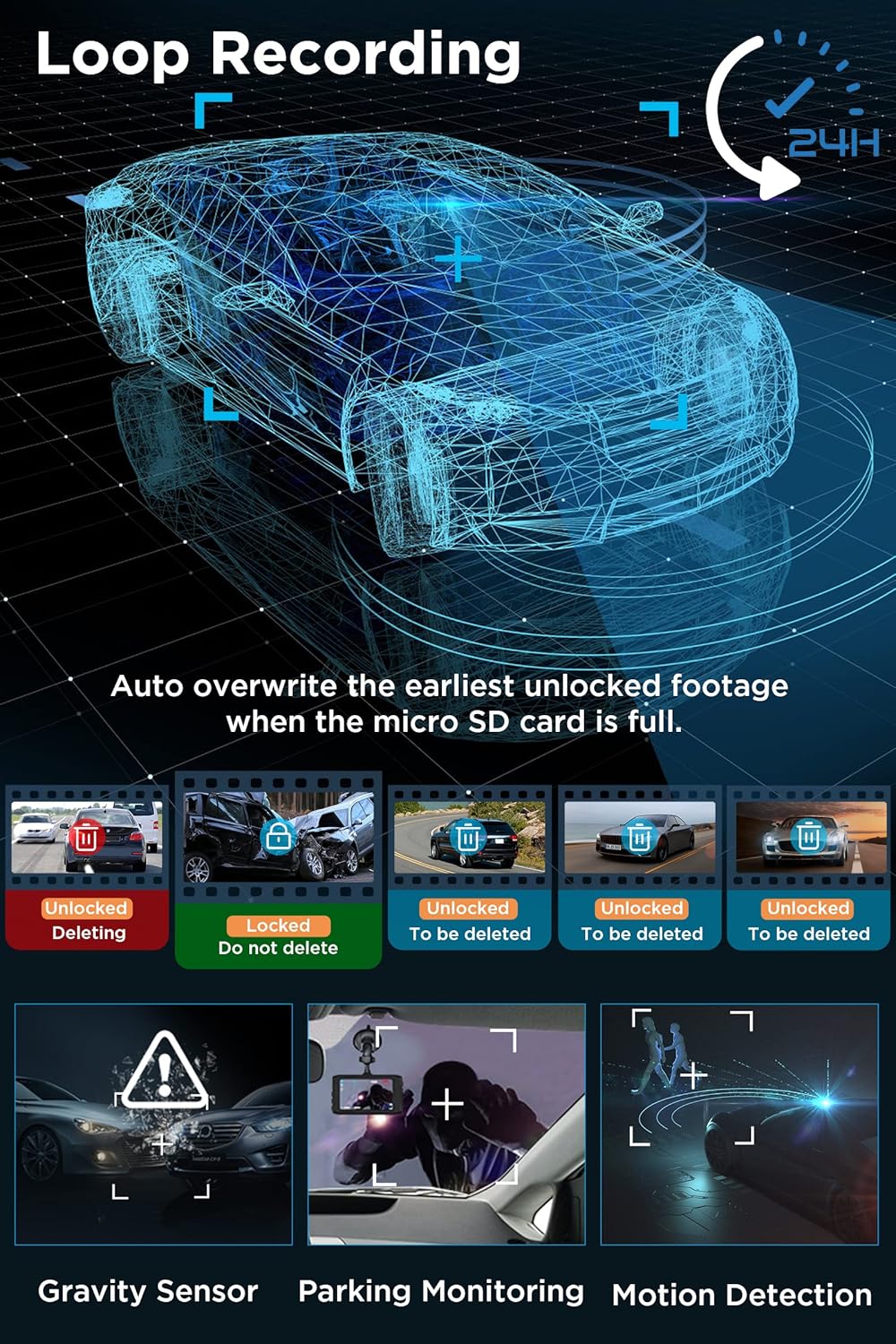
Image: Loop Recording and other key features.
5.3. G-סענסאר (נויטפאַל רעקאָרדינג)
The built-in G-Sensor detects sudden impacts or collisions. When an impact reaches the set G-Sensor level, the dashcam will automatically record a 31-second video, lock it, and save it to prevent overwriting.
5.4. פּאַרקינג מאָניטאָר
When enabled, the parking monitor feature will automatically turn on the dashcam and record a 31-second video if an impact is detected while your car is parked. For 24/7 parking monitoring, a separate hardwire kit is required.
5.5. באַוועגונג דעטעקשאַן
When motion detection is enabled, the dashcam will start recording automatically if it detects movement in front of the camera. It is recommended to set Motion Detection to OFF during normal driving to avoid unnecessary recordings.
5.6. נאַכט זעאונג
The dashcam utilizes an F1.8 large aperture, 4 IR LEDs, and WDR (Wide Dynamic Range) + HDR (High Dynamic Range) technology to enhance low-light sensitivity, ensuring clear and vivid recordings during nighttime driving.

Image: Enhanced Night Vision features.
5.7. פּלייַבאַקק
איר קענען view recorded videos directly on the dashcam's 3-inch IPS screen or by connecting the memory card to a computer.
6. סעטטינגס מעניו
Press the 'M' button (short press) to enter the setup function. Navigate through the menu using the up/down buttons and confirm selections with the 'OK' button.
רעקאַמענדיד סעטטינגס:
- Gravity Sensor Level: נידעריק
- שלייף רעקאָרדינג: קסנומקס מינוט
- באַוועגונג דעטעקשאַן: OFF (for normal driving)
- פּאַרקינג מאָניטאָר: ON
- אַוטאָ מאַכט אַוועק: OFF
7. וישאַלט
To ensure reliable performance, regularly format your Micro SD card (at least once a month). Use the provided cleaning cloth to keep the camera lenses and screen clear.
8. טראָובלעשאָאָטינג
- מיטל פריזיז אָדער מאַלפאַנגקשאַנז: Use a needle to insert into the small reset hole labeled 'R' on the device to restart it.
- הינטערשטע קאַמעראַ ווייַזט נישט: Check all cable connections for the rear camera. Ensure the cable is not damaged.
- Recording Stops Unexpectedly: Ensure the Micro SD card is Class 10 or higher and has been formatted. The card may be full if loop recording is off or too many locked fileס עקסיסטירן.
- שלעכטע נאכט זעאונג: Ensure the camera lens is clean. Check that WDR/HDR settings are enabled.
9. ספּעסאַפאַקיישאַנז
| פּראָדוקט דימענשאַנז | 3.74 X 0.59 X 1.97 אינטשעס |
| פּונקט וואָג | 2.54 אונסעס |
| נומער מאָדעל נומער | A88A Dash Cam |
| קאַנעקטיוויטי טעכנאָלאָגיע | וסב |
| ספּעציעלע פֿעיִקייטן | Built-In Microphone, 1080P FHD, G-Sensor, Parking Monitor, Loop Recording, 170° Wide Angle, WDR, DVR Dashboard Camera, Motion Detection, 3 Inches IPS Screen |
| ווידעא קאַפּטורע רעסאָלוטיאָן | 1080 פּ |
| מאַונטינג טיפּ | ווינטשויב בארג |
| פעלד פון View | 170 דיגריז |
| קאָליר | שוואַרץ |
10. וואָראַנטי און שטיצן
Yansoo offers lifetime after-sales support and a 1-year warranty for the Dual Dashcam A88A. For technical assistance or any questions regarding your dashcam, please contact our customer service team via Amazon or the after-sales email provided in the manual.

Image: Yansoo customer support.