
1. הקדמה
This manual provides detailed instructions for the VETEK UHD02 4K Digital Camera. Please read this manual thoroughly before using the camera to ensure proper operation and to maximize its features. This camera is designed for capturing high-quality photos and videos, featuring 4K video resolution, 48MP photo resolution, a 3.0-inch 180° flip screen, and various connectivity options.

Image: Comparison of 4K and 1080P video quality captured by the VETEK UHD02 camera, demonstrating superior detail in 4K resolution.
2. סעטאַפּ
2.1 אויספּאַקן און קאָמפּאָנענטן
Carefully unpack all components. The package should include:
- VETEK UHD02 4K Digital Camera
- 2 x NP-40/1500mAh Lithium-ion Batteries
- באַטערי טשאַרדזשער
- 32GB TF (Micro SD) Card
- וסב קאַבלע
- ברייט ווינקל לענס
- מאַקראָו לענס
- קאַמעראַ באַג
- אַדאַפּטער
- באַניצער מאַנואַל

Image: A visual representation of the items included in the VETEK UHD02 camera package, such as batteries, charger, SD card, and various lenses.
2.2 באַטעריע אינסטאַלאַציע און טשאַרדזשינג
- עפֿנט דעם דעקל פֿונעם באַטעריע־אָפּטייל אויף דער אונטערשטער זײַט פֿון דער קאַמעראַ.
- Insert the NP-40 battery, ensuring the correct orientation.
- פאַרמאַכן די באַטאַרייע אָפּטייל דעקן סיקיורלי.
- For charging, insert the battery into the provided charger and connect the charger to a power source. The charging indicator will show the status.
- Due to transportation, the battery may be at low power. Fully charge the battery before first use.
2.3 SD קאַרטל אינסטאַלאַציע און פֿאָרמאַטירן
- Locate the SD card slot, usually on the side or bottom of the camera.
- Insert the 32GB TF (Micro SD) card with the metal contacts facing the correct direction until it clicks into place.
- Before using the camera, it is recommended to format the SD card within the camera's menu system. This ensures compatibility and optimal performance.
2.4 לינז אַטאַטשמענט
The camera comes with a Wide Angle Lens and a Macro Lens. To attach a lens:
- Gently screw the desired lens onto the front of the camera's main lens until it is secure.
- Ensure the lens is firmly attached but do not overtighten.
3. אַפּערייטינג ינסטרוקטיאָנס
3.1 מאַכט אויף / אַוועק
- צו אנצינדן, דריק און האלט דעם מאַכט קנעפּל ביז דער עקראַן באַלויכטנט זיך.
- צו אויסלעשן, דריק און האלט דעם מאַכט קנעפּל ווידער ביז דער עקראַן לעשט זיך אויס.
3.2 Basic Photo and Video Modes
- Use the Mode button (if available) or navigate through the menu to select between Photo and Video modes.
- In Photo mode, press the shutter button to capture an image.
- In Video mode, press the record button to start and stop video recording.
3.3 פארגרעסער פֿונקציע
The camera features 16X digital zoom.
- Use the T/W (Telephoto/Wide) button or zoom lever to zoom in (T) or zoom out (W).
3.4 אַוטאָ פאָקוס
The camera supports auto-focus for clear imaging.
- Pre-press the camera button (shutter button) halfway to engage auto-focus. The focus frame will appear on the screen.
- Press the button fully to take a photo or start recording once focus is achieved.

Image: A visual guide demonstrating how the auto-focus system works, highlighting the focus area on the screen.
3.5 180° Flip Screen
The 3.0-inch IPS screen can be flipped 180 degrees, which is useful for self-portraits or vlogging.
- Gently rotate the screen to your desired angle.
- Ensure the screen is securely positioned before use.
3.6 מעניו נאַוויגאַציע
Use the MENU button to access camera settings. Navigate using the directional buttons and confirm selections with the OK/SET button.

בילד: אן איבערview of the camera's key functions, illustrating buttons for timed photo, continuous shooting, delete, fill light, zoom, screen clear, and menu access.
4. WiFi פונקציאָנאַליטעט
The VETEK UHD02 camera features WiFi connectivity for remote control and file transfer via a mobile device.
4.1 ינסטאָלינג די אַפּ
- Download the application named "XDV PRO" from the Apple App Store or Google Play Store. Alternatively, scan the QR code provided in the camera's packaging or on the camera itself.
4.2 קאַנעקטינג צו WiFi
- On your VETEK UHD02 camera, activate the WiFi function through the menu.
- On your smartphone or tablet, go to the WiFi settings.
- Find the WiFi network named "4KWIFI" in the list of available networks.
- אַרייַן די פעליקייַט פּאַראָל: 12345678 צו פאַרבינדן.
- Tip: If you experience connection issues, try turning off your mobile data network on your phone before connecting to the camera's WiFi.
4.3 Remote Shooting and File אַריבערפירן
- After successfully connecting, open the "XDV PRO" app on your device.
- איר קענען איצט view the camera's live feed on your phone screen.
- Use the app to remotely control shooting photos or recording videos.
- The app also allows you to browse and transfer photos and videos from the camera to your mobile device.

Image: The VETEK UHD02 camera wirelessly connected to a smartphone, illustrating the live view and remote control capabilities through the dedicated app.
5. לענסעס
The VETEK UHD02 camera includes two interchangeable lenses to enhance your photography and videography:
5.1 Wide Angle Lens
- The Wide Angle Lens expands the field of view, allowing you to capture more of the scene.
- Ideal for landscapes, group photos, and architectural shots where you need to fit more into the frame.
5.2 Macro Lens
- The Macro Lens is designed for close-up photography, enabling you to capture intricate details of small subjects.
- Perfect for capturing insects, flowers, or small objects with high magnification.
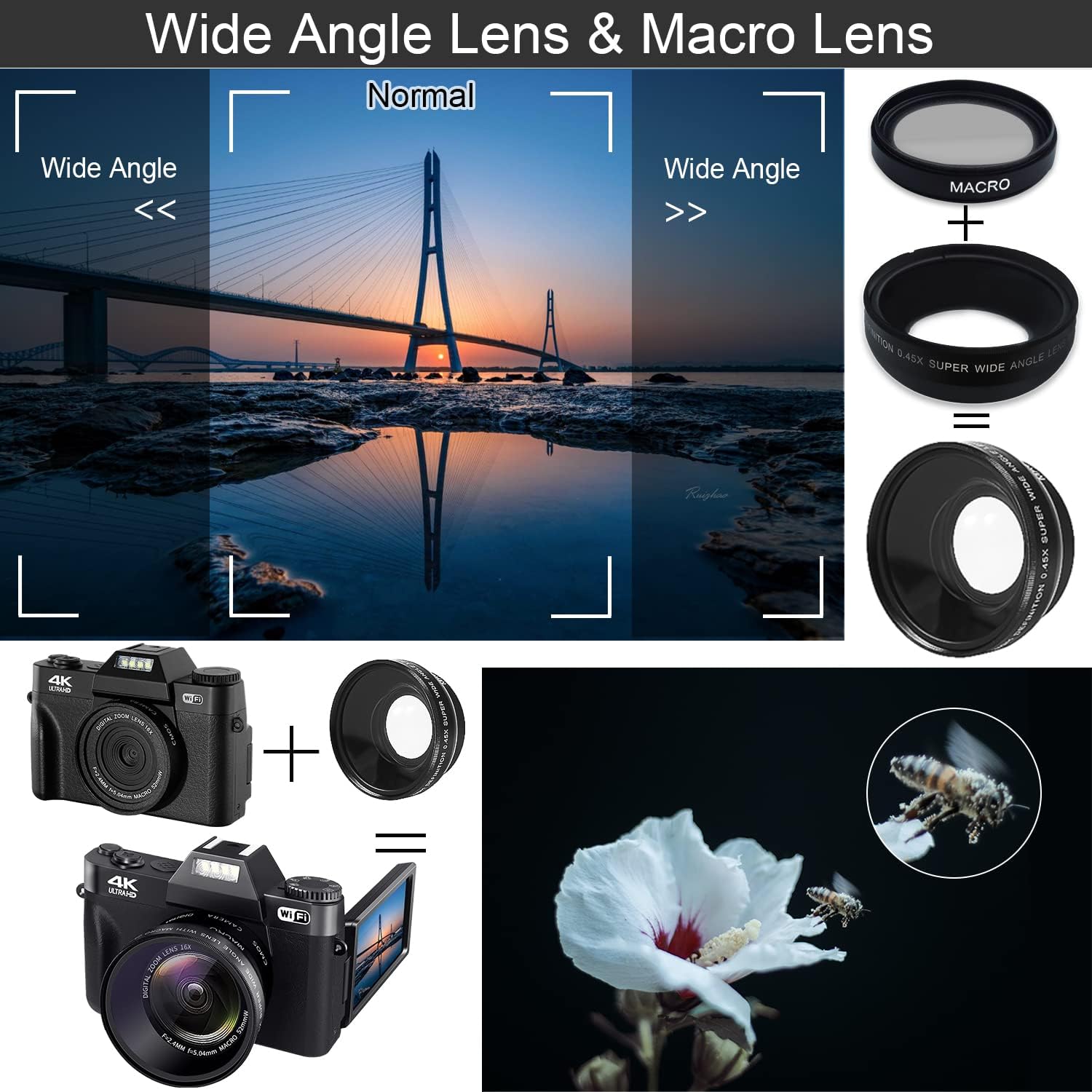
Image: The VETEK UHD02 camera equipped with both wide-angle and macro lenses, demonstrating their distinct visual effects on captured images.
6. ספּעציעלע פֿעיִקייטן
6.1 אַנטי-שייק פונקציאָנירן
The camera includes an anti-shake feature to help stabilize images and videos, reducing blur caused by camera movement.
- This feature is typically enabled by default or can be toggled in the camera settings.
6.2 נאַכט זעאונג
For low-light conditions, the camera offers a night vision mode to capture clearer images and videos in dark environments.
- Activate night vision through the camera's menu settings when shooting in dimly lit areas.
6.3 Live Stream / Webקאַם פאַנגקשאַנאַליטי
The VETEK UHD02 can be used as a webcam for live streaming or video calls.
- פאַרבינדן די אַפּאַראַט צו דיין קאָמפּיוטער דורך די וסב קאַבלע.
- Select the "PC Camera" or "Webcam" mode on the camera when prompted.
- אייער קאָמפּיוטער זאָל דערקענען די קאַמעראַ ווי אַ webcam, allowing you to use it with video conferencing software or live streaming platforms.

Image: The VETEK UHD02 camera set up as a webcam, demonstrating its use for video calls and live streaming with a group of people.
7. וישאַלט
- רייניקונג די לענס: Use a soft, lint-free cloth specifically designed for camera lenses. Avoid using harsh chemicals.
- רייניקונג די פאַרשטעלן: Wipe the screen gently with a microfiber cloth.
- סטאָרידזש: האַלט די קאַמעראַ אין אַ קיל, טרוקן אָרט אַוועק פון דירעקט זונשייַן און עקסטרעמע טעמפּעראַטורן. אַרויסנעמען באַטעריעס אויב איר האַלט עס אויף פֿאַר לענגערע צייטן.
- באַטערי זאָרגן: פֿאַרמײַדט אָפֿט פֿולשטענדיק אויסצולאָדן די באַטעריעס. לאָדט זיי אָפֿט אויף כּדי צו האַלטן די באַטעריע געזונט.
8. טראָובלעשאָאָטינג
- די אַפּאַראַט טוט נישט קער אויף: ענשור אַז די באַטאַרייע איז ריכטיק אינסטאַלירן און גאָר באפוילן.
- נעבעך בילד קוואַליטעט: Check lens cleanliness. Ensure proper lighting and focus. Verify camera settings (resolution, ISO).
- קען נישט פאַרבינדן צו WiFi: Make sure the "XDV PRO" app is installed. Confirm the camera's WiFi is enabled. Try disabling your phone's mobile data before connecting to the camera's WiFi network.
- SD קאַרטל טעות: Ensure the SD card is inserted correctly. Try formatting the SD card through the camera's menu. If the issue persists, try a different compatible SD card.
- קנעפּלעך רעאַגירן נישט: Power off and restart the camera. If the issue continues, contact customer support.
- באַטעריע ווערט שנעל אויסגעשעפּט: Ensure batteries are fully charged. Reduce screen brightness or turn off unused features like WiFi if not needed.
9. ספּעסאַפאַקיישאַנז
| שטריך | באַשרייַבונג |
|---|---|
| סאָרט | VETEK |
| מאָדעל נומער | UHD02 |
| ווידעא האַכלאָטע | 4K (3840x2160 @ 30FPS) |
| פאָטאָ האַכלאָטע | אַרויף צו 48 מפּ |
| ווייַז | 3.0-inch IPS 180° Flip Screen |
| דיגיטאַל פארגרעסער | 16X |
| לענס | Fixed lens F/2.4MM, f=5.04mm (Includes Wide Angle and Macro Lenses) |
| סטאָרידזש | TF card up to 128GB (Class 10 recommended, 32GB included) |
| באַטערי | NP-40/1500mAh Lithium-ion (2 included) |
| קאַנעקטיוויטי | בלועטוט, HDMI, USB, Wi-Fi |
| ספּעציעלע פֿעיִקייטן | Anti-Shake, Night Vision, Webקאַם פֿונקציע |
| File פֿאָרמאַט | MP4 (Video), JPG (Photo) |
10. וואָראַנטי און שטיצן
For warranty information and technical support, please refer to the warranty card included in your product packaging or visit the official VETEK webזייטל. האַלט אייער קויף קוויטל ווי אַ באַווייַז פון קויפן פֿאַר קיין וואָראַנטי קליימז.