
1. הקדמה
This manual provides instructions for the HCDZ Replacement Remote Control, designed for use with various Epson 3LCD 4K Large Venue Laser Projectors. This remote offers direct functionality without the need for programming.
פּעקל אינהאַלט:
- 1 x HCDZ Replacement Remote Control
Note: Batteries and additional instructions are not included in the package.
2. סעטאַפּ
2.1 באַטאַרייע ייַנמאָנטירונג
די ווײַטקאָנטראָל דאַרף צוויי AAA באַטעריעס (נישט אַרייַנגערעכנט). פֿאָלגט די סטעפּס צו זיי אינסטאַלירן:
- געפֿינען די דעקן פון די באַטאַרייע אָפּטייל אויף די צוריק פון די ווייַט קאָנטראָל.
- רוקט דעם דעקל אַראָפּ אָדער דריק דעם לאַטש און הייבט אויף צו עפֿענען דעם אָפּטייל.
- אַרײַנשטעלן צוויי AAA באַטעריעס, און זיכער מאַכן אַז די פּאָזיטיוו (+) און נעגאַטיוו (-) טערמינאַלן זענען ריכטיק אויסגעשטעלט מיט די מאַרקירונגען אינעווייניק אין דעם אָפּטייל.
- לייגט צוריק דעם דעקל פונעם באַטעריע־אָפּטייל, און שטופּט עס צוריק אין פּלאַץ ביז עס קליקט זיכער.

Image: Back of the remote control with the battery compartment open, illustrating correct AAA battery placement.
2.2 ערשט נוצן
Once batteries are correctly installed, the remote control is ready for immediate use. No programming or pairing is required. Point the remote directly at your Epson projector's infrared (IR) sensor.
3. אַפּערייטינג די רימאָוט קאָנטראָל
This remote control provides full functionality for your compatible Epson projector. Refer to your projector's original user manual for specific functions of each button.
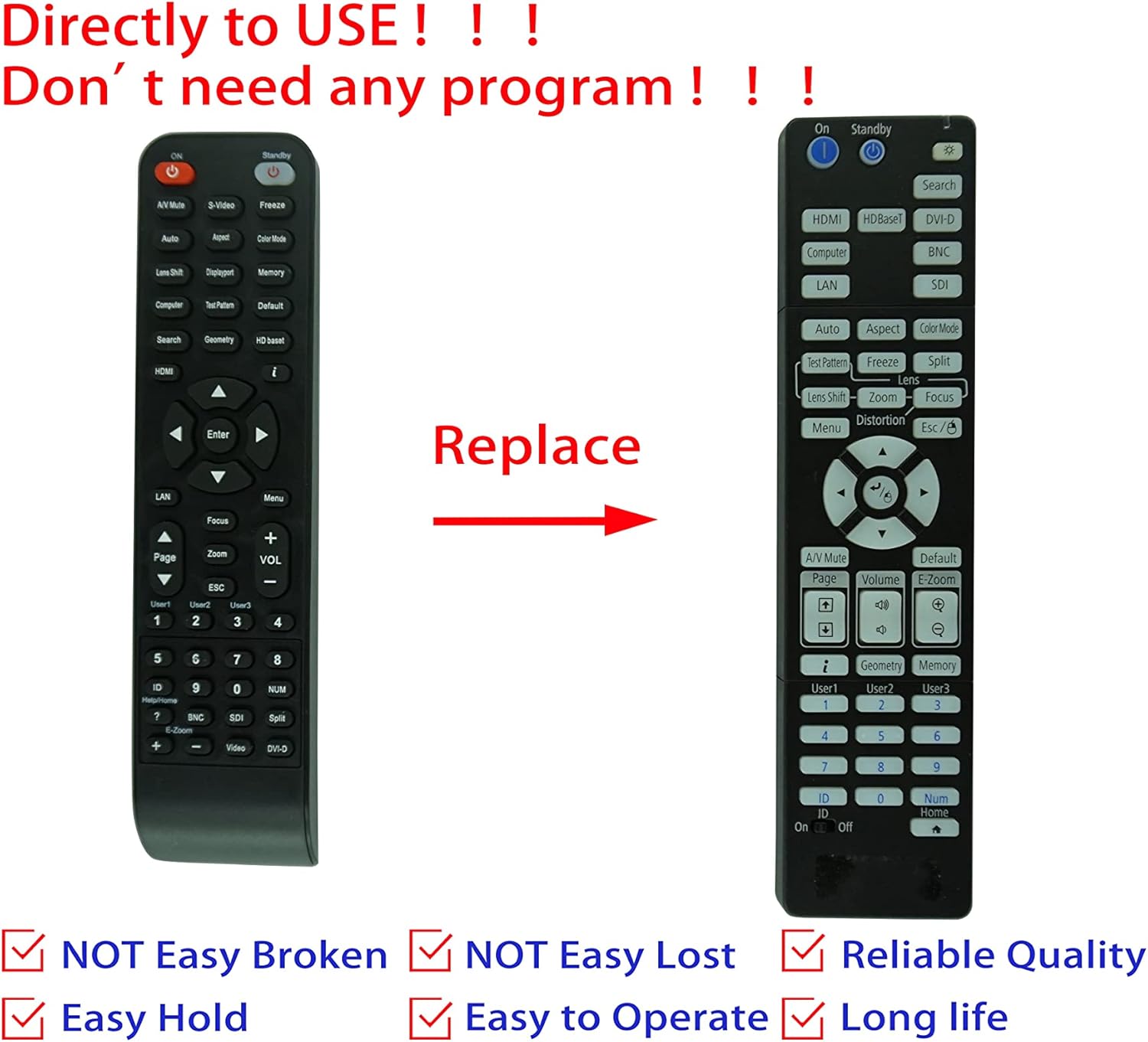
Image: Comparison of an original Epson remote (left) and the HCDZ replacement remote (right), highlighting the replacement functionality.
3.1 Key Functions (General)
- מאַכט אויף / אַוועק: Typically a dedicated button, often red or clearly marked.
- אַרייַנשרייַב סעלעקציע: Buttons for HDMI, Computer, Video, etc., to switch input sources.
- נאַוויגאַציע: Arrow keys (Up, Down, Left, Right) and an Enter/OK button for menu navigation.
- מעניו: Accesses the projector's on-screen display (OSD) menu.
- באַנד: Adjusts audio output if the projector has built-in speakers or audio pass-through.
- פארגרעסער / פאָקוס: Adjusts the projected image size and clarity.
- נומעריק קיפּאַד: For direct input or selecting specific functions.
4. וישאַלט און קער
To ensure the longevity and proper functioning of your remote control, observe the following guidelines:
- רייניקונג: Wipe the remote with a soft, dry cloth. Do not use liquid cleaners or abrasive materials.
- סוויווע: Avoid exposing the remote to extreme temperatures, high humidity, or direct sunlight.
- באַטערי פאַרבייַט: Replace both batteries simultaneously. Do not mix new and old batteries, or different types of batteries.
- סטאָרידזש: אויב דער ווײַטקאָנטראָל וועט נישט געניצט ווערן פֿאַר אַ לענגערע צײַט, נעמט אַרויס די באַטעריעס כּדי צו פֿאַרמײַדן ליקאַדזש און מעגלעכן שאָדן.
- פּראַל: פֿאַרמײַדט צו לאָזן פֿאַלן די ווײַטקאָנטראָלירטע מאַשין אָדער אויסשטעלן זי צו שטאַרקע קלאַפּן.

בילד: הינטערשטע view of the HCDZ remote control, illustrating its design.
5. טראָובלעשאָאָטינג
אויב איר האָט פּראָבלעמען מיט אייער ווײַטקאָנטראָל, פּרוּווט די פֿאָלגנדיקע טריט פֿאַר פּראָבלעם־לייזונג:
- ווייַט ניט ריספּאַנדינג:
- זיכער מאַכן אַז די באַטעריעס זענען ריכטיק אַרײַנגעשטעלט מיט דער ריכטיקער פּאָלאַריטעט.
- פאַרבייַטן אַלט באַטעריז מיט פריש אַאַאַ באַטעריז.
- Check for any obstructions between the remote and the projector's IR sensor.
- Ensure you are within the effective range and pointing the remote directly at the projector.
- ינטערמיטאַנט פאַנגקשאַנאַליטי:
- Strong light sources (e.g., direct sunlight, fluorescent lights) can interfere with IR signals. Try operating the remote in a different lighting condition.
- ענשור אַז די באַטאַרייע קאָנטאַקטן זענען ריין און פריי פון קעראָוזשאַן.
6. ספּעסאַפאַקיישאַנז
| שטריך | דעטאַל |
|---|---|
| סאָרט | HCDZ |
| קאַמפּאַטאַבילאַטי | Epson EB-PU2010B, EB-PU1007B, EB-PU2010W, EB-PU1007W, EB-PU1008B, EB-PU1006W, EB-PU1008W Projectors |
| קאַנעקטיוויטי טעכנאָלאָגיע | ינפרערעד (IR) |
| מאַכט מקור | 2 X AAA באַטעריז (ניט אַרייַנגערעכנט) |
| פּראָגראַממינג פארלאנגט | ניין |
| קאָליר | שוואַרץ |
7. וואָראַנטי און שטיצן
This HCDZ replacement remote control comes with a 90-day warranty from the date of purchase. This warranty covers manufacturing defects under normal use.
For warranty claims or technical support, please contact your retailer or the HCDZ customer service department with your purchase details.
ביטע באַהאַלטן אייער קויפן-באַווייַז פֿאַר גאַראַנטיע צוועקן.