
1. הקדמה
The VEDINDUST HDMI Audio Embedder (Model CHD801) is designed to integrate external audio into an HDMI video signal. This device allows you to replace the original HDMI audio with digital optical (TOSLINK/SPDIF) or analog (3.5mm line) audio sources. It supports high-resolution video up to 4K@60Hz with 18Gbps bandwidth, HDR, CEC, and HDCP2.2/1.4 pass-through. This manual provides detailed instructions for setup, operation, and troubleshooting to ensure optimal performance.
2. פֿעיִקייטן
- Digital/Analog Audio to HDMI Embedding: Replaces the original HDMI audio with external digital optical (TOSLINK/SPDIF) or analog (3.5mm line) audio.
- הויך האַכלאָטע שטיצן: Supports video resolutions up to 4K@60Hz 4:4:4 with 18Gbps bandwidth. Also compatible with 1080p and 720p.
- Advanced Video Features: Supports HDMI2.0, 10-bit High Dynamic Range (HDR), HDCP 2.2/1.4, and CEC pass-through.
- אַודיאָ פֿאָרמאַט קאָמפּאַטאַביליטי: HDMI port passes through all digital/analog audio formats including PCM, LPCM. Optical audio input supports various digital formats. 3.5mm audio input supports 2-channel stereo PCM audio.
- DVI to HDMI Conversion: Supports combining DVI signals with audio signals into HDMI signals using DVI to HDMI cables.
- צאַפּן און שפּיל: No software installation required for operation.
3. פּעקל אינהאַלט
ביטע באַשטעטיקן אַז אַלע זאכן וואָס זענען ליסטעד אונטן זענען אַרייַנגערעכנט אין דיין פּעקל:
- VEDINDUST HDMI Audio Embedder Unit (Model CHD801)
- מיקראָ וסב מאַכט קאַבלע
- באַניצער מאַנואַל
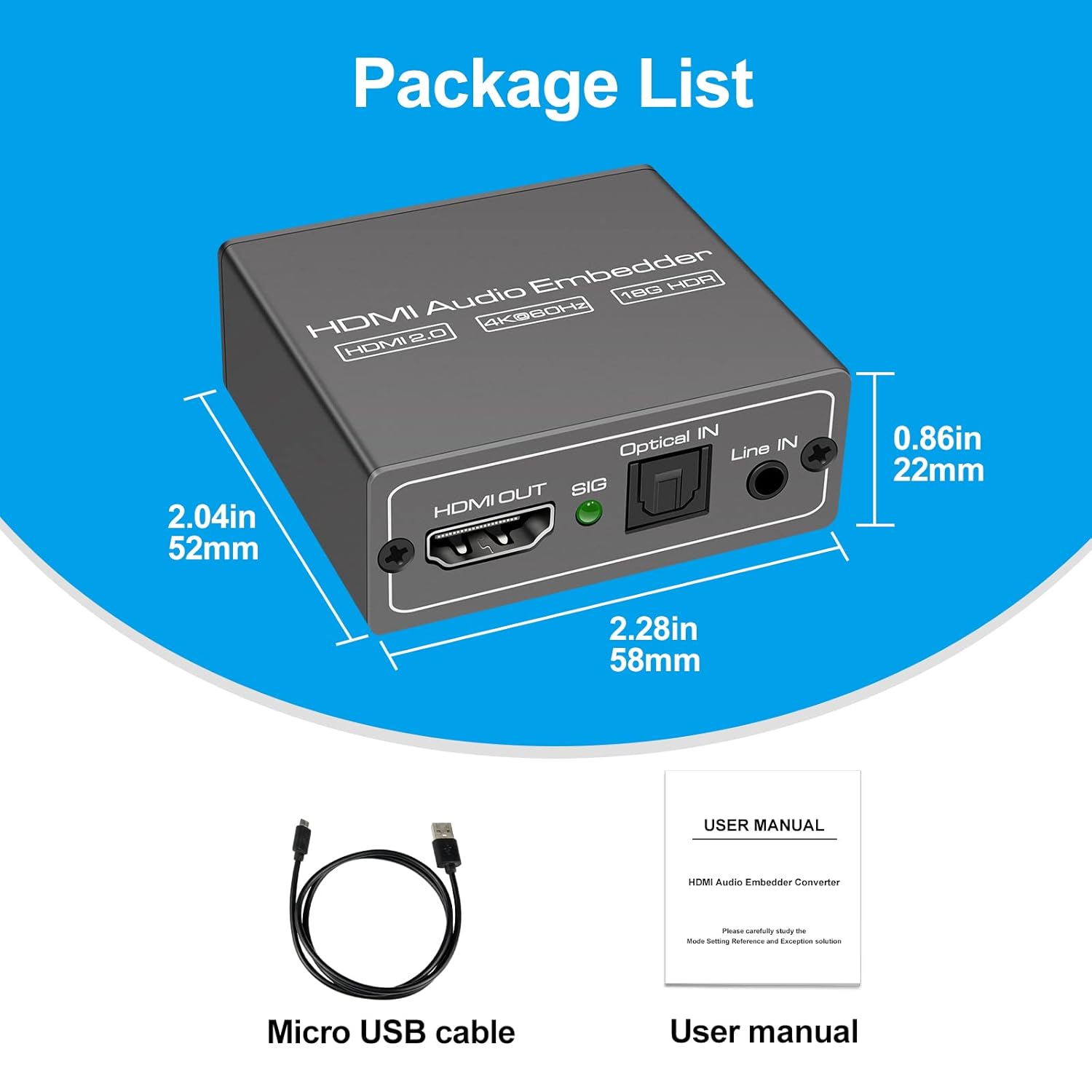
This image displays the items included in the product package: the VEDINDUST HDMI Audio Embedder unit, a Micro USB power cable, and the user manual.
4. פּראָדוקט איבערview און פּאָרטן
Familiarize yourself with the device's ports and controls:

This close-up shows the mode switch on the device, allowing selection between 'Optical' audio input, 'Line' (3.5mm) audio input, or 'Pass' through mode for original HDMI audio.

This image details the audio output and input ports: HDMI OUT, Optical IN (TOSLINK), and 3.5mm Line IN, along with the signal indicator light.
- HDMI ין: Connect your HDMI video source (e.g., laptop, TV box, game console).
- HDMI אויס: Connect to your display device (e.g., TV, projector).
- אָפּטישער אײַן: Connect your digital optical audio source (TOSLINK/SPDIF).
- Line IN: Connect your analog 3.5mm audio source.
- USB 5V (PW): Connect the Micro USB power cable to a 5V power adapter (not included) or a USB port on your display device.
- מאָדע באַשטימען: Selects the desired audio input mode (Pass, Optical, or Line).
- SIG Indicator: Lights up when a signal is detected.
5. סעטאַפּ
Follow these steps to set up your HDMI Audio Embedder:
- Connect your HDMI video source (e.g., laptop, TV box, PS4, Blu-Ray DVD player) to the HDMI ין port on the embedder using an HDMI cable.
- Connect your display device (e.g., HD TV, projector) to the HDMI OUT port on the embedder using an HDMI cable.
- Connect your external audio source to either the אָפּטיש אין port (for digital audio) or the שורה אין (3.5mm) port (for analog audio), depending on your desired audio input.
- Connect the provided Micro USB power cable to the USB 5V (PW) port on the embedder and then to a 5V power source.
- Select the appropriate audio input mode using the מאָדע סוויטש on the device (refer to Section 6: Operating Modes).
- Ensure all connections are secure and power on all connected devices.

This diagram shows how to connect various devices to the HDMI Audio Embedder. HDMI sources (laptop, TV box, PS4, Blu-Ray DVD) connect to the HDMI IN. External audio sources (3.5mm or optical) connect to their respective inputs. The HDMI OUT connects to a display device like a projector or HD TV.
6. אַפּערייטינג מאָדעס
The HDMI Audio Embedder features a mode switch to select how audio is handled:
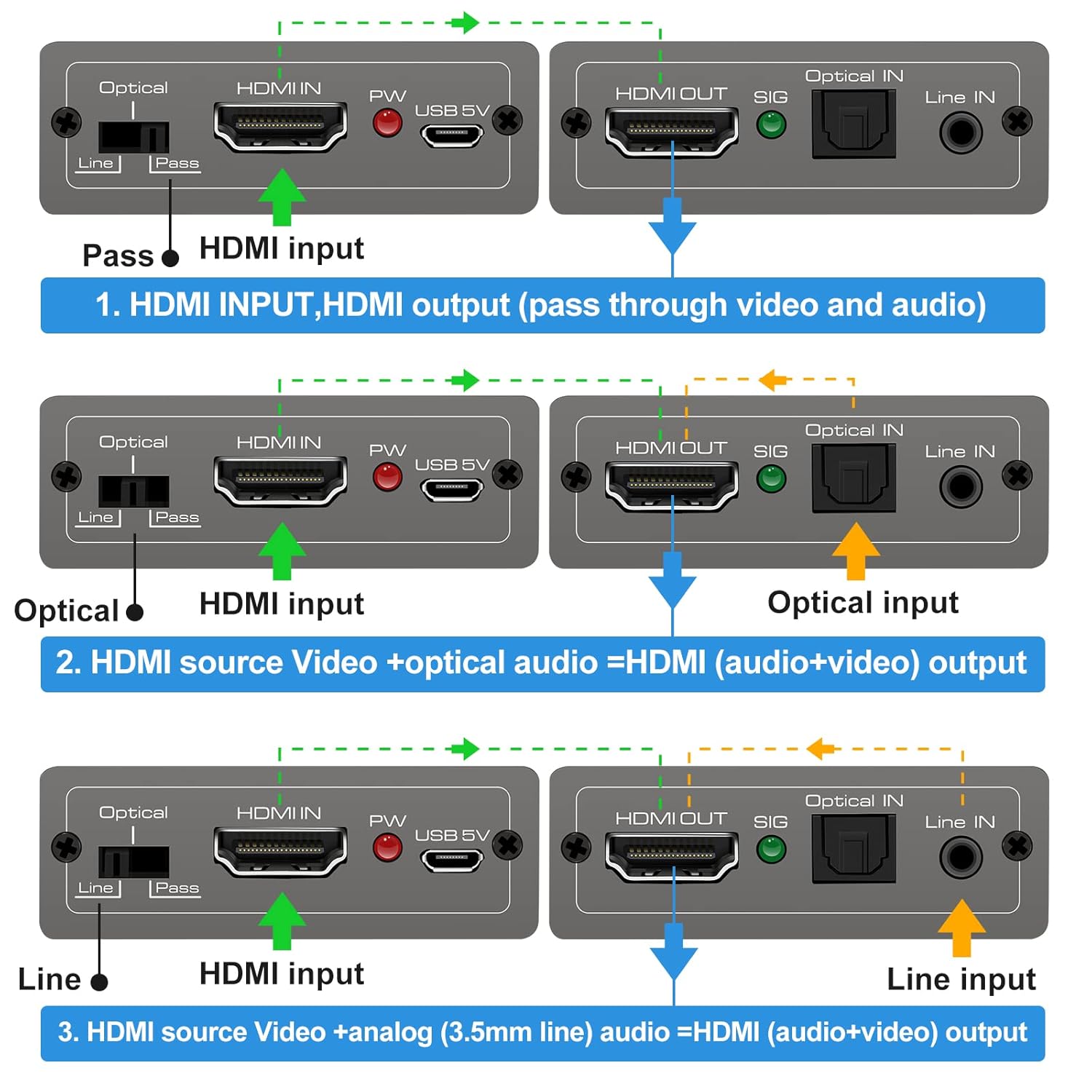
This diagram illustrates the three operational modes: 1. Pass Mode: HDMI input video and audio pass directly to HDMI output. 2. Optical Mode: HDMI input video combines with optical audio input for HDMI output. 3. Line Mode: HDMI input video combines with 3.5mm line audio input for HDMI output.
- פאָרן מאָדע: In this mode, the original HDMI audio from your source device is passed through directly to the HDMI output, along with the video signal. No external audio is embedded.
- אָפּטיש מאָדע: When selected, the HDMI video signal from your source is combined with the audio signal received from the אָפּטיש אין port. The embedded audio is then sent to the HDMI output.
- שורה מאָדע: When selected, the HDMI video signal from your source is combined with the audio signal received from the שורה אין (3.5mm) port. The embedded audio is then sent to the HDMI output.
To change modes, simply slide the switch to the desired position. The device will automatically adjust the audio routing.
7. ספּעסאַפאַקיישאַנז
Technical specifications for the VEDINDUST HDMI Audio Embedder:
- מאָדעל: 801 CHD
- HDMI ווערסיע: HDMI 2.0
- הדקפּ ווערסיע: HDCP 2.2 / 1.4
- ווידעא האַכלאָטע: Up to 4K@60Hz (YUV 4:4:4)
- באַנדווידט: 18 גבפּס
- HDR שטיצן: 10-bit HDR
- CEC שטיצן: דורכפאָר
- Audio Input (Digital): Optical (TOSLINK/SPDIF)
- Audio Input (Analog): 3.5mm Line In (2-channel stereo PCM)
- אַודיאָ רעזולטאַט: HDMI (embedded audio)
- מאַכט צושטעלן: גלייכשטראָם 5V (דורך מיקראָ וסב)
- דימענסיעס: 10.16 X 5.18 X 2.18 סענטימעטער (4.0 X 2.04 X 0.86 אינטשעס)
- וואָג: 110 ג (3.88 אַז)
- פאַבריקאַנט: VEDINDUST
- UPC: 798610311141

This image highlights the device's capability to support high-resolution video, up to 4K at 60Hz, ensuring clear and detailed visuals.
8. טראָובלעשאָאָטינג
If you encounter issues with your HDMI Audio Embedder, please refer to the following common troubleshooting steps:
- קיין ווידעא רעזולטאַט:
- זיכער מאַכן אַז אַלע HDMI קייבאַלז זענען זיכער פארבונדן.
- Verify the power adapter is connected and the device is receiving power.
- פרובירט צו פארבינדן די HDMI מקור גלייך צום דיספלעי צו באשטעטיגן אז די מקור און דיספלעי ארבעטן ריכטיג.
- Check if the display's input source is correctly selected.
- No Audio Output / Incorrect Audio:
- Ensure the correct audio input mode (Pass, Optical, or Line) is selected on the embedder's switch.
- Verify that the external audio source is properly connected and producing sound.
- Check the volume levels on both your audio source and display device.
- If using Optical or 3.5mm input, ensure the cables are fully inserted and not damaged.
- Some audio formats may not be supported by all devices. Try adjusting the audio output format on your source device.
- אינטערמיטענט סיגנאַל:
- Use high-quality HDMI cables, especially for 4K resolutions.
- Ensure the power supply is stable and sufficient (5V).
- Avoid excessive cable lengths.
אויב די פראבלעם בלייבט נאך פרובירן די שריט, ביטע קאנטאקטירט קאסטומער סופארט.
9. וישאַלט
To ensure the longevity and optimal performance of your HDMI Audio Embedder, follow these maintenance guidelines:
- רייניקונג: ניצט אַ ווייכע, טרוקענע שטאָף צו רייניקן דעם אַפּאַראַט. ניצט נישט קיין פליסיקע רייניגער אָדער אַעראָזאָלן.
- סוויווע: האַלט דעם אַפּאַראַט אין אַ קיל, טרוקן אָרט, אַוועק פון דירעקט זונשייַן, היץ קוועלער און נעץ.
- האַנדלינג: ויסמיידן דראַפּינג אָדער אונטערטעניק די מיטל צו שטאַרק ימפּאַקץ.
- ווענטילאַטיאָן: Ensure proper airflow around the device to prevent overheating.
- מאַכט: Disconnect the power supply when the device is not in use for extended periods.
10. וואָראַנטי און שטיצן
VEDINDUST products are designed for reliability and performance. For information regarding warranty coverage, technical support, or service, please refer to the warranty card included with your product or visit the official VEDINDUST website. Please have your model number (CHD801) and purchase information ready when contacting support.