
TAOPON smartwatch zl02
TAOPON Smart Watch User Manual
Model: smartwatch zl02
הקדמה
Thank you for choosing the TAOPON Smart Watch. This device is designed to enhance your daily life with its comprehensive features, including fitness tracking, health monitoring, and smart notifications. This manual provides detailed instructions to help you set up, operate, and maintain your smartwatch for optimal performance.

Figure 1: TAOPON Smart Watch Overview
וואָס איז אין די קעסטל
- TAOPON Smart Watch (with Watch Band)
- טשאַרדזשינג קאַבלע
- באַניצער מאַנואַל
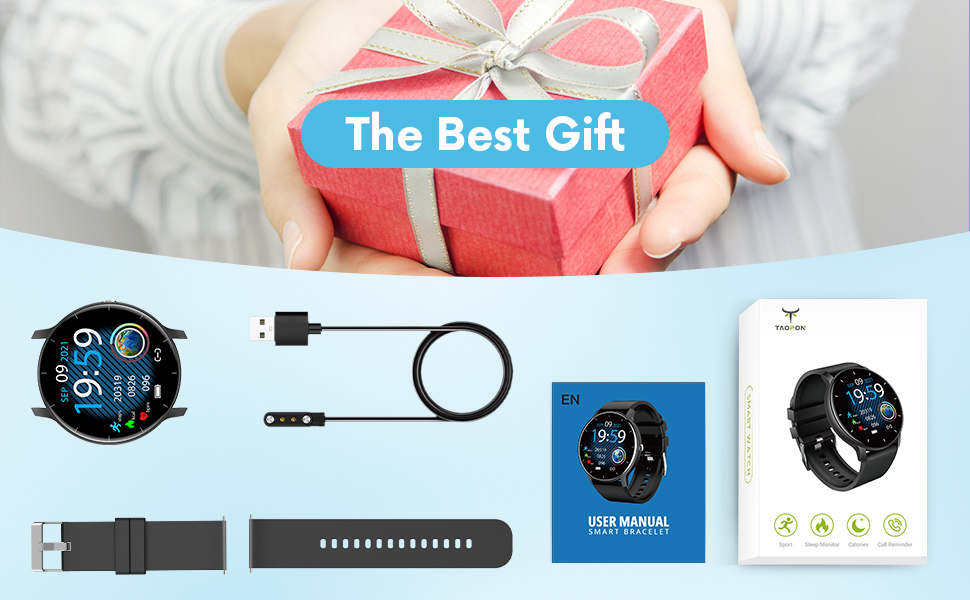
פיגורע 2: פּעקל אינהאַלט
סעטאַפּ גייד
1. אויפלאָדן דעם סמאַרט וואַך
Before first use, fully charge your smartwatch. Connect the magnetic charging cable to the charging points on the back of the watch and plug the USB end into a power adapter (not included) or a computer's USB port. A full charge typically takes about 2 hours and provides up to 7 days of typical use or 30 days of standby time.

פיגור 3: אויפלאָדן דעם סמאַרט וואַך
2. אַפּ אינסטאַלאַציע און פּערינג
To unlock the full potential of your TAOPON Smart Watch, download and install the "Da Fit" app on your smartphone. The app is compatible with iOS 9.0 & Android 5.0 or higher.
- Scan the QR code in the manual or search for "Da Fit" in your phone's app store (App Store for iOS, Google Play Store for Android).
- Install the "Da Fit" app.
- עפֿענען די אַפּ און נאָכגיין די ינסטראַקשאַנז אויף דעם עקראַן צו שאַפֿן אַ חשבון אָדער קלאָץ אין.
- געבן בלועטאָאָטה אויף דיין סמאַרטפאָנע.
- In the "Da Fit" app, navigate to the device section and search for your smartwatch. Select "smartwatch zl02" to pair.
- באַשטעטיקן די פּאָרינג בעטן אויף ביידע דיין טעלעפאָן און די סמאַרטוואַטש
אַמאָל פּערד, וועט די זייגער סינקראָניזירן צייט און דאַטן מיט דיין טעלעפאָן.
אַפּערייטינג ינסטראַקשאַנז
יקערדיק נאַוויגאַציע
- ריר סקרין: Swipe left/right or up/down to navigate through menus and features.
- זייַט קנעפּל: Press to quickly return to the home screen or turn the screen on/off.
- כאַפּן צו וועקן: The display will automatically light up when you raise your wrist.
Customizing Watch Dials
Your smartwatch offers a variety of pre-installed dials. You can also personalize your watch face by setting your favorite photo as the dial through the "Da Fit" app.

Figure 4: Watch Dial Customization
פיטנעסס טראַקינג
The watch supports 8 sports modes to track your activities:
- גיין
- פליסנדיק
- סייקלינג
- סקיפּינג שטריק
- באַדמינטאָן
- קוישבאָל
- פוטבאָל
- Swimming (IP67 waterproof, suitable for hand washing or rainy days, not for prolonged submersion or hot water)
During exercise, the watch tracks calorie consumption, steps, distance, minutes of activity, and heart rate. Connect to your mobile phone's GPS via the app to record your movement track.

Figure 5: Multiple Sports Modes Tracking
געזונט מאָניטאָרינג
The smartwatch accurately tracks real-time health data:
- האַרץ קורס מאָניטאָרינג: Records your heart rate throughout the day. You can also measure it in real-time by tapping the heart rate icon on the watch.
- מאָניטאָרינג פון בלוט זויערשטאָף: Provides SpO2 readings.
- מאָניטאָרינג פון בלוט דרוק: Measures blood pressure levels.
- שלאָף מאָניטאָר: Tracks deep sleep, light sleep, and overall sleep duration, showing trends in sleep quality over a week.

פיגור 6: קאָמפּרעהענסיוו געזונט מאָניטאָרינג
Smart Features and Tools
The TAOPON Smart Watch offers various convenient tools:
- אָנזאָג נאָטיפיקאַטיאָנס: Receive call reminders, SMS, Facebook, Twitter, LinkedIn, WhatsApp, Line, Instagram, etc., by connecting to the "Da Fit" APP. You can reject calls directly from the watch.
- ווייַט אַפּאַראַט: Control your phone's camera remotely from your watch.
- מוזיק קאָנטראָל: Play, pause, skip tracks on your phone's music player.
- וועטער פאָרעקאַסט: באַקומען וועטער דערהייַנטיקונגען אין רעאַל-צייט.
- פּעדאָמעטער: ציילט אייערע טעגלעכע טריט.
- זיציק דערמאָנונג: וואָרנט אייך צו רירן זיך נאָך פּעריאָדן פון אומאַטישקייט.
- טיימער: Built-in timer function.
- Deep Breathing Guide: Assists with guided breathing exercises.
- אַלאַרמס: Set up to 3 alarms directly on the watch.
- אַדזשאַסטאַבאַל ברייטנאַס: Customize screen brightness for optimal viewing.
- טעאַטער מאָדע: Reduces screen brightness and disables vibrations for undisturbed viewing.

Figure 7: Remote Camera

Figure 8: Music Control
וישאַלט
- רייניקונג: Regularly wipe your smartwatch and band with a soft, damp שטאָף. פֿאַרמײַדט שאַרפֿע כעמיקאַלן אָדער אַברייסיוו מאַטעריאַלן.
- וואַסער קעגנשטעל: The watch is IP67 waterproof, meaning it is effective against splashes and can be worn during hand washing or rainy days. It is not recommended for showering with hot water, diving, or prolonged submersion.
- באַטערי זאָרגן: To prolong battery life, avoid extreme temperatures and do not allow the battery to fully drain frequently. Charge the watch regularly.
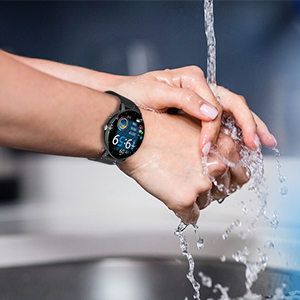
פיגור 9: IP67 וואַסער קעגנשטעל
טראָובלעשאָאָטינג
- זייגער טוט זיך נישט אן: זיכער מאַכן אַז די זייגער איז גאָר אויפגעלאָדן. פֿאַרבינדט עס צום טשאַרדזשינג קאַבל און אַ מאַכט מקור פֿאַר לפּחות 30 מינוט.
- נישט געקענט צופּאַסן מיטן טעלעפאָן:
- זייט זיכער אז בלועטוט איז ענייבאַלד אויף אייער טעלעפאָן און די זייגער איז אין דערגרייך.
- ריסטאַרט ביידע דיין טעלעפאָן און סמאַרטוואַטש
- Check if the "Da Fit" app is updated to the latest version.
- If previously paired, try unpairing the device from your phone's Bluetooth settings and re-pairing through the app.
- נישט פּינקטלעכע געזונט דאַטן:
- זייט זיכער אז די זייגער טראָגט גוט אויף אייער האַנטגעלענק, בערך איין פינגער ברייט פון אייער האַנטגעלענק ביין.
- Keep the sensor clean and free from debris.
- Note that health monitoring features are for reference only and should not be used for medical diagnosis.
- מעלדונגען נישט באקומען:
- Check app permissions in your phone settings to ensure "Da Fit" has access to notifications.
- Verify that notification settings are enabled within the "Da Fit" app for specific applications.
- זיכער מאַכן אַז די זייגער איז פארבונדן דורך בלועטוט צו דיין טעלעפאָן.
ספּעסאַפאַקיישאַנז
| שטריך | דעטאַל |
|---|---|
| מאָדעל נומער | smartwatch zl02 |
| פאַרשטעלן גרייס | 1.28 אינטשעס (זיכטיק פאַרשטעלן דיאַגאָנאַל: 2" / 4 ס"מ) |
| האַכלאָטע | 240 * 240 פּיקסעל |
| באַטאַרייע קאַפּאַציטעט | 200mAh ליטהיום פּאָלימער (אריינגערעכנט) |
| באַטערי לעבן | 7 days (typical use), 30 days (standby) |
| וואָטערפּרוף רייטינג | IP67 |
| קאַמפּאַטאַבילאַטי | iOS 9.0 און אַנדרויד 5.0 אָדער העכער |
| קאַנעקטיוויטי | בלועטאָאָטה |
| פּונקט וואָג | 110 גראַמז (3.88 אונסעס) |
| פּראָדוקט דימענשאַנז | 6.18 X 4.02 X 1.06 אינטשעס |
| פאַבריקאַנט | TAOPON |
וויכטיק סאַפעטי אינפֿאָרמאַציע
- דו זאלסט נישט פּרווון צו דיסאַסעמבאַל, פאַרריכטן אָדער מאָדיפיצירן די מיטל.
- האַלט דעם אַפּאַראַט אַוועק פון עקסטרעמע טעמפּעראַטורן, דירעקט זונשייַן און אָפֿענע פֿלאַמען.
- פֿאַרמײַדט שטאַרקע קלאַפּן אָדער פֿאַלן דאָס אַפּאַראַט.
- האַלטן אויס פון דערגרייכן פון קינדער.
- Dispose of the device and its battery according to local regulations. Do not dispose of with household waste.
- Consult a medical professional before starting any new exercise regimen or if you have any health concerns. The health monitoring data is for reference only.
וואָראַנטי און שטיצן
For warranty information, technical support, or customer service inquiries, please refer to the contact details provided on the product packaging or the official TAOPON webזייטל. ביטע באַהאַלטן אייער קויפן באַווייַז פֿאַר וואָראַנטי קליימז.
פֿאַרבונדענע דאָקומענטן - smartwatch zl02
 |
Manual de Usuario del Reloj Inteligente TAOPON Manual de usuario completo para el Reloj Inteligente TAOPON, cubriendo la identificación de componentes, modo de carga, conexión al teléfono (app, Bluetooth, audio), preguntas frecuentes y precauciones de uso. Diseñado para una experiencia de usuario clara y accesible. |
 |
Smartwatch Data Transparency: Understanding Collection, Storage, and Usage Detailed statement on the data transparency of smartwatches, covering personal and non-personal data types, estimated volumes, formats, storage, retention policies, and user control over their information. Includes information on Fitcloudpro app. |
 |
INSOMA ZL02 2-Zone Digital Water Timer User Manual Comprehensive user manual for the INSOMA ZL02 2-Zone Digital Water Timer. Includes setup instructions, programming guide, troubleshooting, and technical specifications. |
 |
שאַרפּ פּען ווייכווארג אָפּעראַציע מאַנואַל די אָפּעראַציע מאַנואַל גיט דעטאַלירטע אינסטרוקציעס פֿאַר ניצן די SHARP פּען ווייכווארג, אַרייַנגערעכנט אירע פֿעיִקייטן, מאָדעס און סעטטינגס. עס דעקט אַלץ פֿון אָנהייבן און פֿאַרלאָזן די ווייכווארג ביז ניצן פֿאַרשידענע צייכענונג און רעדאַקטירן מכשירים, פאַרוואַלטן fileס, און קאַסטאַמייזן די באַניצער צובינד. די מאַנואַל ליסט אויך די אָנווענדלעך מאָדעלס און סיסטעם רעקווירעמענץ. |
 |
SHARP Pen Software Operation Manual v3.6 Operation manual for SHARP Pen Software version 3.6, detailing features for effective meetings and presentations, including whiteboard functionality, document import, image acquisition, and settings. Compatible with various SHARP display models. |
 |
ZL02 Smart Watch Specifications and Features Detailed specifications for the ZL02 Smart Watch, covering its main features, APP functions, technical specifications, and physical dimensions. Includes information on display, sensors, connectivity, and supported languages. |
Ask a question about this manual
Ask about setup, troubleshooting, compatibility, parts, safety, or missing instructions. Manuals+ will review the question and use this page’s manual context to help answer it.