
1. הקדמה
The MustOOL MT336 is a versatile 2-in-1 True RMS Digital Clamp Meter and Oscilloscope. This device allows for non-contact measurement of AC current waveforms, DC/AC voltage, resistance, capacitance, frequency, and temperature. It features a waveform display for quick analysis and includes functions like diode testing and continuity checks. Designed for safety and efficiency, it is an essential tool for electrical measurements.
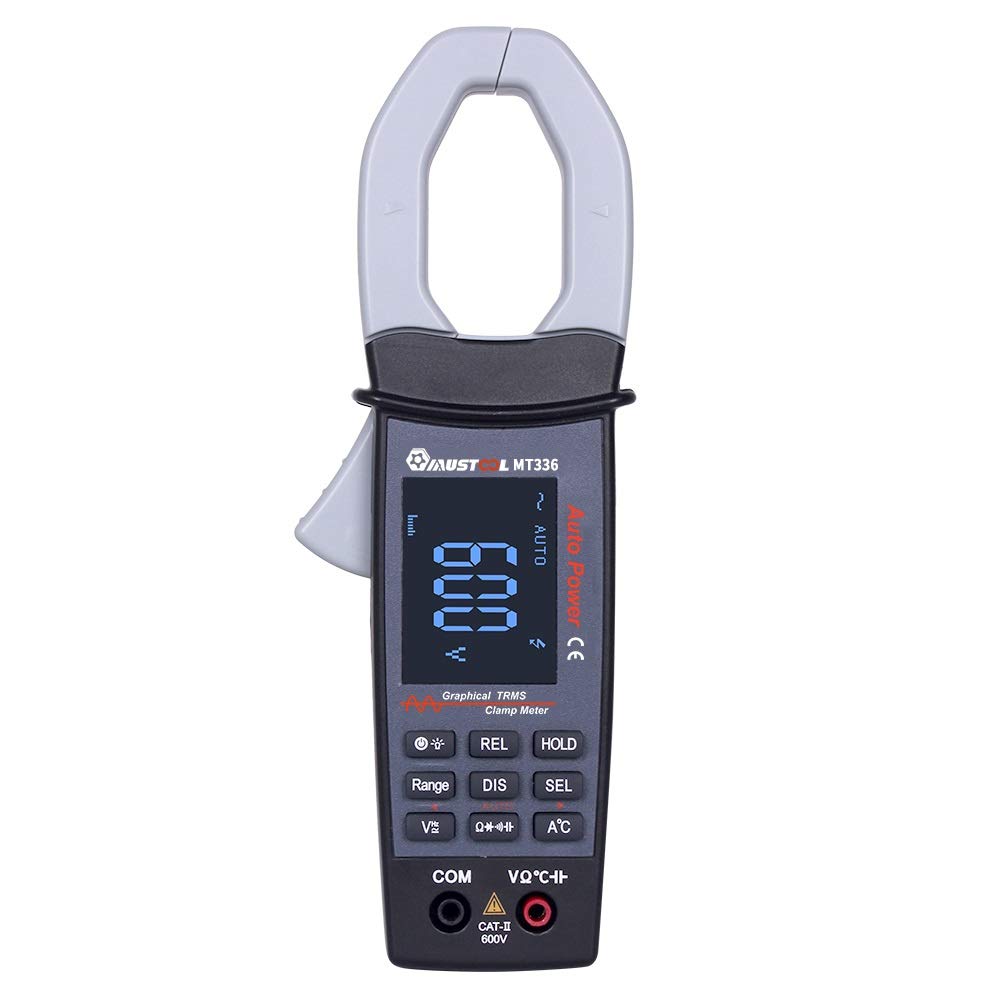
Figure 1: MustOOL MT336 Digital Clamp Meter in use, showing its display.
2. זיכערקייַט אינפֿאָרמאַציע
שטענדיק האַלטן זיך צו זיכערהייט מיטלען ווען איר ניצט עלעקטרישע טעסט עקוויפּמענט. אויב איר טוט דאָס נישט, קען דאָס רעזולטירן אין עלעקטרישן קלאַפּ, שאָדן, אָדער שעדיקן צום מעטער אָדער עקוויפּמענט אונטער טעסט.
- נישט איבערשרייטן די מאקסימום אינפוט לימיטן פאר קיין פונקציע.
- Ensure the test leads are in good condition and properly connected before use.
- Do not use the meter if it appears damaged or if the battery cover is not properly closed.
- געניטונג עקסטרעם וואָרענען ווען ארבעטן מיט וואָלtagעס איז העכער 60V DC אָדער 30V AC RMS.
- שטענדיק אָפּשטעקן די מאַכט צום קרייַז איידער איר מאַכט קעגנשטעל, קאַפּאַסיטאַנס, אָדער דיאָד מעסטונגען.
- Remove test leads from the meter before opening the battery compartment.

פיגורע 2: דערציען view of the MT336, highlighting safety warnings and battery information.
3. פּראָדוקט קאַמפּאָונאַנץ
The MustOOL MT336 clamp meter includes the following main components:
- Clamp קין: For non-contact AC current measurement.
- טריגער: עפנט און פארמאכט די קלamp קין.
- LCD ווייַז: Shows measurement readings, waveforms, and function indicators.
- פונקציע קנעפּלעך: For selecting modes, ranges, and other features.
- Input Jacks (COM, VΩHz): פֿאַר פֿאַרבינדן טעסט דראָטן פֿאַר וואָלtagע, קעגנשטעל, קאַפּאַסיטאַנס, אָפטקייט, דיאָד, און קאָנטינויִטעט מעסטונגען.
- Temperature Probe Input: For connecting the included temperature probe.
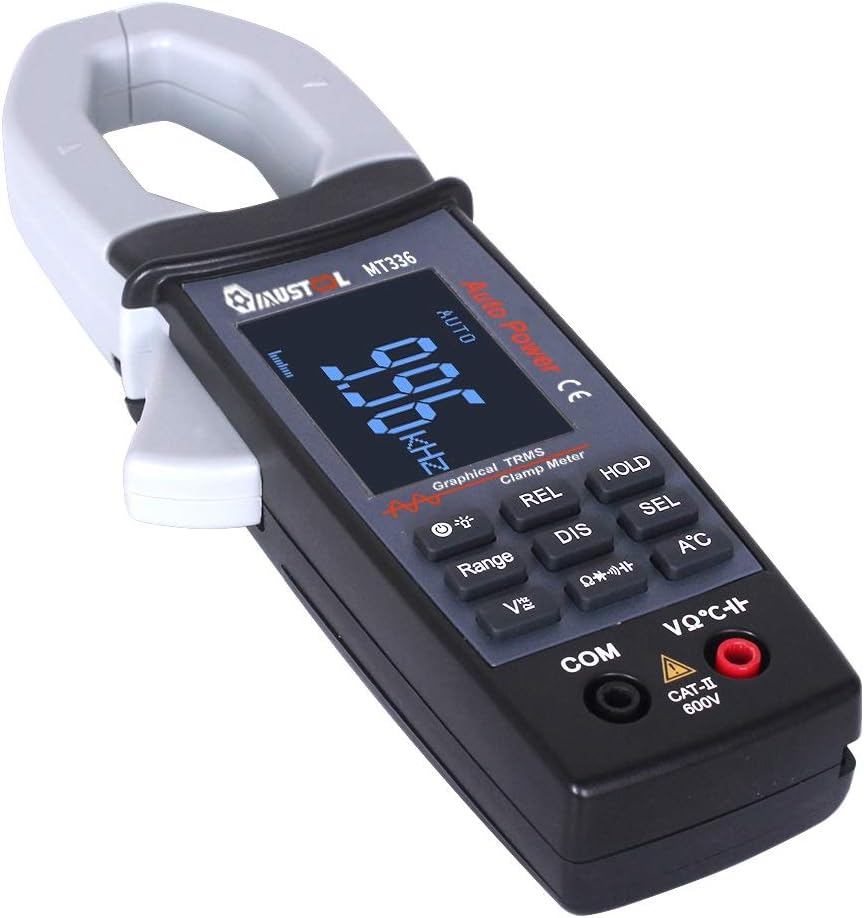
פיגורע 3: איבערview of the MT336 clamp meter, showing its main parts.
4. סעטאַפּ
4.1 באַטאַרייע ייַנמאָנטירונג
- Ensure the meter is powered off and no test leads are connected.
- געפינט די באַטעריע אָפּטייל אויף דער צוריקזייט פון דעם מעטער.
- ונסקרעוו די דעקן פון די באַטאַרייע אָפּטייל.
- Insert three AAA 1.5V batteries, observing correct polarity.
- פאַרבייַטן די דעקן פון די באַטאַרייע אָפּטייל און באַוואָרענען עס מיט די שרויף.
4.2 פֿאַרבינדן טעסט דראָטן
פֿאַר וואָלtage, קעגנשטעל, קאַפּאַסיטאַנס, אָפטקייט, דיאָד, און קאָנטינויִטעט מעסטונגען:
- אַרייַנלייגן די שוואַרץ פּרובירן פירן אין די COM (געמיינזאמע) אינפוט דזשעק.
- אַרייַנלייגן די רויט פּרובירן פירן אין די VΩHz אַרייַנשרייַב דזשאַק.
For temperature measurements, connect the temperature probe to the designated input ports.
5. אַפּערייטינג ינסטרוקטיאָנס
5.1 מאַכט אויף / אַוועק
Press the power button to turn the meter on. The meter will automatically shut down after 15 minutes of inactivity to conserve battery life. Press the power button again to turn it off manually.
5.2 AC קראַנט מעסטונג (Clamp פֿונקציע)
- Select the AC current mode (usually indicated by 'A~' or a similar symbol).
- דריקן די צינגל צו עפֿענען די קלamp קין.
- Enclose a single conductor (not a power cord with multiple wires) within the clamp קין.
- Release the trigger to close the jaw securely around the conductor.
- Read the AC current value and waveform on the display.

Figure 4: Measuring AC current and waveform using the clamp פֿונקציע.
5.3 AC/DC VoltagE מעזשערמאַנט
- פֿאַרבינדט די טעסט דראָטן ווי באַשריבן אין סעקציע 4.2.
- אויסקלייַבן די צונעמען וואָלtage mode (DCV or ACV).
- Touch the red and black test probes to the points where voltage איז צו מעסטן.
- לייענען דעם חלקtagדער ווערט אויפן דיספלעי. פאר AC וואָלומעןtage, the waveform may also be displayed.

פיגור 5: מעסטן AC וואָלומעןtage and waveform from a power outlet.
5.4 קעגנשטעל, קאַפּאַסיטאַנס, אָפטקייט, דיאָד, און קאָנטינויִטעט
For these functions, ensure the circuit is de-energized before connecting the test leads. Select the desired function using the mode buttons and follow standard measurement procedures for multimeters.
- קעגנשטעל (Ω): Measures the electrical resistance of a component.
- קאַפּאַסאַטאַנס (F): Measures the capacitance of capacitors.
- אָפטקייַט (הז): מעסט די פרעקווענץ פון אן AC סיגנאַל.
- דיאָוד טעסט: Checks the forward voltagאַ טראָפּן פֿון אַ דיאָד.
- קאָנטינויטי טעסט: Indicates if a circuit is complete with a low resistance path (typically with an audible beep).
5.5 טעמפּעראַטור מעזשערמאַנט
Connect the temperature probe to the meter's designated input. Select the temperature function and place the probe tip on the object or area to be measured. The temperature will be displayed in Celsius or Fahrenheit.
6. וישאַלט
6.1 רייניקונג
Wipe the meter with a dry, soft cloth. Do not use abrasives or solvents. Keep the input terminals free of dirt and moisture.
6.2 באַטערי פאַרבייַט
When the low battery indicator appears on the display, replace the batteries as described in Section 4.1. Use three new AAA 1.5V batteries.
6.3 סטאָרידזש
If the meter is not used for an extended period, remove the batteries to prevent leakage and damage. Store the meter in a cool, dry place away from direct sunlight.
7. טראָובלעשאָאָטינג
| פּראָבלעם | מעגלעך סיבה | לייזונג |
|---|---|---|
| דער מעטער גייט נישט אן. | טויטע אדער נישט ריכטיק אינסטאלירטע באַטעריעס. | פאַרבייַטן באַטעריעס, זיכער מאַכן אַז די פּאָלאַריטעט איז ריכטיק. |
| קיין לייענונג אדער "OL" ווערט נישט געוויזן. | Open circuit, out of range, or incorrect function selected. | Check connections, select appropriate range/function, or ensure circuit is closed. |
| ומפּינקטלעך רידינגז. | Low battery, dirty test leads/terminals, or external interference. | Replace batteries, clean leads/terminals, move away from strong electromagnetic fields. |
| Waveform not displayed correctly. | Signal frequency too high/low, or incorrect range. | Ensure signal is within 1kHz ACV/ACA. Adjust range if available. |
8. ספּעסאַפאַקיישאַנז
אַלגעמיינע ספּעסאַפאַקיישאַנז:
- ווייַז: 128 x 64 LCM with white backlight on black screen (45mm x 35mm)
- מאַכט: 3 X AAA 1.5V באַטעריז
- אַוטאָ שאַטדאַון: Approximately 15 minutes of inactivity
- דאַטן סטאָרידזש: 100 data points, 10 waveforms
- דימענסיעס: 78 מם X 210 מם X 36 מם
- וואָג: 220g (אָן באַטעריז)
- אַפּערייטינג סוויווע: 0°C to 40°C; <75% RH
- סטאָרידזש סוויווע: -10°C to 60°C; <90% RH
- זיכערהייט רייטינג: קאַץ וו 600וו
Measurement Specifications (Accuracy ±(rdg + dgt)):
| פֿונקציע | קייט | אַקיעראַסי |
|---|---|---|
| DC Voltage | 400 וו / 4 וו / 40 וו / 400 וו / 600 וו | ± (1.5% + 10) |
| AC Voltage (TRMS) | 4 וו / 40 וו / 400 וו / 600 וו | ± (2.0% + 10) |
| AC קראַנט | 40A / 400A | ± (2.5% + 10) |
| קעגנשטעל | 400Ω / 4קΩ / 40kΩ / 400kΩ / 4MΩ / 40mΩ | ± (1.0% + 5) |
| קאַפּאַסיטאַנס | 4nF / 40nF / 400nF / 4uF / 400uF / 4mF | ± (4.0% + 10) |
| אָפטקייַט | 9.999 הז צו 30 כז | ± (2.0% + 10) |
| טעמפּעראַטור | -20 ℃ צו 250 ℃ | ± (2.0% + 3) |
| דייאָוד טעסט | עפֿן קרייַז וואָלtage approx. 3V, max test current approx. 2mA | N/A |
| קאָנטינויטי טעסט | Judgment resistance approx. 50Ω | N/A |
| אַנאַלאָג באַנדווידט | ACV / ACA 1 kHz | N/A |
9. וואָראַנטי און שטיצן
For warranty information and technical support, please refer to the official MustOOL webזייטל אדער קאָנטאַקט אייער הענדלער. האַלט אייער קויף קוויטל ווי אַ באַווייַז פון קויפן.
The package includes: 1x Clamp Meter, 1x Pair of Test Leads, 1x English User Manual, 1x Temperature Probe.