
1. הקדמה
Thank you for choosing the Aurora AU200MA 200-Sheet Auto-Feed Micro-Cut Paper Shredder. This manual provides essential information for the safe and efficient operation, maintenance, and troubleshooting of your new shredder. Please read these instructions thoroughly before use and retain them for future reference.

Figure 1.1: Aurora AU200MA Paper Shredder
The Aurora AU200MA is designed for commercial and home office use, offering high-security micro-cut shredding for sensitive documents. It features an automatic feed for up to 200 sheets and a manual feed slot for up to 10 sheets, including credit cards and small paper clips.
2. וויכטיק סאַפעטי אינסטרוקציעס
כדי צו רעדוצירן דעם ריזיקע פון פייער, עלעקטרישן שאק, אדער שאדן, זאלט איר שטענדיג נאכפאלגן גרונטלעכע זיכערהייט מיטלען ווען איר ניצט דעם אפאראט:
- לייענט אַלע אינסטרוקציעס איידער איר ניצט דעם שרעדער.
- האַלטן קינדער און פּעץ אַוועק פון די שרעדער.
- האַלט לויזע קליידער, צירונג, האָר און הענט אַוועק פון די פּאַפּיר אַרייַנגאַנג שפּאַלט.
- Do not spray any aerosol-based products into or around the shredder.
- Do not shred metal objects, cardboard, or plastic other than credit cards.
- ניצט נישט דעם שרעדער אויב דער עלעקטרישער שנור איז געשעדיגט.
- שטענדיק אויסשטעקן דעם שרעדער איידער איר רוקט, רייניגט, אדער ליידיקט דעם מיסט בין.
- זיכער מאַכן אַז דער שרעדער איז געשטעלט אויף אַ סטאַביל, גלייכער ייבערפלאַך.
3. פּראָדוקט איבערview
3.1 קאַמפּאָונאַנץ
- Auto-Feed Tray: For automatic shredding of up to 200 sheets.
- מאַנואַל פיטער שפּעלטל: For manual shredding of up to 10 sheets, credit cards, and small paper clips.
- קאָנטראָל פּאַנעל: Features power button and indicator lights.
- מיסט בין: 8.5-gallon pullout bin for shredded materials.
- קאַסטערז: פֿאַר גרינגע באַוועגלעכקייט פֿון דער אַפּאַראַט.
3.2 קאָנטראָל פּאַנעל און אינדיקאַטאָרן

פיגור 3.1: קאנטראל פאנעל איבערview
The control panel includes various LED indicators to communicate the shredder's status:
- סטאַנדביי: ווײַזט אָן אַז דער שרעדער איז אָנגעצונדן און גרייט פֿאַר אָפּעראַציע.
- אָוווערכיט: Illuminates when the shredder has exceeded its continuous run time and needs to cool down.
- Bin-full: Indicates the waste bin is full and needs to be emptied.
- אָווערלאָאַד: Lights up if too much paper is inserted, triggering the anti-jam auto-reverse function.
- טיר עפענען: Indicates the waste bin is not properly closed or inserted.
4. סעטאַפּ
- אויספּאַקן דעם שרעדער: נעמט פֿאָרזיכטיק אַרויס דעם שרעדער פֿון זײַן פּאַקעט.
- Position the Shredder: Place the shredder on a flat, stable surface. The integrated casters allow for easy movement.
- פאַרבינדן מאַכט: צאַפּן די מאַכט שנור אין אַ נאָרמאַל 120 וו אַק ווענטיל.
- Ensure Bin is Closed: Make sure the pullout waste bin is fully and correctly inserted into the shredder. The "Door Open" indicator should not be lit.
5. אַפּערייטינג ינסטרוקטיאָנס
5.1 Auto-Feed Shredding

Figure 5.1: Auto-Feed Tray with Documents
The auto-feed feature allows for convenient shredding of multiple sheets without manual feeding.
- עפֿנט דעם דעקל פֿון דער אויטאָמאַטישער פֿיטערונג טאַץ.
- Stack up to 200 sheets of paper neatly into the auto-feed tray. Ensure the paper is free of staples, paper clips (except small ones in manual feed), and other foreign objects.
- Close the auto-feed tray cover. The shredder will automatically begin processing the documents.
- The shredder has a continuous run time of 60 minutes. After this period, it may enter an overheat state to cool down.
5.2 Manual Feed Shredding

Figure 5.2: Manual Feed Slot and Shredding Capabilities
For smaller quantities of paper or other shreddable items:
- Insert up to 10 sheets of paper into the manual feed slot.
- The manual feed slot can also shred credit cards and small paper clips. Insert these items one at a time into the center of the manual feed slot.
5.3 Anti-Jam Auto-Reverse
The shredder is equipped with an anti-jam auto-reverse function. If too much paper is inserted, the shredder will automatically reverse to clear the jam. If a jam persists, press the reverse button on the control panel to manually clear the paper.
5.4 Auto Power-Sleep
For energy efficiency, the shredder will automatically enter a power-sleep mode after a period of inactivity. It will reactivate when paper is detected or a button is pressed.
6. וישאַלט
6.1 עמפּטיינג די וויסט באַן

Figure 6.1: Pullout Waste Bin
When the "Bin-full" indicator illuminates, the waste bin needs to be emptied.
- Ensure the shredder is in standby mode or unplugged.
- Gently pull out the 8.5-gallon waste bin from the front of the shredder.
- אַוועקוואַרפן דאָס צעשניטענע מאַטעריאַל.
- Slide the waste bin back into the shredder until it clicks securely into place. Ensure the "Door Open" indicator is off.
6.2 Shredder Oiling
Regular oiling of the shredder blades is recommended to maintain optimal performance and extend the life of your micro-cut shredder. Use shredder oil specifically designed for paper shredders.
- טראָגט אויף אַ דין ליניע פון שרעדער-אויל אַריבער דעם פּאַפּיר-אַרייַנגאַנג שפּאַלט.
- Run a few sheets of paper through the manual feed slot to distribute the oil.
- Repeat this process after every 30 minutes of accumulated shredding or when you notice a decrease in performance.
6.3 רייניקונג
ווישט אָפּ די אויסערלעכע טייל פֿון דעם שרעדער מיט אַ ווייכן, טרוקענעם שטאָף. ניצט נישט קיין שרײַבנדיקע רייניגערס אָדער סאָלווענטן.
7. טראָובלעשאָאָטינג
| פּראָבלעם | מעגלעך סיבה | לייזונג |
|---|---|---|
| דער שרעדער אַרבעט נישט. | No power; Waste bin not properly inserted; Overheat protection activated. | Check power connection; Ensure waste bin is fully closed (Door Open indicator off); Allow shredder to cool down if Overheat indicator is on. |
| פּאַפּיר קלעם. | צו פיל פּאַפּיר אַרײַנגעלייגט; פּאַפּיר נישט אַרײַנגעלייגט גלייך. | The shredder has an anti-jam auto-reverse function. If it persists, press the reverse button on the control panel to manually clear the paper. Reduce the amount of paper for future shredding. |
| שרעדער שטעלט זיך אפ בעת אפעראציע. | Overheat protection activated; Waste bin full. | Allow shredder to cool down if Overheat indicator is on; Empty the waste bin if Bin-full indicator is on. |
| Shredded material is not fine enough. | Not applicable (Micro-cut shredder). | The Aurora AU200MA is a micro-cut shredder, producing tiny particles (P-5 security level). |
8. ספּעסאַפאַקיישאַנז
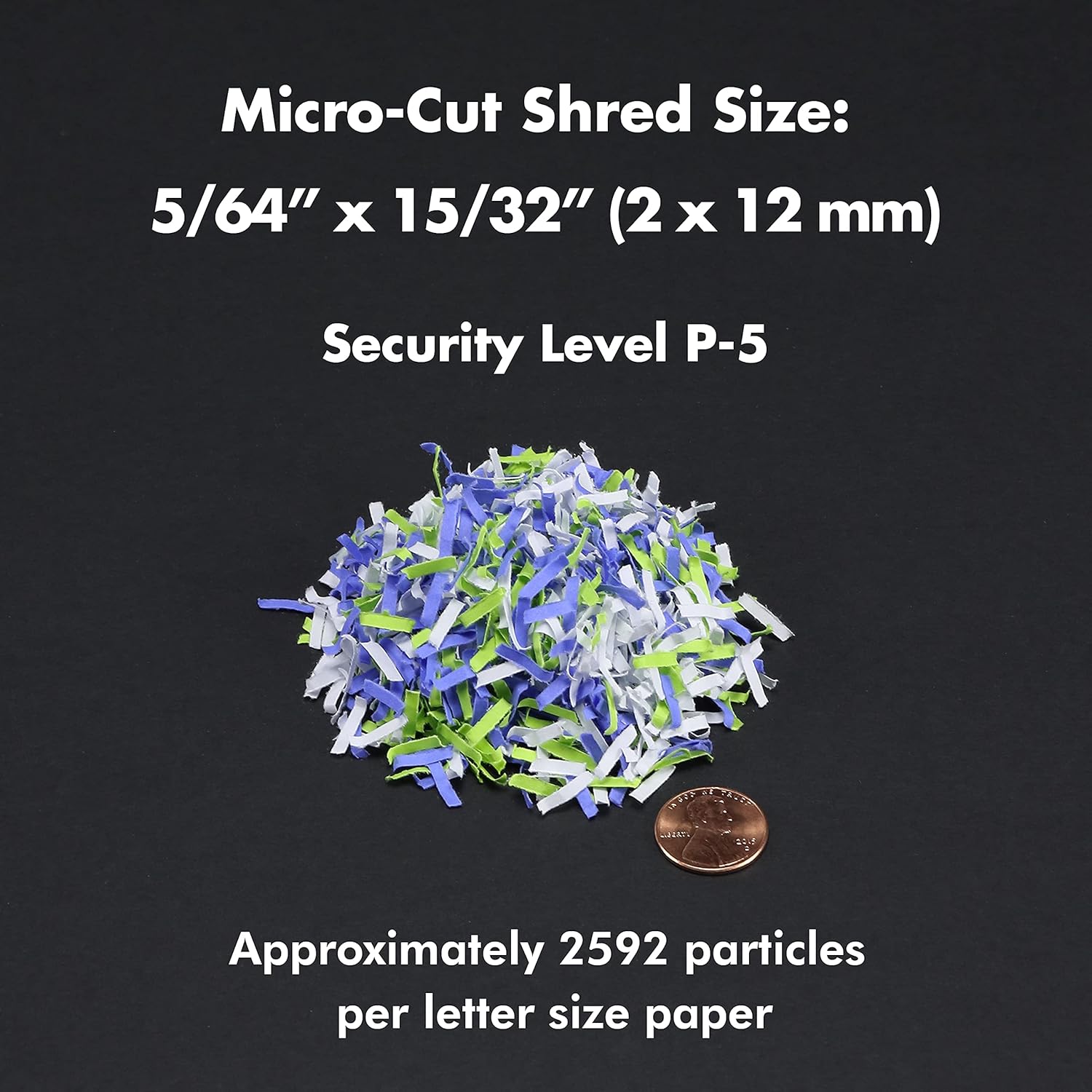
Figure 8.1: Micro-Cut Shred Size and Security Level
- מאָדעל: AU200MA
- שטריק טיפּ: מיקראָ-קאַט
- שעד גרייס: 5/64" x 15/32" (2 x 12 מ"מ)
- זיכערהייט מדרגה: פּ-5
- אויטאָ-פיטער קאַפּאַציטעט: אַרויף צו 200 שיץ
- מאַנואַל פידינג קאַפּאַציטעט: אַרויף צו 10 שיץ
- קעסיידערדיק לויפן צייט: קסנומקס מינוט
- קיל אַראָפּ צייט: Approximately 30-40 minutes (after 60 min continuous use)
- וויסט באַן קאַפּאַציטעט: 8.5 גאלאנען
- שרעדז: Paper, Credit Cards, Small Paper Clips
- Voltage: 120V AC
- אָפטקייַט: 60 הז
- Product Dimensions (H x W x L): 22.83" x 14.02" x 18.35"
- נומער וואָג: 38.1 לבס
9. וואָראַנטי און שטיצן
For warranty information or technical support, please refer to the warranty card included with your product or visit the official Aurora website. You may also contact Aurora customer service directly for assistance.
Aurora Customer Service: Please refer to your product packaging or the official Aurora webזייטל פֿאַר די מערסט אַקטועלע קאָנטאַקט אינפֿאָרמאַציע.