
Milestone MPT-II
Milestone MPT-II 58mm Thermal Printer User Manual
Model: MPT-II | Brand: Milestone
1. הקדמה
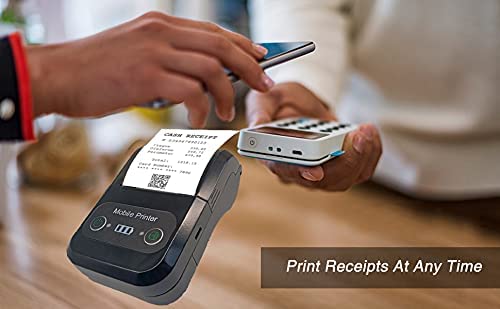
The Milestone MPT-II is a compact and portable 58mm thermal printer designed for various business applications, including retail, restaurants, and mobile logistics. It offers high-speed, clear printing and features Bluetooth connectivity for seamless integration with Android and iOS devices. Its lightweight design and long-lasting battery make it ideal for on-the-go printing needs.

2. שליסל פֿעיִקייטן
- בלועטאָאָטה פּרינטינג: Supports Android and iOS devices for wireless printing.
- פּאָרטאַביליטי: Light and compact design allows for printing anywhere, anytime.
- Low Operating Cost: Direct thermal printing eliminates the need for ink ribbons or cartridges, requiring only thermal paper.
- לאנג באַטאַרייע לעבן: Built-in 7.4V/2500mAh rechargeable lithium battery provides up to 4 hours of continuous printing.
- Versatile Interface: Equipped with both USB and Bluetooth connectivity.
- ESC/POS Compatible: Supports standard ESC/POS print commands for broad software compatibility.

3. ערשט סעטאַפּ
3.1 אויספּאַקן און אינהאַלט
Carefully unpack the printer and verify all components are present:
- 1 x Milestone MPT-II Thermal Printer
- קסנומקס רענטגענ וסב קאַבלע
- 1 x USB Adaptor
- 1 x פּאַפּיר זעמל
- 1 x באַניצער מאַנואַל (דאָס דאָקומענט)
3.2 אויפלאָדן דעם דרוקער
- Connect the USB cable to the printer's charging port.
- שטעקט אריין דעם USB אַדאַפּטער אין אַ נאָרמאַלן עלעקטרישן ווענטיל.
- The charging indicator light will illuminate. Charge the printer fully before first use (approximately 2.5-3 hours for continuous printing).
3.3 לאָדן טערמיש פּאַפּיר
- Open the paper compartment cover by gently pushing the latch.
- Insert the thermal paper roll with the printing side facing outwards (as shown in Figure 2). Ensure the roll is seated correctly.
- Pull a small length of paper out beyond the cutting edge.
- פֿאַרמאַכט דעם דעקל פֿונעם פּאַפּיר־אָפּטייל פֿעסט ביז עס קליקט אַרײַן אין פּלאַץ.
4. אַפּערייטינג ינסטרוקטיאָנס
4.1 פּאַוערינג אויף / אַוועק
- To power on: Press and hold the power button until the indicator light illuminates.
- אויסצולאָשן: דריק און האַלט דעם מאַכט קנעפּל ביז די אינדיקאַטאָר ליכט גייט אויס.
4.2 בלועטאָאָטה קאַנעקשאַן
The MPT-II printer supports Bluetooth connectivity for mobile devices.
- זיכער מאַכן אַז דער דרוקער איז אנגעצונדן און אין דערגרייך פון אייער מאָבילן מיטל.
- On your mobile device (Android/iOS), go to Bluetooth settings and turn Bluetooth on.
- זוכן פֿאַר available devices. The printer will appear as "MPT-II".
- Select "MPT-II" to pair. If prompted for a password, enter 1234 or 0000.
- Once paired, the printer is ready for use with compatible applications.
4.3 ניצן מיט אַפּליקאַציעס
For mobile printing, you will need a compatible application. Milestone recommends downloading RAWBT Printer App or MYXPrint App from the Google Play Store. For iOS, search for compatible thermal printer apps in the App Store.
- Open your chosen printing application.
- Navigate to the printer settings within the app.
- Select the "MPT-II" printer from the list of available Bluetooth devices.
- You can now send print commands from the application.

4.4 USB Connection (for PC)
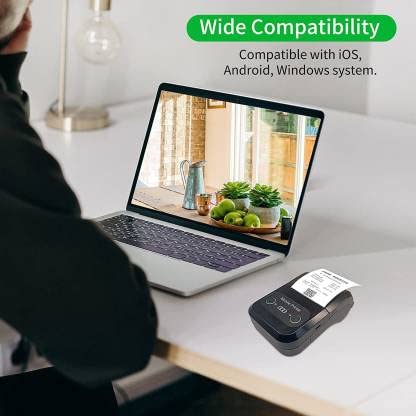
The printer can also be connected to a PC via USB. You may need to install a printer driver, which is typically available from the manufacturer's website or included on a CD with the product (if applicable).
5. וישאַלט
5.1 רייניקונג די פּרינטער
To ensure optimal performance and print quality, regularly clean the printer:
- דרוק קאָפּ: ניצט אַ וואַטע שטעכל לײַכטampened with isopropyl alcohol to gently wipe the thermal print head. Allow it to dry completely before use.
- פּאַפּיר וועג: Use a soft, dry cloth or a small brush to remove any paper dust or debris from the paper path.
- עקסטעריע: ווישט אָפּ די אויסערלעכע זייט פון דעם דרוקער מיט אַ ווייכן, טרוקענעם שטאָף.amp שטאָף. ויסמיידן ניצן האַרב קעמיקאַלז אָדער אַברייסיוו קלינערז.
5.2 באַטערי קער
- באַשולדיקן די באַטאַרייע גאָר איידער ערשטער נוצן.
- פֿאַרמײַדט אָפֿט גאָר אויסצוליידיקן די באַטעריע.
- If storing the printer for an extended period, charge it to about 50% and recharge every few months to prevent battery degradation.
6. טראָובלעשאָאָטינג
| פּראָבלעם | מעגלעך סיבה | לייזונג |
|---|---|---|
| דער דרוקער גייט נישט אן. | די באַטעריע איז נידעריק אָדער אויסגעשעפּט. | Charge the printer using the provided USB cable and adaptor. |
| קען נישט פאַרבינדן דורך בלוטוט. | Bluetooth is off on device; incorrect pairing password; printer not discoverable. | Ensure Bluetooth is enabled on your device. Re-attempt pairing with password 1234 or 0000. Restart both printer and device. |
| No print output or blank paper. | Paper loaded incorrectly; out of paper; print head dirty. | Check paper orientation (printing side out). Replace paper roll if empty. Clean the thermal print head (refer to Maintenance section). |
| Poor print quality (faded, lines). | Print head dirty; low battery; poor quality thermal paper. | Clean the print head. Charge the printer fully. Use high-quality thermal paper. |
| Printer beeps continuously. | Paper alarm (out of paper or paper jam); low battery reminder. | Check and replace paper roll or clear jam. Charge the printer. |
7. טעכניש ספּעסאַפאַקיישאַנז
| שטריך | באַשרייַבונג |
|---|---|
| דרוק מעטאָד | טערמאַל שורה דרוקן |
| דרוק ברייט | Paper width 58mm, effective width 58mm |
| דרוק געדיכטקייַט | 576 פּונקט / שורה |
| האַכלאָטע | 8 dots/mm, 203 DPI |
| דרוק ספּיד | 70mm/s (Max Print speed Monochrome: 50 ppm) |
| Printer Core Life | 50KM (25% print density or less than 100 million pulses) |
| Printable Content | English, numbers, symbols, characters, pictures, 1D/2D barcode, multi-languages |
| דאַטאַ קאָמוניקאַציע צובינד | וסב / בלועטאָאָטה |
| מאַכט צושטעלן | Machine charging 9V-1.5A |
| באַטערי | Built-in rechargeable 2600mAh lithium-ion battery (7.4V/2500mAh) |
| Continuous Printing Time | 2.5-3 שעה |
| ינסטרוקטיאָנס שטעלן | ESC / POS קאַמפּאַטאַבאַל |
| פּאַפּיר קאַטינג | Manually tear |
| אַפּערייטינג סיסטעם קאַמפּאַטאַבילאַטי | אַנדרויד, יאָס, ווינדאָוז |
| פּראָדוקט דימענשאַנז | 15D x 12W x 6H סענטימעטער |
| פּונקט וואָג | 310 גראַמז |
| אַרייַנגערעכנט קאַמפּאָונאַנץ | 1 x Thermal Printer, 1 x USB Cable, 1 x USB Adaptor, 1 x Paper Roll, 1 x User Manual |
8. וואָראַנטי און שטיצן
This product comes with a 10-day warranty as per the purchase terms. For any technical assistance, troubleshooting beyond this manual, or warranty claims, please contact your retailer or the manufacturer's customer support. Refer to your purchase documentation for specific contact details.
פאַבריקאַנט: מיילסטאָון
אימפארטירער: SB RETAILS, SECTOR 28, PRADHIKARAN, PUNE-44, +918888881631
Ask a question about this manual
Ask about setup, troubleshooting, compatibility, parts, safety, or missing instructions. Manuals+ will review the question and use this page’s manual context to help answer it.