
1. הקדמה
This manual provides instructions for the proper installation, operation, and maintenance of your Kolink RGB Extension Cable. Please read this manual thoroughly before use to ensure safe and efficient operation.
The Kolink RGB Extension Cable is designed to extend the reach of your 4-pin RGB lighting connections within your PC system, offering greater flexibility for component placement and aesthetic customization.
2. זיכערקייַט אינפֿאָרמאַציע
- Ensure your PC system is powered off and unplugged from the wall outlet before installing or removing any components.
- Handle the cable by its connectors, not by the wires, to prevent damage.
- Do not expose the cable to excessive force, sharp objects, or extreme temperatures.
- This product is intended for indoor use within a computer chassis.
- Verify that the connector type (4-pin RGB) matches your devices before connection. Incorrect connection may cause damage.
3. פּעקל אינהאַלט
אייער פּעקל זאָל אַנטהאַלטן די פאלגענדע זאַך:
- 1x Kolink RGB Extension Cable (50cm)
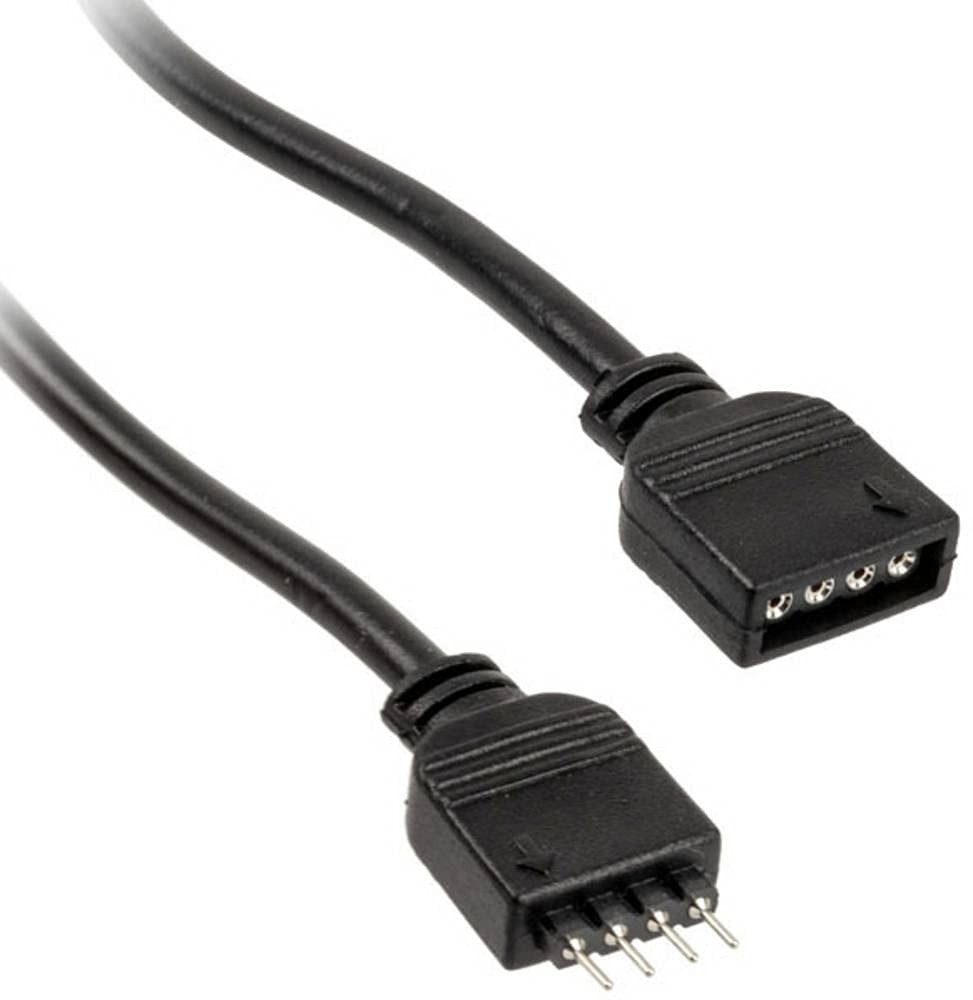
פיגורע 1: Kolink RGB Extension Cable. This image shows the 50cm black extension cable with its 4-pin male and female connectors, designed for extending RGB lighting connections within a PC.
4. סעטאַפּ און ייַנמאָנטירונג
- מאַכט אויס סיסטעם: Ensure your computer is completely powered off and disconnected from the main power supply.
- ידענטיפיצירן קאַנעקטערז: Locate the 4-pin RGB header on your motherboard or existing RGB controller, and the 4-pin RGB connector on the device you wish to extend (e.g., an RGB fan or LED strip).
- Connect Extension Cable: פארזיכטיק פארבינדט די זכר end of the Kolink RGB Extension Cable to the ווייַבלעך 4-pin RGB header on your motherboard or controller. Ensure the pins align correctly and the connection is secure.
- קאָננעקט דיווייס: פאַרבינדן די ווייַבלעך end of the Kolink RGB Extension Cable to the זכר 4-pin RGB connector of your RGB device. Again, ensure correct pin alignment and a secure connection.
- קאַבלע פאַרוואַלטונג: Route the cable neatly within your PC case, ensuring it does not obstruct airflow or interfere with moving parts like fans. The tangle-free design assists with this.
- מאַכט אויף סיסטעם: Once all connections are secure, close your PC case, reconnect the power supply, and power on your system.
5. אָפּעראַציע
The Kolink RGB Extension Cable functions as a passive extension for your 4-pin RGB signals. Once connected, the RGB device will operate as if it were directly connected to the motherboard or controller, allowing you to control its lighting effects through your system's existing RGB software or hardware controls.
קיין נאָך ווייכווארג אדער דרייווערס זענען נישט נויטיק פֿאַר דעם קאַבל אַליין.
6. וישאַלט
- רייניקונג: If necessary, gently wipe the cable with a dry, lint-free cloth to remove dust. Do not use liquid cleaners.
- דורכקוק: Periodically inspect the cable for any signs of wear, fraying, or damage to the connectors. If damage is observed, discontinue use and replace the cable.
- סטאָרידזש: When not in use, store the cable in a cool, dry place, away from direct sunlight and extreme temperatures. Avoid sharp bends or kinks.
7. טראָובלעשאָאָטינג
| פּראָבלעם | מעגלעך סיבה | לייזונג |
|---|---|---|
| RGB device not lighting up. | Loose connection, incorrect pin alignment, or faulty RGB device/controller. | Ensure all 4-pin connections are secure and correctly aligned. Verify the RGB device works when connected directly. Check motherboard/controller settings. |
| אומרעכטע פארבן אדער פליקעריי. | Loose connection, software issue, or incompatible RGB standard. | Check connections. Update or reinstall RGB control software. Ensure your device uses the 4-pin 12V RGB standard (not 3-pin 5V ARGB). |
| דער קאַבל זעט אויס צעבראָכן. | פיזישע שאדן. | Discontinue use immediately. Replace the cable. |
8. ספּעסאַפאַקיישאַנז
- סאָרט: קאָלי
- מאָדעל: PGW-AC-KOL-042
- קאַבלע טיפּ: RGB פארלענגערונג קאַבל
- קאַנעקטער טיפּ: 4-pin RGB (Male-to-Female)
- לענג: 50 סענטימעטער
- נומער פון פּינס: 4
- מאַקסימום וואָלtage: 5 וואלטס (דק) (Note: Standard 4-pin RGB is typically 12V. Users should verify their device's voltage requirement to ensure compatibility.)
- ספּעציעלע שטריך: טאַנגלע פֿרייַ
- רעקאַמענדיד ניצט: PC fan extension, RGB lighting extension
- קאָליר: שוואַרץ
- נאָכקומען: RoHS
9. וואָראַנטי און שטיצן
Kolink products are manufactured to high-quality standards. For warranty information and technical support, please refer to the official Kolink webזייטל אדער קאָנטאַקט אייער הענדלער. האַלט אייער קויפן באַווייַז פֿאַר וואָראַנטי קליימז.
EU Spare Part Availability Duration: 1 Year (as per product specifications).