
הקדמה
Thank you for choosing the VETEK AF6 4K Video Camera Camcorder. This manual provides comprehensive instructions for the proper setup, operation, and maintenance of your device. Please read this manual thoroughly before using the camcorder to ensure optimal performance and longevity.
פּעקל אינהאַלט
באַשטעטיקט אַז אַלע זאכן וואָס זענען אויסגערעכנט אונטן זענען אַרייַנגערעכנט אין אייער פּעקל:
- 1x VETEK AF6 4K Camcorder
- 1x וסב קאַבלע
- 1x HDMI קאַבלע
- 1x Lens Hood
- 1x Fill Light (External LED Light)
- 1x וסב טשאַרדזשער
- 1x רימאָוט קאָנטראָל
- 1x 32GB SD קאַרד
- 1x מיקראָפאָן קאַבל
- 1x עקסטערנער מיקראָפאָן
- 1x Reusable Camera Bag
- 2x Rechargeable Lithium Batteries
- 1x Dual External Battery Charger
- 1x Camera Instruction Manual
- 1x Microphone Instruction Manual
- 1x האַנט-געהאלטענער סטאַביליזאַטאָר

פּראָדוקט איבערview
Familiarize yourself with the main components of your VETEK AF6 camcorder.

שליסל פֿעיִקייטן:
- 4K Video Resolution: Records videos at 3840*2160.
- 48.0 MP Image Resolution: Captures still images at 7920*5940.
- 3.0-inch 270° Rotatable Touch Screen: גיט פלעקסאַבאַל viewing angles and intuitive control.
- 18X דיגיטאַל פארגרעסער: Allows for closer shots of distant subjects.
- Wi-Fi קאַנעקטיוויטי: Enables remote control and file transfer via a smartphone app.
- פּיסי קאַמעראַ פֿונקציע: קען גענוצט ווערן ווי א webcam for live streaming and video calls.
- שטיצע פון עקסטערנעם מיקראָפאָן: Enhances audio quality.
- External Fill Light Support: Improves illumination in low-light conditions.
- Handheld Stabilizer Compatibility: Reduces camera shake for smoother footage.
- Special Shooting Modes: Includes Slow Motion and Time-Lapse.
סעטאַפּ
1. באַטאַרייע ייַנמאָנטירונג און טשאַרדזשינג
- עפֿנט דעם דעקל פֿון דער באַטעריע־אָפּטיילונג אויף דער קאַמעראַ.
- Insert a rechargeable lithium battery, ensuring correct polarity.
- נאָענט די דעקן פון די באַטאַרייע אָפּטייל.
- To charge, insert the batteries into the dual external battery charger. Connect the charger to a power source using the provided USB cable and charger. The indicator lights will show charging status.
באַמערקונג: Ensure batteries are fully charged before first use for optimal performance. If indicator lights flicker or do not show a stable charging status, ensure the batteries are correctly seated in the charger and the power connection is stable.
2. סד קאַרד ינסטאַללאַטיאָן
- Locate the SD card slot on the camcorder.
- Insert the 32GB SD card (included) into the slot with the metal contacts facing the correct direction, until it clicks into place.
- To remove, gently press the SD card until it pops out.
וויכטיק: Format the SD card in the camcorder's menu before initial use to ensure compatibility and prevent data corruption.
3. צוטשעפּען אַקסעסאָריעס
- פונדרויסנדיק מיקראָפאָן: Slide the external microphone onto the hot shoe mount on top of the camcorder. Connect the microphone cable to the MIC input port.
- Lens Hood: Attach the lens hood to the front of the camcorder lens by twisting it clockwise until secure. The lens hood helps reduce glare and protects the lens.
- External LED Light: Slide the external fill light onto the hot shoe mount. Ensure it is securely fastened. This light provides additional illumination.
- Handheld Stabilizer: Attach the camcorder to the handheld stabilizer using the screw mount at the bottom of the camcorder. The stabilizer helps maintain steady footage.



אַפּערייטינג ינסטראַקשאַנז
1. מאַכט אויף / אויסגעלאשן
Open the LCD screen to power on the camcorder. Close the LCD screen to power off. Alternatively, use the power button located on the device.
2. גרונטלעכע רעקאָרדירונג (ווידעא/פאָטאָ)
- באַשטימען מאָדעס: Use the Mode button to switch between video recording mode and photo capture mode.
- אָנהייב / האַלטן רעקאָרדינג: In video mode, press the Record button to start recording. Press it again to stop.
- נעמען פאָטאָ: In photo mode, press the Photo button to capture a still image.

3. זום פונקציע
Use the T (Telephoto) and W (Wide) buttons on the camcorder or the zoom controls on the remote control to adjust the 18X digital zoom.
4. ריר סקרין אָפּעראַציע
The 3.0-inch LCD screen is rotatable up to 270 degrees and supports touch input. Navigate menus, adjust settings, and review footage by tapping or swiping on the screen.
5. Wi-Fi Connection & App
Download the specified app (refer to the camera's manual for the app name) on your smartphone or tablet. Enable Wi-Fi on the camcorder and connect your mobile device to the camcorder's Wi-Fi network (SSID: 4K_WIFI1079, Password: 12345678). This allows for remote viewing, image capture, video shooting, and sharing to social media.

6. PC Camera Mode (Webcam Function)
Connect the camcorder to your PC using the USB cable. Select "PC CAM" mode on the camcorder. Your computer will recognize the camcorder as a webcam, enabling its use for video chatting and live streaming on platforms like YouTube or Facebook.

7. ספּעציעלע פֿעיִקייטן
- סלאָו מאָטיאָן: Access this mode through the camcorder's menu to record videos at a higher frame rate, allowing for slow-motion playback.
- צייט-לאַפּס פאָטאָגראַפיע: Select this option in the menu to capture a series of still images at set intervals, which can then be compiled into a time-lapse video.
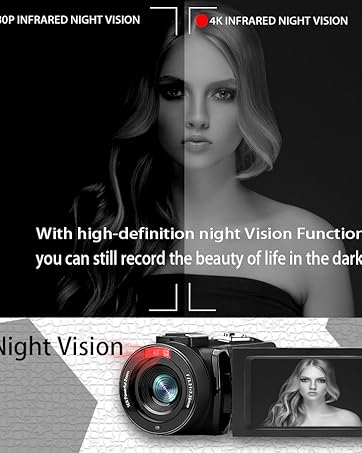
- נאַכט זעאונג: The camcorder features an infrared night vision function, enabling recording in low-light or dark environments. Activate this feature via the menu.


8. רימאָוט קאָנטראָל
The included remote control allows you to operate the camcorder from a distance, controlling functions such as recording, photo capture, and zoom without touching the device.

וישאַלט
- רייניקונג: ניצט אַ ווייכע, טרוקענע שטאָף צו רייניקן דעם קאַמקאָרדער קערפּער. פֿאַר דער לענס, ניצט אַ ספּעציאַליזירטע לענס רייניקונג שטאָף און לייזונג. פֿאַרמייַדט אַברייסיוו מאַטעריאַלן אָדער שטרענגע כעמיקאַלן.
- סטאָרידזש: Store the camcorder in a cool, dry place away from direct sunlight and extreme temperatures. Remove batteries if storing for extended periods.
- וואַסער קעגנשטעל: This camcorder is נישט וואַסער-קעגנשטעליקפֿאַרמײַדן אויסשטעלונג צו וואַסער אָדער הויכער פֿײַכטקייט.
טראָובלעשאָאָטינג
| פּראָבלעם | מעגלעך סיבה | לייזונג |
|---|---|---|
| די קאַמעראַ גייט נישט אָן. | די באַטעריע איז אויסגעשעפּט אָדער נישט ריכטיק אינסטאַלירט. | זיכער מאַכן אַז די באַטעריעס זענען גאָר אויפגעלאָדן און ריכטיק אַרײַנגעשטעלט. |
| Battery charger indicator lights flicker. | Poor contact between battery and charger, or unstable power supply. | Re-seat batteries firmly in the charger. Check USB cable and power adapter connection. Try a different USB port or power source. |
| קען נישט רעקאָרדירן ווידעא אדער נעמען פאָטאָס. | SD card is full, not inserted, or corrupted. Incorrect mode selected. | Check SD card status, ensure it's inserted and has free space. Format the SD card if necessary (this will erase all data). Verify camcorder is in the correct mode. |
| שלעכטע ווידעא/פאָטאָ קוואַליטעט. | Lens is dirty. Insufficient lighting. Incorrect settings. | Clean the lens. Use the external fill light or shoot in better-lit conditions. Adjust resolution and other settings in the menu. |
| Wi-Fi פֿאַרבינדונג פּראָבלעמען. | Incorrect Wi-Fi password or app not installed. | Ensure correct SSID (4K_WIFI1079) and password (12345678). Download and install the correct app. |
ספּעסאַפאַקיישאַנז
- סאָרט: VETEK
- מאָדעל נומער: AF6
- ווידעא כאַפּן האַכלאָטע: 4K (3840*2160)
- עפעקטיוו נאָך האַכלאָטע: 48.0 MP (7920*5940)
- דיגיטאַל פארגרעסער: 18X
- פאַרשטעלן גרייס: 3.0 אינטשעס
- ווייַז טיפּ: 270° Rotatable Touch Screen
- פלאַש זכּרון טיפּ: SD (supports up to 128GB, 32GB included)
- ווידעא קאַפּטור פֿאָרמאַט: mp4
- שטיצט אַודיאָ פֿאָרמאַט: mp4
- קאַנעקטיוויטי טעכנאָלאָגיע: יו-עס-בי, הדמי, וויי-פיי
- אַפּערייטינג סיסטעם קאַמפּאַטאַבילאַטי: Windows XP/7/8/10, MAC
- בילד סטאַביליזאַטיאָן: דיגיטאַל
- וואַסער קעגנשטעל מדרגה: ניט וואַסער קעגנשטעליק
- נומער פון באַטעריז: 2 ליטהיום פּאָלימער באַטעריז (אַרייַנגערעכנט)
- נומער דימענשאַנז (ד x וו x ה): 3.9"ד רענטגענ 6.2"וו רענטגענ 7.8"ה
וואָראַנטי און שטיצן
For warranty information and technical support, please refer to the contact details provided in the separate warranty card or visit the official VETEK webזייטל. אויב איר טרעפט אויף פראבלעמען וואָס זענען נישט באדעקט אין דעם מאַנואַל, ביטע קאָנטאַקטירט קונה סערוויס פֿאַר הילף.