
1. הקדמה
א דאנק פארן קויפןasing the MONODEAL Portable CD Player. This device is designed for personal and portable audio playback, featuring built-in speakers, anti-skip protection, and dual headphone jacks. This manual provides detailed instructions for setup, operation, maintenance, and troubleshooting to ensure optimal performance and longevity of your CD player.

Image: The MONODEAL Portable CD Player, a compact black device with a clear top cover and control buttons on the front.
2. וואָס איז אין דער קעסטל
ביטע טשעקט די אינהאַלט פון די פּאַקעט צו זיכער מאַכן אַז אַלע זאכן זענען דאָרט:
- קאָמפּאַקטדיסק שפּילער
- ירפאָונז
- וסב טשאַרדזשינג קאַבלע
- אָו קאַבלע
- באַניצער מאַנואַל

Image: The MONODEAL CD Player, its packaging, and all included accessories: earphones, USB charging cable, and aux cable.
3. פּראָדוקט איבערview
Familiarize yourself with the various parts and controls of your CD player:
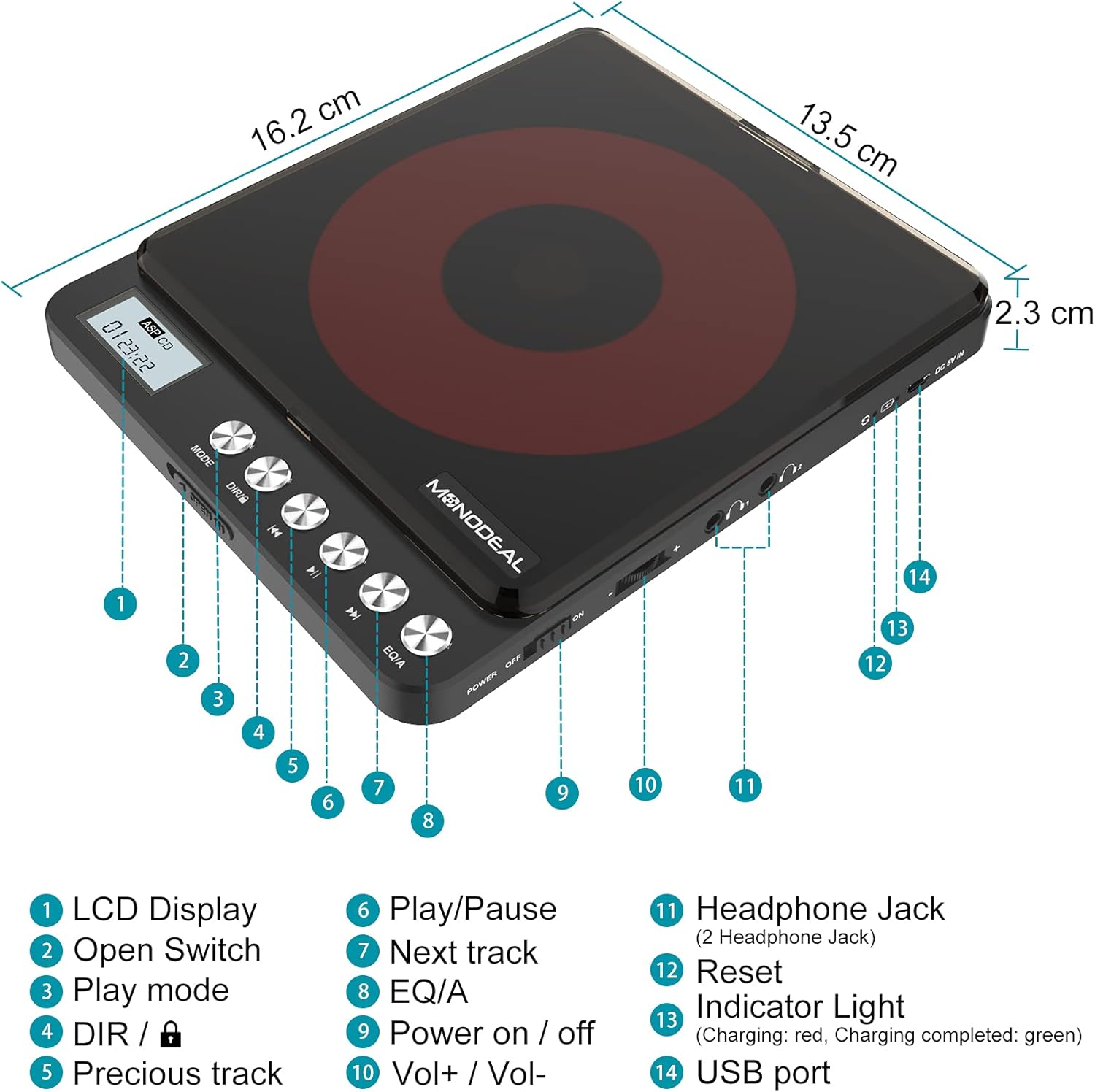
Image: A detailed diagram of the MONODEAL Portable CD Player, highlighting its various components with numbered labels.
- LCD ווייַז: Shows track number, time, and playback status.
- Open Switch: Used to open the CD compartment.
- שפּיל מאָדע: Cycles through playback modes (e.g., repeat, random).
- DIR / Lock: Directory navigation for MP3 CDs / Key lock function.
- פֿריִערדיקע שפּור: Skips to the beginning of the current track or the previous track.
- שפּיל / פּויזע: סטאַרץ אָדער פּאָזאַז פּלייבאַק.
- ווייַטער שפּור: שפּרינגען צו דער ווייַטער שפּור.
- EQ/A: Equalizer settings / Anti-skip function indicator.
- מאַכט אויף / אַוועק: הויפּט מאַכט באַשטימען.
- Vol+ / Vol-: באַנד קאָנטראָל.
- Headphone Jack (2 Headphone Jacks): Audio output for headphones.
- באַשטעטיק: Recessed button to reset the device (requires a thin object like a needle).
- ינדיקאַטאָר ליכט: Shows charging status (red for charging, green for fully charged).
- וסב פּאָרט: פֿאַר טשאַרדזשינג די מיטל.
4. סעטאַפּ
4.1 טשאַרדזשינג די מיטל
The CD player has a built-in rechargeable battery. Before first use, fully charge the device. A full charge provides up to 15 hours of playback.
- Connect the supplied USB charging cable to the USB port (14) on the CD player.
- Connect the other end of the USB cable to a power adapter, car charger, laptop, or power bank.
- The indicator light (13) will show red during charging and turn green when fully charged.
- טשאַרדזשינג נעמט טיפּיש אַרום 4 שעה.

Image: The MONODEAL CD Player being charged via various methods including a power bank, power adapter, laptop, and car charger.
4.2 Connecting to External Audio Systems
You can connect the CD player to external speakers, car audio systems, or home stereos using the provided 3.5mm AUX cable.
- Insert one end of the 3.5mm AUX cable into one of the headphone jacks (11) on the CD player.
- Insert the other end of the AUX cable into the 3.5mm auxiliary input port of your car stereo or external sound system.
- באַמערקונג: The CD player is not compatible with car's USB ports or Bluetooth connections for audio output. An AUX port is required.
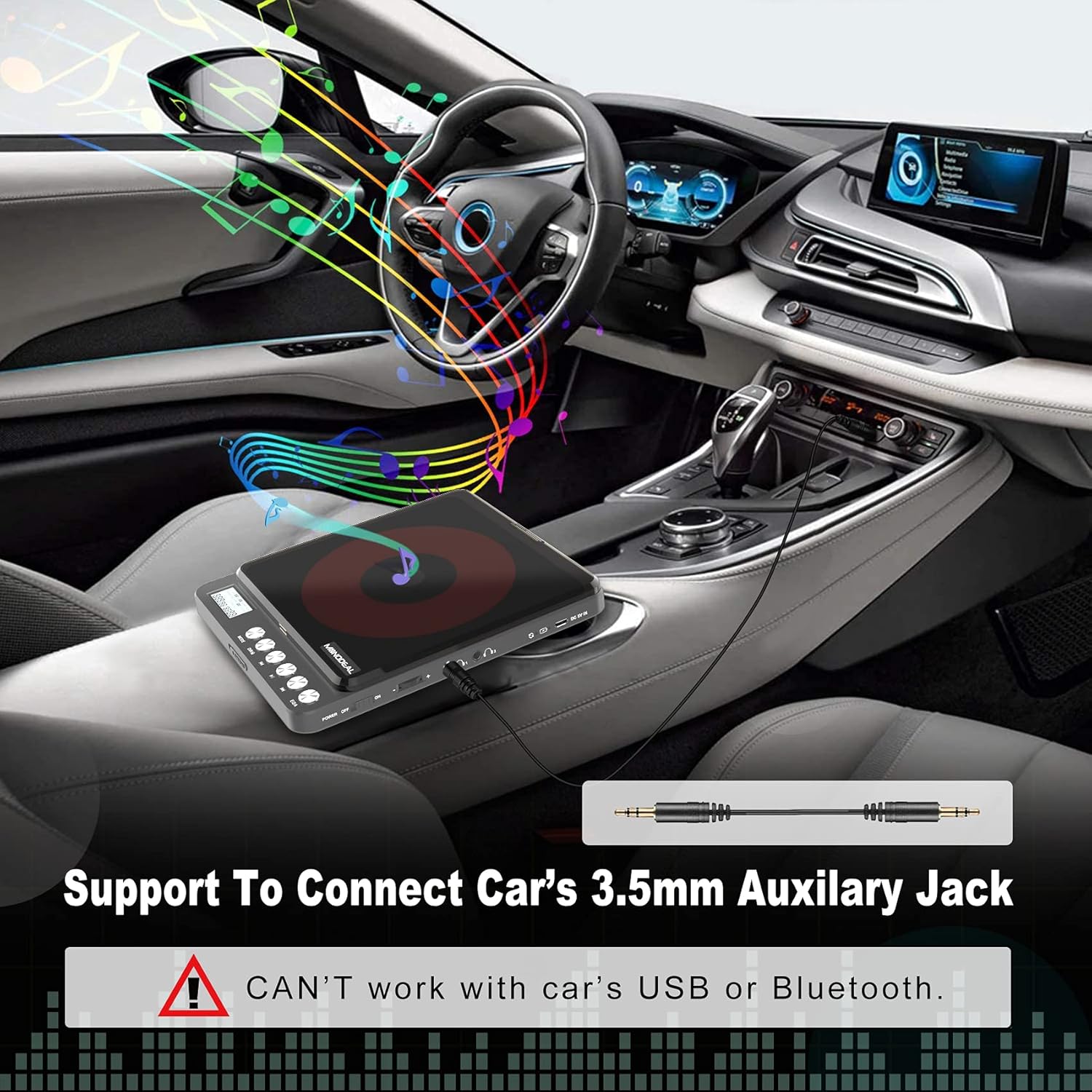
Image: The MONODEAL CD Player connected to a car's dashboard via a 3.5mm auxiliary cable, illustrating its use in a vehicle.
5. אַפּערייטינג ינסטרוקטיאָנס
5.1 גרונטלעכע ווידערשפּיל
- Slide the Power On/Off switch (9) to the "ON" position.
- Press the Open Switch (2) to open the CD compartment.
- Carefully place a compatible CD (CD, MP3, CD-R, CD-RW, HDCD) onto the spindle, ensuring it is seated correctly.
- נאָענט די קאָמפּאַקטדיסק אָפּטייל.
- The LCD display (1) will show "READ" and then the total number of tracks and total playback time.
- Press the Play/Pause button (6) to start playback.
- Adjust the volume using the Vol+ / Vol- controls (10).
- To pause, press the Play/Pause button (6) again. Press again to resume.
- To skip to the next track, press the Next Track button (7).
- To go back to the previous track or the beginning of the current track, press the Previous Track button (5).
- To turn off the player, slide the Power On/Off switch (9) to the "OFF" position. The player will remember the last played position if a disc remains inside.
5.2 שפּיל מאָדעס
Press the Play Mode button (3) repeatedly to cycle through different playback modes:
- שפּיל אין סדר: Plays tracks sequentially.
- Repeat a track: ריפּיץ די קראַנט שפּור.
- איבערחזרן אַלע: Repeats all tracks on the disc.
- הקדמה: Plays the first 10 seconds of each track.
- Shuf (Shuffle): שפּילט לידער אין אַ צופֿעליקער סדר.

Image: A visual representation of the five play modes available on the MONODEAL CD Player, including play in order, repeat track, repeat all, intro, and shuffle.
5.3 Dual Headphone Jacks
The MONODEAL CD Player is equipped with two headphone jacks (11), allowing two users to listen simultaneously. Simply plug two sets of headphones into the available jacks.

Image: Two individuals sharing the MONODEAL CD Player using both headphone jacks, emphasizing the dual listening feature.
5.4 איינגעבויטע רעדנערס
For listening without headphones, the CD player features built-in stereo speakers. The sound quality is suitable for personal listening in quiet environments. The maximum volume of the internal speakers is designed for portability and may not be as loud as larger audio systems.

Image: The MONODEAL CD Player with an overlay indicating the location of its built-in dual speakers, shown in a setting with people dancing to music.
6. וישאַלט
- Keep the CD player clean by wiping it with a soft, dry cloth.
- דו זאלסט נישט נוצן אַברייסיוו קלינערז אָדער סאָלוואַנץ.
- Regularly clean the disc and the optical pickup lens of the CD player with a dry, lint-free cloth.
- ויסמיידן יקספּאָוזינג די מיטל צו עקסטרעם טעמפּעראַטורעס, הומידיטי אָדער דירעקט זונשייַן.
- Store the player in a cool, dry place when not in use.
7. טראָובלעשאָאָטינג
| פּראָבלעם | מעגלעך סיבה | לייזונג |
|---|---|---|
| סי-די שפרינגט איבער אדער שפילט נישט. | Disc is dirty, scratched, or incompatible format. Low battery. |
|
| No sound from internal speakers. | Volume too low. Headphones plugged in. |
|
| No sound when connected to car/external speakers. | Incorrect connection. Car/external system not set to AUX input. |
|
| דער שפּילער טוט זיך נישט אָן. | Low battery. Power switch off. |
|
8. ספּעסאַפאַקיישאַנז
| שטריך | דעטאַל |
|---|---|
| מאָדעל נאָמען | CW705 |
| פּראָדוקט דימענשאַנז | 6.1 X 5.1 X 1.1 אינטשעס |
| פּונקט וואָג | 1.3 פונט |
| קאָליר | שוואַרץ |
| קאַנעקטיוויטי טעכנאָלאָגיע | אַגזיליערי |
| ספּעציעלע שטריך | Portable, Built-in Speakers, Anti-Skip, Dual Headphone Jacks, Rechargeable |
| שטיצט דיסק פֿאָרמאַטירונגען | CD, MP3, CD-R, CD-RW, HDCD |
| שטיצט מוזיק פֿאָרמאַטירונגען | קאָמפּאַקטדיסק-דאַ, mp3, וומאַ |
| באַטערי לעבן | Up to 15 hours playback (after full charge) |

Image: The MONODEAL CD Player highlighting its 2000mAh built-in rechargeable battery for up to 15 hours of playback, and listing supported disc and music formats.
9. וואָראַנטי און שטיצן
For warranty information or further assistance, please refer to the official MONODEAL website or contact customer support through your purchase platform. A digital version of this user manual is also available for download at: MONODEAL User Manual PDF.