
1. הקדמה
Thank you for choosing the Andoer W200RGB LED Video Light. This manual provides detailed instructions for the proper setup, operation, and maintenance of your device. Please read this manual thoroughly before use to ensure optimal performance and longevity of the product. Keep this manual for future reference.
2. פּראָדוקט איבערview
2.1 פּעקל אינהאַלט
ביים עפענען דעם פעקל, ביטע זיכער מאכן אז אלע זאכן וואס זענען אויסגערעכנט אונטן זענען דא און אין גוטן צושטאנד:
- Andoer W200RGB LED Video Light
- וסב טיפּע- C טשאַרדזשינג קאַבלע
- מיני טריפּאָד
- האַנטגעלענק רימען
- User Manual (English and Chinese)

Image: Contents of the Andoer W200RGB LED Video Light package, showing the light, USB cable, mini tripod, and wrist strap.
2.2 שליסל פֿעיִקייטן
- סאָליד און פּאָרטאַטיוו פּלאַן: Rod-shaped design, 20cm in length, lightweight for easy transport.
- הויך ברייטנאַס: Equipped with 184 high-quality LED beads (69 white, 69 yellow, 46 RGB) with 7W output and CRI 95+.
- RGB Colored Light Mode: 360° adjustable HUE and 0%-100% adjustable brightness for diverse colorful lighting effects.
- CCT Cold & Warm Light Mode: Wide adjustable color temperature range from 2500K to 9000K.
- 20 Special Lighting Effects: Includes ambulance, fireworks, TV, candle, party, strobe, RGB strobe, red flash, green flash, blue flash, slow HSI, fast HSI, and more.
- געבויט-אין קריקאָנלאָדלעך באַטערי: Integrated 3.7V 3000mAh lithium battery for extended working time, rechargeable via Type-C port.
- מאַגנעטיק צוריק: Built-in magnets at both ends allow for easy attachment to magnetic surfaces.
2.3 קאָנטראָלן און אַרויסווייַזונג
The Andoer W200RGB features intuitive controls and an LCD screen for easy operation.

Image: The control panel of the Andoer W200RGB LED Video Light, showing the power button, mode button, adjustment buttons, and LCD screen.
- מאַכט קנעפּל: Press and hold to turn the light on or off. Short press to switch between modes.
- מאָדע קנעפּל (M): Short press to cycle through CCT, HSI (RGB), and Scene modes.
- אַרויף/אַראָפּ קנעפּלעך (▲/▼): Adjust parameters such as brightness, color temperature, HUE, or saturation depending on the selected mode.
- LCD פאַרשטעלן: Displays current settings including mode, brightness, color temperature, HUE, and battery level.
- טיפּ C טשאַרדזשינג פּאָרט: Located at one end for charging the internal battery.
3. סעטאַפּ
3.1 טשאַרדזשינג די באַטאַרייע
The Andoer W200RGB LED Video Light comes with a built-in rechargeable lithium battery. Before first use, it is recommended to fully charge the device.
- Connect the supplied USB Type-C cable to the charging port on the light.
- פֿאַרבינדט דעם אַנדערן עק פֿונעם USB קאַבל צו אַ נאָרמאַלן USB מאַכט אַדאַפּטער (נישט אַרייַנגערעכנט) אָדער אַ קאָמפּיוטער USB פּאָרט.
- The LCD screen will indicate the charging status. A full charge typically takes a few hours.

Image: The Andoer W200RGB LED Video Light highlighting its internal 3.7V 3000mAh battery and Type-C charging capability.
3.2 Attaching the Mini Tripod
The included mini tripod can be attached to the 1/4-inch screw hole at the bottom of the light for stable placement.
- Locate the 1/4-inch screw hole on the bottom of the LED light.
- Screw the mini tripod securely into the screw hole.
- Adjust the tripod legs for desired height and stability.
4. אַפּערייטינג ינסטרוקטיאָנס
4.1 מאַכט אויף / אַוועק
- To turn on the light, press and hold the Power button (labeled with a circle and vertical line) for a few seconds.
- To turn off the light, press and hold the Power button again for a few seconds.
4.2 סוויטשינג מאָדעס
After powering on, short press the Mode button (M) to cycle through the available lighting modes:
- CCT Mode (Color Correlated Temperature): For adjusting white light from warm to cool.
- HSI Mode (Hue, Saturation, Intensity): For adjusting RGB colored light.
- סצענע מאָדע: פֿאַר אויסקלייבן ספּעציעלע לייטינג עפֿעקטן.
4.3 CCT Mode Operation
In CCT mode, you can adjust the color temperature and brightness.
- Use the Up/Down buttons (▲/▼) to adjust the brightness from 0% to 100%.
- Short press the Power button to switch to color temperature adjustment. Use the Up/Down buttons (▲/▼) to adjust the color temperature from 2500K (warm) to 9000K (cool).

Image: Visual representation of brightness adjustments (0%, 50%, 100%) and color temperature settings (6000K, 5000K, 2800K) in CCT mode.
4.4 HSI Mode (RGB) Operation
In HSI mode, you can adjust the HUE (color), saturation, and brightness.
- Use the Up/Down buttons (▲/▼) to adjust the HUE (360° color spectrum).
- Short press the Power button to switch to saturation adjustment. Use the Up/Down buttons (▲/▼) to adjust saturation.
- Short press the Power button again to switch to brightness adjustment. Use the Up/Down buttons (▲/▼) to adjust brightness from 0% to 100%.
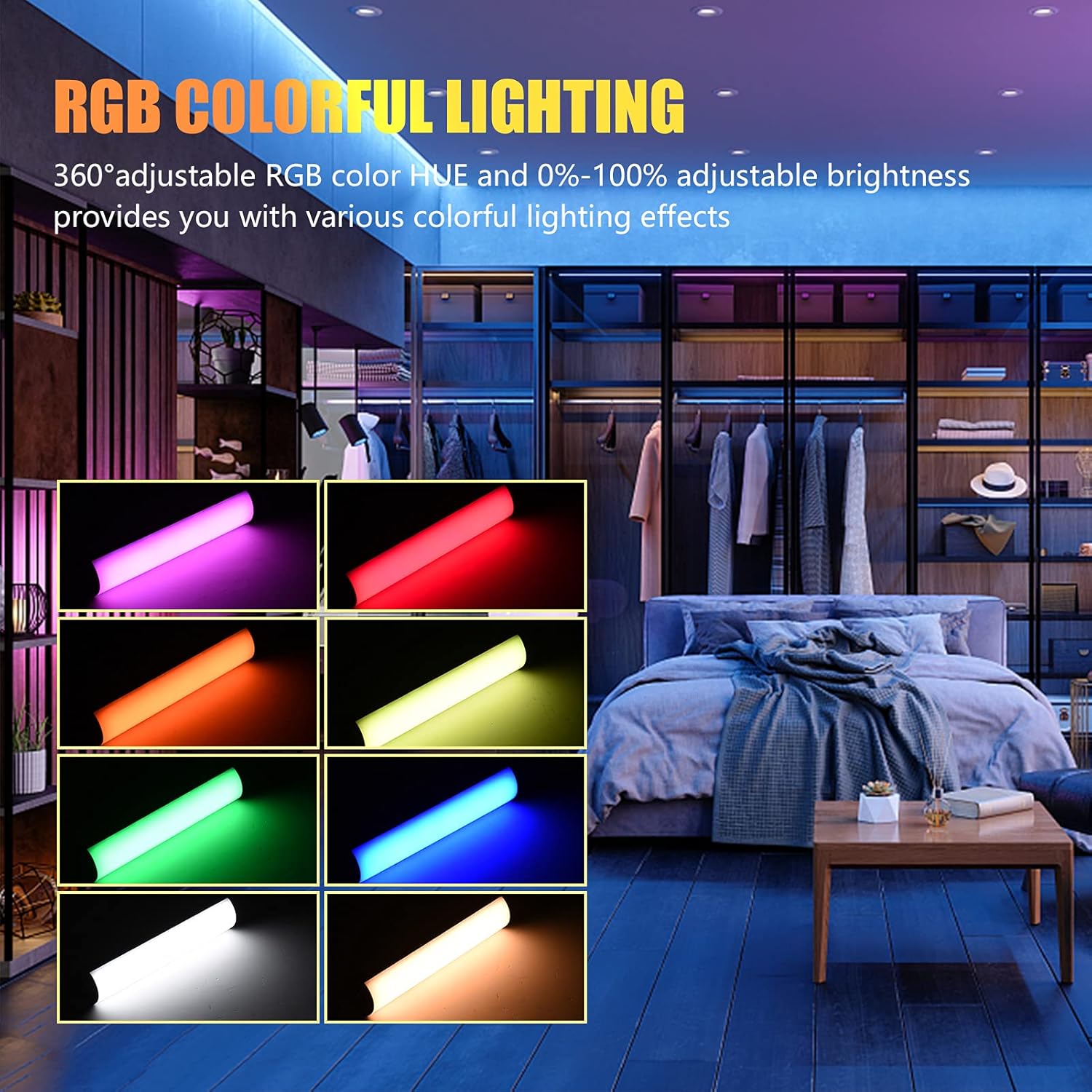
Image: The Andoer W200RGB LED Video Light demonstrating its RGB colorful lighting capabilities, showing different hues and brightness levels.

Image: Several Andoer W200RGB LED Video Lights illuminated in various solid RGB colors, showcasing the rod-shaped design.
4.5 Scene Mode Operation (Special Effects)
In Scene mode, you can select from 20 pre-programmed special lighting effects.
- Use the Up/Down buttons (▲/▼) to cycle through the 20 special effects.
- Some effects may have adjustable parameters (e.g., speed or intensity), which can be adjusted by short pressing the Power button and then using the Up/Down buttons.

Image: A visual guide to the 20 dynamic scene light effects, such as police car, ambulance, fireworks, TV, candle, party, strobe, and various color flashes.
4.6 Using the Magnetic Back
The Andoer W200RGB LED Video Light features built-in magnets at both ends, allowing it to be easily attached to metallic surfaces for flexible lighting setups.
- Simply place either end of the light onto a suitable magnetic surface.
- Ensure the surface is stable and can support the weight of the light.

Image: The Andoer W200RGB LED Video Light highlighting its magnetic ends, demonstrating how it can be attached to metal surfaces.
4.7 Practical Applications

Image: A comparison of scenes before and after using the Andoer W200RGB LED Video Light, illustrating its effectiveness in enhancing illumination for various activities.
5. וישאַלט
5.1 רייניקונג
- זיכער מאַכן אַז די דעוויס איז אויסגעלאָשן און אָפּגעטיילט פֿון יעדער מאַכט מקור איידער רייניקונג.
- ניצט אַ ווייכן, טרוקענעם שטאָף צו ווישן די ייבערפלאַך פון דער ליכט.
- פֿאַר שווערן שמוץ, אַ ביסל דampווייקט דעם שטאָף מיט וואַסער. פֿאַרמייַדט ניצן שטרענגע כעמיקאַלן, סאָלווענטן, אָדער אַברייסיוו רייניגער.
- Do not allow water or liquids to enter the device.
5.2 סטאָרידזש
- האַלט די ליכט אין אַ קיל, טרוקן אָרט אַוועק פון דירעקט זונשייַן און עקסטרעמע טעמפּעראַטורן.
- אויב איר לייגט עס אויף פאר א לענגערע צייט, לאדט אויף די באטעריע ביז בערך 50% יעדע דריי חדשים כדי צו אויפהאלטן די געזונטהייט פון די באטעריע.
5.3 באַטערי קער
- פֿאַרמײַדט אָפֿט פֿולשטענדיק אויסצולאָדן די באַטעריע.
- דו זאלסט נישט ויסשטעלן די באַטאַרייע צו הויך טעמפּעראַטורעס אָדער פּאַנגקשער עס.
- If the battery shows signs of swelling or leakage, discontinue use immediately and dispose of it properly according to local regulations.
6. טראָובלעשאָאָטינג
If you encounter any issues with your Andoer W200RGB LED Video Light, please refer to the following common problems and solutions:
- ליכט טוט נישט קער אויף:
- Ensure the battery is charged. Connect the light to a power source using the USB Type-C cable.
- Press and hold the Power button for a few seconds to ensure it's not just a short press.
- Light flickers or output is unstable:
- Check the battery level; low battery can cause unstable performance. Recharge if necessary.
- Ensure the light is not exposed to extreme temperatures.
- Cannot change modes or adjust parameters:
- Ensure you are pressing the correct buttons (Mode button for mode changes, Power button to cycle through adjustable parameters within a mode, Up/Down buttons for value adjustment).
- ריסטאַרט די מיטל דורך קערן עס אַוועק און אויף ווידער.
- באַטערי נישט טשאַרדזשינג:
- Verify the USB Type-C cable is securely connected to both the light and the power source.
- פרובירט אן אנדערן USB קאבל אדער פאוער אדאפטער צו אויסשליסן דעפעקטיווע אקסעסארן.
- זיכער מאַכן אַז די מאַכט מקור איז פאַנגקשאַנאַל.
אויב די פראבלעם בלייבט נאך פרובירן די לייזונגען, ביטע קאנטאקטירט קאסטומער סופארט פאר ווייטערדיגע הילף.
7. ספּעסאַפאַקיישאַנז
| שטריך | באַשרייַבונג |
|---|---|
| סאָרט | Andoer |
| מאָדעל | W200RGB |
| געפירט בעאַדס | 69pcs White + 69pcs Yellow + 46pcs RGB |
| קאָליר טעמפּעראַטור | 2500K-9000K |
| CRI (קאָליר רענדערינג אינדעקס) | 95+ |
| מאַקס רעזולטאַט מאַכט | 7W |
| לייַכטיק פלאַקס | 800Lux / 0.3m |
| שטראַל ווינקל | 120° |
| באַטערי טיפּ | געבויט-אין 3.7 וו 3000 מאַה ליטהיום באַטערי |
| טשאַרדזשינג פּאָרט | וסב טיפּ-C |
| נומער גרייס | 20 X 4 X 3.5 סענטימעטער (7.9 X 1.6 X 1.4 אינטשעס) |
| פּונקט וואָג | 11.3 אונסעס (בעערעך 320 ג) |
| Tripod (folded length) | 7.5cm (use height 4.5cm) |
| מאָדעל נומער (ASIN) | QEX6686347803069PL (B09F8RLMSY) |
8. זיכערקייַט אינפֿאָרמאַציע
ווארענונג:
אויב איר טרעפט אז דער פּראָדוקט איז געשעדיגט, דעפאָרמירט, אדער ווייזט אן אומגעוויינטלעכע פאָרשטעלונג, ביטע הערט אויף צו ניצן עס גלייך און קאָנטאַקט אונדז.
Always handle the device with care. Do not disassemble or modify the product. Keep out of reach of children.
9. וואָראַנטי און שטיצן
Andoer products are designed for reliability and performance. This product is covered by a standard manufacturer's warranty against defects in materials and workmanship. For specific warranty terms and conditions, please refer to the documentation provided at the time of purchase or contact your retailer.
For technical support, troubleshooting assistance, or warranty claims, please contact Andoer customer service through the retailer's platform or the official Andoer webזייטל. ביטע האַלט אייער פּראָדוקט מאָדעל און קויפן אינפֿאָרמאַציע גרייט ווען איר קאָנטאַקטירט שטיצע.
באַזוכן די Andoer Store on Amazon פֿאַר מער אינפֿאָרמאַציע און פּראָדוקטן.