
הקדמה
The Studebaker Retro Edge Big Sound Bluetooth Boombox (Model SB2150B) is a versatile audio system designed for portable entertainment. It combines classic retro aesthetics with modern features, including a CD player, cassette player/recorder, AM/FM stereo radio, and Bluetooth connectivity. This manual provides detailed instructions for setup, operation, maintenance, and troubleshooting to ensure optimal performance and longevity of your device.
וויכטיק סאַפעטי אינפֿאָרמאַציע
ביטע ליינט אלע אינסטרוקציעס קערפול איידער איר ניצט דעם אַפּאַראַט. האַלט דעם מאַנואַל פֿאַר צוקונפֿטיקע רעפֿערענץ.
- דו זאלסט נישט ויסשטעלן דעם אַפּאַראַט צו רעגן אָדער נעץ.
- דו זאלסט נישט פאַרשפּאַרן קיין ווענטאַליישאַן אָופּאַנינגז.
- דו זאלסט נישט ינסטאַלירן לעבן קיין היץ קוואלן אַזאַ ווי ראַדיאַטאָרס, היץ רעדזשיסטערז, סטאָוווז אָדער אנדערע אַפּאַראַט (אַרייַנגערעכנט ampליפיערס) וואָס פּראָדוצירן היץ.
- באַשיצן די מאַכט שנור פון גיין אויף אָדער פּינטשעד.
- נאָר נוצן אַטאַטשמאַנץ / אַקסעסעריז ספּעסיפיעד דורך דער פאַבריקאַנט.
- אָפּשטעקן דעם אַפּאַראַט בעשאַס בליץ סטאָרמז אָדער ווען אַניוזד פֿאַר לאַנג פּיריאַדז.
- אָפּשיקן אַלע סערוויסעס צו קוואַלאַפייד סערוויס פּערסאַנעל.
פּעקל אינהאַלט
באַשטעטיקן אַז אַלע זאכן זענען פאַראַן ביים אויספּאַקן:
- Studebaker Retro Edge Big Sound Bluetooth Boombox (SB2150B)
- אַק מאַכט שנור
- ינסטראַקשאַנז מאַנואַל
פּראָדוקט פֿעיִקייטן און קאָנטראָלן
Familiarize yourself with the various components and controls of your boombox.
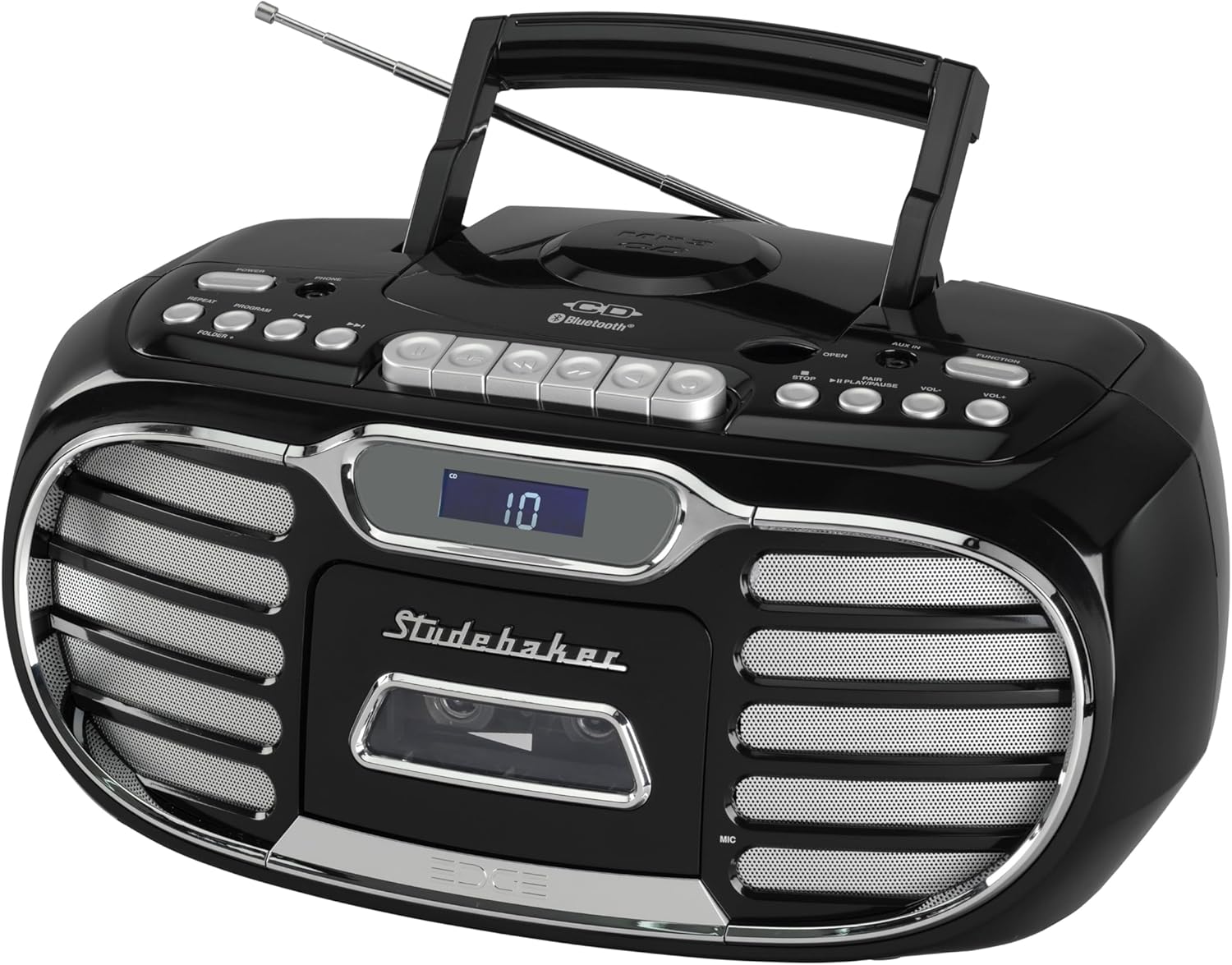
פיגורע 1: קוילעלדיק view of the Studebaker Retro Edge Boombox, showcasing its classic design, integrated handle, and front-facing controls and speakers.

פיגורע 2: פראָנט view highlighting the central LCD display, cassette compartment, and speaker grilles on either side. Control buttons are visible above the display.

פיגורע 3: דעטאַילעד view of the cassette player compartment, showing the tape mechanism and the transparent cover for tape visibility.

פיגורע 4: Close-up of the top-loading CD player with a disc inserted, illustrating the open compartment for disc placement.
קאָנטראָל פּאַנעל איבערview:
- מאַכט קנעפּל: טורנס די אַפּאַראַט אויף/אַוועק.
- פונקציע סעלעקטאָר: Switches between CD, Cassette, AM, FM, Bluetooth, and AUX modes.
- באַנד קאָנטראָל: אַדזשאַסץ די אַודיאָ רעזולטאַט מדרגה.
- סי-די קאנטראלן: Play/Pause, Stop, Skip/Search (Forward/Backward), Program, Repeat.
- Cassette Controls: Play, Record, Fast Forward, Rewind, Stop/Eject, Pause.
- ראַדיאָ קאָנטראָלס: Tuning knob/buttons, Band selector (AM/FM).
- בלועטאָאָטה פּערינג קנעפּל: הייבט אן בלועטוט פארינג מאָדע.
- LCD ווייַז: Shows current mode, track number, radio frequency, etc.
- AUX-אין דזשעק: פֿאַר קאַנעקטינג פונדרויסנדיק אַודיאָ דעוויסעס.
- כעדפאָון דזשאַק: פֿאַר פּריוואַט צוגעהערט.
- Built-in Condenser Microphone: For recording audio to cassette.
- טעלאַסקאָפּיק אַנטענע: פֿאַר FM ראַדיאָ אָפּנאַם.
סעטאַפּ
מאַכט די אַפּאַראַט:
The boombox can be powered by AC power or batteries (not included).
- AC אָפּעראַציע: Connect the supplied AC power cord to the AC IN jack on the unit and then to a standard AC outlet (120V~60Hz).
- באַטערי אָפּעראַציע: Open the battery compartment, insert the required number of batteries (e.g., 8 x 'C' size, not supplied) ensuring correct polarity (+/-), and close the compartment.
ערשט באנוץ:
Extend the telescopic antenna fully for optimal FM radio reception. For AM, rotate the unit for best reception.
אַפּערייטינג ינסטראַקשאַנז
CD Player אָפּעראַציע:
- דרוק דעם מאַכט קנעפּל צו קער אויף די אַפּאַראַט.
- Press the Function button repeatedly to select "CD" mode.
- Open the CD compartment door by pressing the "OPEN" button.
- Place a CD (CD-R/RW or MP3 CD) onto the spindle with the label side facing up.
- מאַכט צו די סי-די קעסטל טיר. די על-סי-די דיספּלעי וועט ווייַזן די גאַנצע צאָל לידער.
- דריקן די שפּיל / פּויזע קנעפּל צו אָנהייבן פּלייבאַק.
- Use the Skip/Search buttons to navigate tracks.
- דרוק דעם סטאָפּ קנעפּל צו האַלטן פּלייבאַק.
- Use the Program button to program tracks for playback in a specific order.
- Use the Repeat button to repeat a single track or the entire CD.
Cassette Player/Recorder Operation:
- דרוק דעם מאַכט קנעפּל צו קער אויף די אַפּאַראַט.
- Press the Function button repeatedly to select "TAPE" mode.
- Press the Stop/Eject button to open the cassette compartment.
- Insert a cassette tape with the open edge facing down.
- נאָענט די קאַסעט אָפּטייל.
- דרוק דעם שפּיל קנעפּל צו אָנהייבן פּלייבאַק.
- Use Fast Forward and Rewind buttons to navigate the tape.
- Press the Stop/Eject button to stop playback or eject the tape.
- רעקאָרדינג:
- From Built-in Microphone: Ensure the unit is in TAPE mode. Press the Record button. The unit will start recording from the built-in microphone.
- From Radio/CD/AUX/Bluetooth: Select the desired source (Radio, CD, AUX, or Bluetooth). Press the Record button on the cassette player. The unit will record the audio playing from the selected source.
- Press the Stop/Eject button to stop recording. The cassette player features auto-stop.
AM/FM ראַדיאָ אָפּעראַציע:
- דרוק דעם מאַכט קנעפּל צו קער אויף די אַפּאַראַט.
- Press the Function button repeatedly to select "AM" or "FM" mode.
- פארלענגערט די טעלעסקאָפּישע אַנטענע פֿאַר FM אָפּנאַם. פֿאַר AM, דרייט דעם אַפּאַראַט פֿאַר בעסטן אָפּנאַם.
- Use the Tuning control to select your desired radio station. The frequency will be displayed on the LCD.
בלועטאָאָטה אָפּעראַציע:
- דרוק דעם מאַכט קנעפּל צו קער אויף די אַפּאַראַט.
- Press the Function button repeatedly to select "BT" (Bluetooth) mode. The LCD display will show "BT" and flash, indicating it's in pairing mode.
- אַקטיווירן בלועטוט אויף אייער מאָביל מיטל (סמאַרטפאָן, טאַבלעט, אאז"וו) און זוכן פֿאַר בנימצא דעוויסעס.
- Select "SB2150B" from the list of devices.
- Once paired, the "BT" indicator on the LCD display will stop flashing and remain solid. You can now play audio from your device through the boombox.
- To disconnect, disable Bluetooth on your mobile device or select a different function mode on the boombox.
AUX-in Operation:
- דרוק דעם מאַכט קנעפּל צו קער אויף די אַפּאַראַט.
- Press the Function button repeatedly to select "AUX" mode.
- Connect one end of a 3.5mm audio cable (not supplied) to the AUX-in jack on the boombox and the other end to the headphone jack or audio output of your external audio device (e.g., MP3 player, smartphone).
- שפּילט אַודיאָ פֿון אייער עקסטערנעם מיטל. דער קלאַנג וועט אַרויסגעגעבן ווערן דורך די בומבאַקס רעדנערס.
כעדפאָון אָפּעראַציע:
For private listening, connect a pair of headphones (not supplied) to the Headphone Jack. The sound from the speakers will be muted automatically.
וישאַלט
- רייניקונג: ווישן די אַפּאַראַט מיט אַ ווייך, דamp שטאָף. דו זאלסט נישט נוצן אַברייסיוו קלינערז אָדער סאָלוואַנץ.
- קאָמפּאַקטדיסק שפּילער: Keep the CD compartment clean. Do not touch the lens.
- קאַסעטע שפּילער: Periodically clean the tape heads and pinch rollers with a cotton swab lightly moistened with isopropyl alcohol.
- סטאָרידזש: If storing the unit for an extended period, remove batteries (if used) and disconnect from AC power.
טראָובלעשאָאָטינג
| פּראָבלעם | מעגלעך סיבה | לייזונג |
|---|---|---|
| דער אַפּאַראַט טוט נישט מאַכט אויף. | עלעקטרישע שנור נישט פארבונדן; באַטעריעס אויסגעשעפט אדער נישט ריכטיג אריינגעשטעלט. | Ensure AC cord is securely plugged in. If using batteries, check polarity and replace if necessary. |
| קיין געזונט פון ספּיקערז. | Volume too low; Incorrect function mode selected; Headphones connected. | Increase volume. Select the correct function mode (CD, TAPE, AM/FM, BT, AUX). Disconnect headphones. |
| די סי-די שפילט נישט. | סי-די נישט ריכטיק אריינגעשטעלט; סי-די איז שמוציג אדער צוקראצט; איינהייט אין אומרעכטן מאָדוס. | Ensure CD is inserted label-side up. Clean or replace CD. Select "CD" function mode. |
| קאַסעטע טייפּ שפּילט/רעקאָרדירט נישט. | Tape inserted incorrectly; Tape is damaged; Unit in wrong mode. | Ensure tape is inserted correctly. Try a different tape. Select "TAPE" function mode. |
| נעבעך ראַדיאָ אָפּטראָג. | אַנטענע נישט אויסגעשטרעקט/ריכטיג פּאַזיציאָנירט; שטערונג. | Fully extend and adjust the telescopic antenna for FM. Rotate the unit for best AM reception. Move away from other electronic devices. |
| בלועטאָאָטה פּערינג פיילז. | איינהייט נישט אין פארבינדונג מאָדע; איינהייט צו ווייט; איינהייט שוין פארבינדן מיט אן אנדער איינהייט. | Ensure boombox is in "BT" mode and flashing. Move device closer. Disconnect from other Bluetooth devices. Try restarting both devices. |
ספּעסאַפאַקיישאַנז
- מאָדעל: SB2150B
- פּראָדוקט דימענשאַנז (L x W x H): 9.41 X 14.57 X 7.03 אינטשעס
- נומער וואָג: 6.78 פונט
- מאַכט מקור: AC 120V~60Hz or DC Battery Operation (Batteries not included)
- רעדנער טיפּ: סטערעאָ
- קאַנעקטיוויטי טעכנאָלאָגיע: הילפס-פארבינדונג, בלועטוט
- רעזולטאַט מאַכט: 2.2W x 2
- CD קאַמפּאַטאַבילאַטי: CD, CD-R/RW, MP3 CD
- קאַסעטע פֿעיִקייטן: Player/Recorder, Auto Stop
- ראַדיאָ באַנדס: AM/FM PLL Stereo
- נאָך פֿעיִקייטן: Headphone Jack, Built-in Condenser Microphone, LCD Display with Backlight, Built-in Carrying Handle
וואָראַנטי און שטיצן
For warranty information and technical support, please refer to the warranty card included with your product or contact Studebaker customer service directly. You may also visit the official Studebaker webזייטל פֿאַר די מערסט אַרויף-צו-דאַטע שטיצע רעסורסן.
פאַבריקאַנט: Spectra Merchandising International, Inc.