
1. הקדמה
Thank you for choosing the 5 Core AMP 30W-UTX-DLX Professional Paging Ampליפיער. דאס amplifier is designed to provide clear and powerful audio for a variety of applications, including home stereo systems, public address (PA) setups, DJ events, and karaoke. Please read this manual carefully to ensure proper setup, operation, and maintenance of your ampליפער.

The 5 Core amplifier is designed for versatile audio applications, from home entertainment to professional paging.
2. פּראָדוקט פֿעיִקייטן
The 5 Core AMP 30W-UTX-DLX amplifier offers a robust set of features for enhanced audio control and performance:
- מאַכט רעזולטאַט: 30W RMS, 300W PMPO for strong audio delivery.
- קייפל אַרייַנשרייַב: Features 3 microphone inputs, 1 AUX input, and 1 USB input for diverse connectivity.
- עקוואַליזער: Built-in Bass and Treble controls for sound customization.
- דיגיטאַל ווייַז: Provides clear visual feedback on current settings.
- ווייַט קאָנטראָל: Fully functional remote for convenient operation.
- צווייענדיק מאַכט מקור: Operates on AC 220-240V 50/60Hz or DC 12V (car battery) for flexible use.
- טערמאַל שוץ: Includes protection against overheat, overload, short circuit, DC, and soft start.
- דוראַבאַל קאַנסטראַקשאַן: Housed in a professional 2U metal chassis.
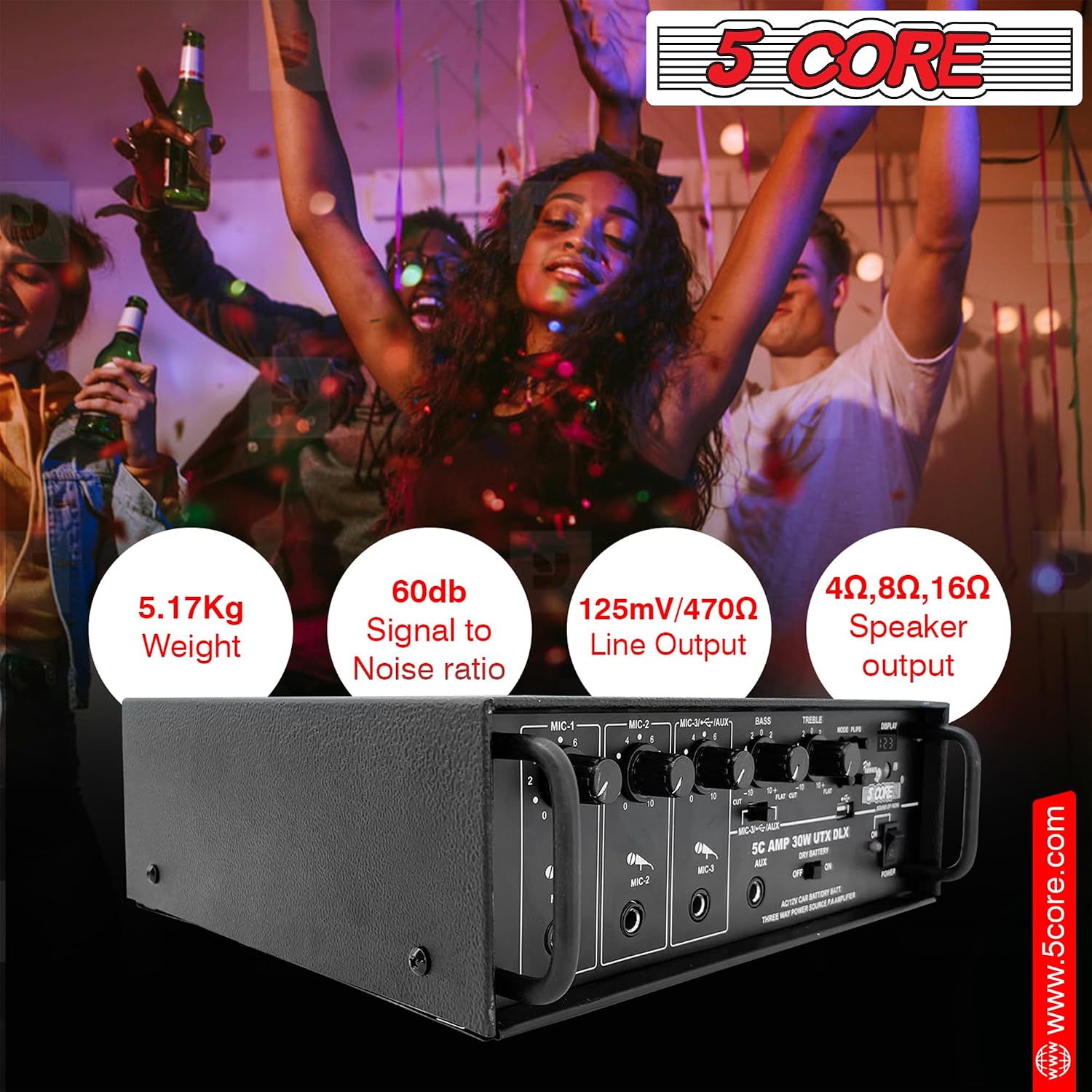
Front panel layout with microphone inputs, volume controls, equalizer, and digital display.

Key features including AUX input, master volume control, and the main power switch for easy operation.

The integrated digital display provides visual feedback, complemented by a precise volume controller.
3. סעטאַפּ אינסטרוקציעס
Follow these steps to set up your 5 Core ampלייבער:
- מאַכט קשר:
- For AC power, connect the provided power cord to the AC 220-240V 50/60Hz input on the rear panel and then to a wall outlet.
- For DC power, connect a 12V car battery to the DC 12V terminals on the rear panel, ensuring correct polarity.
- רעדנער קשר:
- Connect your passive speakers to the speaker output terminals on the rear panel. Ensure the impedance (4Ω, 8Ω, 16Ω) matches your speakers and the ampליפערז ס קייפּאַבילאַטיז.
- For powered speakers, connect them to the amplifier's line output (if available) or directly to your audio source.
- אַודיאָ מקור קשר:
- AUX אַרייַנשרייַב: Use a 3.5mm jack cable to connect external audio devices (e.g., smartphone, CD player) to the AUX input on the front panel.
- וסב ינפּוט: Insert a USB drive into the USB port on the front panel to play audio files גלייַך.
- מיקראָפאָן קאַנעקשאַן:
- Connect up to three microphones to the MIC-1, MIC-2, and MIC-3 inputs on the front panel.

Connection diagram illustrating how to integrate the amplifier with passive speakers, powered speakers, headsets, and various audio sources like laptops, TVs, and gaming consoles.
4. אַפּערייטינג ינסטרוקטיאָנס
אַמאָל די ampאויב דער ליפיער איז אויפגעשטעלט, גייט נאך די שריט צו ארבעטן:
- מאַכט אויף / אַוועק: Press the 'POWER' button on the front panel to turn the amplifier on or off. The digital display will illuminate when powered on.
- אַרייַנשרייַב סעלעקציע: Use the 'MODE' button on the front panel or remote control to switch between AUX and USB inputs.
- באַנד קאָנטראָל:
- Adjust the 'MASTER VOLUME' knob for overall sound level.
- Use the individual 'MIC' volume knobs to control the volume of each connected microphone.
- Equalizer Adjustment: Use the 'BASS' and 'TREBLE' knobs to adjust the low and high frequencies of the audio output to your preference.
- וסב פּלייַבאַקק: When a USB drive is inserted and selected, use the playback controls (Play/Pause, Next, Previous) on the front panel or remote to manage your music.
- ווייַט קאָנטראָל: The included remote control provides full functionality for power, input selection, volume, and media playback. Ensure line of sight to the ampליפיער'ס IR ופנעמער.

די amplifier supports universal karaoke, allowing multiple microphones for group singing.
Official product video demonstrating the features and capabilities of the 5 Core Professional Paging Ampליפער.
5. וישאַלט
געהעריקע אויפהאלטונג זיכערט די לאנגעוויטי און אפטימאלע פאָרשטעלונג פון אייער ampלייבער:
- רייניקונג: ניצן אַ ווייך, טרוקן שטאָף צו ריין די יקסטיריער פון די amplifier. Avoid using liquid cleaners or solvents, as they may damage the finish or internal components.
- ווענטילאַטיאָן: פאַרזיכערן די amplifier has adequate ventilation. Do not block the ventilation openings on the top or sides. Operating in a well-ventilated area prevents overheating.
- סטאָרידזש: ווען נישט אין באַנוץ פֿאַר לענגערע צייטן, זאָל מען עס אַוועקלייגן ampהאַלטן די ליפיער אין אַ קיל, טרוקן אָרט אַוועק פון דירעקט זונשייַן און עקסטרעמע טעמפּעראַטורן.
- מאַכט אַוועק: Always turn off and unplug the amplifier before cleaning or performing any maintenance.
6. טראָובלעשאָאָטינג
אויב איר טרעפט פראבלעמען מיט אייער ampליפיער, זעט די פאלגענדע אלגעמיינע פראבלעמען און לייזונגען:
| פּראָבלעם | מעגלעך סיבה | לייזונג |
|---|---|---|
| קיין מאַכט | שטראָם שנור נישט פארבונדן; שטראָם סוויטש אויסגעלאָשן; צעבראָכענע פיוז | Check power cord connection; Ensure power switch is ON; Replace fuse (if applicable and safe to do so). |
| קיין געזונט רעזולטאַט | Incorrect input selected; Speaker cables loose/disconnected; Volume too low; Mute activated | Select correct input; Check speaker connections; Increase master volume; Deactivate mute function. |
| פאַרקרימט געזונט | Volume too high; Incorrect impedance speakers; Damaged speaker cables | Reduce volume; Ensure speaker impedance matches amplifier; Check and replace damaged cables. |
| מיקראָפאָן טוט נישט אַרבעטן | Microphone not connected; Microphone volume knob low; Faulty microphone | Connect microphone securely; Increase individual MIC volume; Test with another microphone. |
| ווייַט קאָנטראָל נישט ארבעטן | Dead batteries; Obstruction between remote and amplifier; Remote sensor blocked | Replace batteries; Remove obstructions; Ensure remote sensor is clear. |
If the problem persists after trying these solutions, please contact 5 Core customer support for assistance.
7. ספּעסאַפאַקיישאַנז
Detailed technical specifications for the 5 Core AMP 30W-UTX-DLX ampלייבער:
| שטריך | באַשרייַבונג |
|---|---|
| מאָדעל נאָמען | AMP 30W-UTX-DLX |
| RMS מאַכט רעזולטאַט | 30 וו |
| PMPO Power Output | 300 וו |
| טשאַנאַלז | 2 |
| מיקראָפאָן ינפּוץ | 3 (0.60mV/4.7kΩ sensitivity) |
| AUX ינפּוט | 1 (125mV/470kΩ sensitivity) |
| וסב ינפּוט | 1 |
| מאַכט מקור | AC: 220-240V 50/60Hz, DC: 12V (Car battery) |
| רעזולטאַט רעגולירן | >84dB@20Hz to 20kHz at Maximum output |
| רעדנער רעזולטאַט ימפּידאַנס | 4Ω, 8Ω, 16Ω |
| Ampליבער טיפּ | סאָליד שטאַט |
| אָפּצוימונג מאַטעריאַל | מעטאַל |
| קאָליר | שוואַרץ |
| דימענשאַנז (ב x ד x ה) | 296 מם רענטגענ 294 מם רענטגענ 116 מם |
| וואָג | 5.17 קג |
| UPC | 810047166788 |

Physical dimensions of the amplifier (296mm W x 294mm D x 116mm H) and key power output details.
8. וואָראַנטי און שטיצן
For warranty information or technical support, please refer to the documentation included with your purchase or contact 5 Core customer service directly. Keep your purchase receipt as proof of purchase.