
הקדמה
א דאנק פארן קויפןasing the Tzumi 7796 GO Theater Wi-Fi LED Cinema Projector. This manual provides essential information for setting up, operating, and maintaining your projector. Please read it thoroughly before use to ensure proper functionality and to maximize your viewing experience. This projector is designed for versatile use, including home entertainment, outdoor movie nights, and business presentations, offering a portable solution with Wi-Fi and multiple connectivity options.
וויכטיק סאַפעטי אינפֿאָרמאַציע
- קוק נישט גלייך אריין אין די פּראָיעקטאָר לינז ווען די לamp איז אויף.
- זיכערט זיך אז די ווענטילאציע איז געהעריג ארום דעם פראיעקטאר כדי צו פארמיידן איבערהיצונג. בלאקירט נישט די ווענטילאציע עפענונגען.
- האַלט דעם פּראָיעקטאָר ווײַט פֿון וואַסער אָדער אַנדערע פֿליסיקייטן.
- ניצט נאָר דעם מאַכט אַדאַפּטער וואָס ווערט צוגעשטעלט מיטן פּראָיעקטאָר.
- פרובירט נישט צו פאררעכטן דעם פראיעקטאר אליין. לאָזט איבער אלע סערוויסעס צו קוואַליפֿיצירטע פּערסאָנעל.
- Place the projector on a stable, level surface to prevent damage from falling.
- נעמט ארויס דעם פּראָיעקטאָר בעת בליץ-שטורעמס אדער ווען מען ניצט אים נישט פאר לאַנגע פּעריאָדן.
פּעקל אינהאַלט
Please check to ensure all items are present:
- Tzumi 7796 GO Theater Wi-Fi LED Cinema Projector
- ווייַט קאָנטראָל
- מאַכט אַדאַפּטער
- באַניצער מאַנואַל (דעם דאָקומענט)
- AV Cable (if included)
פּראָדוקט איבערview
פראָנט View

בילד: פראָנט view of the Tzumi 7796 projector. This image displays the main projection lens on the left side and ventilation grilles along the front and right side of the device. The overall casing is white.
זייַט View מיט פּאָרטן
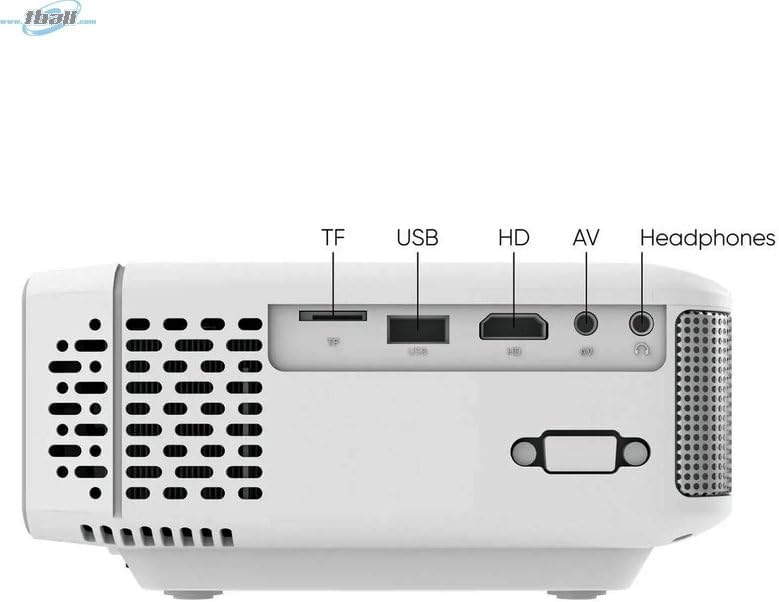
בילד: זייַט view of the Tzumi 7796 projector highlighting its various input ports. From left to right, these include a TF card slot, a USB port, an HD (HDMI) port, an AV input, and a headphone jack. This side also features ventilation grilles.
Top View מיט קאָנטראָלס

בילד: Top view of the Tzumi 7796 projector. This image shows the manual focus and keystone correction dials located near the lens. The central control panel features directional buttons (Up, Down, Left, Right), Home, Option, Back, Power, and Enter buttons for navigation and control.
דערציען View מיט מאַכט אַרייַנגאַנג

בילד: דערציען view of the Tzumi 7796 projector. This view primarily shows the power input socket on the left side and additional ventilation grilles on the right side.
סעטאַפּ גייד
קסנומקס. פּלאַסעמענט
שטעלט דעם פּראָיעקטאָר אויף אַ שטאַרקער, גלאַטער ייבערפלאַך. פֿאַר אָפּטימאַלן viewing, position the projector directly in front of your screen or wall. The ideal projection distance will vary based on the desired screen size. Ensure there is adequate space around the projector for ventilation.

בילד: This image illustrates the versatility of the Tzumi 7796 projector, showing it being used in both an indoor home setting and an outdoor movie night environment. This highlights its suitability for various entertainment scenarios.
2. מאַכט קאַנעקשאַן
- Connect the power adapter to the projector's power input port (refer to "Rear View with Power Input" image).
- צאַפּן די אנדערע סוף פון די מאַכט אַדאַפּטער אין אַ וואַנט ווענטיל.
- The power indicator light on the projector should illuminate.
3. קאַנעקטינג דעוויסעס
דער פּראָיעקטאָר שטיצט פֿאַרשידענע אַרייַנשרייַב קוואלן:
- הדמי: Connect your laptop, gaming console, or streaming device using an HDMI cable to the HD port.
- וסב: אַרײַנשטעלן אַ USB פֿלעש דרייוו אין דעם USB פּאָרט צו שפּילן מעדיע files גלייַך.
- פון: Use the provided AV cable to connect older devices like DVD players to the AV port.
- TF קאָרט: Insert a TF (MicroSD) card into the TF card slot to play media files.
- ווי-פי: For wireless screen mirroring or streaming, connect the projector to your Wi-Fi network (see "Operating Instructions - Wi-Fi Connectivity").
4. פאָקוס און קיסטאָון אַדזשאַסטמענט
- פאָקוס: דרייען די פאָקוס ring near the lens until the projected image is clear and sharp.
- שליסל שטיין: If the image appears trapezoidal (wider at the top or bottom), adjust the KEYSTONE correction dial until the image is rectangular.
אַפּערייטינג ינסטראַקשאַנז
מאַכט אויף / אַוועק
- מאַכט אויף: דרוק די מאַכט button on the projector's control panel or the remote control.
- מאַכט אַוועק: דרוק די מאַכט button again. Confirm shutdown if prompted.
אַרייַנשרייַב מקור סעלעקציע
After powering on, the projector will display its main menu. To select an input source:
- Use the directional buttons on the projector or remote to navigate to the desired input (e.g., HDMI, USB, AV, TF Card, Wi-Fi).
- דרוק די אַרייַן קנעפּל צו באַשטעטיקן דיין סעלעקציע.
Wi-Fi קאַנעקטיוויטי
To connect your projector to a Wi-Fi network for screen mirroring or online content:
- From the main menu, navigate to the ווי-פי or נעץ סעטטינגס אָפּציע.
- אויסקלייַבן Wi-Fi סעטאַפּ and choose your desired network from the list.
- אַרייַן די Wi-Fi פּאַראָל ניצנדיק די אויף-פאַרשטעלן קלאַוויאַטור און באַשטעטיקן.
- Once connected, you can use screen mirroring features (e.g., Miracast, AirPlay) or access built-in smart features if available.
אַודיאָ סעטטינגס
The projector features two built-in 3W speakers. You can also connect external audio devices:
- געבויט-אין ספּיקערז: Audio will play automatically through the projector's speakers. Adjust volume using the remote or control panel.
- Headphones/External Speakers: Connect headphones or external speakers to the 3.5mm headphone jack on the side of the projector. This will typically mute the built-in speakers.
וישאַלט
רייניקונג די לענס
To maintain optimal image quality, keep the projector lens clean.
- ניצט אַ ווייכן, לינט-פֿרייע שטאָף ספּעציעל דיזיינד פֿאַר אָפּטישע לענסעס.
- Gently wipe the lens in a circular motion.
- Avoid using abrasive cleaners or excessive pressure, which can scratch the lens.
אַלגעמיינע קער און סטאָרידזש
- Keep the projector in a cool, dry place when not in use.
- Protect the projector from dust and extreme temperatures.
- Do not expose the projector to direct sunlight for extended periods.
- רייניקן די אויסערליכע קasinג מיט אַ ווייך, דamp שטאָף. ויסמייַדן האַרב קעמיקאַלז.
טראָובלעשאָאָטינג
| פּראָבלעם | מעגלעך סיבה | לייזונג |
|---|---|---|
| קיין בילד נישט פּראָיעקטירט |
|
|
| די בילד איז בלערי |
|
|
| בילד איז טראַפּעזאָידאַל |
|
|
| קיין געזונט |
|
|
| ווי-פי קשר ישוז |
|
|
ספּעסאַפאַקיישאַנז
- מאָדעל: 7796
- סאָרט: צומי
- ווייַז האַכלאָטע: 1920 רענטגענ 1080 (פול הד)
- ברייטקייט: 1600 לומענס
- קאַנעקטיוויטי טעכנאָלאָגיע: HDMI, Wi-Fi, USB, AV, TF Card
- ספּעציעלע שטריך: פּאָרטאַטיוו
- רעקאַמענדיד ניצט: Home entertainment, Outdoor movie nights, Business presentations
- נומער וואָג: 3 פונט
- פּעקל דימענשאַנז: 11 X 9 X 5 אינטשעס
- געבויט-אין ספּיקערז: צוויי 3 וואט רעדנערס
וואָראַנטי און שטיצן
For warranty information and technical support, please refer to the documentation included with your purchase or visit the official Tzumi webזייטל. האַלט דיין קויפן באַווייַז פֿאַר וואָראַנטי קליימז.
אָנליין שטיצן: Visit the Tzumi Store on Amazon