
1. הקדמה
This manual provides essential instructions for the installation, operation, and maintenance of your Hikvision 8MP AcuSense WDR Mini Bullet Network Camera, model DS-2CD2083G2-IU. Please read this manual thoroughly before using the product and retain it for future reference.
פּראָדוקט איבערview
The Hikvision DS-2CD2083G2-IU is a high-performance 8-megapixel (4K) network camera designed for advanced surveillance. It features AcuSense technology for accurate human and vehicle target classification, Wide Dynamic Range (WDR) for clear imaging against strong backlight, and a fixed 2.8mm lens for a wide field of view. Its IP67 rating ensures robust outdoor performance, and the integrated microphone allows for audio monitoring.
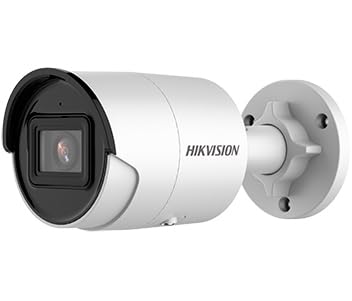
Figure 1: Hikvision 8MP AcuSense WDR Mini Bullet Network Camera (DS-2CD2083G2-IU)
This image displays the Hikvision 8MP AcuSense WDR Mini Bullet Network Camera, highlighting its compact bullet-style design suitable for various installation environments.
שליסל פֿעיִקייטן
- 8 Megapixel (4K) Resolution: Delivers high-quality, detailed video.
- AcuSense טעכנאָלאָגיע: Reduces false alarms by accurately classifying human and vehicle targets.
- ברייט דינאַמיש קייט (WDR): Ensures clear images even in scenes with strong contrast.
- Fixed 2.8mm Lens: גיט א ברייטע viewינג ווינקל.
- אינפֿראַרויט (IR) באַלויכטונג: Night vision up to 40 meters.
- IP67 וועטערפּרוף שאַץ: פּאַסיק פֿאַר דרויסנדיק נוצן אין פֿאַרשידענע וועטער באדינגונגען.
- געבויט-אין מיקראָפאָן: Enables audio monitoring.
- Integrated Card Reader: Supports local storage (microSD card not included).
2. זיכערקייַט אינפֿאָרמאַציע
ביטע האַלטן די פאלגענדע זיכערהייט מיטלען צו פאַרמייַדן שאָדן אָדער שעדיקן צו דעם פּראָדוקט:
- Ensure the power supply meets the camera's requirements (6.5 Watts).
- שטעלט נישט אויס די קאַמעראַ צו עקסטרעמע טעמפּעראַטורן, הומידיטי, אדער קאָראָזיווע סביבות.
- Avoid pointing the lens directly at strong light sources, as this may damage the sensor.
- די אינסטאַלאַציע זאָל דורכגעפירט ווערן דורך קוואַליפֿיצירטע פּערסאָנעל אין לויט מיט די לאָקאַלע עלעקטרישע קאָודן.
- ניצן בלויז אַקסעסעריז ספּעסיפיעד דורך דער פאַבריקאַנט.
- Clean the camera lens with a soft, dry cloth. Avoid harsh chemicals.
3. סעטאַפּ און ייַנמאָנטירונג
3.1 אַנפּאַקינג
Carefully unpack the camera and check for any signs of damage. Ensure all components are present. (Typical components include: camera unit, mounting template, screws, waterproof connector, quick start guide).
3.2 גשמיות ינסטאַלירונג
The camera is designed for ceiling mounting. Select a suitable location that provides the desired field of view and is within reach of network and power cables. Due to its IP67 rating, it is suitable for outdoor environments.
- Use the provided mounting template to mark drill holes on the ceiling.
- Drill the necessary holes and insert wall plugs if required.
- באַפֿעסטיקן די קאַמעראַ באַזע צו דער מאָנטירונג ייבערפלאַך מיט די צוגעשטעלטע שרויפֿן.
- סטרויערן די אַפּאַראַט ווינקל פֿאַר אָפּטימאַל קאַווערידזש.
3.3 נעץ און מאַכט פֿאַרבינדונג
This is an IP network camera. It requires a network connection and power. Power over Ethernet (PoE) is typically supported, simplifying installation by delivering both power and data over a single Ethernet cable. If PoE is not used, a separate 12V DC power adapter (not included) will be required.
- Connect an Ethernet cable from your network switch/router to the camera's RJ45 port. Use the waterproof connector for outdoor installations.
- If not using PoE, connect a 12V DC power adapter to the camera's power input.
- Once connected, the camera will power on. Allow a few minutes for it to boot up.
3.4 ערשט קאַנפיגיעריישאַן
צוטריט צו די קאַמעראַ web צובינד דורך אַ web browser using its default IP address (refer to the quick start guide or use Hikvision's SADP tool to discover the IP address). You will be prompted to set a strong password for security. Follow the on-screen instructions to configure network settings, date/time, and other basic parameters.
4. אַפּערייטינג ינסטרוקטיאָנס
4.1 לעבן View און רעקאָרדינג
After initial setup, you can view the live feed from the camera through its web interface, a Network Video Recorder (NVR), or Hikvision's client software (e.g., iVMS-4200) or mobile app (Hik-Connect). Configure recording schedules and methods (continuous, motion-triggered) via the camera's settings or NVR.
4.2 AcuSense Smart Features
The AcuSense technology allows the camera to distinguish between humans, vehicles, and other moving objects, significantly reducing false alarms caused by animals, rain, or falling leaves. Configure these detection rules in the camera's event settings to receive more accurate alerts.
- באַוועגונג דעטעקשאַן 2.0: Set up detection zones and sensitivity for human and vehicle events.
- ינטרוזשאַן דעטעקשאַן: Define virtual boundaries, and the camera will trigger an alarm if a human or vehicle crosses them.
- ליניע קראָסינג דעטעקציע: Similar to intrusion, but for a specific line.
4.3 ברייט דינאַמיש קייט (WDR)
WDR compensates for extreme lighting conditions, such as strong backlight, to ensure that both bright and dark areas of the image are clearly visible. This feature is typically enabled by default but can be adjusted in the image settings.
4.4 Infrared (IR) Night Vision
The camera automatically switches to IR mode in low-light conditions, providing clear black-and-white video up to 40 meters. Ensure no obstructions block the IR LEDs for optimal night vision performance.
4.5 אַודיאָ מאָניטאָרינג
With its built-in microphone, the camera can capture audio from the surveillance area. Audio settings, including gain control, can be configured in the camera's web interface. Ensure local regulations regarding audio recording are followed.
5. וישאַלט
- רייניקונג: רעגולער רייניקט די קאַמעראַ לינז און הויזינג מיט אַ ווייכן, דamp שטאָף. דו זאלסט נישט נוצן אַברייסיוו קלינערז.
- Firmware דערהייַנטיקונגען: קאָנטראָלירט פּעריִאָדיש דעם Hikvision באַאַמטער website for firmware updates. Keeping the firmware updated ensures optimal performance, new features, and security enhancements.
- קאַבלע דורכקוק: For outdoor installations, periodically inspect cables and connections for wear or damage, especially the waterproof connectors.
- פּאַראָל פאַרוואַלטונג: Regularly change your camera's password to maintain security.
6. טראָובלעשאָאָטינג
| פּראָבלעם | מעגלעך סיבה | לייזונג |
|---|---|---|
| No image/camera offline | No power, network cable disconnected, incorrect IP address. | Check power supply and network cable. Verify IP address using SADP tool. Restart camera. |
| נעבעך בילד קוואַליטעט | Dirty lens, incorrect focus (if adjustable), poor lighting, network bandwidth issues. | Clean the lens. Ensure adequate lighting. Check network connection speed. Adjust image settings (WDR, exposure). |
| False alarms from motion detection | Sensitivity too high, environmental factors (trees, animals), AcuSense not configured. | Adjust motion detection sensitivity. Configure AcuSense human/vehicle detection. Adjust detection zones. |
| קענען ניט צוטריט web צובינד | Incorrect IP address, network connectivity issue, browser compatibility. | Verify IP address. Ensure camera and PC are on the same network segment. Try a different browser. |
אויב די פראבלעם בלייבט נאך פרובירן די לייזונגען, ביטע קאנטאקטירט Hikvision טעכנישע שטיצע.
7. ספּעסאַפאַקיישאַנז
| שטריך | דעטאַל |
|---|---|
| מאָדעל נומער | DS-2CD2083G2-IU |
| בילד סענסאָר | קמאָס |
| מאַקס. האַכלאָטע | 8 מעגאַפּיקסעל (4K) |
| לענס | 2.8 מם פאַרפעסטיקט אָביעקטיוו |
| יר ראַנגע | אַרויף צו 40 מעטער |
| WDR | געשטיצט |
| Acusense | Human and Vehicle Target Classification |
| אַודיאָ | געבויט-אין מיקראָפאָן |
| לאקאלע סטאָרידזש | Integrated Card Reader (MicroSD slot) |
| וועטערפּראָאָף שאַץ | IP67 |
| מאַכט קאַנסאַמשאַן | 6.5 וואטס |
| דימענסיעס (L X W X H) | 15 x 15 x 8 ס״מ (אומגעפער) |
| מאַונטינג טיפּ | סטעליע בארג |
| פלינק טיפּ | Motion Only (configurable for human/vehicle) |
8. וואָראַנטי און שטיצן
Hikvision products typically come with a limited manufacturer's warranty. Please refer to the warranty card included with your product or visit the official Hikvision webוועבזייטל פֿאַר דעטאַלירטע וואָראַנטי טערמינען און באַדינגונגען ספּעציפֿיש פֿאַר אייער געגנט.
For technical support, firmware downloads, or further assistance, please visit the official Hikvision support portal or contact their customer service department. Ensure you have your product model number (DS-2CD2083G2-IU) and serial number ready when contacting support.
אפיציעלע היקוויזשאַן Webפּלאַץ: www.hikvision.com