
1. הקדמה
Thank you for choosing the Sauder Worksense Palo Alto 60" Commercial Credenza. This manual provides essential information for the proper setup, operation, and maintenance of your new furniture. Please read these instructions carefully before use to ensure optimal performance and longevity of your credenza.
The Palo Alto credenza is designed to offer ample space for office essentials, functioning as both a desk and an accent piece. It features a durable, 1-inch thick top and end panels, along with a melamine top surface that is heat, stain, and scratch resistant. Impact-resistant, high-grade thermoplastic edges enhance its durability. The credenza is finished on all sides for versatile placement within your office environment.

בילד 1.1: פראָנט view of the Sauder Worksense Palo Alto 60" Commercial Credenza.
2. סעטאַפּ
Your Sauder Worksense Palo Alto Credenza is designed for efficient assembly. The pedestals and drawers arrive pre-assembled, significantly reducing the overall setup time.
2.1 אויספּאַקן און צוגרייטן
- פּאַקט פֿאָרזיכטיק אויס אַלע קאָמפּאָנענטן און קאָנטראָלירט קעגן דער טיילן־ליסטע וואָס איז צוגעשטעלט אין אייער פּאַקעט.
- זייט זיכער אז איר האָט גענוג פּלאַץ פֿאַר פֿאַרזאַמלונג.
- עס איז רעקאַמענדיד אַז איין מענטש is sufficient for assembly, as indicated by the manufacturer.
2.2 אַסעמבלי סטעפּס
Refer to the detailed assembly instructions included in your product packaging for step-by-step guidance. The main assembly involves connecting the pre-assembled pedestals to the credenza top and central support structure.

Image 2.1: The credenza integrated into an office environment.
3. אַפּערייטינג ינסטרוקטיאָנס
The Palo Alto credenza is designed with functionality and organization in mind. Familiarize yourself with its features for efficient use.
3.1 שופלאד סיסטעם
- Center Drawer/Shelf: This features metal runners and safety stops. A flip-down panel allows it to accommodate a laptop or a keyboard and mouse, converting into a convenient workstation.
- Six Drawers: All six drawers on the pedestals are equipped with full extension slides, allowing for complete access to their contents.
- File שופלאָדן: The lower drawers are designed to hold letter or legal-size hanging files, providing organized document storage.
- זיכערהייט לאַקס: די file drawer and the drawer directly above it on each pedestal include a key lock for securing sensitive documents or personal items.
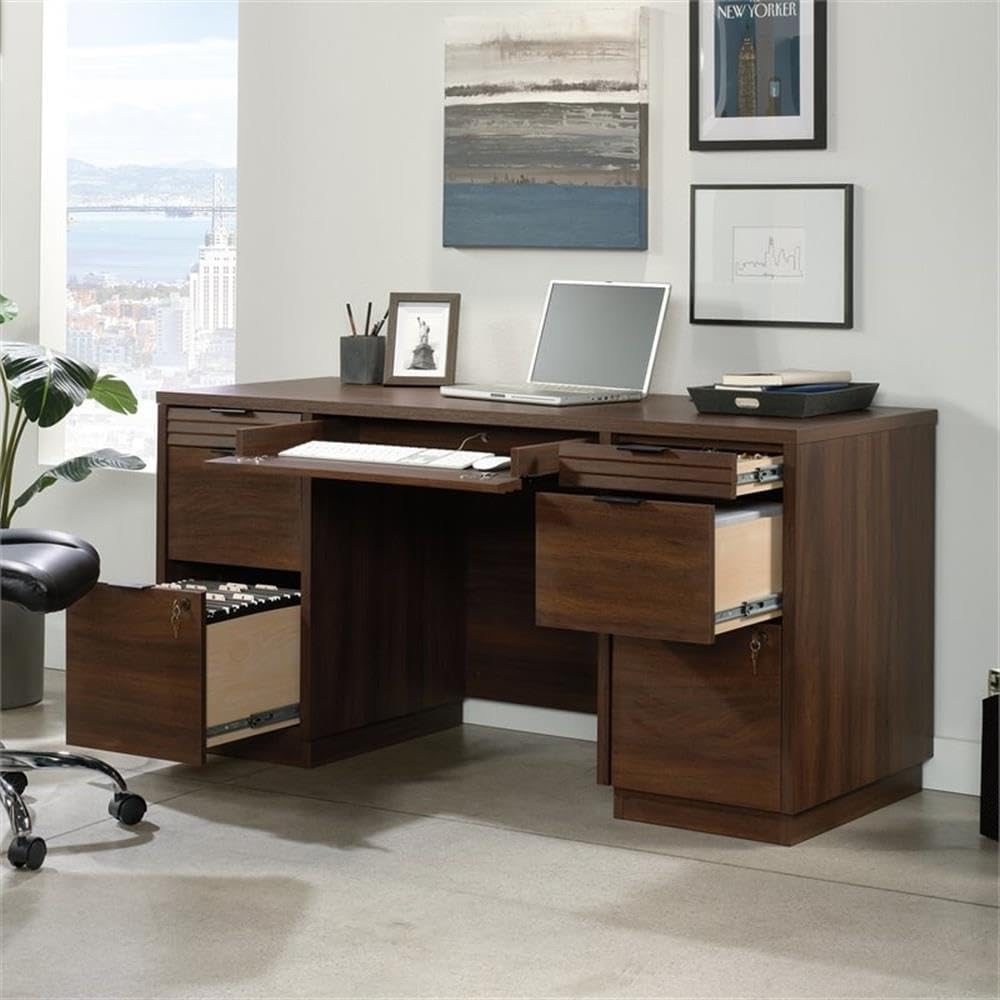
Image 3.1: Credenza showing the pull-out keyboard tray and an open file שופלאָד.

Image 3.2: Detail of an open drawer, illustrating storage capacity for small office items.
3.2 קאָרד פאַרוואַלטונג
The credenza includes a built-in cord management system with two desktop grommet holes. These are designed to help organize and route power cables and data cords, maintaining a tidy and functional workspace.
4. וישאַלט
Proper care will help maintain the appearance and extend the life of your credenza.
4.1 רייניקונג
- For general cleaning, wipe the surfaces with a damp שטאָף.
- פֿאַרמײַדן ניצן שאַרפֿע כעמיקאַלן, אַברייסיוו רייניגער, אָדער פּאָלירן וואָס קענען שעדיקן די ענדיקונג.
- The melamine top surface is designed to be heat, stain, and scratch resistant, but it is still advisable to use coasters for beverages and protective pads under hot items.

Image 4.1: Detail of the durable Spiced Mahogany finish.
4.2 אַלגעמיינע קער
- Periodically check and tighten any loose hardware.
- Avoid exposing the credenza to direct sunlight or extreme temperature changes, which can cause fading or warping.
- Do not overload drawers to ensure smooth operation of the full extension slides.
5. טראָובלעשאָאָטינג
This section addresses common issues you might encounter with your credenza.
5.1 שופלאד אפעראציע
- אַרויסגעבן: שופלאדן גליטשן נישט גלאט.
לייזונג: Check for obstructions within the drawer slides. Ensure drawers are not overloaded. Verify that the credenza is on a level surface. - אַרויסגעבן: Drawer locks are stiff or not engaging.
לייזונג: Apply a small amount of graphite lubricant to the key and lock mechanism. Ensure the drawer is fully closed before attempting to lock.
5.2 סטאַביליטעט פּראָבלעמען
- אַרויסגעבן: Credenza wobbles or feels unstable.
לייזונג: Ensure all assembly hardware is securely tightened. Verify that the credenza is placed on a flat, level floor. Adjust any leveling feet if present.
6. ספּעסאַפאַקיישאַנז
Detailed specifications for the Sauder Worksense Palo Alto 60" Commercial Credenza.
- סאָרט: Sauder
- מאָדעל נומער: 427791
- פּראָדוקט גרייסן (ד x ב x ה): 23.31" x 59.13" x 29.25" (59.2 ס״מ x 150.2 ס״מ x 74.3 ס״מ)
- נומער וואָג: 84.8 פונט (38.46 קג)
- קאָליר: Spiced Mahogany
- סטייל: מאָדערן
- באַזע מאַטעריאַל: מעטאַל
- ענדיקן טיפּ: Mahogany Finish
- ספּעציעלע פֿעיִקייטן: Durable, Resistant (Heat, Stain, Scratch)
- צימער טיפּ: אָפיס
- רעקאַמענדיד ניצט: אָפיס
- פּראָדוקט זאָרגן אינסטרוקציעס: ווישן מיט דamp שטאָף
- עלטער קייט באַשרייַבונג: דערוואַקסן
- אַרייַנגערעכנט קאַמפּאָונאַנץ: שעלוועס
- שפּיץ מאַטעריאַל טיפּ: מעלאַמין
- שופלאָד גלייד מאַטעריאַל: מעטאַל
- פארלאנגט אַסעמבלי: Yes (Partial)
- רעקאַמענדיד נומער פון מענטשן פֿאַר אַסעמבלי: 1
- פאָרעם: רעקטאַנגגיאַלער
- שרייַבטיש פּלאַן: Credenza Desk
- נומער פון שופלאָדן: 6
- Number Of Shelves: 2
- טאַבלעטאָפּ גרעב: 1 אינטשעס
- Number Of Cabinets: 2
- מאַונטינג טיפּ: שטאָק בארג
- שאָפער טיפּ: File שופלאָד
- באַזע טיפּ: פּעדעסטאַל
- האט פאַרטיק צוריק: יא
- שופלאָד גלייד מעקאַניזאַם: גאַנץ פאַרלענגערונג סליידז
- סטאָרידזש אָפּציעס: Drawers (6), Shelf (1)
- שופלאָד פּעדעסטאַל גראף: 2
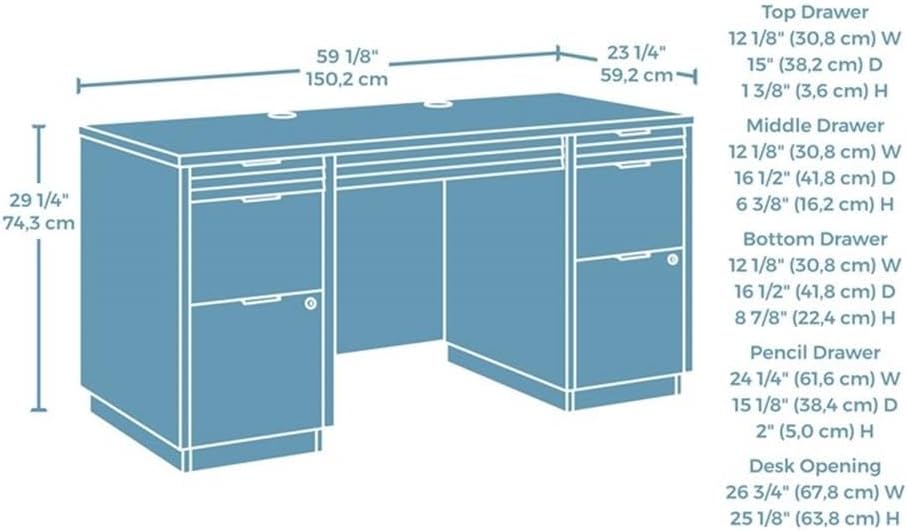
Image 6.1: Dimensional diagram of the credenza, including drawer and desk opening measurements.
7. וואָראַנטי אינפֿאָרמאַציע
The Sauder Worksense Palo Alto 60" Commercial Credenza comes with a 5-יאָר לימיטעד וואָראַנטי פונעם פאַבריקאַנט. די וואָראַנטי דעקט חסרונות אין מאַטעריאַלן און אַרבעט אונטער נאָרמאַל נוצן. ביטע האַלטן אייער קויפן באַווייַז פֿאַר וואָראַנטי קליימז.
For specific details regarding warranty coverage and to initiate a claim, refer to the warranty documentation included with your product or contact Sauder customer support.
8. שטיצן
Should you require assistance with your Sauder Worksense Palo Alto Credenza, please utilize the following resources:
- פאַבריקאַנט ס Webפּלאַץ: Visit the official Sauder webזייטל פֿאַר פּראָדוקט אינפֿאָרמאַציע, אָפֿט געשטעלטע פֿראַגעס, און שטיצע קאָנטאַקט דעטאַלן.
- פֿאַרזאַמלונג אינסטרוקציעס: Always refer to the detailed assembly manual provided in your product packaging for specific step-by-step instructions.
- קונה סערוויס: For direct support, contact Sauder customer service using the information found on their official webוועבזייטל אדער אין אייער פּראָדוקט דאָקומענטאַציע.
איר קענט אויך באַזוכן די יו Sauder Store on Amazon פֿאַר נאָך פּראָדוקט אינפֿאָרמאַציע און רעסורסן.