
הקדמה
This manual provides essential information for setting up, operating, and maintaining your NiPoGi Mini PC Stick T6 PRO 6-128. Please read it carefully before using the device to ensure optimal performance and longevity. The NiPoGi Mini PC Stick is a compact and powerful micro desktop computer designed for various tasks, including web browsing, media consumption, office work, and light gaming.
פּעקל אינהאַלט
באַשטעטיקן אַז אַלע זאכן זענען פאַראַן אין פּעקל:
- 1 x NiPoGi Mini PC Stick
- 1 x מאַכט אַדאַפּטער
- 1 x HDMI Extension Cable
- 1 x באַניצער מאַנואַל
- 1 x VESA Mount Bracket
פּראָדוקט איבערview
The NiPoGi Mini PC Stick T6 PRO 6-128 is a highly portable and efficient computing solution. Its compact design allows it to be easily carried for travel or business. It features a robust cooling system and a variety of connectivity options.

בילד: איבערview of the NiPoGi Mini PC Stick, highlighting its various ports including USB 3.0, HDMI, and Ethernet, along with the power button.
שליסל פֿעיִקייטן:
- אַפּערייטינג סיסטעם: Pre-installed Windows 10 Pro (upgradeable to Windows 11).
- פּראַסעסער: Intel Celeron J4125 Quad-Core (up to 2.7 GHz).
- זכּרון: 6 גיגאבייט DDR4 ראַם.
- סטאָרידזש: 128GB eMMC.
- גראַפיקס: Intel UHD Graphics 600 with 4K UHD @60Hz support via HDMI 2.0.
- קאַנעקטיוויטי: Dual-Band Wi-Fi (2.4G/5G), Gigabit Ethernet, Bluetooth 4.2.
- פּאָרץ: 2x USB 3.0 ports, 1x HDMI port, 1x Gigabit Ethernet port.
- ספּעציעלע פֿעיִקייטן: Supports Wake on LAN, PXE, Auto Power On, RTC Wake.

בילד: The compact size of the Mini PC Stick, measuring approximately 4.7 x 1.9 x 0.7 inches (12 x 5 x 1.8 cm).
קאָאָלינג סיסטעם:
The device incorporates a built-in fan designed for rapid heat dissipation and low noise operation, ensuring stable performance during extended use.
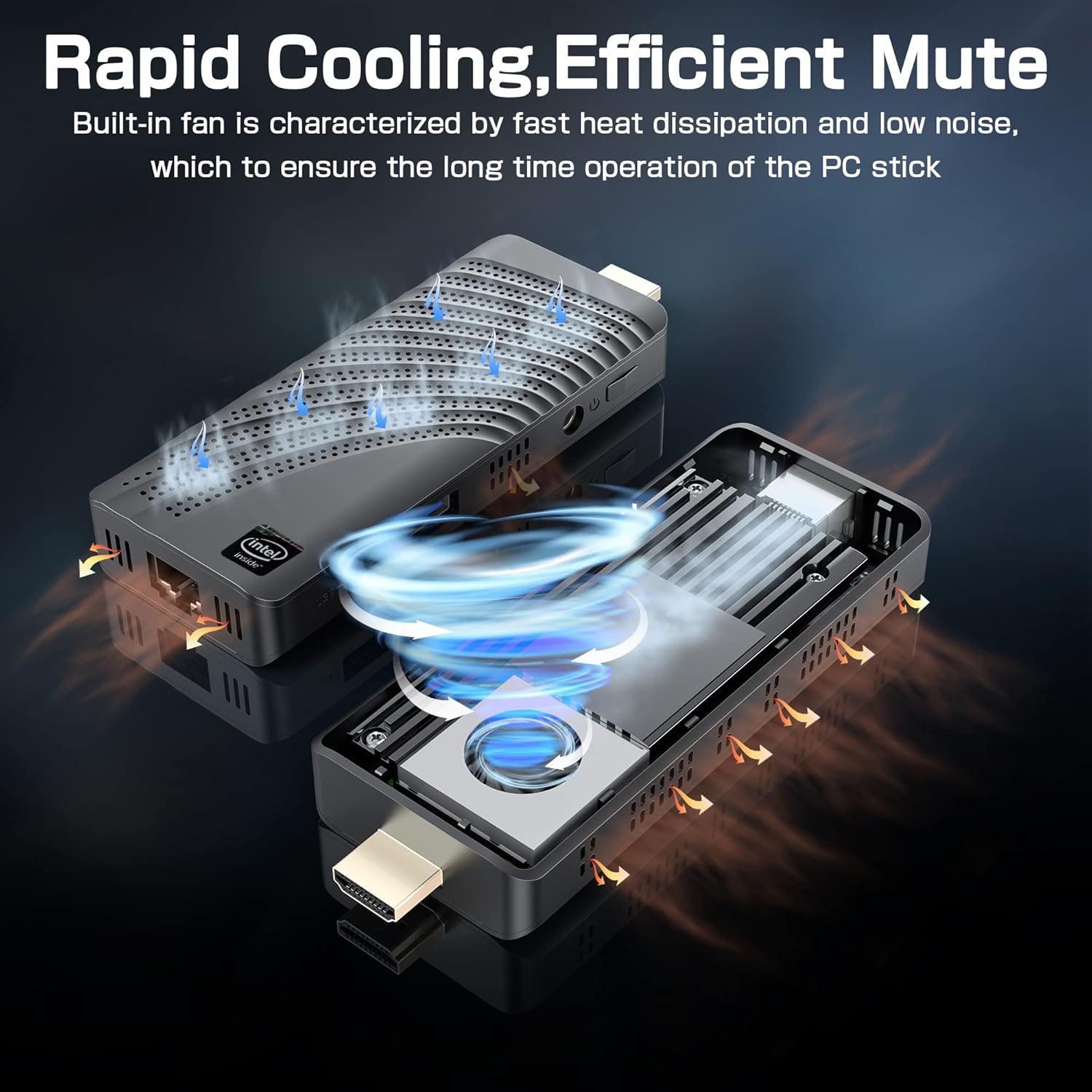
בילד: An illustration showing the internal fan design and airflow for efficient cooling within the Mini PC Stick.
סעטאַפּ גייד
Follow these steps to set up your NiPoGi Mini PC Stick:
- פאַרבינדן צו ווייַז: Plug the Mini PC Stick directly into an HDMI port on your monitor or TV. If space is limited, use the provided HDMI extension cable.

בילד: A visual guide demonstrating how to connect the Mini PC Stick to a monitor using the HDMI port, with an option to use an extension cable.
- פאַרבינדן מאַכט: Connect the power adapter to the DC-in port on the Mini PC Stick and then plug it into a power outlet.
- פאַרבינדן פּעריפעראַלס: Connect your USB keyboard and mouse to the available USB 3.0 ports. Alternatively, pair Bluetooth devices (keyboard, mouse, speakers) after initial setup.
- מאַכט אויף: Press the power button on the side of the Mini PC Stick. The device will boot up, and the Windows 10 Pro operating system will load.
- ערשטע ווינדאָוס סעטאַפּ: פֿאָלגט די אינסטרוקציעס אויף דעם עקראַן צו פֿאַרענדיקן די Windows 10 Pro סעטאַפּ, אַרייַנגערעכנט שפּראַך, ראַיאָן, נעץ פֿאַרבינדונג און באַניצער אַקאַונט שאַפונג.
אַפּערייטינג ינסטראַקשאַנז
נעץ קאַנעקטיוויטי:
- ווי-פי: The Mini PC Stick supports dual-band 2.4G/5G Wi-Fi. During Windows setup or via network settings, connect to your preferred wireless network.
- עטהערנעט: For a stable wired connection, plug an Ethernet cable into the Gigabit Ethernet port on the device.

בילד: Icons representing Dual-band WiFi and Gigabit Ethernet connectivity options for the Mini PC Stick.
בלועטאָאָטה דעוויסעס:
The Mini PC Stick features Bluetooth 4.2, allowing connection to various peripherals such as keyboards, mice, and speakers. Access Bluetooth settings in Windows to pair new devices.

בילד: The Mini PC Stick demonstrating its Bluetooth 4.2 compatibility with over 10 types of devices, including monitors, TVs, speakers, and various input devices.
4K UHD Output:
The device supports 4K UHD resolution at 60Hz via its HDMI 2.0 port, providing a clear and smooth visual experience for compatible displays.

בילד: A visual representation of the advanced image decoding and processing techniques, showcasing smooth and natural 4K HD picture quality.
אַוואַנסירטע פֿעיִקייטן:
- וועקן אויף לאַן: Allows the device to be powered on remotely over a network.
- PXE שטיוול: Enables booting from a network server.
- אַוטאָ מאַכט אויף: Configures the device to automatically power on when connected to power.
- RTC Wake: Schedules the device to wake up at a specific time.
These features can typically be configured in the BIOS settings. Refer to the Windows documentation for specific instructions on accessing and modifying these settings.
וישאַלט
- רייניקונג: Use a soft, dry cloth to clean the exterior of the device. Avoid liquid cleaners. Ensure ventilation holes are free from dust to maintain optimal cooling.
- ווייכווארג דערהייַנטיקונגען: קאָנטראָלירט און אינסטאַלירט רעגולער Windows דערהייַנטיקונגען צו ענשור סיסטעם פעסטקייט, זיכערהייט און פאָרשטעלונג.
- ינווייראַנמענאַל טנאָים: Operate the Mini PC Stick in a well-ventilated area, away from direct sunlight, heat sources, and excessive moisture.
טראָובלעשאָאָטינג
קיין ווייַז:
- Ensure the HDMI cable is securely connected to both the Mini PC Stick and the display.
- Verify that the display is set to the correct HDMI input source.
- Try a different HDMI cable or display if possible.
קיין מאַכט:
- Check if the power adapter is correctly plugged into the device and a working power outlet.
- זיכער מאַכן אַז דער מאַכט קנעפּל איז געווען געדריקט.
- פּרוּווט אַ אַנדערש מאַכט ווענטיל.
נעץ קאָנעקטיוויטי פּראָבלעמען:
- ווי-פי: Check if Wi-Fi is enabled in Windows settings. Restart your router. Ensure you are within range of your Wi-Fi network.
- עטהערנעט: Verify the Ethernet cable is properly connected. Check your router/modem status.
פּאַמעלעך פאָרשטעלונג:
- שליסט אומנייטיקע אַפּליקאַציעס וואָס לויפן אין הינטערגרונט.
- זיכער מאַכן אַז די דעווייס האָט גענוג ווענטילאַציע און ווערט נישט איבערהייצט.
- Run Windows updates and disk cleanup.
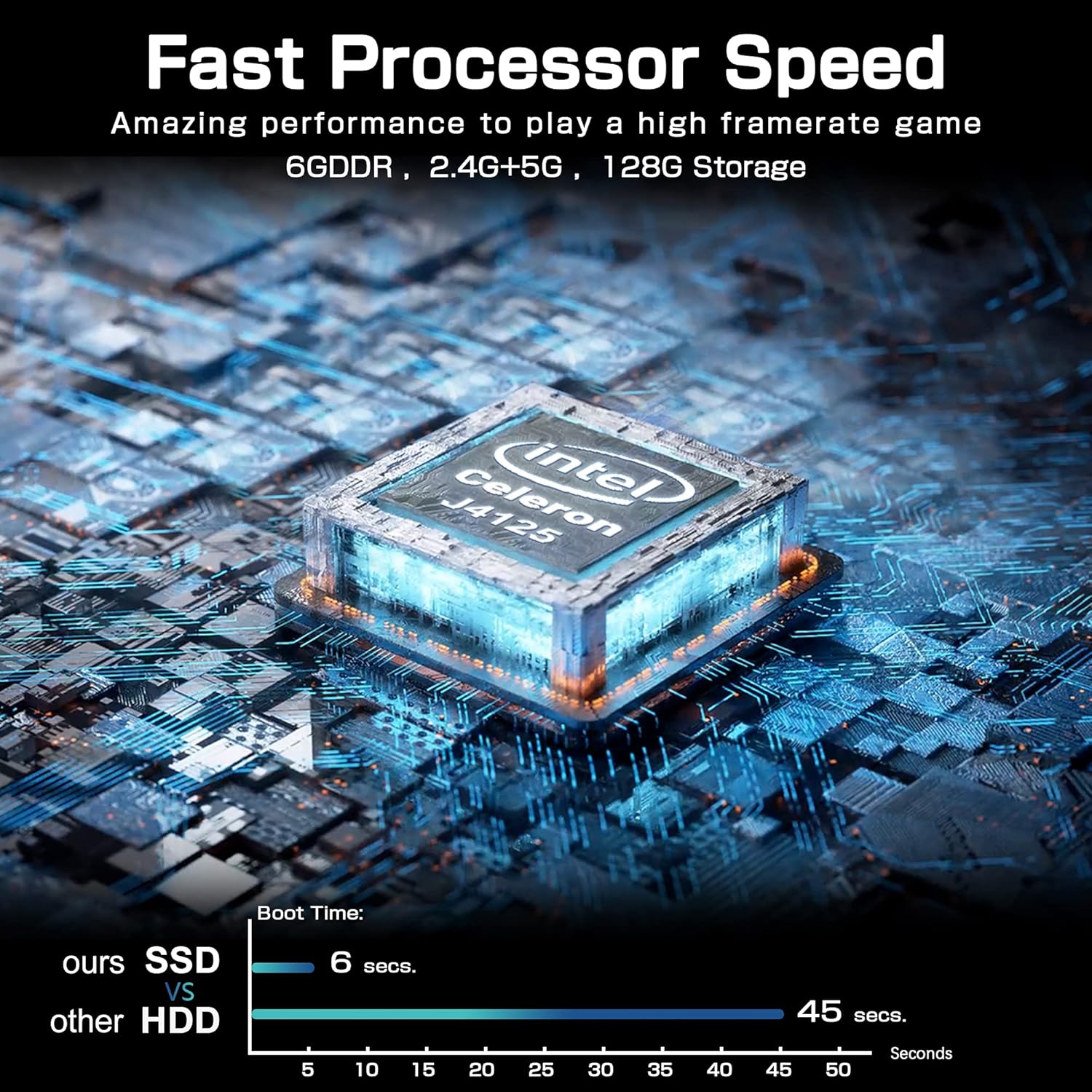
בילד: A comparison chart illustrating the fast boot time of the Mini PC Stick (6 seconds) compared to traditional HDD systems (45 seconds).
ספּעסאַפאַקיישאַנז
Detailed technical specifications for the NiPoGi Mini PC Stick T6 PRO 6-128:
| שטריך | באַשרייַבונג |
|---|---|
| סאָרט | NiPoGi |
| מאָדעל נומער | T6 PRO 6-128 |
| אָפּערייטינג סיסטעם | Windows 10 פּראָ |
| קפּו מאָדעל | Intel Celeron J4125 |
| קפּו ספּיד | 2.7 GHz (Burst) |
| נומער פון פּראַסעסערז | 4 |
| גראַפיקס קאָופּראַסעסער | Intel UHD Graphics 600 |
| ראַם זכּרון אינסטאַלירט גרייס | 6 גיגאבייט |
| ראַם זכּרון טעכנאָלאָגיע | DDR4 SDRAM |
| סטאָרידזש קאַפּאַסיטי | 128 גיגאבייט eMMC |
| שווער דרייוו צובינד | וסב 3.0 |
| וידאו רעזולטאַט צובינד | HDMI |
| גאַנץ הדמי פּאָרץ | 1 |
| גאַנץ וסב פּאָרץ | 2 |
| קאַנעקטיוויטי טעכנאָלאָגיע | Ethernet, WiFi Built-in, Bluetooth, USB |
| ווירעלעסס טיפּ | 802.11a/b/g/n/ac (Dual-Band Wi-Fi) |
| בלועטאָאָטה | בלועטאָאָטה 4.2 |
| מאַקסימום דיספּליי רעזאָלוציע | 3840 רענטגענ 2160 (4K UHD) |
| פּראָדוקט דימענשאַנז (L x W x H) | 10 X 4 X 3 סענטימעטער (3.94 X 1.57 X 1.18 אינטשעס) |
| פּונקט וואָג | 390 גראַמז (0.86 לבס) |
| ספּעציעלע פֿעיִקייטן | Auto Power On, Wake On LAN, PXE, RTC Wake |
וואָראַנטי און שטיצן
For warranty information and technical support, please refer to the documentation included with your product or visit the official NiPoGi webזייטל. ספּעציפֿישע וואָראַנטי טערמינען און באַדינגונגען קענען זיין אַנדערש לויט געגנט און הענדלער.