
NOUUI NU-PC010
NOUUI 63W PD 3.0 & QC 3.0 5-Port USB C Charging Station User Manual
Model: NU-PC010
1. הקדמה
This manual provides essential information for the safe and efficient operation of your NOUUI 63W PD 3.0 & QC 3.0 5-Port USB C Charging Station. Please read these instructions thoroughly before use and retain them for future reference.

Figure 1: NOUUI 63W 5-Port USB C Charging Station
2. פּראָדוקט איבערview
The NOUUI 63W PD 3.0 & QC 3.0 5-Port USB C Charging Station is designed to provide efficient and simultaneous charging for multiple devices. It features one USB-C Power Delivery (PD 3.0) port and four USB-A Quick Charge (QC 3.0) ports, delivering a total output of 63W. Its compact design makes it suitable for various environments, from home to office or travel.
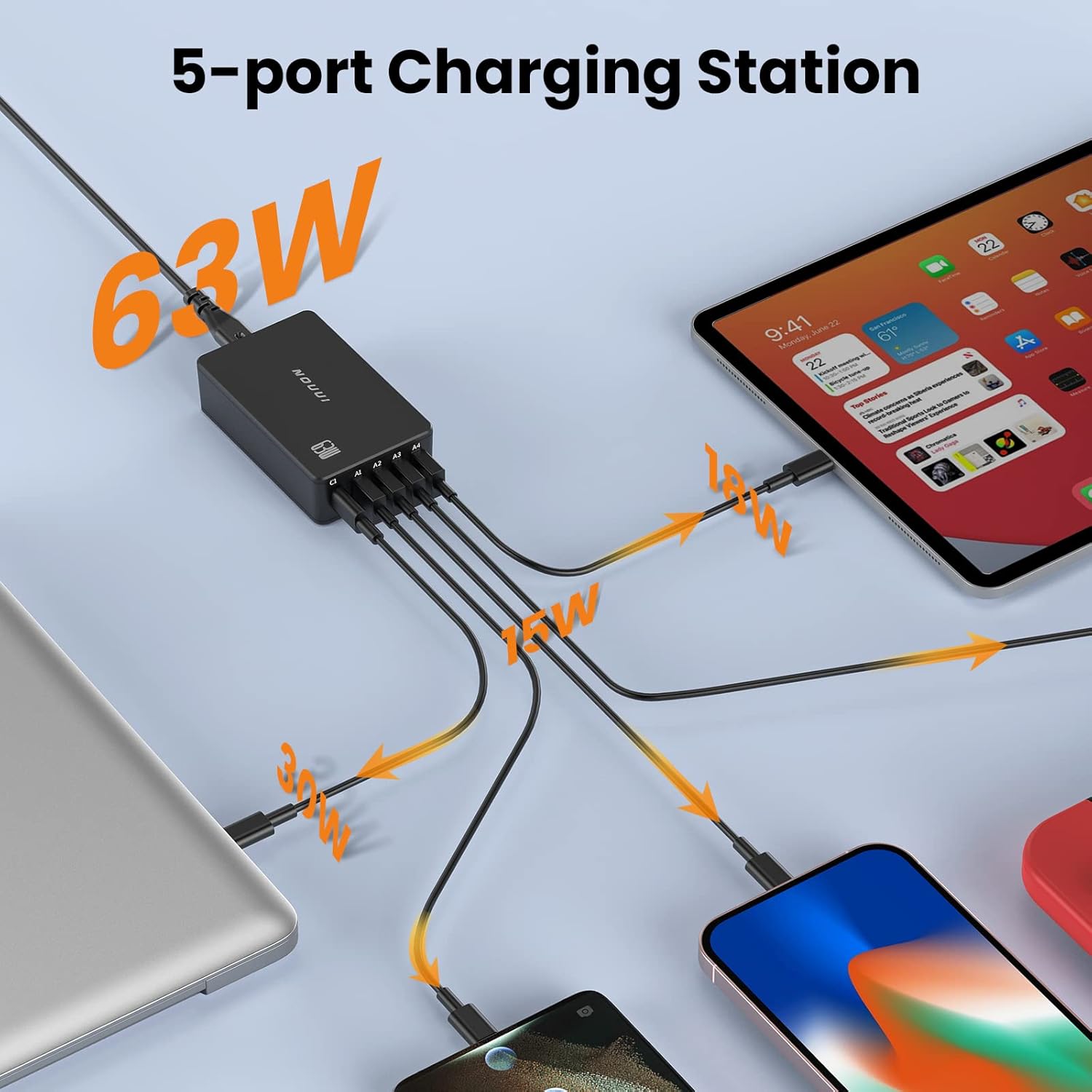
Figure 2: Simultaneous Charging with NOUUI 5-Port Station

Figure 3: NOUUI 5-in-1 63W Charging Station Features
3. וואָס איז אין דער קעסטל
- NOUUI PowerPort 5 (63W 5-Port USB Charging Station)
- 5ft Detachable Power Cord
- באַניצער מאַנואַל
Video 1: Official product video demonstrating the NOUUI 5-port Desktop USB Charging Station, highlighting its features and use cases.
4. סעטאַפּ אינסטרוקציעס
- Unpack the NOUUI 63W PD 3.0 & QC 3.0 5-Port USB C Charging Station and its accessories.
- Connect the provided 5ft detachable power cord to the power input port on the charging station.
- שטעקט אריין דעם אנדערן עק פונעם עלעקטרישן שנור אין א געווענליכע וואנט-אויסגאבע.
- די טשאַרדזשינג סטאַנציע איז איצט גרייט פֿאַר באַנוץ.
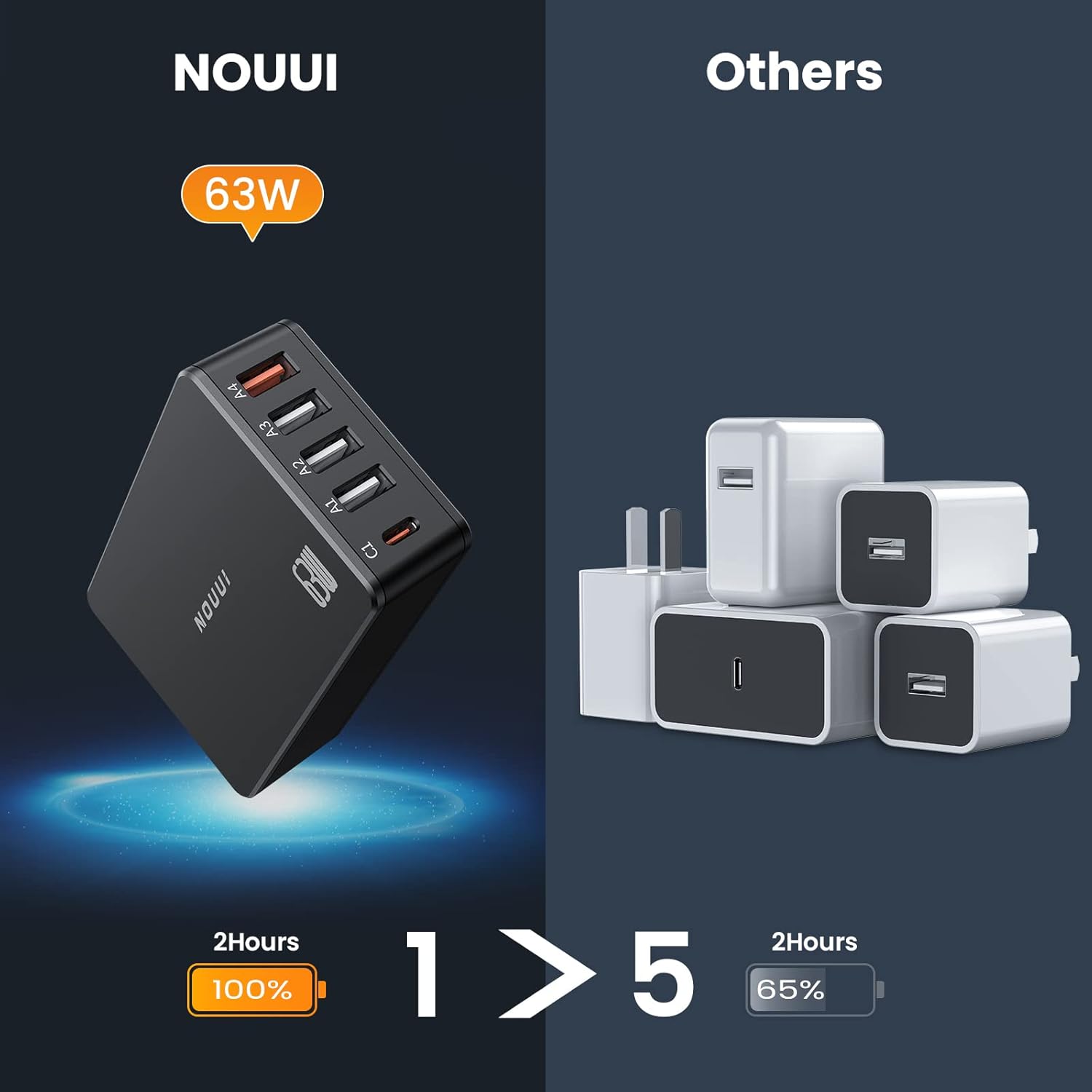
Figure 4: Connecting the Charging Station to Devices
5. אַפּערייטינג ינסטרוקטיאָנס
To charge your devices, connect them to the appropriate ports on the NOUUI Charging Station using compatible USB cables (not included).
5.1 וסב- C פּד 3.0 פּאָרט
Use the USB-C port (labeled 'C1') for devices that support Power Delivery (PD 3.0) for fast charging, such as laptops, tablets, and compatible smartphones. This port can deliver up to 30W max output.
5.2 USB-A QC 3.0 Ports
Use the four USB-A ports (labeled 'A1' through 'A4') for devices that support Quick Charge (QC 3.0) or standard USB charging. These ports are suitable for smartphones, smartwatches, and other USB-powered accessories. Each QC 3.0 port can deliver up to 18W max output.
The charging station intelligently detects the connected device and delivers the optimal charging current for efficient and safe charging.

Figure 5: Fast Charging Performance
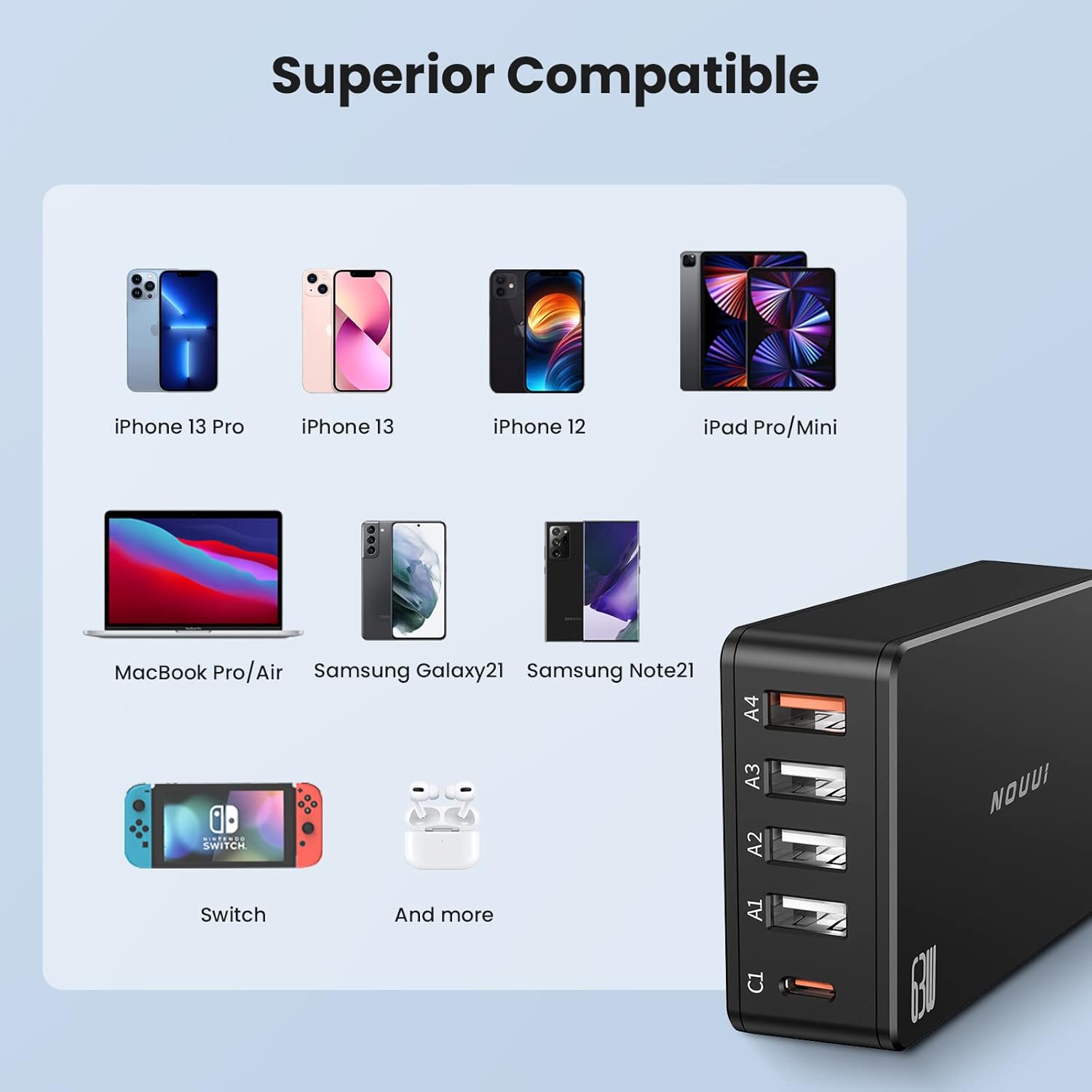
Figure 6: Efficiency and Space-Saving Design
6. קאַמפּאַטאַבילאַטי
The NOUUI 63W PD 3.0 & QC 3.0 5-Port USB C Charging Station is compatible with a wide range of devices, including but not limited to:
- לאַפּטאָפּס: MacBook Pro/Air, and other USB-C powered laptops.
- טאַבלעץ: iPad Pro/Mini, and other USB-C/USB-A powered tablets.
- סמאַרטפאָנעס: iPhone 13 Pro, iPhone 13, iPhone 12, Samsung Galaxy S21, Samsung Note 21, and other USB-C and USB-A enabled smartphones.
- גיימינג קאַנסאָול: נינטענדאָו סוויטש.
- אַקסעסעריז: AirPods, Smartwatches, and other USB-powered devices.
פיגור 7: ברייטע דעווייס קאָמפּאַטיביליטי

Figure 8: Incredible Compatibility Overview
7. זיכערקייַט פּראַטעקשאַן
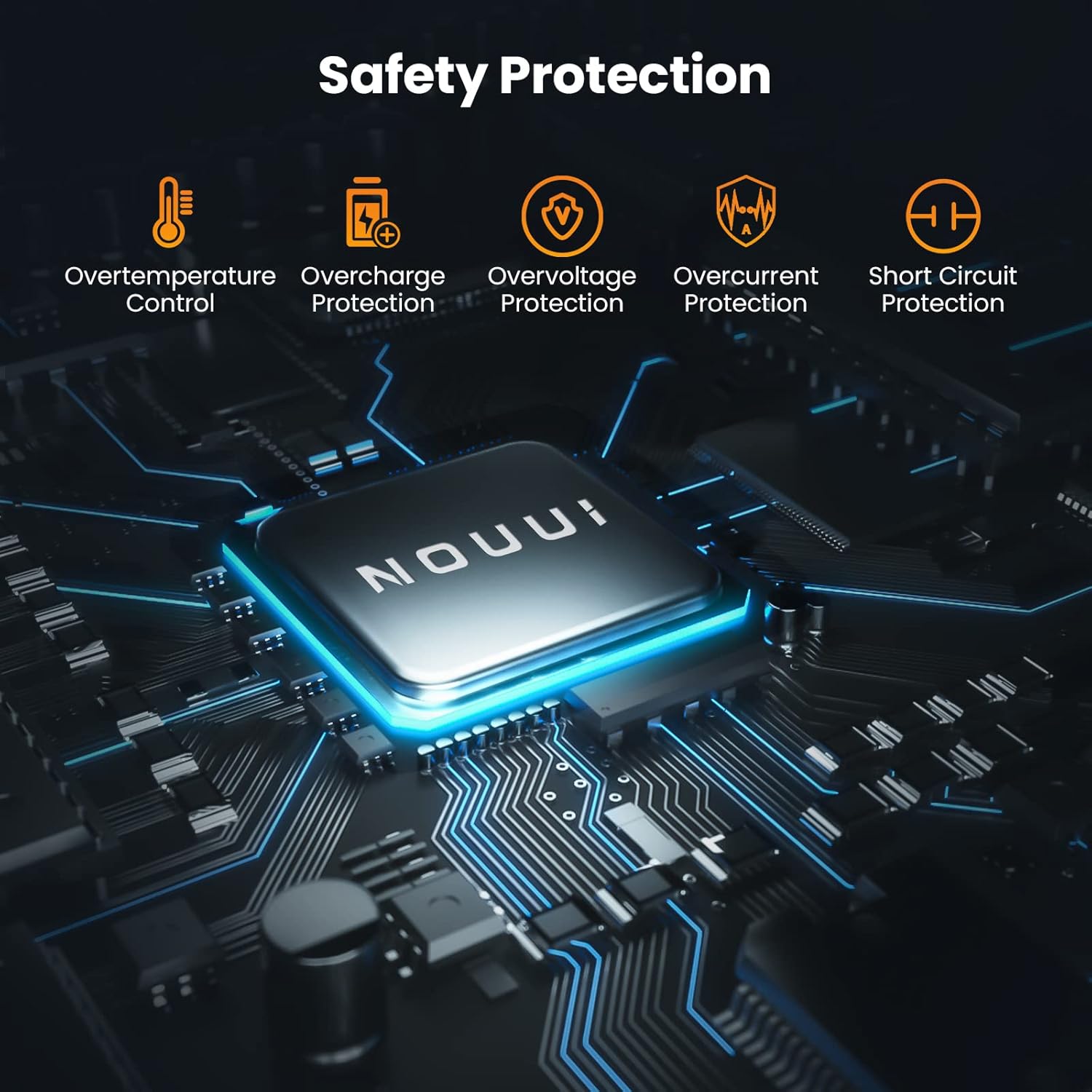
The NOUUI Charging Station incorporates multiple safety features to protect your devices and the charger itself:
- Overtemperature Control: פאַרהיט איבערהיצונג בעת אָפּעראַציע.
- אָווערטשאַרדזש שוץ: Safeguards devices from being overcharged.
- אָווערוואָלtagE שוץ: באַשיצט קעגן איבערגעטריבענעם וואָלומעןtagE אַרייַנשרייַב.
- אָווערקוררענט שוץ: פאַרהיט שאָדן פון איבערגעטריבענעם קראַנט פלוס.
- קורץ קרייַז שוץ: אויטאָמאַטיש שליסט זיך אויס אין פאַל פון אַ קורץ קרייַז.

פיגור 9: אינטעגרירטע זיכערהייט שוץ
8. ספּעסאַפאַקיישאַנז
| פּאַראַמעטער | ווערט |
| מאָדעל נומער | NU-PC010 |
| סאָרט | NOUUI |
| גאַנץ וסב פּאָרץ | 5 (1x יו-עס-בי-סי, 4x יו-עס-בי-איי) |
| וואָסtage | 63W (Total Output) |
| וסב-C רעזולטאַט | PD 3.0 (Up to 30W Max) |
| וסב-א רעזולטאַט | QC 3.0 (Up to 18W Max per port) |
| אַרייַנשרייַב וואָלtage | 240 וואלטס |
| Ampעראַגע | 0.26 Amps |
| ספּעציעלע שטריך | שנעל טשאַרדזשינג |
| פּונקט וואָג | 10.8 אונסעס |
| פּעקל דימענשאַנז | 4.84 X 4.33 X 1.42 אינטשעס |
9. טראָובלעשאָאָטינג
- מיטל ניט טשאַרדזשינג: Ensure the charging station is properly plugged into a live wall outlet. Verify that the charging cable is securely connected to both the device and the charging station. Try a different port or cable to rule out cable or port issues.
- פּאַמעלעך טשאַרדזשינג: Confirm that your device and cable support fast charging protocols (PD 3.0 for USB-C, QC 3.0 for USB-A) if you expect rapid charging. Ensure you are using the correct port for fast charging (USB-C for PD, specific USB-A for QC). Charging multiple devices simultaneously may distribute the total wattage, potentially affecting individual port speeds.
- די טשאַרדזשינג סטאַנציע פילט זיך וואַרעם: It is normal for the charging station to become warm during operation, especially when charging multiple devices or high-power devices. If it becomes excessively hot, disconnect it from the power source and devices, and allow it to cool down.
10. וישאַלט
- Keep the charging station dry and away from moisture.
- רייניקט דעם אַפּאַראַט מיט אַ ווייכן, טרוקענעם שטאָף. ניצט נישט קיין שרײַבנדיקע רייניגערס אדער סאָלווענטן.
- Avoid exposing the charging station to extreme temperatures or direct sunlight.
- סטאָר אין אַ קיל, טרוקן אָרט ווען ניט אין נוצן.
11. וואָראַנטי און שטיצן
For warranty information or technical support, please refer to the contact details provided with your purchase or visit the official NOUUI webזייטל. האַלט דיין קויפן באַווייַז פֿאַר וואָראַנטי קליימז.
Ask a question about this manual
Ask about setup, troubleshooting, compatibility, parts, safety, or missing instructions. Manuals+ will review the question and use this page’s manual context to help answer it.