
TACK EMS01A
TACK Miter Saw User Manual
Model: EMS01A | Brand: TACK
1. הקדמה
Thank you for choosing the TACK EMS01A Miter Saw. This powerful and versatile tool is designed for precise cutting of various materials, including wood, soft metal, and plastic. Featuring a dual-speed motor, laser guide, and adjustable cutting capacities, it is suitable for both professional and DIY projects. Please read this manual thoroughly before operation to ensure safe and efficient use of your new miter saw.
2. זיכערקייַט אינסטרוקציעס
שטענדיק פֿאָלגן די גרונטלעכע זיכערהייט מיטלען צו רעדוצירן דעם ריזיקע פֿון פֿײַער, עלעקטרישן קלאַפּ און פּערזענלעכע שאָדן. האַלט דעם מאַנואַל פֿאַר צוקונפֿטיקע רעפֿערענץ.
- לייענען דעם מאַנואַל: Familiarize yourself with all controls and operations before using the saw.
- טראָגט פערזענלעכע שוץ-עקוויפּמענט (PPE): Always wear safety glasses, hearing protection, and a dust mask. Use gloves when handling blades.
- אַרבעט שטח: האַלט אייער אַרבעטס־געגנט ריין, גוט באַלויכטן, און פֿרײַ פֿון קלאַטער. אַרבעט נישט אין עקספּלאָזיווע אַטמאָספֿערעס, ווי למשל אין דער אנוועזנהייט פֿון ברענענדיקע פֿליסיקייטן, גאַזן, אָדער שטויב.
- עלעקטריקאַל זיכערקייַט: Ensure the power supply matches the saw's requirements. Do not expose power tools to rain or wet conditions. Avoid body contact with earthed or grounded surfaces.
- זיכערער ארבעטסשטיק: שטענדיק קלamp the workpiece firmly before cutting. Never hold it by hand.
- בלייד גאַרד: Ensure the blade guard is always in place and functioning correctly. Never bypass safety features.
- דיסקאַנעקט מאַכט: Always disconnect the saw from the power supply before making any adjustments, changing accessories, or performing maintenance.
- טאָפּל סאַפעטי סוויטש: The saw is equipped with a double safety switch to prevent accidental startup. Always engage both parts of the switch to operate.
3. פּעקל אינהאַלט
Carefully unpack your TACK Miter Saw and check for the following components:
- 1x TACK EMS01A Miter Saw
- 1x שטויב זעקל
- 1x TCT Blade (40 teeth, 255mm diameter)
- 2x Hex Wrenches
- 2x Side Supports
- 1x Clampינג דיווייס
- 2x קוילן באַרשטן
- 1x באַניצער מאַנואַל
- 1x וואָראַנטי קאַרד
4. פּראָדוקט איבערview
Familiarize yourself with the main parts of your miter saw:
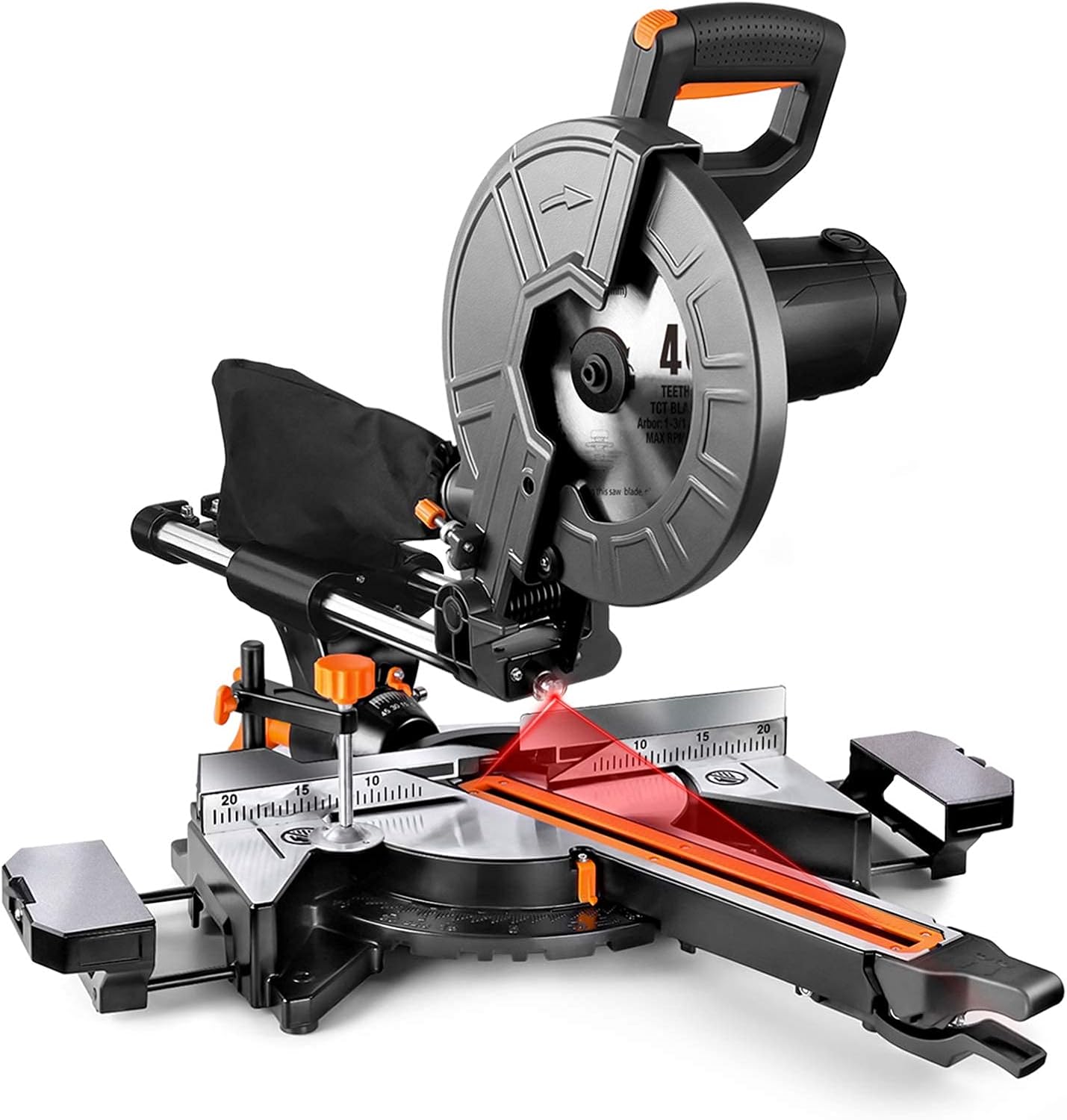
פיגורע 4.1: קוילעלדיק view of the TACK EMS01A Miter Saw.

Figure 4.2: Key components including the metal blade guard, ergonomic handle, dust collection bag, and double safety switch.
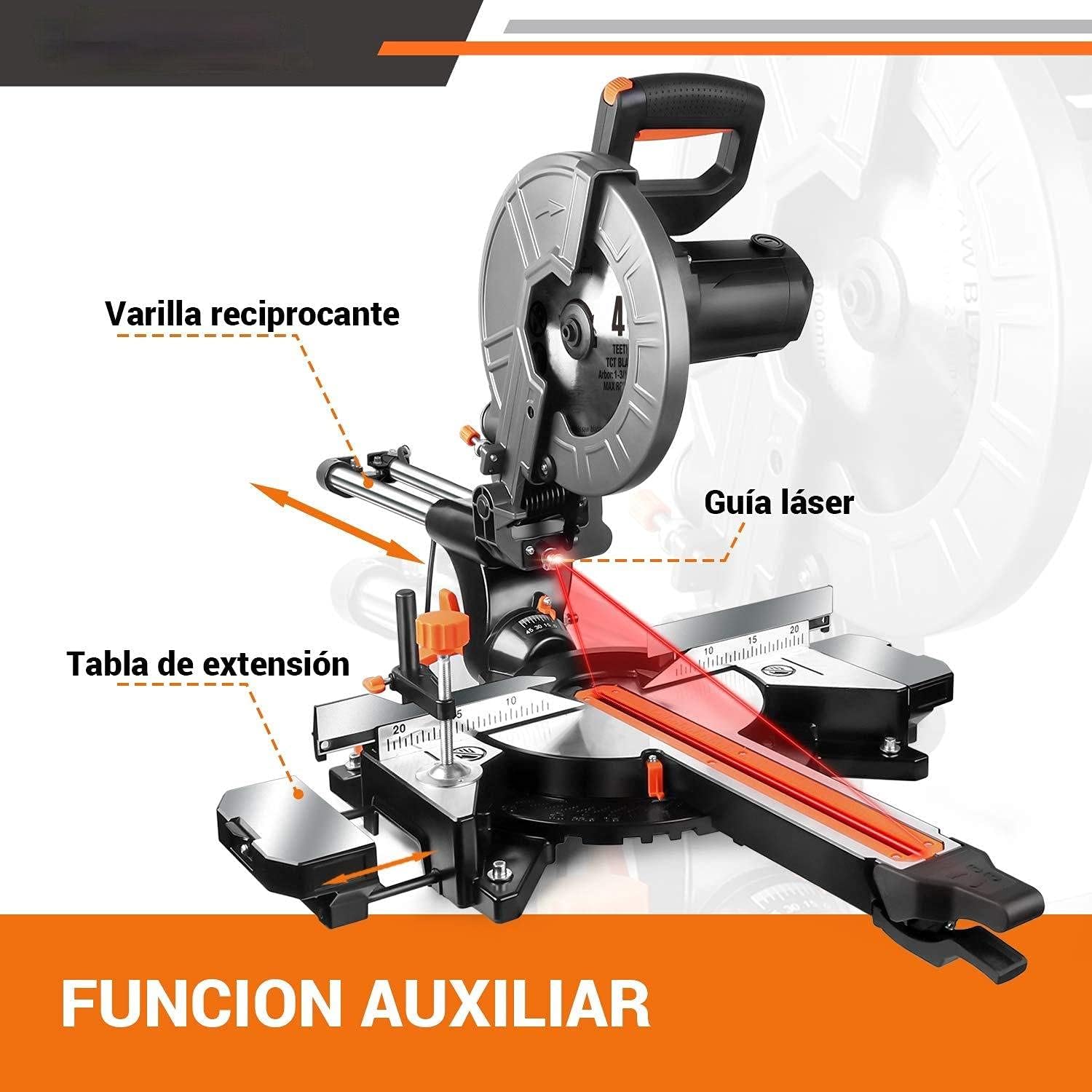
Figure 4.3: Auxiliary functions: reciprocating rod, laser guide, and extension table.

פיגורע 4.4: קלamping device, rear fence, and key specifications.
5. סעטאַפּ
5.1 בלייד ינסטאַללאַטיאָן
- זיכער מאַכן אַז די זעג איז אַרויסגעצויגן פֿון דער מאַכט מקור.
- הייבט אויף דעם בלייד שוץ.
- Use the provided hex wrench to loosen the blade retaining bolt.
- Carefully remove the old blade (if applicable) and install the new 255mm blade, ensuring the teeth are pointing in the correct direction (indicated by an arrow on the blade and saw).
- Tighten the blade retaining bolt securely.
- נידעריקער די בלייד היטן.
5.2 שטויב זעקל אַטאַטשמענט
Attach the dust bag to the dust port located at the rear of the blade housing. Ensure it is securely fastened to effectively collect sawdust and debris.
5.3 Extension Table Adjustment
The saw features extended platforms on both sides. Adjust these tables as needed to support longer workpieces, ensuring stability during cuts.
6. אַפּערייטינג ינסטרוקטיאָנס
6.1 פּאַוערינג אויף / אַוועק
To turn on the saw, press the double safety switch. To turn off, release the switch. The saw will stop automatically.
6.2 אַדזשאַסטירן גיכקייט
The TACK EMS01A Miter Saw offers dual speed settings for optimal cutting performance on different materials:
- 3200 רפּם: Ideal for cutting soft metals and plastics.
- 4500 רפּם: Recommended for cutting wood.
Refer to the speed selector switch on the saw to choose the appropriate speed for your material.

Figure 6.1: Dual speed control for different materials.
6.3 Using the Laser Guide
The integrated red laser guide provides a precise cutting line, allowing for accurate alignment of your workpiece. Activate the laser guide before making a cut to ensure precision.
6.4 מיטער און בעוועל שניטן
The saw allows for versatile cutting angles:
- מיטער ווינקל: Adjustable from 45° left to 45° right, with positive stops at 0°, 15°, 22.5°, 30°, and 45°.
- בעוועל ווינקל: The saw head can tilt 45° to the left for bevel cuts.
Adjust the miter and bevel settings using the appropriate levers and scales on the saw base and head.

Figure 6.2: Demonstrating miter cutting capacity.
6.5 שנייד קאַפּאַציטעט
The maximum cutting capacities are as follows:
| מיטער ווינקל | בעוועל אַנגלע | Cutting Capacity (Height x Width) |
|---|---|---|
| 0° | 0° | H90mm X W340mm |
| 0° | 45° | H45mm X W340mm |
| 45° | 0° | H90mm X W240mm |
| 45° | 45° | H45mm X W240mm |
6.6 שטויב זאַמלונג
The saw is equipped with a dust collection port and includes a dust bag. For improved health and easier cleanup, ensure the dust bag is attached or connect the port to an external dust extraction system.

Figure 6.3: Dust collection port in use.
7. וישאַלט
Regular maintenance ensures the longevity and optimal performance of your miter saw.
- רייניקונג: After each use, unplug the saw and clean off sawdust and debris from the motor vents, blade area, and table using a brush or compressed air.
- בלייד דורכקוק: Regularly inspect the blade for sharpness and damage. Replace dull or damaged blades promptly.
- קאַרבאָן ברושעס: The saw comes with spare carbon brushes. If the motor performance decreases or sparks excessively, the carbon brushes may need replacement. Refer to the saw's specific instructions for accessing and replacing them.
- שמירן: Periodically lubricate moving parts as indicated in the saw's design to ensure smooth operation.
- שנור דורכקוק: Check the power cord for any signs of damage. Do not use the saw if the cord is damaged.
8. טראָובלעשאָאָטינג
If you encounter issues with your TACK Miter Saw, refer to the following common problems and solutions:
- זעג הייבט זיך נישט אן:
- Check if the saw is properly plugged into a working power outlet.
- Ensure the double safety switch is fully engaged.
- Check for tripped circuit breakers.
- Inspect carbon brushes for wear.
- שניטן זענען נישט גענוי:
- Verify that the workpiece is securely clampעד.
- קאָנטראָלירט צי די בלייד איז שאַרף און ריכטיק אינסטאַלירט.
- Ensure miter and bevel angle settings are locked in place.
- Calibrate the laser guide if necessary.
- איבערגעטריבענע ווייבריישאַן אָדער ראַש:
- Check if the blade is securely fastened and not warped.
- Ensure all mounting bolts are tight.
- קוקט איבער פֿאַר קיין פרייַ קאָמפּאָנענטן.
If the problem persists after troubleshooting, please contact customer support.
9. טעכניש ספּעסאַפאַקיישאַנז
| באַשרייַבונג | ווערט |
|---|---|
| מאָדעל | EMS01A |
| מאַכט | 2000 וו |
| Voltage | 230 V |
| ספּיד | 3200 RPM / 4500 RPM (Dual Speed) |
| בלייד דיאַמעטער | 255 מם (10 אינטשעס) |
| מאַכט שנור לענג | 2 מעטער |
| פּראָדוקט דימענשאַנז | 78 X 58 X 45 סענטימעטער |
| פּראָדוקט וואָג | 15.8 קג |
| מאַטעריאַל | מעטאַל און פּלאַסטיק |
| בלייד מאַטעריאַל | ומבאַפלעקט שטאָל |
10. וואָראַנטי און שטיצן
This TACK Miter Saw comes with a 24-חודש וואָראַנטי from the date of purchase. If you encounter any quality issues during the warranty period, please contact our customer service team. We are committed to responding to your inquiries within 24 hours.
For any questions regarding the product, setup, operation, or troubleshooting, please do not hesitate to reach out to us. Your satisfaction is our priority.
Ask a question about this manual
Ask about setup, troubleshooting, compatibility, parts, safety, or missing instructions. Manuals+ will review the question and use this page’s manual context to help answer it.