
LAUNCH Launch X-431 TSGUN
LAUNCH X-431 i-TPMS TSGUN User Manual
Tire Pressure Detector Tool: Relearn, Reset, and Coding TPMS Sensors
1. פּראָדוקט איבערview
The LAUNCH X-431 i-TPMS TSGUN is an advanced, app-based tire pressure monitoring system (TPMS) tool designed to assist automotive professionals and enthusiasts in managing vehicle tire pressure sensors. This device integrates essential TPMS functions including sensor activation, data reading, system relearning, and sensor programming, ensuring optimal tire performance and safety.
It is engineered to work seamlessly with LAUNCH X-431 series diagnostic tablets (8 inches or above) and the dedicated i-TPMS mobile application for Android devices, providing a comprehensive solution for TPMS diagnostics and service.
2. שליסל פֿעיִקייטן
- Comprehensive TPMS Functions: Activates, reads, learns, and programs TPMS sensors.
- ברייט סענסאָר קאָמפּאַטאַביליטי: Supports both 315MHz and 433MHz tire sensors.
- Detailed Sensor Data: Reads sensor ID, voltage, tire pressure, temperature, battery status, location, and frequency.
- Efficient Programming: Programs LAUNCH LTR-01 radio frequency tire pressure sensors.
- באַניצער-פרייַנדלעך צובינד: Features one-touch reception of sensor data and real-time tire status display.
- ברייטע פאָרמיטל קאַווערידזש: Compatible with 98% of global vehicles equipped with TPMS.
- Built-in Guidance: Provides integrated learning guidance for quick operation.
- דוראַבאַל פּלאַן: Robust construction for professional use.
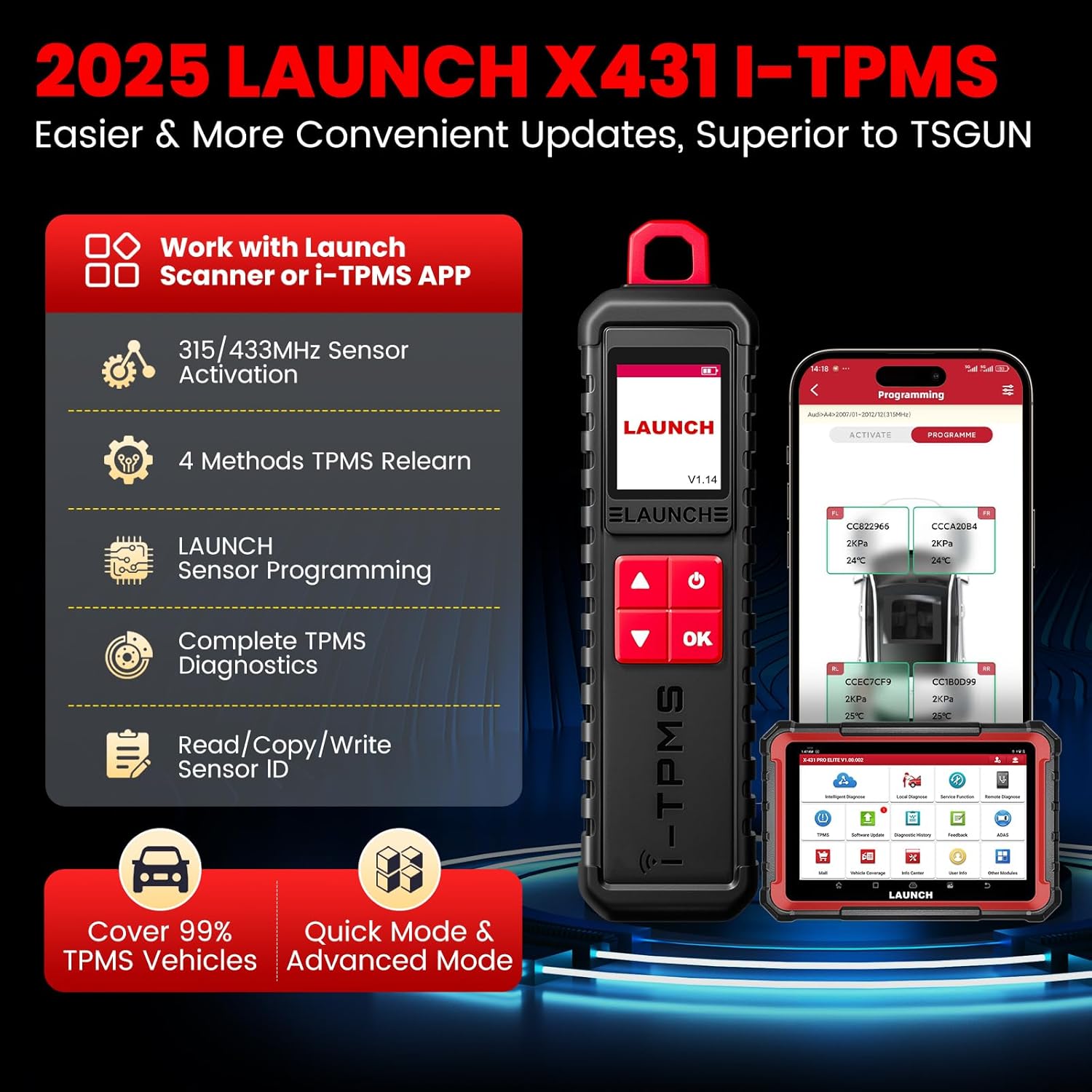
פיגורע 2.1: איבערview of LAUNCH X-431 i-TPMS TSGUN capabilities and features.
3. Compatibility and Requirements
The LAUNCH X-431 i-TPMS TSGUN is designed to operate as an accessory to specific LAUNCH diagnostic tools. Please ensure your setup meets the following requirements:
- Required Diagnostic Tablet: Must be used with a LAUNCH diagnostic tablet of 8 inches or larger (e.g., X431 V/V+, PRO3S+, Pro3 ACE/APEX, Pro5, PAD V/VII). The TSGUN cannot be used as a standalone device.
- מאָביל אַפּלאַקיישאַן: Can also be used with the i-TPMS APP on Android devices.
- סענסאָר קאַמפּאַטאַבילאַטי: Supports 315MHz and 433MHz TPMS sensors.
- Programming Limitation: The TSGUN can only program LAUNCH LTR-01 sensors. It does not support programming of other brand sensors.

Figure 3.1: Two primary methods of using the LAUNCH i-TPMS TSGUN: with a LAUNCH scanner or the i-TPMS app.
4. אויפשטעלן און ערשטע באנוץ
Before using the LAUNCH X-431 i-TPMS TSGUN, ensure it is fully charged and properly paired with your compatible LAUNCH diagnostic tablet or Android device.
4.1. טשאַרדזשינג די מיטל
Connect the TSGUN to a power source using the provided USB cable. The charging indicator will show the charging status. Ensure the device is fully charged before first use for optimal performance.
4.2. Pairing with a LAUNCH Diagnostic Tablet
- Power on your LAUNCH diagnostic tablet and the TSGUN.
- On the tablet, navigate to the TPMS application or module.
- Follow the on-screen prompts to establish a Bluetooth connection between the tablet and the TSGUN. The pairing process is typically straightforward and guided by the tablet's software.
- Once paired, the TSGUN is ready for use with the tablet's TPMS functions.
4.3. Using with the i-TPMS APP (Android)
- Download and install the i-TPMS APP from the appropriate app store on your Android device.
- זיכער מאַכן אַז בלועטוט איז ענייבאַלד אויף דיין אַנדרויד מיטל.
- Open the i-TPMS APP and follow the instructions to pair with the TSGUN via Bluetooth.
- Once connected, you can perform TPMS functions directly from your Android device.
5. אַפּערייטינג ינסטרוקטיאָנס
The LAUNCH X-431 i-TPMS TSGUN offers several core functions for TPMS management. Always refer to the specific vehicle's service manual for detailed TPMS procedures.

פיגורע 5.1: איבערview of the primary TPMS functions supported by the TSGUN.
5.1. TPMS סענסאר אקטיווירונג
This function is used to activate dormant TPMS sensors and retrieve their data. Point the TSGUN towards the tire valve stem and activate the sensor. The device will read and display the following information:
- סענסאָר שייַן
- טייער דרוק
- טייער טעמפּעראַטור
- סענסאָר באַטאַרייע סטאַטוס
- סענסאָר שטעלע
- אָפטקייַט

Figure 5.2: Visual representation of activating a TPMS sensor.
5.2. טפּמס רעלערן
After replacing a TPMS sensor or rotating tires, the vehicle's ECU needs to learn the new sensor IDs. The TSGUN supports various relearn procedures:
- סטאציאנערע איבערלערנען: Requires the vehicle to be in a specific relearn mode, often initiated via the vehicle's dashboard controls.
- אויטאָמאַטיש ווידער לערנען: The vehicle automatically learns new sensor IDs after driving for a certain period under specific conditions.
- OBD Relearning: Writes new sensor IDs directly to the vehicle's TPMS module via the OBD-II port, typically performed through the connected LAUNCH diagnostic tablet.

Figure 5.3: Different methods for TPMS sensor relearning.
5.3. TPMS Sensor Programming
The TSGUN can program blank LAUNCH LTR-01 sensors to replace faulty or missing sensors. It offers four programming methods:
- אויטאָמאַטיש שאַפֿן: Generates a new, unique sensor ID.
- Manual Create: Allows manual input of a specific sensor ID.
- קאפירן דורך אקטיוואציע: קאפירט די אידענטיפיקאציע פון אן עקזיסטירנדן אקטיווירטן סענסאר.
- קאפירן דורך OBD: Copies sensor IDs directly from the vehicle's ECU via the OBD-II port.
Important: This tool can only program LAUNCH LTR-01 sensors. It is not compatible with other brands of TPMS sensors for programming.

Figure 5.4: The four programming methods available for LAUNCH LTR-01 sensors.
5.4. TPMS Diagnosis
The TSGUN, in conjunction with a LAUNCH diagnostic tablet, can perform quick and complete TPMS health status checks, including:
- Reading and clearing TPMS Diagnostic Trouble Codes (DTCs).
- Turning off the TPMS warning light on the dashboard.
- Checking sensor ID matching with the vehicle's ECU.

Figure 5.5: Diagnostic capabilities of the TSGUN for TPMS systems.
6. וישאַלט
To ensure the longevity and optimal performance of your LAUNCH X-431 i-TPMS TSGUN, follow these maintenance guidelines:
- רייניקונג: Wipe the device with a soft, dry cloth. Avoid using abrasive cleaners or solvents that could damage the casinג אדער עקראַן.
- סטאָרידזש: האַלט דעם אַפּאַראַט אין אַ קיל, טרוקן אָרט אַוועק פון דירעקט זונשייַן און עקסטרעמע טעמפּעראַטורן.
- באַטערי זאָרגן: לאָדט אויף דעם אַפּאַראַט רעגולער, אפילו אויב מען ניצט עס נישט אָפט, כּדי צו האַלטן די באַטאַריע געזונט. פֿאַרמייַדט צו גאָר אויסלאָדן די באַטאַריע פֿאַר לענגערע פּעריאָדן.
- Firmware דערהייַנטיקונגען: Periodically check for and install firmware updates for the TSGUN via your connected LAUNCH diagnostic tablet. This ensures compatibility with new vehicle models and improved functionality.
7. טראָובלעשאָאָטינג
If you encounter issues while using the LAUNCH X-431 i-TPMS TSGUN, refer to the following common troubleshooting tips:
- מיטל נישט פּאַוערינג אויף: Ensure the battery is charged. Connect to a power source and allow it to charge for at least 30 minutes before attempting to power on again.
- Failure to Connect/Pair:
- Verify Bluetooth is enabled on both the TSGUN and the diagnostic tablet/Android device.
- Ensure the TSGUN is within Bluetooth range of the tablet/device.
- Restart both the TSGUN and the tablet/device.
- Confirm that your LAUNCH diagnostic tablet is 8 inches or larger, as required for compatibility.
- Cannot Activate/Read Sensor:
- Ensure the TSGUN is positioned correctly near the tire valve stem.
- Check if the sensor is active or if it's a compatible 315MHz/433MHz sensor.
- Verify the sensor itself is not faulty.
- Cannot Program Sensor:
- Confirm that the sensor you are attempting to program is a LAUNCH LTR-01 sensor. The TSGUN cannot program other brands.
- Ensure the TSGUN has sufficient battery charge.
- TPMS Light Remains On After Relearn:
- Verify that the relearn procedure was completed successfully according to the vehicle's specific requirements.
- Check for any remaining TPMS DTCs using the diagnostic function.
- Ensure all sensors are functioning correctly.
8. ספּעסאַפאַקיישאַנז
| באַשרייַבונג | דעטאַל |
|---|---|
| מאָדעל נומער | Launch X-431 TSGUN |
| פּונקט וואָג | 12.3 אונסעס |
| פּראָדוקט דימענשאַנז | 9.92 X 2.13 X 1.18 אינטשעס |
| ווייַז האַכלאָטע | 168*128 LED Display |
| באַטערי טיפּ | 1 ליטהיום יאָן באַטאַרייע (אַרייַנגערעכנט) |
| באַטאַרייע קאַפּאַציטעט | 2000 מאַה |
| סענסאָר קאָמפּאַטיביליטי | 315 מהז / 433 מהז |
9. וואָראַנטי און שטיצן
LAUNCH is committed to providing reliable products and customer satisfaction.
- צוריקקער/פאַרבייַט פּאָליטיק: The product is eligible for a 30-day refund or replacement from the date of purchase, provided there is no reason for return.
- טעכניש שטיצן: For any questions or assistance with the LAUNCH X-431 i-TPMS TSGUN, please utilize the Q&A section on the product's purchase page for timely support.
- Lifetime Upgrades: Benefit from lifetime software upgrades to ensure your tool remains current with new vehicle models and TPMS technologies.
Ask a question about this manual
Ask about setup, troubleshooting, compatibility, parts, safety, or missing instructions. Manuals+ will review the question and use this page’s manual context to help answer it.