
1. פּראָדוקט איבערview
The NVX QBUS10P is a compact, amplified 10-inch ported subwoofer system designed to deliver powerful bass in spatially challenged vehicles. It features a built-in 500W peak (200W RMS) Class-D amplifier, offering robust audio performance without requiring extensive installation space. This system is engineered for ease of integration with both factory and aftermarket audio systems.
- Space Saver: Integrated 10-inch subwoofer and 500W peak amplifier for compact installations.
- וואַריאַבלע נידעריק-פּאַס פילטער: Adjustable from 50-150 Hz to optimize bass output and prevent high-frequency distortion.
- פלעקסיבלע איינגאבעס: Supports both high-level (speaker wire) and low-level (RCA) inputs for broad compatibility.
- אָטאַמאַטיק קער אויף: Detects audio signal to automatically power on, simplifying installation by eliminating the need for a remote turn-on wire.
- וואַריאַבלע באַס בוסט: Allows fine-tuning of low bass levels to personal preference.
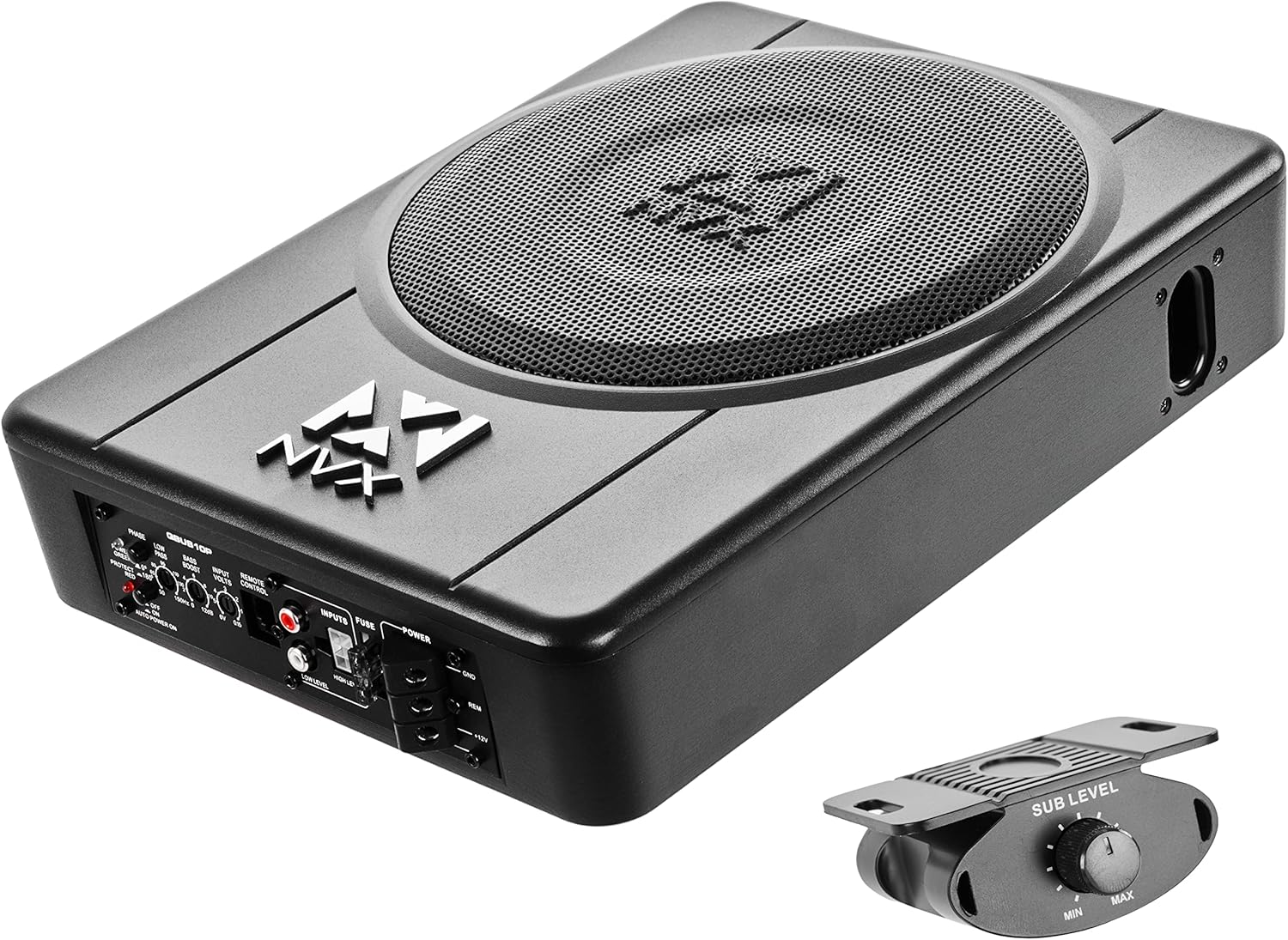
Figure 1.1: NVX QBUS10P Amplified Under Seat Subwoofer System with included remote bass knob.
2. סעטאַפּ און ייַנמאָנטירונג
2.1 פּעקל אינהאַלט
איידער איר הייבט אן די אינסטאַלאַציע, זיכערט זיך אז אלע קאָמפּאָנענטן זענען פאַראַן:
- NVX QBUS10P Ampליפיעד סובוואָאָפער
- Remote Bass Knob with Cable
- הויך-מדרגה אַרייַנשרייַב כאַרנאַס
- Mounting Hardware (brackets, screws)
- באַניצער מאַנואַל

Figure 2.1: Included accessories for the NVX QBUS10P, including mounting hardware and high-level input harness.
2.2 וויירינג קאַנעקשאַנז
Proper wiring is crucial for optimal performance and safety. Refer to the subwoofer's rear panel for connection points.
- מאַכט (+12V): Connect to the positive terminal of your vehicle's battery. An in-line fuse (not included, but highly recommended within 12 inches of the battery) should be used for protection. The subwoofer has a built-in 15A fuse.
- ערד (GND): Connect to a clean, unpainted metal surface on the vehicle's chassis. Ensure a solid connection for proper grounding.
- ווייטער-אינסטאלירן (REM): This terminal is optional. The QBUS10P features an automatic turn-on circuit that senses audio input (either high-level or low-level RCA) and powers on the subwoofer. If using this feature, the REM terminal does not need to be connected. If your head unit provides a dedicated remote turn-on output, you may connect it here and disable the auto-turn-on feature via the switch on the unit.
- Input (Low-Level RCA): For head units with RCA pre-outs, connect RCA cables from the head unit's subwoofer output to the QBUS10P's Low-Level inputs.
- Input (High-Level): For factory or aftermarket head units without RCA pre-outs, use the included high-level input harness. Connect the speaker wires from your head unit's speaker outputs to the corresponding wires on the harness, then plug the harness into the High-Level input port.

Figure 2.2: Rear panel of the NVX QBUS10P, showing power, input, and control connections.
2.3 מאָונטינג אָרט
The compact design of the QBUS10P allows for versatile mounting options, typically under a seat or in other confined spaces.
- Under Seat Mount: This is the primary intended mounting type, utilizing the available space beneath car seats. Ensure adequate clearance for air circulation and cable routing.
- זיכער מאָונטינג: Use the provided mounting brackets and screws to firmly secure the subwoofer to the vehicle's floor or a stable surface. This prevents movement and enhances bass performance.
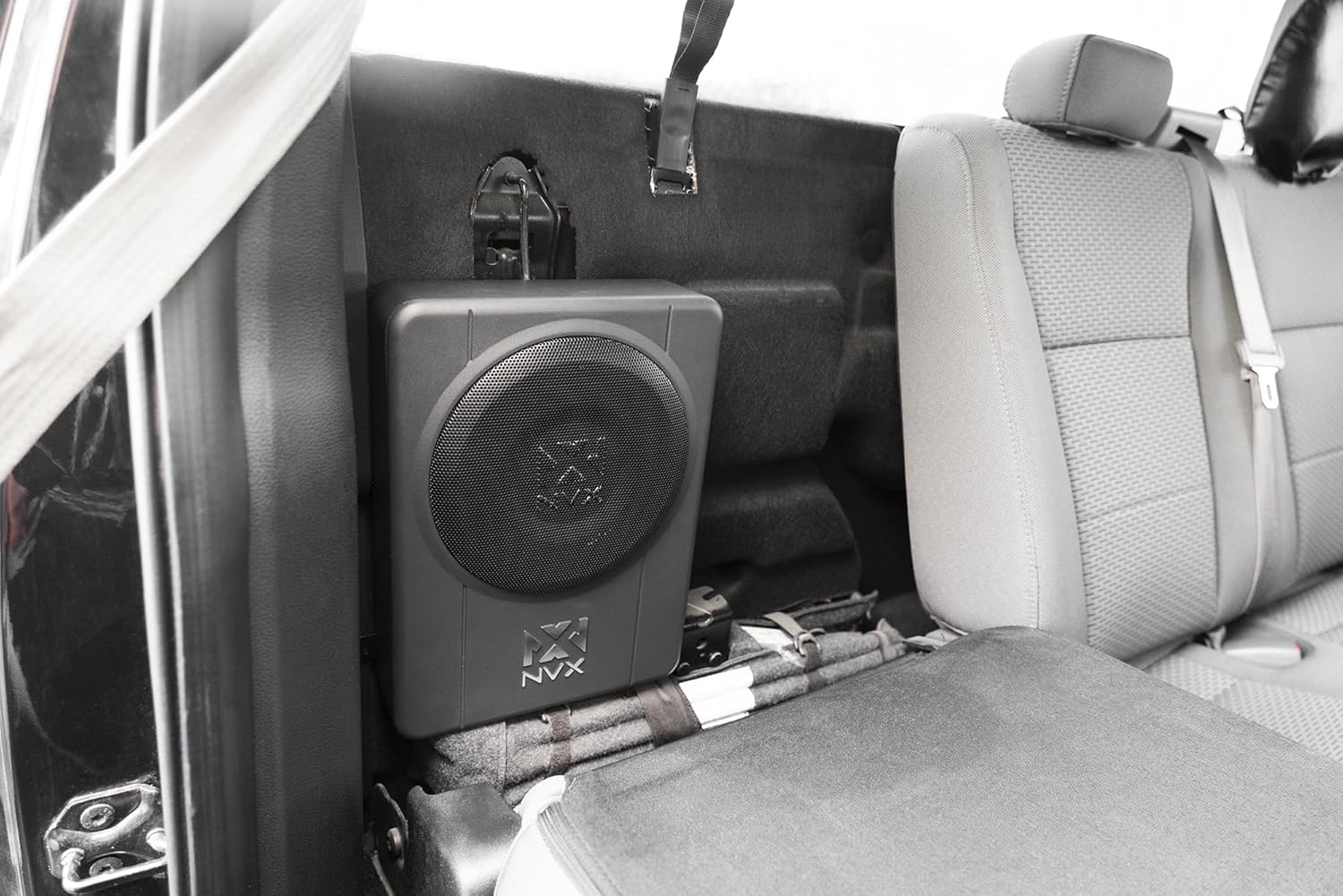
פיגורע 2.3: עקסample of the NVX QBUS10P subwoofer installed discreetly under a car seat.

Figure 2.4: The NVX QBUS10P features a durable enclosure with the NVX logo.
3. Operating Controls and Adjustments
The QBUS10P offers several controls on its rear panel to fine-tune audio output:
- פאַזע סוויטש (0°/180°): Adjusts the phase of the subwoofer's output relative to the main speakers. Experiment with both settings to find the one that provides the most cohesive and impactful bass.
- Low-Pass Filter (LPF) (50Hz-150Hz): Controls the upper frequency limit of the subwoofer. Set this to blend smoothly with your main speakers, typically between 80Hz and 120Hz.
- Bass Boost (0dB-12dB): Increases the output at a specific low frequency. Use sparingly to avoid distortion.
- Input Volts (0.15V-6V): שוועבעלעך די רעזולטאַט וואָלtage of your head unit's RCA pre-outs or speaker-level outputs to the subwoofer's input sensitivity. Adjust this for optimal signal level without distortion.
- Auto Power On Switch: Toggles the automatic turn-on feature. Set to 'ON' if using high-level or low-level inputs without a remote turn-on wire. Set to 'OFF' if using a dedicated remote turn-on wire.
3.1 Remote Bass Knob
The included remote bass knob provides convenient control over the subwoofer's output level from the driver's seat. Connect it to the 'REMOTE CONTROL' port on the subwoofer's rear panel.

Figure 3.1: The remote bass knob allows for convenient adjustment of subwoofer output level.
4. וישאַלט
To ensure the longevity and optimal performance of your NVX QBUS10P subwoofer, follow these general maintenance guidelines:
- רייניקונג: Use a soft, dry cloth to wipe down the exterior of the subwoofer. Avoid using harsh chemicals or abrasive cleaners.
- ווענטילאַטיאָן: Ensure the subwoofer's vents are not obstructed to allow for proper heat dissipation.
- קשר טשעקס: Periodically inspect all wiring connections (power, ground, inputs) to ensure they are secure and free from corrosion.
5. טראָובלעשאָאָטינג
If you experience issues with your QBUS10P subwoofer, consult the following table:
| פּראָבלעם | מעגלעך סיבה | לייזונג |
|---|---|---|
| קיין מאַכט (מאַכט LED אויסגעלאָשן) | Blown fuse; Loose power/ground connection; No remote turn-on signal (if auto-on is off) | Check and replace 15A fuse; Verify all power and ground connections; Ensure auto-on is enabled or remote wire is connected and receiving signal. |
| קיין קלאַנג (מאַכט LED אָן) | Input signal issue; Gain/Input Volts set too low; Low-Pass Filter set too low; Phase incorrect | Check RCA/High-Level input connections; Adjust Gain/Input Volts; Adjust LPF; Experiment with Phase switch. |
| פאַרקרימט סאָונד | Gain/Input Volts set too high; Bass Boost too high; Poor input signal quality | Reduce Gain/Input Volts; Lower Bass Boost; Check head unit settings and input signal quality. |
| Subwoofer Overheating (Protect LED On) | Insufficient ventilation; Impedance mismatch; Prolonged high-volume use | Ensure proper airflow around the unit; Verify speaker impedance (4 Ohm); Reduce volume or allow unit to cool down. |
6. ספּעסאַפאַקיישאַנז
Detailed technical specifications for the NVX QBUS10P:
| שטריך | באַשרייַבונג |
|---|---|
| מאָדעל נאָמען | QBUS10P |
| רעדנער טיפּ | סובוואָאָפער |
| סובוואָאָפער דיאַמעטער | 10 אינטשעס |
| רעדנער מאַקסימום רעזולטאַט מאַכט | 500 וואטס (פּיקס) |
| RMS מאַכט | 200 וואטס |
| מאַונטינג טיפּ | Under Seat Mount |
| פּראָדוקט דימענשאַנז (ד רענטגענ וו רענטגענ ה) | 13.6"ד רענטגענ 10.3"וו רענטגענ 3.2"ה |
| פּונקט וואָג | 11.14 פונט |
| קאַנעקטיוויטי טעכנאָלאָגיע | RCA, High-level (Speaker-level) |
| קאָנטראָללער טיפּ | ווייַט קאָנטראָל |
| אַודיאָ רעזולטאַט מאָדע | סטערעאָ |
| אַרייַנשרייַב וואָלtage | 6 Volts (for RCA input sensitivity) |
| אַרייַנגערעכנט קאַמפּאָונאַנץ | 1 x Speaker (Subwoofer Unit) |
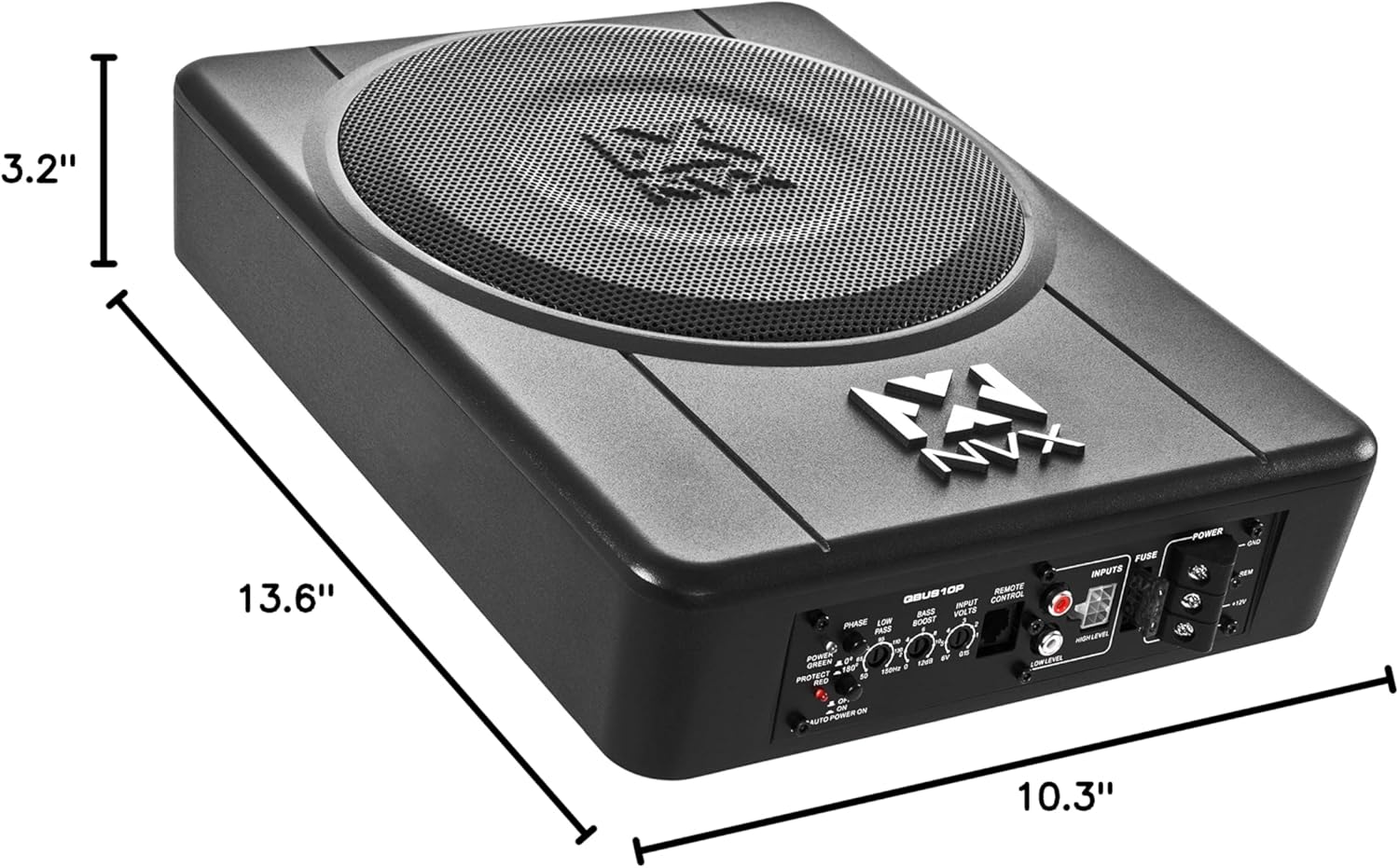
Figure 6.1: Dimensions of the NVX QBUS10P subwoofer for installation planning.
7. וואָראַנטי און שטיצן
The NVX QBUS10P comes with a limited warranty. For detailed warranty information, product support, or to contact customer service, please visit the official NVX store or contact their support channels.
NVX Official Store: https://www.amazon.com/stores/NVX/page/61287025-4741-48F6-876D-1B3C570566E5