
1. הקדמה
This manual provides comprehensive instructions for the setup, operation, and maintenance of your Mitzu MRC-UNI13 Universal Remote Control. Please read this manual carefully before using the device to ensure proper functionality and to maximize its lifespan.
2. פּראָדוקט איבערview
The Mitzu MRC-UNI13 is a universal remote control designed for Smart TVs and Slim Screens. It features a lightweight and ergonomic design, providing a practical solution for controlling multiple television brands.
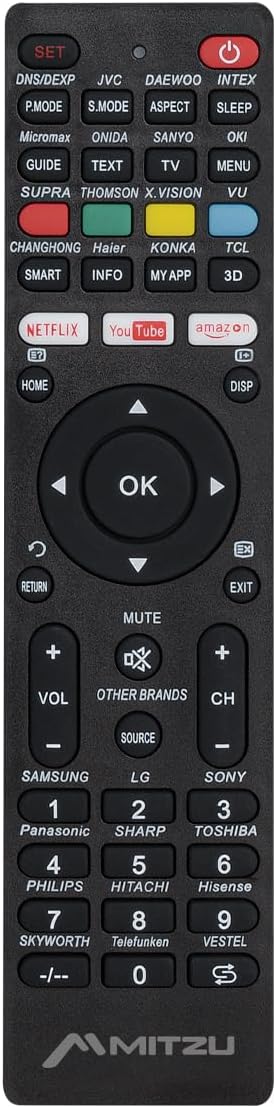
בילד 2.1: פראָנט view of the Mitzu MRC-UNI13 Universal Remote Control, showing all buttons and layout.

בילד 2.2: אַנגגאַלד view of the Mitzu MRC-UNI13 Universal Remote Control, highlighting its slim profile.

בילד 2.3: Mitzu MRC-UNI13 Universal Remote Control with approximate dimensions: 17.7 cm length, 4.5 cm width, and 2 cm thickness.
3. סעטאַפּ
3.1. באַטאַרייע ייַנמאָנטירונג
The Mitzu MRC-UNI13 remote control requires two AAA batteries (not included) for operation. Follow these steps to install the batteries:
- געפֿינען די דעקן פון די באַטאַרייע אָפּטייל אויף די צוריק פון די ווייַט קאָנטראָל.
- שלעפּט דעם דעקל אַראָפּ אָדער דריק דעם לאַטש צו עס עפֿענען.
- אַרײַנשטעלן צוויי AAA באַטעריעס, און זיכער מאַכן אַז די פּאָזיטיוו (+) און נעגאַטיוו (-) טערמינאַלן זענען ריכטיק אויסגעשטעלט מיט די מאַרקירונגען אינעווייניק אין דעם אָפּטייל.
- לייגט צוריק דעם דעקל פונעם באַטעריע־אָפּטייל דורך עס צוריקצורוקן אין פּלאַץ ביז עס קליקט זיכער.
באַמערקונג: ניצט שטענדיק נייע באַטעריעס און טוישט ביידע באַטעריעס אין דער זעלבער צייט. מישט נישט אַלטע און נייע באַטעריעס אדער פאַרשידענע טייפּס באַטעריעס.
3.2. פּראָגראַממינג די רימאָוט קאָנטראָל
The MRC-UNI13 is a universal remote control that needs to be programmed to operate your specific television. The programming method typically involves entering a code or using an auto-search function. Refer to the included code list (if provided with the physical product) for your TV brand. If no code list is available, or if the codes do not work, use the auto-search method.
3.2.1. Code Entry Method (Exampל)
- Turn on the TV you wish to control manually.
- דריקן און האַלטן די שטעלן button on the remote until the indicator light (usually red) illuminates.
- Enter the 3-digit code for your TV brand using the numeric keypad. (e.g., for Samsung, LG, Sony, Panasonic, Sharp, Toshiba, Philips, Hitachi, Hisense, Skyworth, Telefunken, Vestel, etc., as indicated on the remote).
- If the code is correct, the indicator light will turn off. Test the remote by pressing the מאַכט button. If the TV turns off, the remote is programmed.
- If the TV does not respond, repeat the process with the next code listed for your brand.
3.2.2. Auto-Search Method (Exampל)
- Turn on the TV you wish to control manually.
- פונט די ווייַט קאָנטראָל צו די טעלעוויזיע.
- דריקן און האַלטן די שטעלן קנעפּל און די מאַכט button simultaneously until the indicator light illuminates.
- Release both buttons. The indicator light will flash.
- קעסיידער דריקן די VOL+ קנעפּל (אָדער CH+) repeatedly until the TV volume changes or the channel changes. This indicates the remote has found a compatible code.
- Once the TV responds, immediately press the שטעלן קנעפּל צו ראַטעווען דעם קאָד. די אינדיקאַטאָר ליכט וועט זיך אויסלעשן.
- Test all functions of the remote. If some functions do not work, you may need to repeat the auto-search process to find a more compatible code.
באַמערקונג: The exact programming steps may vary slightly. If these methods do not work, consult the specific instructions that came with your physical remote or visit the Mitzu support website for detailed programming guides.
4. אַפּערייטינג ינסטרוקטיאָנס
Once programmed, the Mitzu MRC-UNI13 remote control functions similarly to your original TV remote. Below is a general guide to its main functions:
- POWER (רויט קנעפּל): טורנס די טעלעוויזיע אויף אָדער אַוועק.
- שטעלן: Used for programming the remote.
- DNS/DEXP, JVC, DAEWOO, INTEX, etc. (Brand Buttons): Specific buttons for direct brand code entry or selection.
- P.MODE, S.MODE, ASPECT, SLEEP: Picture mode, Sound mode, Aspect ratio, Sleep timer functions.
- GUIDE, TEXT, TV, MENU, VU: Electronic Program Guide, Teletext, TV/AV input, Menu, Volume Up/Down (likely a typo on the remote, VU usually means Volume Up).
- SMART, INFO, MY APP, 3D: Smart TV functions, Information display, Custom app access, 3D mode.
- NETFLIX, YouTube, Amazon: Direct access buttons for streaming services.
- HOME, DISP: Home menu, Display information.
- נאַוויגאַציע פּאַד (אַרויף, אַראָפּ, לינקס, רעכטס, גוט): נאַוויגירט מעניוז און באַשטעטיקט סעלעקשאַנז.
- RETURN, EXIT: Go back to the previous screen or exit a menu.
- שטיל: שטומט אדער אנשטומט דעם טעלעוויזיע קלאַנג.
- VOL+ / VOL-: אַדזשאַסטיד די באַנד אַרויף אָדער אַראָפּ.
- CH+ / CH-: ענדערונגען דעם קאַנאַל אַרויף אָדער אַראָפּ.
- מקור: אויסקלייבט אריינגאנג קוועלער (HDMI, AV, אאז"וו).
- נומעריק קיפּאַד (0-9): דירעקט קאַנאַל פּאָזיציע.
- -/--: For two-digit channel entry.
באַמערקונג: The functionality of some buttons may depend on the specific TV model and brand you are controlling. Not all buttons may be supported by all TVs.
5. וישאַלט
To ensure the longevity and optimal performance of your Mitzu MRC-UNI13 Universal Remote Control, follow these maintenance guidelines:
- רייניקונג: ניצט אַ ווייכע, טרוקענע שטאָף צו רייניקן די ווײַטקאָנטראָל. פֿאַר שווערע שמוץ, אַ ביסל טרוקענעםampen the cloth with water or a mild cleaning solution. Do not use abrasive cleaners, alcohol, or solvents.
- באַטערי זאָרגן:
- אַרויסנעמען די באַטעריעס אויב דער ווײַטקאָנטראָל וועט נישט ווערן גענוצט פֿאַר אַ לענגערע צײַט כּדי צו פֿאַרמײַדן ליקאַדזש.
- If battery leakage occurs, clean the compartment thoroughly before inserting new batteries.
- פּאָטער פון געוויינט באַטעריז לויט די היגע רעגיאַליישאַנז.
- סטאָרידזש: Store the remote control in a cool, dry place, away from direct sunlight, extreme temperatures, and high humidity.
- האַנדלינג: פֿאַרמײַדט צו לאָזן פאַלן די ווײַטקאָנטראָל אָדער אויסשטעלן עס צו שטאַרקע קלאַפּן, ווײַל דאָס קען שעדיקן אינעווייניקסטע קאָמפּאָנענטן.
6. טראָובלעשאָאָטינג
If you encounter issues with your Mitzu MRC-UNI13 Universal Remote Control, refer to the following troubleshooting tips:
- Remote is not working at all:
- קאָנטראָלירט צי די באַטעריעס זענען ריכטיק אַרײַנגעשטעלט מיט דער ריכטיקער פּאָלאַריטעט (+/-).
- פאַרבייַטן אַלט באַטעריז מיט נייַע.
- Ensure there is a clear line of sight between the remote and the TV's infrared sensor.
- Remote controls some functions but not others:
- The current code may not be fully compatible with your TV model. Try reprogramming the remote using a different code for your TV brand or using the auto-search method again.
- Some advanced functions (e.g., specific Smart TV features) may not be supported by universal remotes.
- Indicator light does not illuminate during programming:
- זייט זיכער אז איר דריקט און האלט די שטעלן button for the required duration.
- קוק אָדער פאַרבייַטן באַטעריז.
- TV does not respond during auto-search:
- Ensure the TV is turned on manually before starting the auto-search.
- זייט זיכער אז איר ריכטעט די ווײַטקאָנטראָל גלייך אויפן טעלעוויזיע.
- דרוק די VOL+ or CH+ button repeatedly and quickly enough to cycle through codes.
If the problem persists after trying these steps, contact Mitzu customer support for further assistance.
7. ספּעסאַפאַקיישאַנז
| שטריך | דעטאַל |
|---|---|
| סאָרט | מיטזו |
| מאָדעל | MRC-UNI13 |
| קאַמפּאַטאַבאַל דעוויסעס | Televisions (Smart TVs, Slim Screens) |
| ספּעציעלע פֿעיִקייטן | Lightweight, Universal Compatibility (up to 10 devices, though typically programmed for one TV at a time) |
| קאַנעקטיוויטי טעכנאָלאָגיע | ינפרערעד (IR) |
| מאַכט מקור | 2 X AAA באַטעריז (ניט אַרייַנגערעכנט) |
| דימענסיעס (בעערעך) | 22.2 x 8.8 x 2.8 cm (Package); Remote: ~17.7 x 4.5 x 2 cm |
| וואָג (בעערעך) | 70 ג (פּאַקעט) |
8. וואָראַנטי און שטיצן
8.1. וואָראַנטי אינפֿאָרמאַציע
Mitzu products are designed for quality and reliability. For specific warranty terms and conditions, please refer to the warranty card included with your purchase or visit the official Mitzu webזייטל. האַלט דיין קויפן באַווייַז פֿאַר וואָראַנטי קליימז.
8.2. קונה שטיצן
For technical assistance, programming codes, or any other inquiries regarding your Mitzu MRC-UNI13 Universal Remote Control, please contact Mitzu customer support. Contact details can typically be found on the Mitzu official webוועבזייטל אדער אויף דער פּראָדוקט פּאַקאַדזשינג.
איר קענט אויך באַזוכן די יו Mitzu Brand Store on Amazon פֿאַר מער פּראָדוקט אינפֿאָרמאַציע.