
הקדמה
Thank you for choosing the PHEANOO D6 Sound Bar System. This 2.1 channel soundbar with a dedicated wired subwoofer is designed to enhance your audio experience, providing clear dialogue, powerful bass, and immersive sound for your home entertainment. This manual provides detailed instructions for setup, operation, maintenance, and troubleshooting to ensure optimal performance and longevity of your device.
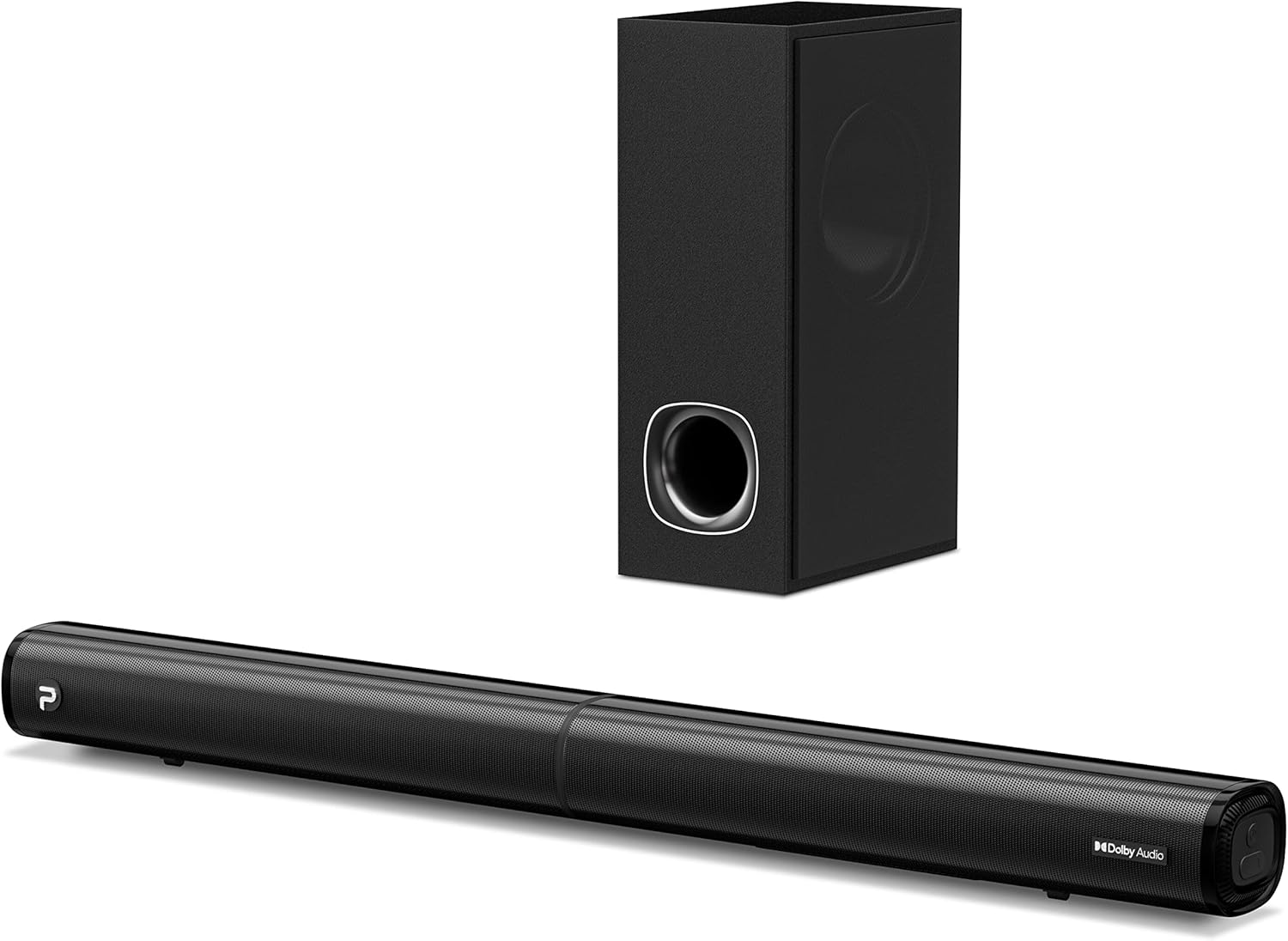
Image: The PHEANOO D6 Sound Bar and its accompanying wired subwoofer, showcasinזייער גלאַט שוואַרץ דיזיין.
וואָס איז אין די קעסטל
ביטע קאָנטראָלירט די אינהאַלט פון דעם פּעקל קערפֿול. אויב עס פֿעלן אָדער זענען געשעדיגט, קאָנטאַקטירט קונה שטיצע.
- Soundbar and Wired Subwoofer
- הדמי קאַבלע
- רקאַ אַודיאָ קאַבלע
- Wall Mount Kit (screws and anchors)
- רימאָוט קאָנטראָל (באַטעריז ניט אַרייַנגערעכנט)
- מאַכט אַדאַפּטער

Image: All components included in the PHEANOO D6 Sound Bar package, laid out for clear identification, including the soundbar, subwoofer, cables, remote, and wall mount kit.
סעטאַפּ
1. Assembling the Soundbar (Detachable Design)
The PHEANOO D6 soundbar features a unique detachable design for flexible placement. Follow these steps to assemble it:
- Align the audio connector from one half of the soundbar with the corresponding port on the other half.
- Gently push the two halves together until they click into place.
- Twist the two halves to secure the connection, ensuring the soundbar is firmly assembled.

Image: A three-step visual guide demonstrating how to connect the two halves of the detachable soundbar, ensuring proper alignment and secure locking.
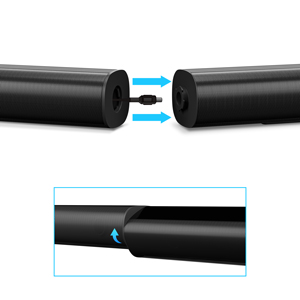
בילד: א נאָענטע בילד view of the soundbar's detachable connection point, showing the male and female connectors.
2. קאַנעקטינג די סובוואָאָפער
Connect the wired subwoofer to the soundbar using the dedicated subwoofer cable. Ensure the connection is secure.
3. פּלייסמאַנט אָפּציעס
You can place the soundbar on a tabletop or mount it on a wall.
- טאַבלעטאָפּ אָרט: Place the soundbar directly in front of your TV, ensuring it does not obstruct the TV's remote sensor.
- וואַנט מאָונטינג: Use the included wall mount kit. It is recommended to measure and mark the drilling points accurately, rather than relying solely on the paper stencil, to ensure a level installation.
4. אַודיאָ קאַנעקשאַנז
The PHEANOO D6 offers multiple connectivity options. Choose the best one for your device:
- הדמי (קרייַזבויגן): For the best audio quality and control, connect an HDMI cable from the soundbar's HDMI (ARC) port to your TV's HDMI (ARC) port. This allows your TV remote to control the soundbar's volume.
- אָפּטיש: Connect an optical cable from the soundbar's Optical port to your TV's Optical Digital Audio Out port.
- AUX: Use the 3.5mm AUX cable to connect to devices with a 3.5mm audio output.
- בלועטאָאָטה 5.0: For wireless connection, pair your device via Bluetooth.

Image: The rear panel of the PHEANOO D6 Sound Bar, highlighting the HDMI (ARC), Bluetooth, Optical, and AUX input ports with corresponding icons.

בילד: א דעטאַלירטע view of the soundbar's input panel, showing the AUX, Optical, and HDMI (ARC) ports clearly labeled.
5. מאַכט קאַנעקשאַן
Connect the power adapter to the soundbar and then plug it into a wall outlet.
אַפּערייטינג ינסטראַקשאַנז
ווייַט קאָנטראָל
The included remote control allows you to manage all functions of the soundbar. Insert two AAA batteries (not included) into the remote before use.

Image: The remote control for the PHEANOO D6 Sound Bar, showing its buttons and an indicator light.
מאַכט אויף / אַוועק
Press the power button on the remote or the soundbar to turn the unit on or off.
אַרייַנשרייַב סעלעקציע
Press the "Input" button on the remote to cycle through available input sources: HDMI (ARC), Optical, AUX, and Bluetooth.
בלועטאָאָטה פּערינג
צו פאַרבינדן אַ בלועטאָאָטה מיטל:
- Select Bluetooth input on the soundbar. The indicator light will flash.
- Enable Bluetooth on your device (smartphone, tablet, etc.) and search for "PHEANOO D6".
- Select the soundbar from the list to pair. Once connected, the indicator light will be solid.

Image: A smartphone displaying a music app, wirelessly connected to the PHEANOO D6 Sound Bar via Bluetooth, indicated by a Wi-Fi like symbol.
געזונט מאָדעס
די סאָונדבאַר אָפפערט פֿאַרשידענע סאָונד מאָדעס צו אָפּטימיזירן דיין הערן דערפאַרונג:
- דיאַלאָג מאָדע: Enhances vocal clarity, making speech easier to understand.
- מוזיק מאָדע: אָפּטימיזירט פֿאַר מוזיק ווידערשפּיל, פּראַוויידינג באַלאַנסט אַודיאָ.
- פֿילם מאָדע: Delivers an immersive cinematic experience with enhanced effects.
- 3D מאָדע: Creates a wider, more enveloping soundstage.

Image: Icons representing different sound modes: Dialogue, Music, Movie, and 3D, indicating the soundbar's versatility.
באַס אַדזשאַסטמאַנט
Use the dedicated bass control buttons on the remote to increase or decrease the subwoofer's output level to your preference.

Image: A close-up of the subwoofer, with a visual effect suggesting powerful bass emanating from it.
Dolby Digital Support
The PHEANOO D6 Sound Bar supports Dolby Digital decoding, providing a rich and dynamic audio experience for compatible content.

Image: A living room setup with the soundbar and TV, overlaid with a grid pattern indicating premium 3D surround sound powered by Dolby Audio.

Image: The Dolby Audio logo accompanied by visual representations of sound waves, emphasizing the enhanced audio quality.
ראָקו טעלעוויזיע גרייט
This soundbar is certified to work seamlessly with your Roku TV. Enjoy smooth setup, easy access to sound settings, and compatibility with any Roku TV remote.

Image: A television screen displaying the "Roku TV Ready" setup interface, with the PHEANOO Soundbar and subwoofer positioned below it, illustrating seamless integration.
וישאַלט
- רייניקונג: ניצט אַ ווייכע, טרוקענע שטאָף צו רייניקן די ייבערפלאַכן פון די סאַונדבאַר און סאַבוווּפער. ניצט נישט פליסיקע רייניגער אָדער אַעראָזאָלן.
- ווענטילאַטיאָן: זאָרגט פֿאַר געהעריקע ווענטילאַציע אַרום דעם סאַונדבאַר און סאַבוווּפער צו פֿאַרמייַדן איבערהיצונג. בלאָקירט נישט קיין ווענטילאַציע עפענונגען.
- סטאָרידזש: אויב איר לייגט דאָס אַפּאַראַט אַוועק פֿאַר אַ לענגערע צייט, זאָלט איר עס אָפּשטעקן פֿון עלעקטריציטעט און עס אַוועקלייגן אין אַ קילן, טרוקענעם אָרט.
טראָובלעשאָאָטינג
| פּראָבלעם | מעגלעך סיבה | לייזונג |
|---|---|---|
| קיין מאַכט | שטראָם קאַבל נישט פארבונדן; שטראָם אַוטלעט אַרבעט נישט. | זיכער מאַכן אַז דער עלעקטרישער קאַבל איז זיכער פֿאַרבונדן. פּרוּווט אַן אַנדער עלעקטרישער אַוטלעט. |
| קיין געזונט | אומרעכטע איינגאבע אויסגעקליבן; וואליום צו נידעריג; קאבלען נישט ריכטיג פארבונדן. | Select the correct input source. Increase volume. Check all audio cable connections. |
| בלועטאָאָטה פּערינג ניט אַנדערש | סאַונדבאַר נישט אין פּערינג מאָדע; דעווייס צו ווייט; שטערונג. | Ensure soundbar is in Bluetooth input and indicator is flashing. Move device closer. Turn off other Bluetooth devices. |
| נעבעך געזונט קוואַליטעט | Incorrect sound mode; Source audio quality is low. | Try different sound modes (Music, Movie, Dialogue). Ensure the audio source is high quality. |
| ווייַט קאָנטראָל נישט ארבעטן | Batteries dead or incorrectly inserted; Obstruction between remote and soundbar. | טוישט די באַטעריעס, זיכער מאַכנדיק די ריכטיקע פּאָלאַריטעט. אַראָפּנעמען אַלע שטערונגען. |
For more detailed troubleshooting, refer to the official Troubleshooting Guide PDF available on the product page or contact PHEANOO customer support.
ספּעסאַפאַקיישאַנז
| שטריך | דעטאַל |
|---|---|
| מאָדעל | D6 |
| סאָרט | PHEANOO |
| רעדנער טיפּ | סאָונדבאַר מיט ווייערד סובוואָאָפער |
| קאַנאַל קאַנפיגיעריישאַן | 2.1 CH |
| קאַנעקטיוויטי טעכנאָלאָגיע | HDMI (ARC), Bluetooth 5.0, Optical, AUX |
| בלועטאָאָטה קייט | Up to 100 Meters (approx. 328 feet) |
| רעדנער מאַקסימום רעזולטאַט מאַכט | 240 וואטס |
| פּראָדוקט דימענסיעס (סאַונדבאַר) | 29.5" ברייט x 2.4" הויך x 2.8" טיף |
| פּונקט וואָג | 11.57 פונט |
| קאָנטראָללער טיפּ | ווייַט קאָנטראָל |
| ספּעציעלע פֿעיִקייטן | Dolby Digital Decoding, Dialogue Enhancement, Bass Adjustable, Detachable Design, Roku TV Ready |
וואָראַנטי און שטיצן
The PHEANOO D6 Sound Bar System comes with a לימיטעד וואָראַנטיביטע זעט די וואָראַנטי קאַרטל וואָס איז אַרייַנגערעכנט אין אייער פּאַקעט פֿאַר ספּעציפֿישע תּנאים און באַדינגונגען.
For technical support, warranty claims, or further assistance, please visit the official PHEANOO website or contact their customer service department. You can also find additional resources like the באַניצער גייד (PDF) און פראבלעם-פארלעשונג אנווייזונג (PDF) אָנליין.