
הקדמה
This manual provides essential instructions for the proper setup, operation, and maintenance of your ISLANDSAFE Digital Small Personal Safe, Model QT. Please read this manual thoroughly before using the safe to ensure correct functionality and security.
זיכערקייַט אינפֿאָרמאַציע
- Keep emergency keys in a secure location away from the safe and out of reach of children. Do not store them inside the safe.
- Ensure the safe is placed on a stable, level surface or securely mounted to a wall or cabinet.
- Do not attempt to force the safe open if the electronic lock malfunctions. Use the emergency override methods.
- טוישט באַלד די באַטעריעס ווען דער אינדיקאַטאָר פֿאַר נידעריקע באַטעריע דערשיינט, כּדי צו פֿאַרמייַדן אַז מען זאָל זיי פֿאַרשפּאַרט ווערן.
- This safe is water-resistant, not waterproof. Avoid exposing it to excessive moisture or direct water contact.
פּעקל אינהאַלט
- ISLANDSAFE Digital Personal Safe (Model QT)
- Emergency Override Keys (2)
- עמערגענסי באַטערי באָקס
- Removable Shelf (1)
- Mounting Hardware (Expansion Screws)
- ינסטראַקשאַנז מאַנואַל
פּראָדוקט איבערview
The ISLANDSAFE Digital Personal Safe is designed to secure your valuables with an electronic combination lock and robust construction. It features a matte finish alloy steel body, dual solid steel bolts, and a pry-resistant door for enhanced security. The interior includes a soft lining and a removable shelf for organized storage.

Image: The ISLANDSAFE Digital Safe with its door open, revealing a spacious interior with a removable shelf, storing various items such as a camera, lens, and small containers.
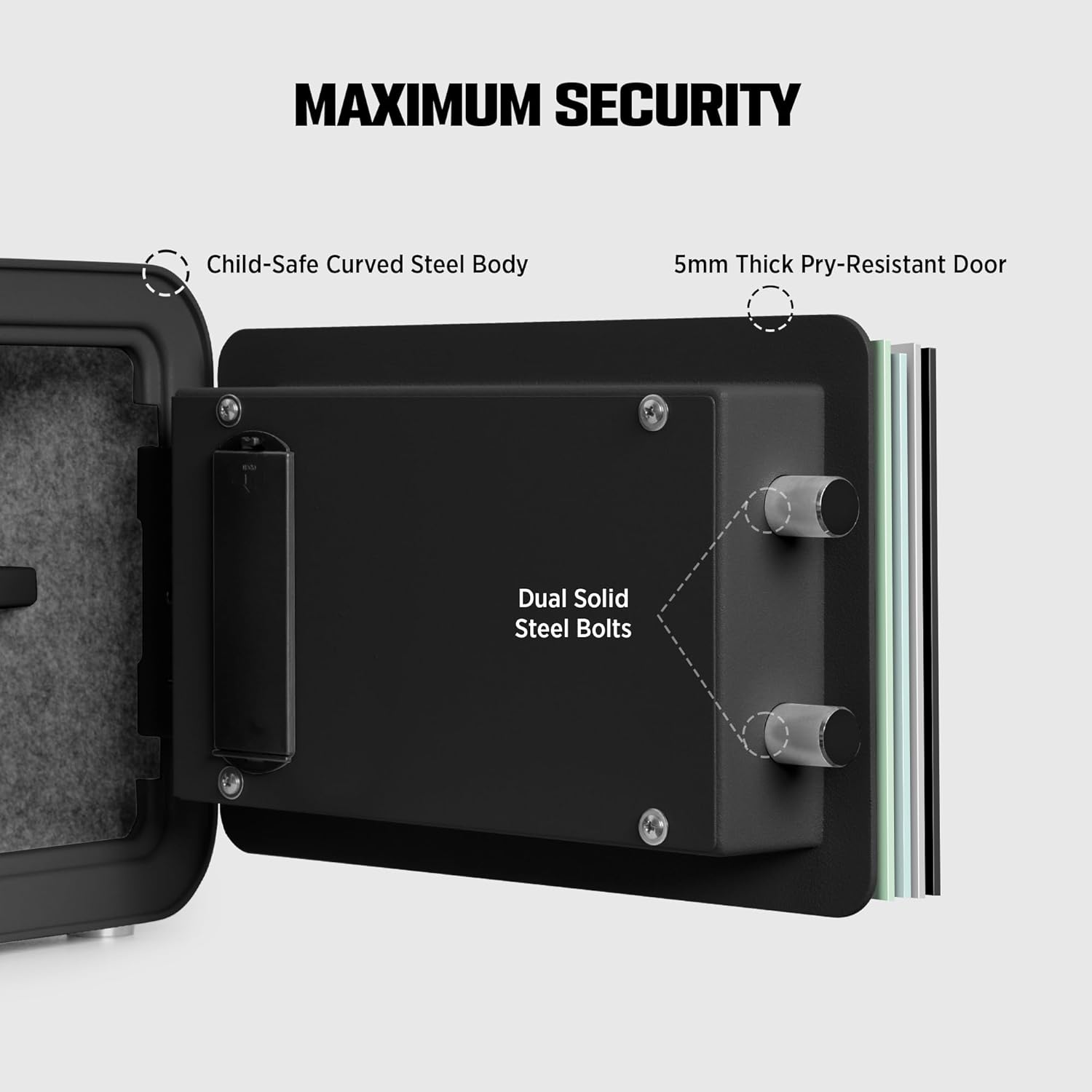
בילד: א דעטאַלירטע view of the safe's door mechanism, illustrating the 5mm thick pry-resistant door and dual solid steel locking bolts for maximum security.

בילד: נאָענט-אַרויף viewס ווייַזןasing the safe's design elements: streamlined curved edges, soft interior lining, a built-in LED light for visibility, and protective floor pads.
סעטאַפּ
1. ינסטאָלינג באַטעריז
- געפינט די באַטעריע אָפּטייל אויף דער אינעווייניק פון דער זיכער טיר.
- Insert 4 AA Alkaline batteries (not included) according to the polarity markings.
- נאָענט די דעקן פון די באַטאַרייע אָפּטייל.
2. Initial Passcode Setting
The safe comes with a factory default passcode (usually 1-2-3-4 or 0-0-0-0). It is crucial to change this immediately.
- With the safe door open, press the red reset button located on the inside of the door near the hinge. You will hear a beep.
- On the keypad, enter your desired 3-8 digit passcode.
- Press the '#' button to confirm. The safe will beep, indicating the new passcode is set.
- פּרובירט דעם נייעם פּאַראָל מיטן טיר אָפֿן איידער איר עס פֿאַרמאַכט.
3. אויפשטעלן דעם זיכערן
The safe has pre-drilled mounting holes on the back for secure installation.
- Choose a suitable location on a wall or inside a cabinet.
- Mark the drilling points through the pre-drilled holes on the safe's back.
- Drill pilot holes in the marked locations.
- Align the safe with the drilled holes and secure it using the provided expansion screws.
Operating the Safe

Image: Visual guide to the three secure access modes: Keypad Entry, Override Key, and Emergency Power, with step-by-step instructions for each.
1. קלאַוויאַטור אַרייַנטרעטן
- Enter your personal passcode (3-8 digits).
- Press the '#' button. The green light will illuminate.
- אינערהאלב 5 סעקונדעס, דרייט דעם קנעפּל זייגערווייז צו עפענען די זיכערע טיר.
2. Override Key Access
Use this method if you forget your passcode or if the batteries are completely drained.
- Remove the small cover plate on the keypad to reveal the keyhole.
- Insert one of the emergency override keys and turn it counter-clockwise.
- While holding the key in the turned position, turn the main knob clockwise to open the safe door.
- Remove the key once the door is open.
3. Emergency Power Box Usage
This method is for when batteries are dead and emergency keys are not immediately available, or if the keypad is unresponsive due to low power.
- Connect the emergency battery box to the external power port on the keypad.
- Enter your passcode on the keypad.
- Press the '#' button. The green light will illuminate.
- אינערהאלב 5 סעקונדעס, דרייט דעם קנעפּל זייגערווייז צו עפענען די זיכערע טיר.
4. Changing the Passcode
Follow these steps to change your passcode at any time:
- Open the safe door using your current passcode or emergency key.
- Press the red reset button on the inside of the door. You will hear a beep.
- אַרייַן דיין נייַע 3-8 ציפֿערן פּאַראָל אויף די קיפּאַד.
- Press the '#' button to confirm. A beep will indicate successful programming.
- Verify the new passcode with the door open before closing it.
5. שרעק סיסטעם
The ISLANDSAFE Digital Personal Safe is equipped with a dual alarm system to deter unauthorized access.
- Failed Entry Alarm: If an incorrect passcode is entered 3 consecutive times, the safe will activate a 60-second audible alarm.
- Vibration/Attack Alarm: If the safe experiences violent shaking or an attempted attack, a vibration sensor will trigger a 60-second audible alarm.

Image: An illustration detailing the dual alarm system, showing triggers for failed entry and violent impact, leading to a 60-second audible alert.
וישאַלט
1. באַטערי פאַרבייַט
When the low battery indicator light illuminates on the keypad, it is time to replace the batteries. Use 4 new AA Alkaline batteries. Refer to the "Installing Batteries" section under Setup for detailed steps.
2. רייניקונג
To clean the exterior of your safe, use a soft, damp cloth. Avoid abrasive cleaners or solvents that could damage the finish. For the interior, a dry cloth is sufficient. Ensure no moisture enters the electronic components.
טראָובלעשאָאָטינג
| פּראָבלעם | מעגלעך סיבה | לייזונג |
|---|---|---|
| זיכער עפֿנט זיך נישט מיטן פּאַראָל. | Incorrect passcode entered; batteries are low or dead; knob not turned within 5 seconds. | Re-enter passcode carefully. Replace batteries or use emergency power box. Turn knob immediately after green light. |
| די קלאַוויאַטור רעאַגירט נישט. | די באַטעריעס זענען אינגאַנצן טויט. | Use the emergency power box or emergency override key to open the safe and replace batteries. |
| אַן אַלאַרם קלינגט אומגעריכט. | Incorrect passcode entered multiple times; safe was shaken or impacted. | Enter correct passcode to disarm. Avoid moving or impacting the safe while locked. |
| Cannot change passcode. | Reset button not pressed correctly; new passcode not confirmed with '#'. | Ensure the reset button is pressed until a beep is heard. Confirm new passcode by pressing '#'. |
ספּעסאַפאַקיישאַנז

Image: A detailed diagram illustrating the exterior and interior dimensions of the safe, along with other key specifications.
| שטריך | דעטאַל |
|---|---|
| סאָרט | אינזל זיכער |
| מאָדעל נומער | QT |
| אויסערלעכע דימענסיעס (ד x ב x ה) | 11" x 13.7" x 9.8" |
| קאַפּאַציטעט | 0.8 קוביק פֿיס |
| לאַק טיפּ | עלעקטראָניש קאָמבינאַציע לאַק |
| מאַטעריאַל | אַללוי סטיל |
| ספּעציעלע פֿעיִקייטן | Alarm System, Anti-Theft, Portable, Removable Shelf |
| מאַונטינג טיפּ | וואנט בארג |
| פּונקט וואָג | 10 קילאָגראַמס (22 פונט) |
| שרעק טיפּ | ווייבריישאַן |
| וואַסער קעגנשטעל מדרגה | וואַסער קעגנשטעליק |
| באַטעריז פארלאנגט | Yes (4x AA Alkaline, not included) |
וואָראַנטי און שטיצן
ISLANDSAFE is committed to providing quality products and customer satisfaction. For any questions, concerns, or technical assistance regarding your safe, please utilize our 24-hour online customer service. Contact information can typically be found on the product packaging or the official ISLANDSAFE webפּלאַץ.