
1. פּראָדוקט איבערview
The Lexmark MX611DHE is a monochrome laser multifunction device designed for office environments, offering comprehensive capabilities including printing, copying, scanning, and faxing. This robust unit is engineered for high-volume output and efficient document handling.
- מולטיפונקטיאָנאַליטי: Integrates print, copy, fax, and scan functions into a single device.
- הויך-גיכקייַט פאָרשטעלונג: Capable of printing and copying at speeds up to 50 pages per minute (ppm).
- דופּלעקס דרוק: Supports automatic two-sided printing to conserve paper.
- אַרייַנשרייַב קאַפּאַציטעט: Features a standard input capacity of 650 sheets, expandable for larger tasks.
- קאַנעקטיוויטי: Equipped with USB and Ethernet interfaces for versatile network integration.
- ינטויטיווע קאָנטראָל: Features a touchscreen display for easy navigation and operation.
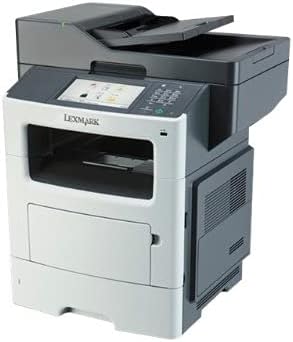
פיגורע 1: פראָנט view of the Lexmark MX611DHE multifunction printer, showcasing its compact design and front-facing paper tray.
2. סעטאַפּ גייד
Follow these steps to set up your Lexmark MX611DHE printer for initial use.
- אויספּאַקן: נעמט פֿאָרזיכטיק אַרויס דעם דרוקער פֿון זײַן פֿאַרפּאַקונג. נעמט אַראָפּ אַלע שוץ־טעיפּס און פֿאַרפּאַקונג־מאַטעריאַלן פֿון דער אויסערלעכער און אינעווייניקסטער זײַט פֿון דעם אַפּאַראַט.
- אָרט: Place the printer on a stable, level surface with adequate ventilation. Ensure there is enough space around the printer for proper operation and maintenance.
- מאַכט קשר: Connect the power cord to the printer's power input and then to a grounded electrical outlet. Do not connect to a surge protector or extension cord initially.
- פּאַפּיר לאָודינג: Open the paper tray and load the appropriate paper size (up to 8.5 x 14 inches). Adjust the paper guides to fit the paper stack snugly.
- נעץ/USB פֿאַרבינדונג:
- For Network (Ethernet): פֿאַרבינדט אַן עטערנעט קאַבל פֿון דעם דרוקער'ס עטערנעט פּאָרט צו אייער נעץ ראַוטער אָדער סוויטש.
- פֿאַר וסב: פֿאַרבינדט אַ USB קאַבל פֿון דעם דרוקער'ס USB פּאָרט צו אייער קאָמפּיוטער.
- ערשט מאַכט אויף: Press the power button to turn on the printer. Follow the on-screen prompts on the touchscreen display to select language, region, and perform initial setup configurations.
- דרייווער ינסטאַלירונג: אינסטאלירט די נויטיגע דרוקער דרייווערס אויף אייער קאמפיוטער. דרייווערס קען מען געווענליך געפינען אויף די לעקסמארק שטיצע וועבזייטל. website or on an included installation CD (if applicable).
3. אַפּערייטינג ינסטרוקטיאָנס
This section provides basic instructions for using the Lexmark MX611DHE's primary functions.
3.1. דרוקן
- זיכער מאַכן אַז דער דרוקער איז אנגעצונדן און פארבונדן צו אייער קאָמפּיוטער אָדער נעץ.
- עפֿנט דאָס דאָקומענט וואָס איר ווילט דרוקן אויף אייער קאָמפּיוטער.
- אויסקלייַבן File > דרוקן (אדער דער עקוויוואַלענטער באַפֿעל אין אייער אַפּליקאַציע).
- Choose "Lexmark MX611DHE" from the list of available printers.
- Adjust print settings such as number of copies, paper size, and duplex options as needed.
- דריקט דרוקן.
3.2. קאַפּיינג
- לייגט דעם דאָקומענט מיטן פּנים אַראָפּ אויף דעם סקענער גלאָז, אָדער מיטן פּנים אַרויף אין דעם אויטאָמאַטישן דאָקומענט־פידער (ADF).
- אויף דעם דרוקער'ס טאָוטשסקרין, סעלעקטירט די קאָפּי פֿונקציע.
- Adjust settings such as number of copies, lightness/darkness, and paper size.
- דרוק די אָנהייב קנעפּל צו אָנהייבן קאַפּיינג.
3.3. סקאַנינג

Figure 2: The Lexmark MX611DHE with its scanner lid open, revealing the flatbed scanner glass and the automatic document feeder mechanism.
- לייגט דעם דאקומענט אויפן סקענער גלאז אדער אין דעם ADF.
- אויף דעם דרוקער'ס טאָוטשסקרין, סעלעקטירט די סקאַן פֿונקציע.
- Choose your desired scan destination (e.g., Scan to Computer, Scan to Email, Scan to Network Folder).
- Configure scan settings such as resolution, color mode, and file פֿאָרמאַט.
- דרוק די אָנהייב קנעפּל צו אָנהייבן דעם סקען.
3.4. פאַקסן
- Ensure the printer is connected to a telephone line.
- לייגט דעם דאקומענט אויפן סקענער גלאז אדער אין דעם ADF.
- אויף דעם דרוקער'ס טאָוטשסקרין, סעלעקטירט די פאַקס פֿונקציע.
- Enter the recipient's fax number using the keypad on the control panel.
- אַדזשאַסטירן אַלע נייטיקע פאַקס סעטטינגס.
- דרוק די אָנהייב קנעפּל צו שיקן די פאַקס.
4. וישאַלט
Regular maintenance ensures optimal performance and extends the lifespan of your Lexmark MX611DHE.
- רייניקונג די יקסטיריער: ניצן אַ ווייך, דamp, lint-free cloth to wipe the exterior surfaces of the printer. Avoid abrasive cleaners.
- רייניקונג פון די סקאַנער גלאָז: For clear scans, regularly clean the scanner glass with a soft, lint-free cloth and a mild glass cleaner.
- Toner Cartridge Replacement: When the toner low message appears, order a new Lexmark toner cartridge. Follow the instructions provided with the new cartridge for proper installation.
- Paper Path Cleaning: If paper jams become frequent, consult the printer's internal guides or the Lexmark support website for instructions on cleaning the paper path rollers.
5. טראָובלעשאָאָטינג
This section addresses common issues you might encounter with your Lexmark MX611DHE.
| פּראָבלעם | מעגלעך סיבה | לייזונג |
|---|---|---|
| דרוקער רעאגירט נישט | שטראָם קאַבל אָפּגעטיילט, נעץ פּראָבלעם, דרייווער פּראָבלעם. | קאָנטראָלירט די מאַכט קאַנעקשאַנז. וועריפיצירט נעץ קאַבל אָדער USB קאַנעקשאַן. ריינסטאַלירט דרוקער דרייווערס. |
| פּאַפּיר קלעם | פאַלש אַריינגעלאָדן פּאַפּיר, פרעמדער אָביעקט אין פּאַפּיר וועג. | Open access covers and carefully remove jammed paper. Ensure paper is loaded correctly. |
| נעבעך דרוק קוואַליטעט | Low toner, dirty print head/rollers, incorrect print settings. | Replace toner cartridge. Clean internal components as per maintenance guide. Adjust print quality settings in driver. |
| סקאַננער נישט ארבעטן | Scanner glass dirty, software issue, connectivity problem. | Clean scanner glass. Restart computer and printer. Check USB/network connection. |
6. ספּעסאַפאַקיישאַנז
Detailed technical specifications for the Lexmark MX611DHE.
| שטריך | דעטאַל |
|---|---|
| סאָרט | לעקסמאַרק |
| מאָדעל נאָמען | MX611DHE |
| ווייַז טיפּ | LCD (Touchscreen) |
| דרוק טעכנאָלאָגיע | לאַזער (מאָנאָכראָם) |
| מאַקסימום דרוק גיכקייט (מאָנאָכראָם) | 50 פּיפּיעם |
| מאַקסימום קאָפּי גיכקייַט (שוואַרץ און ווייַס) | 50 פּיפּיעם |
| האַכלאָטע | 1200 רענטגענ 1200 דפּי |
| זכּרון סטאָרידזש קאַפּאַסיטי | 1024 מב |
| שטיצע פֿאַר בלאַט גרייס | Up to 8.5 x 14 Inches |
| ייַזנוואַרג צובינד | וסב, עטהערנעט |
| פּראָדוקט דימענשאַנז | 22.6 X 23.5 X 26.5 אינטשעס |
| קאָליר | גרוי / ווייַס |
| UPC | 656942073611 |
7. וואָראַנטי און שטיצן
Your Lexmark MX611DHE (Renewed) product is covered by a limited warranty and support resources.
- וואָראַנטי: דער פּראָדוקט קומט מיט אַ 90 טעג לימיטעד וואָראַנטי. Please refer to your purchase documentation for specific terms and conditions of the Amazon Renewed Guarantee.
- טעכניש שטיצן: פֿאַר טעכנישע הילף, דרייווער דאַונלאָודז, אָדער ווייטערדיקע פּראָבלעם לייזונג, ביטע באַזוכט די באַאַמטער לעקסמאַרק שטיצע webפּלאַץ אָדער קאָנטאַקט זייער קונה דינסט.
- אָנליין רעסורסן: Additional user guides, FAQs, and firmware updates may be available on the Lexmark support portal.