
1. הקדמה
The Alonefire SV38 is a powerful 5W 365nm UV LED flashlight designed for various professional and household applications. Its 365nm wavelength, combined with a black filter lens, ensures a pure ultraviolet output, making it effective for tasks such as detecting counterfeit documents, verifying currency, identifying pet urine stains, curing UV resin, and examining fluorescent minerals. This manual provides essential information for the safe and efficient use of your SV38 flashlight.

Figure 1: Alonefire SV38 UV LED Flashlight and USB-C charging cable.
2. זיכערקייַט אינפֿאָרמאַציע
ווארענונג: Ultraviolet (UV) light can be harmful to eyes and skin. Please read and follow all safety precautions.
- אויג שוץ: Always wear UV protective eyewear when operating the flashlight to prevent eye damage. Do not look directly into the UV light source.
- הויט ויסשטעלן: Avoid prolonged exposure of skin to UV light.
- קינדער און פּעץ: Keep the flashlight out of reach of children and pets. Do not shine the light into their eyes.
- היץ: The flashlight may generate heat during extended use. Handle with care.
- באַטערי זיכערקייַט: Use only the specified battery type. Do not attempt to disassemble, short-circuit, or expose the battery to high temperatures.

Figure 2: Components of the SV38 flashlight, including the anodized aluminum alloy shell, power switch/charging indicator, spring contact, and back clip.
3. סעטאַפּ
3.1 באַטאַרייע ייַנמאָנטירונג
- ונסקרעוו די עק היטל פון די פלאַשליגהט.
- Insert the provided 2000mAh Lithium-ion battery with the positive (+) end facing towards the flashlight head (LED).
- שרויף די עק היטל צוריק אויף סיקיורלי.
3.2 ערשט טשאַרדזשינג
Before first use, fully charge the flashlight.
- געפינט דעם USB טיפ-C טשאַרדזשינג פּאָרט אויף דער זייט פון דער פלאַשליכט.
- Connect the provided USB Type-C cable to the flashlight and the other end to a compatible USB power source (e.g., computer, power bank, wall adapter).
- The charging indicator light will illuminate red during charging. It will turn green when fully charged.

Figure 3: Charging indicator status. Red indicates charging or low battery, green indicates fully charged.
4. אָפּעראַציע
4.1 מאַכט אויף / אַוועק
- Press the power button located on the side of the flashlight to turn the UV light ON.
- Press the power button again to turn the UV light OFF.
4.2 Black UV Filter Lens
The SV38 is equipped with a hardened black optical filter lens. This lens is designed to filter out ambient visible light, ensuring that the emitted ultraviolet light is purer and more effective for detection tasks.

Figure 4: The black UV filter lens blocks undesired ambient light, making the UV output purer.
4.3 אַפּפּליקאַטיאָנס
The Alonefire SV38 UV flashlight can be used for various purposes:
- פאַלש דעטעקשאַן: Verify currency, passports, and other official documents with UV security features.
- דיטעקשאַן פון ליבלינג פלעק: Locate invisible pet urine stains on carpets, rugs, and furniture.
- Mineral and Gemstone Inspection: Identify fluorescent minerals and authenticate amber.
- רעזין קיורינג: Accelerate the curing process of UV-sensitive resins.
- ליק דעטעקשאַן: Detect leaks in HVAC systems, automotive, and industrial machinery when used with UV dye.
- Scorpion Spotting: Scorpions fluoresce under UV light, making them visible in dark environments.
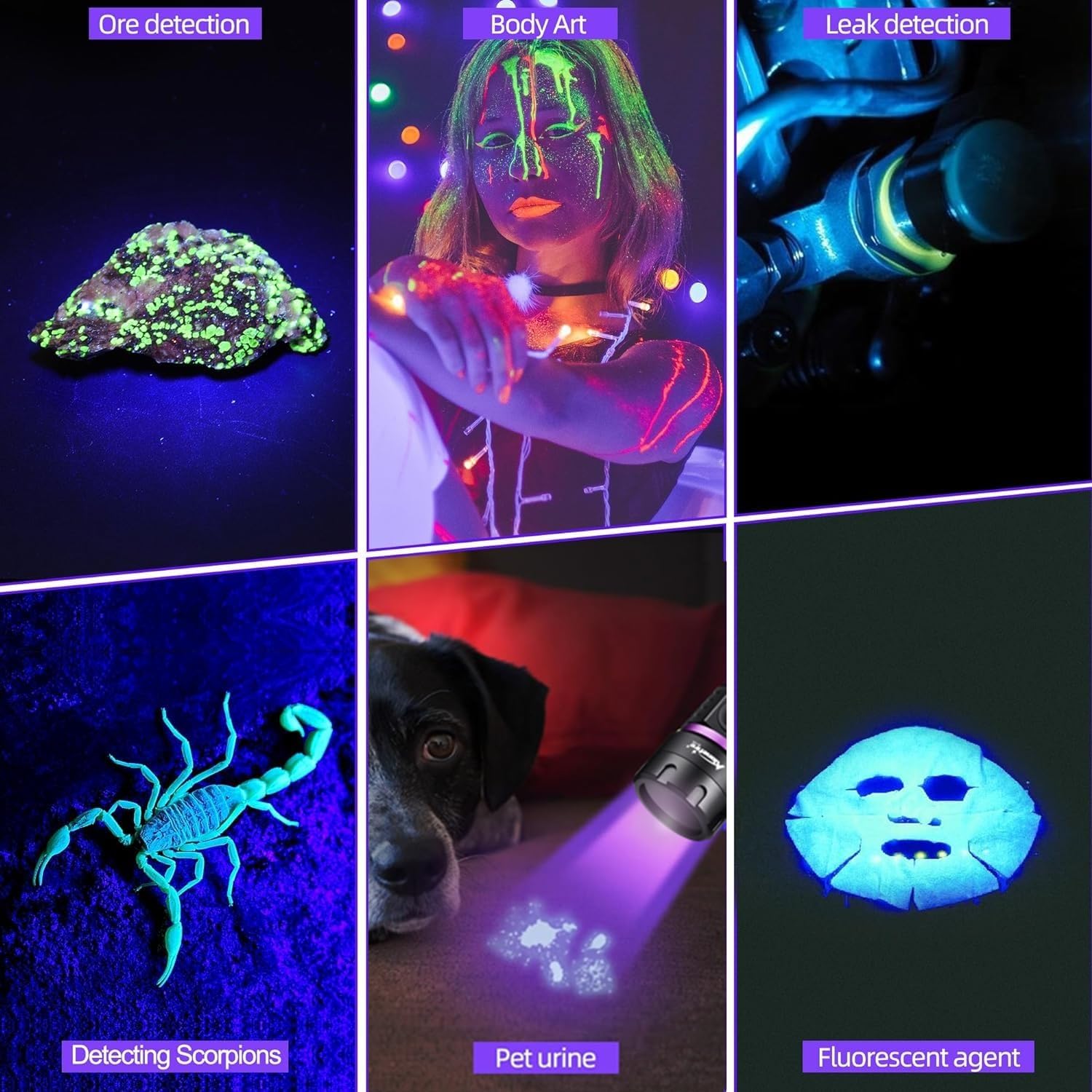
פיגורע 5: עקסamples of SV38 UV flashlight applications.

Figure 6: Detecting pet urine stains with the UV flashlight.
5. וישאַלט
- רייניקונג: ווישט אָפּ דעם קערפּער פֿון דער פֿלאַשליכט מיט אַ ווייכן, טרוקענעם שטאָף.amp שטאָף. דו זאלסט נישט נוצן אַברייסיוו קלינערז אָדער סאָלוואַנץ.
- Lens Care: Gently clean the lens with a lens cleaning cloth to maintain optimal UV output.
- באַטערי זאָרגן: If the flashlight will not be used for an extended period, remove the battery to prevent leakage. Recharge the battery every 3-6 months to maintain its lifespan.
- סטאָרידזש: סטאָר די פלאַשליגהט אין אַ קיל, טרוקן אָרט אַוועק פון דירעקט זונשייַן און עקסטרעם טעמפּעראַטורעס.
6. טראָובלעשאָאָטינג
| פּראָבלעם | מעגלעך סיבה | לייזונג |
|---|---|---|
| פלאַשליגהט טוט נישט קער אויף. | Low battery or battery incorrectly installed. | Charge the battery or ensure it is installed with the correct polarity. |
| UV ליכט דערשיינט שוואַך. | נידעריגע באַטעריע אָדער שמוציקע לינז. | לאָדט אויף די באַטעריע. רייניקט די לינז מיט אַ ווייכן שטאָף. |
| די טשאַרדזשינג אינדיקאַטאָר אַרבעט נישט. | דעפעקטיווער USB קאַבל אָדער מאַכט מקור. | Try a different USB cable or power source. Ensure the cable is fully inserted. |
| די פלאַשליכט ווערט הייס בעת באַנוץ. | Normal operation for high-power LED. | This is normal. If it becomes excessively hot, turn it off and allow it to cool. Avoid prolonged continuous use. |
7. ספּעסאַפאַקיישאַנז
| שטריך | דעטאַל |
|---|---|
| סאָרט | אַלאָנעפייער |
| מאָדעל נומער | SV38 |
| ליכט מקור טיפּ | UV LED (365nm) |
| מאַכט קאַנסאַמשאַן | 5W |
| מאַטעריאַל | אַלומינום צומיש |
| קאָליר | שוואַרץ |
| באַטערי טיפּ | 1 x 2000mAh Lithium-ion (included) |
| טשאַרדזשינג פּאָרט | וסב טיפּ-C |
| ספּעציעלע פֿעיִקייטן | Durable, Lightweight, Rechargeable, Black Filter Lens |
| פּראָדוקט דימענשאַנז | בעערעך 14.5 X 7.3 X 3.3 סענטימעטער |
| פּונקט וואָג | בעערעך 105 ג |
8. וואָראַנטי און שטיצן
Alonefire products are manufactured to high-quality standards. For warranty information or technical support, please refer to the seller's return policy or contact Alonefire customer service through their official channels. Spare parts availability is guaranteed for 5 years.