
הקדמה
This manual provides essential instructions for the safe and efficient operation of your Miroir M600 1080p Battery-Powered Projector. Please read this manual thoroughly before using the device and retain it for future reference.
וואָס איז אין די קעסטל
באַשטעטיקט אַז אַלע זאכן וואָס זענען אויסגערעכנט אונטן זענען אַרייַנגערעכנט אין אייער פּעקל:
- שפּיגל M600 פּראָיעקטאָר
- HDMI קאַבלע
- AC Adapter and Charger

Image: Contents of the Miroir M600 Projector package.
פּראָדוקט איבערview
The Miroir M600 is a compact, portable 1080p projector designed for various projection needs. Familiarize yourself with its components:
פראָנט View

בילד: פראָנט view of the Miroir M600 Projector, showing the projection lens and ventilation grille.
דערציען View און פּאָרטן

בילד: הינטערשטע view of the Miroir M600 Projector, highlighting the various input/output ports.
- 3.5 מם אַודיאָ אָוט: פֿאַר פֿאַרבינדן עקסטערנע רעדנערס אָדער כעדפאָונז.
- USB-C Video Port: For video input from compatible USB-C devices.
- הדמי פּאָרט: For video input from HDMI-enabled devices.
- וסב טשאַרדזש פּאָרט: פֿאַר טשאַרדזשינג עקסטערנע דעוויסעס.
- DC מאַכט אַרייַנשרייַב: For connecting the AC adapter to power and charge the projector.
סעטאַפּ
1. פּאַוערינג אויף און טשאַרדזשינג
- Connect the AC adapter to the DC Power Input port on the projector and then to a power outlet. The projector can operate while charging.
- Press and hold the power button (location not specified in data, assume standard placement) for a few seconds until the projector powers on.
- The internal battery provides portable operation. Ensure it is sufficiently charged for use without the AC adapter.
2. Placement and Projection
Position the projector on a stable, flat surface or mount it on a compatible stand. Ensure the lens is unobstructed and pointed towards your desired projection surface (wall or screen).

Image: Miroir M600 Projector positioned on a stand for optimal projection.
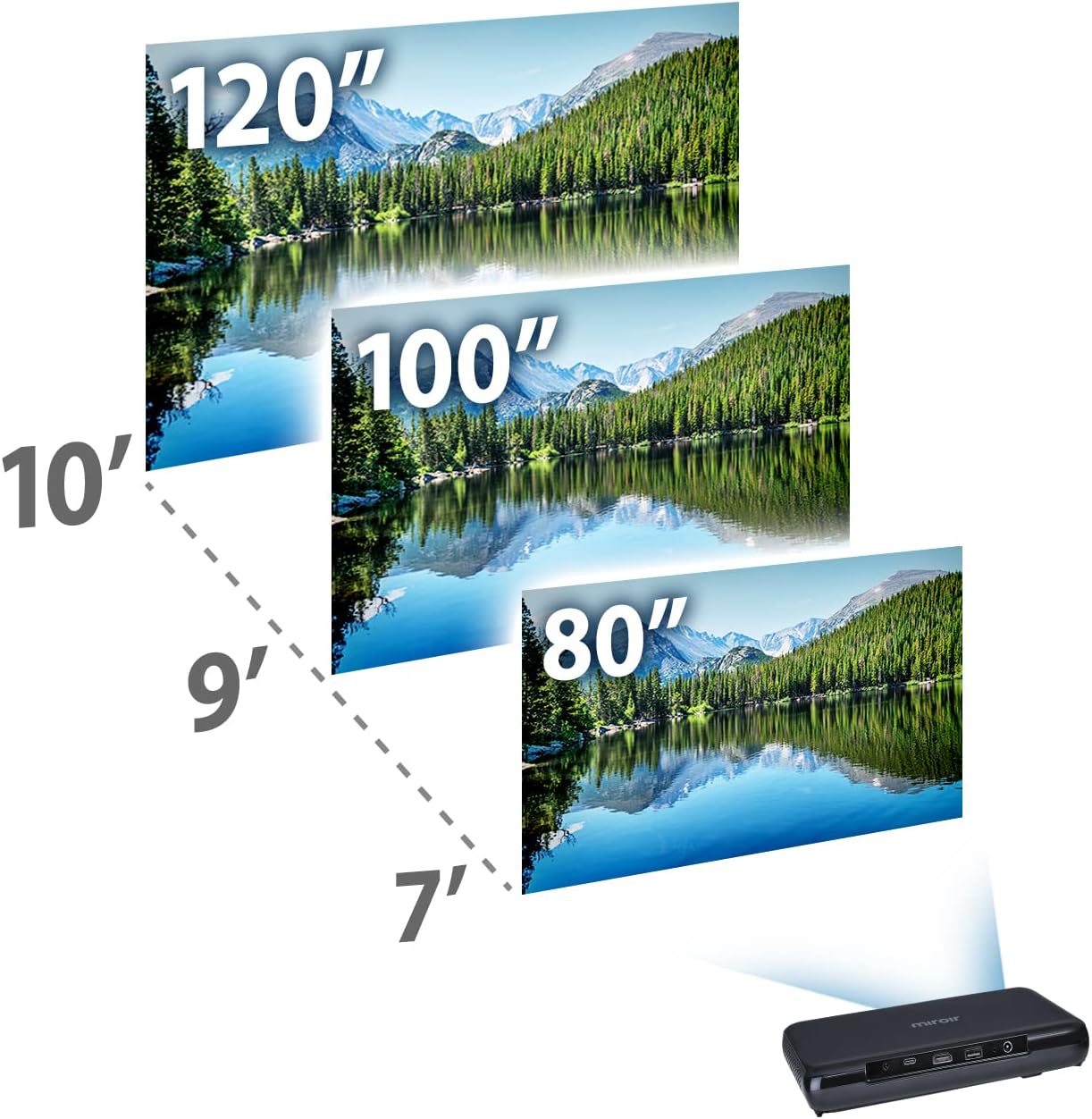
Image: Guide for projection distances to achieve various screen sizes (e.g., 7 feet for 80 inches, 10 feet for 120 inches).
אַפּערייטינג
1. פֿאַרבינדן אַרייַנשרייַב דעוויסעס
- הדמי: Connect an HDMI cable from your source device (laptop, streaming stick, game console) to the HDMI port on the projector.
- USB-C Video: For compatible devices, connect a USB-C cable from your source to the USB-C Video port on the projector.
2. Adjusting Image and Focus
The Miroir M600 features automatic keystone correction to adjust the image shape. For focus, manual adjustment may be required via a focus wheel (location not specified in data, assume standard placement near lens).
3. אַודיאָ אָוטפּוט
The projector includes a built-in 5-watt speaker. For enhanced audio, connect external speakers or headphones to the 3.5mm Audio Out jack.
4. לamp מאָדעס
די געפירט לamp offers two modes:
- נאָרמאַל מאָדע: Up to 20,000 hours of lamp לעבן.
- עקאָ מאָדע: Up to 30,000 hours of lamp life, providing extended usage and reduced power consumption.
וישאַלט
1. רייניקן דעם פּראָיעקטאָר
- לענס: ניצט אַ ווייכע, לינט-פֿרייע שטאָף ספּעציעל דיזיינד פֿאַר אָפּטישע לענסעס. ניצט נישט קיין שרײַבנדיקע רייניגערס אָדער איבערגעטריבענע קראַפט.
- עקסטעריע: ווישט אָפּ דעם פּראָיעקטאָר'ס אויסערלעכן זייט מיט אַ ווייכן, טרוקענעם שטאָף. פֿאַרמייַדט צו נוצן פֿליסיקע רייניקונגסמיטלען גלייך אויף דעם אַפּאַראַט.
- ווענטילאַטיאָן: Ensure the ventilation grilles are clear of dust and debris to prevent overheating.
2. באַטערי קער
- פֿאַר אַן אָפּטימאַלן באַטאַרייע לעבן, זאָלט איר נישט אָפט גאָר אויסלאָדן די באַטאַרייע.
- האַלט דעם פּראָיעקטאָר אין אַ קיל, טרוקן אָרט ווען עס איז נישט אין באַנוץ פֿאַר לענגערע פּעריאָדן.
טראָובלעשאָאָטינג
If you encounter issues with your Miroir M600 projector, refer to the following common solutions:
- קיין בילד: Ensure the input source is correctly connected and selected. Check all cable connections.
- בלערי בילד: Adjust the focus manually. Ensure the projection surface is flat and the projector is stable.
- קיין קול: Verify that the volume is not muted on both the projector and the source device. If using external speakers, ensure they are properly connected and powered.
- איבערהייצונג: Ensure adequate ventilation around the projector. Do not block air vents.
For more detailed troubleshooting steps, please consult the full user manual available for download (see Support section).
ספּעסאַפאַקיישאַנז
| שטריך | דעטאַל |
|---|---|
| פּראָדוקט דימענשאַנז | 9 X 5 X 1 אינטשעס |
| פּונקט וואָג | 1.6 פונט |
| נומער מאָדעל נומער | M600 |
| באַטעריז | 1 ליטהיום פּאָלימער באַטאַרייע (אַרייַנגערעכנט) |
| פאַבריקאַנט | מיראָיר |
| סאָרט | מיראָיר |
| רעקאָממענדעד ניצט | ביזנעס |
| ספּעציעלע שטריך | פיקאָ, רעדנערס |
| קאַנעקטיוויטי טעכנאָלאָגיע | וסב, הדמי |
| ווייַז האַכלאָטע | 1920 X 1080 (1080 פּ) |
| Lamp Life (Normal Mode) | אַרויף צו 20,000 שעה |
| Lamp Life (ECO Mode) | אַרויף צו 30,000 שעה |
| געבויט-אין רעדנער | 5 וואט |
| קענטיק סקרין דיאַגאָנאַל | 120" / 305 ס״מ |
וואָראַנטי אינפֿאָרמאַציע
Specific warranty details are not provided in this document. Please refer to the official Miroir website or the warranty card included with your product for comprehensive warranty terms and conditions.
שטיצן & קאָנטאַקט
For further assistance, detailed instructions, or to contact customer support:
- גאַנץ באַניצער מאַנואַל: A comprehensive PDF user manual is available for download דאָ.
- פאַבריקאַנט Webפּלאַץ: Visit the official Miroir webזייטל פֿאַר פּראָדוקט רעגיסטראַציע, אָפֿט געשטעלטע פֿראַגעס, און שטיצע רעסורסן.