
Sangoma P315
Sangoma P315 IP Phone User Manual
Model: P315 | Part Number: 1TELP315LF
1. הקדמה
This user manual provides comprehensive instructions for the setup, operation, and maintenance of your Sangoma P315 IP Phone. Please read this manual thoroughly to ensure proper use and to maximize the features of your device. For additional support, refer to the official Sangoma documentation and support resources.
2. פּראָדוקט איבערview
The Sangoma P315 is a 2-line SIP IP Phone designed for clear communication with HD Voice quality. It features a 2.4-inch color display and supports Gigabit Ethernet connectivity. This phone is compatible with Sangoma's UC offerings, including Switchvox, PBXact, FreePBX, and Asterisk, offering seamless auto-provisioning.
2.1 שליסל פֿעיִקייטן
- 2-line appearance keys for managing multiple calls.
- 2.4-inch (320 x 240 pixel) backlit color LCD display for clear visibility.
- High-definition call quality for superior audio.
- Power over Ethernet (PoE) support with 2 switched 10/100/1000 Mbps Gigabit Ethernet ports.
- Built-in EHS support for Sangoma H10 and H20 wireless headsets.
- Secure deployments with SRTP/TLS and VLAN support.
- Compatibility with Switchvox 7.7, FreePBX v14, PBXact v14, Asterisk v16, Endpoint Manager v14/v15, DPMA 3.6.x.
2.2 Phone Components
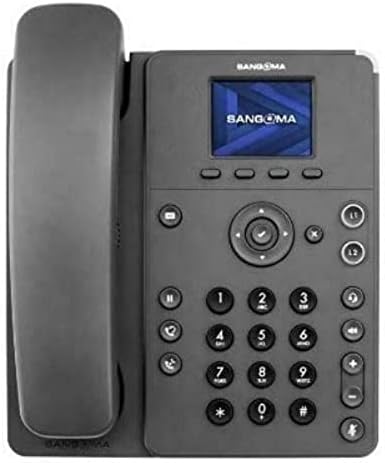
Figure 1: Sangoma P315 IP Phone Front View
The Sangoma P315 IP Phone features a standard telephone handset on the left, connected to the main unit. The main unit includes a 2.4-inch color display at the top, below which are four context-sensitive soft keys. A navigation cluster with a central 'OK' button is located below the soft keys. To the left of the navigation cluster are dedicated buttons for message, headset, and speakerphone. To the right are line keys (L1, L2) and call management buttons (hold, transfer, conference, mute, volume up/down). A standard numeric keypad (0-9, *, #) is positioned centrally on the lower part of the unit.
3. סעטאַפּ
3.1 פּעקל אינהאַלט
איידער איר גייט ווייטער, זיכערט זיך אז אלע קאמפאנענטן זענען פאראן:
- Sangoma P315 IP Phone unit
- כאַנדסעט און כאַנדסעט שנור
- עטהערנעט קאַבלע
- טעלעפאָן שטיין
- Note: A 12V Power Adapter (1TELP001LF) is not included and may be required if PoE is not available.
3.2 פיזיש קאַנעקשאַן
- צוטשעפּען דעם טעלעפאָן שטאַנד: גלייכט דעם שטאַנד צו מיט די סלאָץ אויף דער צוריקזייט פון דעם טעלעפאָן אַפּאַראַט און דריקט עס אַרײַן אין פּלאַץ.
- פֿאַרבינדן דעם האַנדסעט: שטעקט איין עק פון דעם אויפגעדרייטן האַנדסעט שנור אין דעם האַנדסעט און דעם אַנדערן עק אין דעם האַנדסעט פּאָרט אויף דעם טעלעפאָן אַפּאַראַט (געווענליך באצייכנט מיט אַ האַנדסעט בילדל).
- פאַרבינדן צו די נעץ:
- אויב ניצן מאַכט איבער עטהערנעט (PoE): Connect one end of the Ethernet cable to the LAN port on the phone and the other end to a PoE-enabled network switch or router.
- אויב איר נוצן אַ אַק אַדאַפּטער (sold separately): Connect the AC adapter to the power port on the phone, then connect one end of the Ethernet cable to the LAN port on the phone and the other end to a standard network switch or router.
- פאַרבינדן צו קאָמפּיוטער (אפציאָנעל): If you wish to connect a computer through the phone, connect an Ethernet cable from your PC to the PC port on the phone.
3.3 Initial Boot-up and Provisioning
Once connected to the network and powered on, the phone will begin its boot-up sequence. The Sangoma P315 supports auto-provisioning with Sangoma's UC platforms. The phone will attempt to obtain network settings and configuration from your PBX system automatically. This process may take a few minutes. Once complete, the display will show your line status and be ready for use.
4. אַפּערייטינג ינסטרוקטיאָנס
4.1 גרונטלעכע רוף פונקציעס
- מאַכן אַ רוף:
- Pick up the handset, press the speakerphone button, or press an available line key.
- רעדל די געבעטן נומער ניצן די נומעריק קיפּאַד.
- דרוק די רעדל ווייכע קנעפל אדער ווארטן ביז דער רוף פארבינדט זיך אויטאמאטיש.
- ענטפֿערן אַ רוף: When the phone rings, pick up the handset, press the speakerphone button, or press the flashing line key.
- ענדיקן אַ רוף: Hang up the handset, press the speakerphone button again, or press the סוף רופן ווייך שליסל.
4.2 Advanced Call Features
- האַלטן: בעשאַס אַן אַקטיוו רופן, דריקן די האַלטן קנעפל. דריק עס נאכאמאל צו ווידער אנפאנגען דעם רוף.
- אַריבערפירן: בעשאַס אַן אַקטיוו רופן, דריקן די אַריבערפירן קנעפּל. רוף די נומער צו וועלכער איר ווילט איבערפירן, און דריק דעם אַריבערפירן soft key again (blind transfer) or wait for the party to answer and then press אַריבערפירן (באַזוכטע טראַנספער).
- קאָנפֿערענץ: בעשאַס אַן אַקטיוו רופן, דריקן די קאָנפֿערענץ קנעפּל. רוף די נומער פון דער דריטער פּאַרטיי, און אַמאָל פארבונדן, דריק די קאָנפֿערענץ soft key again to join all parties.
- שטום: דרוק די שטום קנעפּל צו שטיל מאַכן דיין מיקראָפאָן בעת אַ רוף. דריק עס ווידער צו אַנשטימען.
- וואויסמעיל: דרוק די אָנזאָג button to access your voicemail. Follow the voice prompts.
- באַנד אַדזשאַסטמאַנט: ניצן די באַנד אַרויף / אַראָפּ buttons to adjust the handset, headset, or speakerphone volume during a call, or the ringer volume when idle.
4.3 אַרויסווייַז נאַוויגאַציע
The 2.4-inch color display provides access to various phone features and settings. Use the navigation cluster (up, down, left, right arrows, and central OK button) to scroll through menus and select options. The soft keys below the display change their function based on the current screen or call status.
5. וישאַלט
5.1 רייניקן דעם טעלעפאָן
צו אויפהאלטן דעם אויסזען און פונקציאנאליטעט פון אייער טעלעפאן:
- ניצן אַ ווייך, אַ ביסל דamp, א לינט-פֿרייע שטאָף צו ווישן די טעלעפֿאָן'ס ייבערפֿלאַך.
- Avoid using harsh chemicals, abrasive cleaners, or aerosol sprays, as these can damage the phone's finish and internal components.
- שפריצט נישט רייניגער גלייך אויפן טעלעפאן.
5.2 ווייכווארג דערהייַנטיקונגען
Your Sangoma P315 IP Phone may receive software updates to improve performance, add features, or address security vulnerabilities. These updates are typically managed by your system administrator through the PBX. Do not attempt to manually update firmware unless instructed by your administrator or Sangoma support.
6. טראָובלעשאָאָטינג
If you encounter issues with your Sangoma P315 IP Phone, refer to the following common problems and solutions:
| פּראָבלעם | מעגלעך סיבה | לייזונג |
|---|---|---|
| No dial tone / Cannot make or receive calls | Network cable disconnected, no power, incorrect network configuration, PBX issue. |
|
| דיספּליי איז ליידיק אָדער פֿאַרפֿרוירן | פּראָבלעם מיט שטראָם, ווייכווארג. |
|
| שלעכטע אַודיאָ קוואַליטעט (עקאָ, סטאַטיק) | Network congestion, faulty cable, environmental interference. |
|
For issues not covered here, please contact your IT department or Sangoma technical support.
7. ספּעסאַפאַקיישאַנז
| שטריך | דעטאַל |
|---|---|
| מאָדעל | P315 |
| טייל נומער | 1TELP315LF |
| ווייַז | 2.4-inch (320 x 240 pixel) backlit color LCD |
| שורה קיז | 2 |
| עטהערנעט פּאָרץ | 2 x 10/100/1000 Mbps Gigabit Ethernet (switched) |
| מאַכט מקור | PoE (Power over Ethernet) and AC Adapter (12V, not included) |
| העאַדסעט שטיצן | EHS support for Sangoma H10 and H20 wireless headsets |
| זיכערהייַט | SRTP/TLS, VLAN support |
| דימענסיעס (בעערעך) | 27.9 X 21.3 X 8.9 סענטימעטער (10.98 X 8.39 X 3.5 אינטשעס) |
| וואָג (בעערעך) | 1.08 קג (2.38 לבס) |
| UPC | 797734603330 |
8. וואָראַנטי און שטיצן
8.1 פּראָדוקט וואָראַנטי
The Sangoma P315 IP Phone comes with a standard manufacturer's warranty. For detailed information regarding warranty terms, duration, and coverage, please refer to the warranty card included with your product or visit the official Sangoma webזייטל. האַלט דיין קויפן באַווייַז פֿאַר וואָראַנטי קליימז.
8.2 טעכניש שטיצן
For technical assistance, troubleshooting beyond this manual, or advanced configuration, please contact your system administrator or Sangoma technical support. You can find contact information and additional resources on the official Sangoma support portal.
אָנליין רעסורסן: www.sangoma.com/support
Ask a question about this manual
Ask about setup, troubleshooting, compatibility, parts, safety, or missing instructions. Manuals+ will review the question and use this page’s manual context to help answer it.