
1. הקדמה
א דאנק פארן קויפןasing the Soundsation MIOMIX 404FXM 6-Channel Mixer. This versatile mixer is designed for a wide range of audio applications, including home recording, live performances, and podcasting. It combines professional audio quality with portability, featuring low-noise preamplifiers, digital effects, a USB media player/recorder, and Bluetooth connectivity. This manual provides essential information for safe operation, setup, and optimal use of your MIOMIX 404FXM mixer.
2. זיכערקייַט אינסטרוקציעס
ווארענונג: צו רעדוצירן די ריזיקירן פון פייַער אָדער עלעקטריש קלאַפּ, טאָן ניט ויסשטעלן דעם עקוויפּמענט צו רעגן אָדער נעץ.
- לייענען די ינסטראַקשאַנז קערפאַלי איידער אַפּערייטינג די אַפּאַראַט.
- האַלטן דעם מאַנואַל פֿאַר צוקונפֿט רעפֿערענץ.
- היט אַלע וואָרנינגז און נאָכגיין אַלע ינסטראַקשאַנז.
- דו זאלסט נישט נוצן דעם אַפּאַראַט לעבן וואַסער.
- ריין בלויז מיט אַ טרוקן שטאָף.
- בלאָקירט נישט קיין ווענטילאַציע עפענונגען. אינסטאַלירט לויט די אינסטרוקציעס פונעם פאַבריקאַנט.
- דו זאלסט נישט ינסטאַלירן לעבן קיין היץ קוואלן אַזאַ ווי ראַדיאַטאָרס, היץ רעדזשיסטערז, סטאָוווז אָדער אנדערע אַפּאַראַט (אַרייַנגערעכנט ampליפיערס) וואָס פּראָדוצירן היץ.
- דו זאלסט נישט באַזיגן די זיכערקייַט ציל פון די פּאָולערייזד אָדער גראַונדינג-טיפּ צאַפּן. א פּאָלאַריזעד צאַפּן האט צוויי בלאַדעס מיט איינער ברייט ווי די אנדערע. א גראַונדינג-טיפּ צאַפּן האט צוויי בלאַדעס און אַ דריט גראַונדינג צאָן. די ברייט בלייד אָדער די דריט צאָן זענען צוגעשטעלט פֿאַר דיין זיכערקייַט. אויב די צוגעשטעלט צאַפּן טוט נישט פּאַסיק אין דיין ווענטיל, באַראַטנ אַ ילעקטרישאַן פֿאַר פאַרבייַט פון די פאַרעלטערט ווענטיל.
- באַשיצן די מאַכט שנור פון גיין אויף אָדער פּינטשט, ספּעציעל אין די פּלאַגז, קאַנוויניאַנס רעסאַפּיז און די פונט ווו זיי אַרויסגיין פון די אַפּאַראַט.
- נאָר נוצן אַטאַטשמאַנץ / אַקסעסעריז ספּעסיפיעד דורך דער פאַבריקאַנט.
- אָפּשטויסן דעם אַפּאַראַט בעשאַס בליץ סטאָרמז אָדער ווען אַניוזד פֿאַר לאַנג פּיריאַדז.
- אָפּשיקן אַלע סערוויסעס צו קוואַלאַפייד סערוויס פּערסאַנעל. סערוויס איז פארלאנגט ווען דער אַפּאַראַט איז דאַמידזשד אין קיין וועג, אַזאַ ווי מאַכט צושטעלן שנור אָדער צאַפּן איז דאַמידזשד, פליסיק איז ספּילד אָדער אַבדזשעקץ זענען געפאלן אין די אַפּאַראַט, דער אַפּאַראַט איז יקספּאָוזד צו רעגן אָדער נעץ, אַרבעט נישט נאָרמאַלי , אָדער האט שוין דראַפּט.
3. פּעקל אינהאַלט
ביטע קאָנטראָלירט אַז אַלע זאכן וואָס זענען ליסטעד אונטן זענען אַרייַנגערעכנט אין דעם פּעקל:
- Soundsation MIOMIX 404FXM Mixer
- מאַכט אַדאַפּטער
- באַניצער מאַנואַל
4. פּראָדוקט פֿעיִקייטן
- 6-channel mixer with digital multi-effect processor.
- Integrated USB player/recorder supporting WAV, MP3, WMA, and FLAC formats.
- Wireless Bluetooth audio streaming.
- 4 Mic/Line channels with low-noise preamps and Combo connectors.
- Selectable Hi-Z inputs for guitars and other high-impedance instruments.
- +48V פאַנטאָם מאַכט פֿאַר קאָנדענסער מיקראָפאָנען.
- Peak indicators on input channels.
- 1 stereo line channel with 6.3mm jacks and +4/-10 dB pad adapter.
- 2-band EQ on channels 1-4.
- 24-bit/48 kHz digital effects processor with 16 presets (Reverb, Delay, Echo, Chorus, etc.) and TAP-Tempo function.
- USB player level control.
- כעדפאָון רעזולטאַט מיט מדרגה קאָנטראָל.
- XLR main outputs with volume control.
- Stereo VU Meter with 2 x 6 LED bars.
5. קאָנטראָלס און פאַנגקשאַנז
5.1 פראָנט פּאַנעל איבערview

Image: Front panel of the Soundsation MIOMIX 404FXM mixer, showing all input channels, EQ controls, effect section, USB/Bluetooth media player, and main output controls.
Input Channels (MIC/INST 1-4)
- MIC/INST Input (Combo Jack): Connect XLR microphones or 1/4" instrument/line cables.
- +48 וו פאַנטאָם מאַכט: Activates phantom power for condenser microphones. Use with caution.
- Hi-Z Switch: Engages high impedance input for direct connection of guitars or basses.
- GAIN קנעפּל: אַדזשאַסטירט די אינפוט סענסיטיוויטי פֿאַר דעם פֿאַרבונדענעם מיקראָפֿאָן אָדער אינסטרומענט.
- HIGH Knob: Adjusts the high-frequency equalization (treble).
- LOW Knob: Adjusts the low-frequency equalization (bass).
- FX קנעפּל: Controls the amount of signal sent to the internal digital effects processor.
- PAN קנופּ: Adjusts the stereo position (left/right) of the channel.
- VOL קנופּ: Adjusts the output volume of the individual channel.
- PK (Peak) LED: צינדט זיך אָן ווען דער אינפוט סיגנאַל איז צו הויך, וואָס ווײַזט אויף אַ מעגלעכן קליפּינג.
Stereo Line Input (CH 5-6)
- L/Mono, R Inputs (1/4" Jacks): Connect stereo line-level devices (keyboards, CD players, DJ consoles, etc.). The L/Mono input can be used alone for a mono signal.
- +4/-10dB Switch: Adjusts input sensitivity for different line-level devices.
- PAN קנופּ: אַדזשאַסטירט די סטערעאָ פּאָזיציע פֿון דעם קאַנאַל.
- VOL קנופּ: Adjusts the output volume of the stereo channel.
- PK (Peak) LED: Illuminates when the input signal is too high.
USB & Bluetooth Media Player
- וסב פּאָרט: Connect a USB drive for playing audio files or recording.
- ווייַז פאַרשטעלן: ווײַזט איצטיקן מאָדע, טראַק אינפֿאָרמאַציע און סעטטינגס.
- Up/Rewind Button: Navigates up in menus or rewinds current track.
- Down/Forward Button: Navigates down in menus or fast-forwards current track.
- Play/Pause/Enter Button: Plays/pauses audio or confirms menu selections.
- MENU קנעפּל: Accesses media player menu options (BT streaming, music player, audio recorder, selection).
- MP3 PLAYER LVL Knob: Controls the output level of the USB/Bluetooth media player.
Digital Effects Processor (24-bit/48 kHz)
- ווירקונג ווייַז: Shows the selected effect number and parameter values.
- פּראָגראַם קנעפּל: Rotates to select one of the 16 built-in digital effects. Press to confirm selection.
- טאַפּ טעמפּאָ קנעפּל: Tap multiple times to set the tempo for time-based effects (e.g., Delay).
- LEVEL קנופּ: Adjusts the overall wet/dry mix of the effects.
Output & Monitoring Section
- PHONES Jack (1/4"): פאַרבינדן כעדפאָונז פֿאַר מאָניטאָרינג.
- PHONES LVL Knob: אַדזשאַסטירט דעם באַנד פֿון די כעדפאָון אַרויסגאַנג.
- MAIN OUT L/R (XLR): Balanced XLR outputs for connecting to powered speakers, ampליפיערס, אָדער רעקאָרדינג דעוויסעס.
- MAIN OUT Knob: Controls the overall output volume of the main mix.
- VU Meter (LED): Displays the stereo output level of the main mix.
5.2 דערציען פּאַנעל איבערview
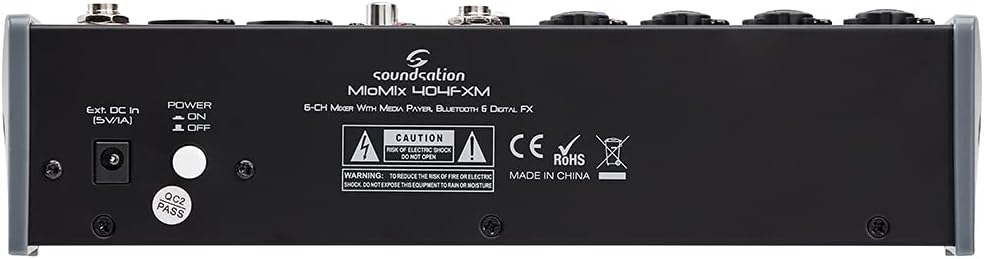
Image: Rear panel of the Soundsation MIOMIX 404FXM mixer, showing the power input, power switch, and main output connections.
- Ext. DC In (5V/1A): Power input for connecting the provided external power adapter.
- POWER ON/OFF Switch: Turns the mixer's power on or off.
- REC OUT L/R (RCA): Unbalanced RCA outputs for connecting to recording devices.
6. סעטאַפּ
- ופשליסן די מיקסער: Carefully remove the MIOMIX 404FXM from its packaging.
- אָרט: שטעלט דעם מיקסער אויף א סטאַבילער, גלאַטער ייבערפלאַך, און זאָרגט פֿאַר גענוג ווענטילאַציע אַרום דעם אַפּאַראַט.
- מאַכט קשר: Ensure the mixer's POWER switch is in the OFF position. Connect the provided power adapter to the "Ext. DC In (5V/1A)" port on the rear panel, then plug the adapter into a suitable power outlet.
- ערשט מאַכט אויף: Flip the POWER switch to the ON position. The mixer's indicators should light up, and the display should activate.
- פֿאַרבינדן אַוטפּוץ: Connect the MAIN OUT XLR outputs to your powered speakers, amplifier, or audio interface. Connect headphones to the PHONES jack for monitoring.
- פֿאַרבינדן איינגאַבעס: Connect your microphones, instruments, and line-level devices to the appropriate input channels.
7. אַפּערייטינג ינסטרוקטיאָנס
7.1 פֿאַרבינדן אַודיאָ קוועלער
- מיקראָפאָן: Connect dynamic microphones via XLR cables to the MIC/INST Combo jacks. For condenser microphones, connect via XLR and activate the +48V Phantom Power switch for the respective channel.
- Instruments (Guitars/Basses): Connect directly using a 1/4" TS cable to the MIC/INST Combo jack and engage the Hi-Z switch for that channel.
- Line-Level Devices (Keyboards, CD Players): Connect using 1/4" TS cables to the MIC/INST Combo jacks (for mono) or to the CH 5-6 L/Mono and R inputs (for stereo). Adjust the +4/-10dB switch on CH 5-6 as needed.
7.2 Adjusting Channel Levels and EQ
- Set all GAIN, VOL, and MAIN OUT knobs to their minimum positions before starting.
- Speak into the microphone or play your instrument. Slowly increase the GAIN knob for the respective channel until the PK LED flashes only occasionally during the loudest parts.
- Adjust the HIGH and LOW EQ knobs to shape the tone of your sound.
- Use the PAN knob to position the sound in the stereo field.
- Slowly increase the channel's VOL knob to blend it into the overall mix.
7.3 Using the USB Media Player/Recorder
- פּלייבאַק: Insert a USB drive containing WAV, MP3, WMA, or FLAC files into the USB port. The display will show the file list. Use the Up/Down buttons to navigate and Play/Pause/Enter to select and play. Adjust the MP3 PLAYER LVL knob to control its volume in the mix.
- רעקאָרדינג: In the media player menu (accessed via MENU button), select the 'Audio Recorder' function. Ensure your USB drive has enough free space. Press Play/Pause/Enter to start and stop recording. The mixer records the main stereo mix.
7.4 בלועטוט קאָנעקטיוויטי
- Press the MENU button on the media player and select 'BT Streaming'. The display will show 'Bluetooth' and indicate it's searching.
- On your smartphone or Bluetooth device, search for available devices and select 'MIOMIX 404FXM'.
- Once paired, you can stream audio from your device to the mixer. Control the volume using your device and the MP3 PLAYER LVL knob on the mixer.
7.5 Applying Digital Effects
- Turn the FX knob on the desired input channel to send signal to the effects processor.
- Rotate the PROGRAM knob to browse through the 16 available effects. Press the PROGRAM knob to select an effect.
- Adjust the LEVEL knob in the FX section to control the overall amount of effect applied to the mix.
- For time-based effects, use the TAP TEMPO button to synchronize the effect to your music.
7.6 Monitoring and Main Output
- כעדפאָונז: Connect headphones to the PHONES jack and adjust the PHONES LVL knob for comfortable monitoring.
- הויפּט רעזולטאַט: Slowly increase the MAIN OUT knob to send the mixed audio to your connected speakers or amplifier. Monitor the VU Meter to ensure levels are not clipping (avoiding red LEDs).
8. וישאַלט
- רייניקונג: Use a soft, dry cloth to clean the mixer's surface. Do not use liquid cleaners or solvents.
- סטאָרידזש: ווען נישט אין באַנוץ פֿאַר לענגערע פּעריאָדן, האַלט דעם מיקסער אין אַ קיל, טרוקן אָרט, אַוועק פון דירעקט זונשייַן און עקסטרעמע טעמפּעראַטורן.
- ווענטילאַטיאָן: פאַרזיכערן אַז די ווענטאַליישאַן אָופּאַנינגז זענען נישט אפגעשטעלט צו פאַרמייַדן אָוווערכיטינג.
9. טראָובלעשאָאָטינג
- קיין סאָונד רעזולטאַט:
- קאָנטראָלירט אַלע מאַכט קאַנעקשאַנז און זיכער מאַכן אַז דער מיקסער איז אנגעצינדן.
- Verify that all channel VOL knobs, MAIN OUT knob, and PHONES LVL knob are turned up.
- Ensure your speakers/amplifier are powered on and connected correctly.
- Check input source connections and ensure GAIN knobs are set appropriately.
- פאַרקרימט סאָונד:
- Reduce the GAIN knob for the input channel.
- Check if the PK LED is constantly lit; if so, reduce the input level.
- Lower the MAIN OUT volume if the VU Meter is consistently in the red.
- פאַנטאָם מאַכט ניט ארבעטן:
- Ensure the +48V switch is engaged for the specific channel.
- Verify that you are using an XLR cable, as phantom power is only supplied via XLR.
- בלועטאָאָטה ניט קאַנעקטינג:
- Ensure the mixer's media player is in 'BT Streaming' mode.
- Make sure your device's Bluetooth is enabled and it's searching for devices.
- פּרוּווט אָפּצופּאַרן און ווידער צופּאַרן דעם דעווייס.
- USB ווידערשפּיל/רעקאָרדירונג פּראָבלעמען:
- Ensure the USB drive is formatted correctly (FAT32 is generally recommended).
- קאָנטראָלירן אַז די אַודיאָ files are in a supported format (WAV, MP3, WMA, FLAC).
- For recording, ensure the USB drive has sufficient free space.
10. ספּעסאַפאַקיישאַנז
| שטריך | באַשרייַבונג |
|---|---|
| פאַבריקאַנט | סאַונדסיישאַן |
| מאָדעל נומער | E923E |
| נומער פון טשאַנאַלז | 6 |
| פּונקט וואָג | 1900 גראַמז |
| קאַנעקטיוויטי טעכנאָלאָגיע | וסב, בלועטאָאָטה |
| מאַכט מקור | עלעקטריק קאַבלע |
| רעזולטאַט קאַנעקטער טיפּ | XLR |
| אַודיאָ אַרייַנשרייַב | XLR, 1/4" דזשעק |
| Voltage | 48 וואלטס (פאַנטאָם מאַכט) |
| דיגיטאַל עפפעקץ | 16 Presets, 24-bit/48 kHz |
| געשטיצטע USB אַודיאָ פֿאָרמאַטן | WAV, MP3, WMA, FLAC |
11. וואָראַנטי און שטיצן
Soundsation products are designed and manufactured to the highest quality standards. For information regarding warranty coverage, service, or technical support, please refer to the warranty card included with your product or visit the official Soundsation webזייטל. האַלט אייער קויף קוויטל ווי אַ באַווייַז פון קויפן פֿאַר קיין וואָראַנטי קליימז.