
הקדמה
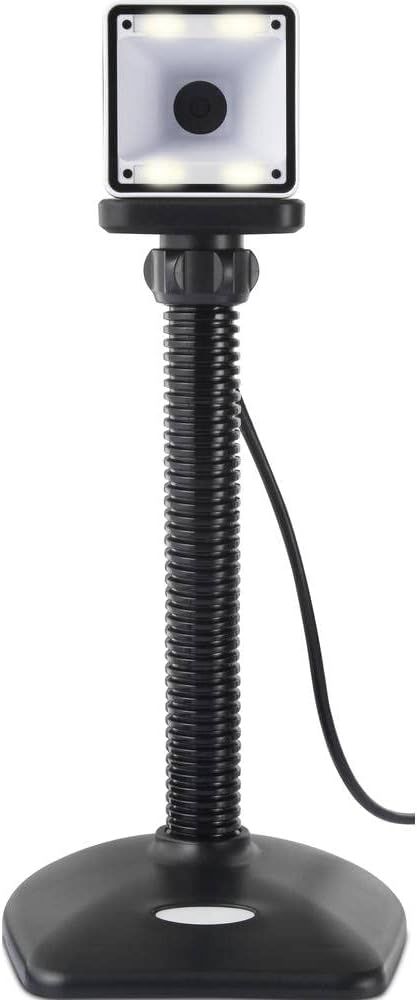
Thank you for choosing the Renkforce RF-SBS-500 2D Wired Barcode Scanner. This device is designed for efficient and reliable scanning of both 1D and 2D barcodes from various surfaces, including paper and smartphone screens. Its omnidirectional scanning capability and hands-free operation make it suitable for a wide range of applications. This manual provides essential information for the proper setup, operation, and maintenance of your scanner.
זיכערקייַט אינסטרוקציעס
- שטעלט נישט אויס דעם סקאַנער צו עקסטרעמע טעמפּעראַטורן, הומידיטי, אדער דירעקטע זונשייַן.
- פֿאַרמײַדט צו לאָזן דעם סקאַנער פאַלן אָדער אים אויסשטעלן צו שטאַרקע קלאַפּן.
- פרובירט נישט צו צענעמען אדער מאדיפיצירן דעם סקענער. דאס וועט בטל מאכן די גאראנטיע.
- Keep the scanning window clean to ensure optimal performance. Use a soft, dry cloth.
- Ensure the USB cable is connected securely to prevent accidental disconnection.
פּעקל אינהאַלט
- Renkforce RF-SBS-500 2D Wired Barcode Scanner
- Integrated USB-A Cable
- באַניצער מאַנואַל (דעם דאָקומענט)
סעטאַפּ
Follow these steps to set up your Renkforce RF-SBS-500 barcode scanner:
- אויספּאַקן דעם סקאַנער: נעמט פֿאָרזיכטיק אַרויס דעם סקאַנער פֿון זײַן פּאַקעט.
- פאַרבינדן צו אַ קאָמפּיוטער: Plug the integrated USB-A cable from the scanner into an available USB port on your desktop or laptop computer.
- דרייווער ינסטאַלירונג: The scanner is typically plug-and-play. Your operating system (Windows, macOS, Linux) should automatically detect and install the necessary drivers. Wait for the installation to complete.
- אָרט: Place the scanner on a stable, flat surface. The flexible neck allows for adjustment of the scanning head angle for optimal positioning.

אַפּערייטינג די סקאַננער
The Renkforce RF-SBS-500 is designed for ease of use with its omnidirectional and hands-free capabilities.
- מאַכט אויף: Once connected via USB, the scanner will power on automatically. The LED indicators on the scanner head may illuminate briefly.
- סקענען אַ באַרקאָד: Position the barcode within the scanning area of the scanner head. The scanner will automatically detect and read the barcode.
- וויסואַל און אַודיבלע באַמערקונגען: Upon successful scanning, the integrated buzzer will emit a short beep, and the LED display on the scanner will flash or change color, indicating a successful read.
- Omnidirectional Reading: The scanner can read barcodes regardless of their orientation, eliminating the need to align the barcode precisely.
- Hands-Free Mode (Presentation Mode): The scanner operates continuously in a presentation mode, allowing you to simply pass items with barcodes in front of the scanning window without pressing any buttons. This saves time and improves workflow efficiency.
- שטיצט באַרקאָדעס: The scanner supports both 1D (e.g., EAN, UPC, Code 39) and 2D (e.g., QR Code, Data Matrix, PDF417) barcode types.
וישאַלט
געהעריגע אויפהאלטונג גאראנטירט די לאנגעוויטי און אפטימאלע פערפארמאנס פון אייער סקענער.
- רייניקן דעם סקענען פֿענצטער: רייניקט רעגולער דאָס סקענען פֿענצטער מיט אַ ווייכן, לינט-פֿרײַעם שטאָף. פֿאַר שווערן שמוץ, אַ ביסל אָפּווישןampווישט דעם שטאָף מיט וואַסער אָדער אַ מילדן, נישט-שרייַבנדיקן רייניגער. שפּריצט נישט דעם רייניגער גלייך אויף דעם סקאַנער.
- אַלגעמיינע רייניקונג: Wipe the exterior of the scanner with a dry or slightly damp שטאָף. ויסמיידן ניצן האַרב קעמיקאַלז אָדער אַברייסיוו מאַטעריאַלס.
- סטאָרידזש: When not in use, store the scanner in a clean, dry environment away from direct sunlight and extreme temperatures.
טראָובלעשאָאָטינג
אויב איר טרעפט פּראָבלעמען מיט אייער סקאַנער, זעט די פאלגענדע געוויינטלעכע פּראָבלעמען און לייזונגען:
| פּראָבלעם | מעגלעך סיבה | לייזונג |
|---|---|---|
| דער סקאַנער גייט נישט אָן. | USB cable not connected properly or faulty USB port. | Ensure the USB cable is firmly connected to both the scanner and the computer. Try a different USB port. |
| דער סקאַנער לייענט נישט קיין באַרקאָודז. | Barcode damaged, scanning window dirty, or incorrect barcode type. | Check the barcode for damage. Clean the scanning window. Ensure the barcode type is supported (1D/2D). Adjust the distance and angle of the barcode to the scanner. |
| No beep or LED feedback after scanning. | Barcode not read successfully. | Refer to the "Scanner does not read barcodes" solution. If the issue persists, contact support. |
| סקענירטע דאַטן דערשייַנען פאַלש. | Keyboard layout mismatch or software issue. | Ensure your computer's keyboard layout matches the expected output. Test with a simple text editor. |
If the problem persists after trying these solutions, please contact Renkforce customer support.
ספּעסאַפאַקיישאַנז
| שטריך | באַשרייַבונג |
|---|---|
| מאָדעל נומער | רף-4679568 |
| סקאַנינג פיייקייט | 1D און 2D באַרקאָדס |
| קאַנעקטיוויטי טעכנאָלאָגיע | יו-עס-בי-א (ווייערד) |
| סקאַן קורס | 60 בילדער פּער סעקונדע |
| סקאַנינג מאָדע | Omnidirectional, Hands-free (Presentation Mode) |
| באַמערקונגען | Integrated Buzzer, LED Display |
| קאַמפּאַטאַבאַל דעוויסעס | Desktop Computer, Laptop, Smartphone (via appropriate adapter if needed) |
| דימענסיעס (L X W X H) | 150 X 5.2 X 5.2 סענטימעטער |
| פּונקט וואָג | 102 גראַמז |
| מאַכט מקור | USB Powered |
| לאַנד פון אָריגין | דייטשלאנד |
וואָראַנטי און שטיצן
Renkforce products are manufactured to high-quality standards and come with a standard warranty. Please refer to your purchase documentation or the Renkforce official webוועבזייטל פֿאַר ספּעציפֿישע וואָראַנטי טערמינען און באַדינגונגען וואָס זענען אָנווענדלעך צו אייער געגנט.
For technical support, troubleshooting assistance, or warranty claims, please contact Renkforce customer service. Contact details can typically be found on the Renkforce webוועבזייטל אדער אויף אייער פּראָדוקט פּאַקאַדזשינג.