
1. הקדמה
The TELEVES Avant X Basic is a programmable multi-input headend designed for terrestrial TV installations, suitable for single or multi-dwelling units. It features 32 programmable digital filters across 4 VHF+UHF (DTT) inputs. The unit has 5 inputs, configurable for two distribution modes: FM-4xVHF/UHF or FM-DAB-3xUHF. It allows for precise adjustment of amplification and equalization for various RF inputs. Programming is simplified via the ASuite application (Android or Windows). The device includes automatic LTE filtering, detecting and cutting frequencies from channel 48 (LTE700). It is RED compliant.
2. זיכערקייַט אינפֿאָרמאַציע
- לייענען אַלע ינסטראַקשאַנז קערפאַלי איידער ייַנמאָנטירונג און אָפּעראַציע.
- שטעלט נישט אויס דעם אפאראט צו רעגן, פייכטקייט, אדער עקסטרעמע טעמפעראטורן.
- פאַרזיכערן געהעריק ווענאַליישאַן צו פאַרמייַדן אָוווערכיטינג.
- Only use the provided power supply or a compatible alternative specified by TELEVES.
- טרענט אפ די עלעקטריציטעט איידער איר מאכט אירגענד וועלכע פארבינדונגען אדער דורכפירן אויפהאלטונג.
- Installation should be performed by qualified personnel to ensure safety and optimal performance.
3. פּעקל אינהאַלט
באַשטעטיקן אַז אַלע זאכן זענען פאַראַן אין פּעקל:
- TELEVES Avant X Basic Programmable Headend Unit (Model 532103)
- מאַכט קאַבלע
- ינסטרוקטיאָן מאַנואַל (דעם דאָקומענט)
- מאַונטינג אַקסעסעריז (אויב אָנווענדלעך)
4. פּראָדוקט איבערview
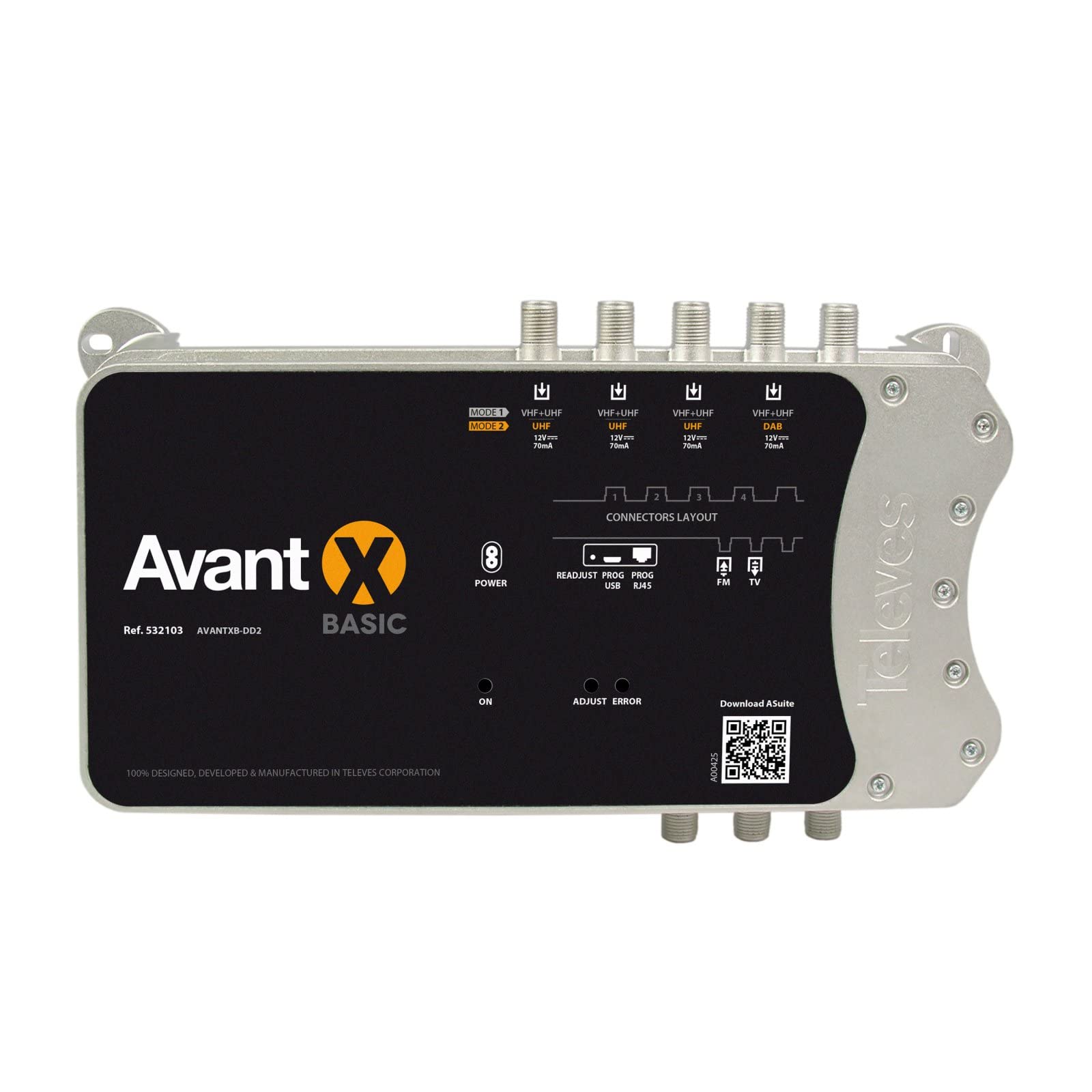
פיגורע 1: פראָנט view of the TELEVES Avant X Basic Programmable Headend. This image displays the unit's casing, indicating the various input and output connectors for signal management.
שליסל פֿעיִקייטן:
- 5 Inputs: Configurable for FM-4xVHF/UHF or FM-DAB-3xUHF distribution modes.
- 32 Digital Filters: Programmable for precise signal selection and ampליפיקאַטיאָן.
- Automatic Gain Control (AGC): Ensures stable output levels.
- LTE Filtering: Automatic detection and suppression of LTE700 (Channel 48) interference.
- ASuite Compatibility: Easy programming via Android or Windows application.
- RED Compliant: Meets European regulatory standards.
אַרייַנשרייַב / רעזולטאַט פּאָרץ:
- אַרייַנשרייַבן: 5 (e.g., 1x FM, 4x VHF/UHF or 1x FM, 1x DAB, 3x UHF)
- אויסגאבעס: 1 (Main RF Output)
- פּראָגראַממינג פּאָרט: For connection with ASuite application.
5. סעטאַפּ און ייַנמאָנטירונג
5.1 מאָונטינג די אַפּאַראַט
- Choose a dry, well-ventilated location, away from direct sunlight and heat sources.
- Mount the unit securely to a wall or suitable surface using appropriate fasteners. Ensure sufficient space around the unit for cable connections and heat dissipation.
5.2 Connecting Antennas and Cables
- Connect your terrestrial antennas (FM, DAB, VHF, UHF) to the corresponding input ports on the Avant X Basic unit.
- Connect the main RF output of the Avant X Basic to your distribution network or directly to the first amplifier/splitter in your system.
- Ensure all F-connectors are securely tightened to prevent signal loss.
5.3 מאַכט קאַנעקשאַן
- Connect the power cable to the unit's power input.
- Plug the power cable into a suitable electrical outlet (220-230 Vac).
- The unit will power on, and indicators will illuminate.
6. אַפּערייטינג ינסטרוקטיאָנס
6.1 Initial Configuration and Programming
The TELEVES Avant X Basic is programmed using the ASuite application, available for Android devices and Windows computers.
- Download and install the ASuite application from the official TELEVES webוועבזייטל אדער אייער דעווייס'ס עפּ סטאָר.
- Connect your programming device (smartphone/tablet via Bluetooth or PC via USB) to the Avant X Basic unit.
- Launch the ASuite application. The application will guide you through the process of scanning available terrestrial signals and configuring the digital filters.
- Filter Programming: Program up to 32 digital filters to select and amplify specific channels from your VHF+UHF inputs.
- אַרייַנשרייַב קאַנפיגיעריישאַן: Select the desired distribution mode (FM-4xVHF/UHF or FM-DAB-3xUHF) based on your antenna setup.
- Gain and Equalization: סטרויערן די amplification and equalization levels for each input to optimize signal quality and balance output levels. The unit features Automatic Gain Control (AGC) for stable output. Manual adjustments can be made within a specified range.
- LTE Filtering: The unit automatically detects and filters LTE700 signals (Channel 48 and above) to prevent interference with DTT signals. No manual configuration is typically required for this feature.
- Save your configuration to the device once programming is complete.
6.2 מאָניטאָרינג אָפּעראַציע
After programming, the unit will continuously process and amplify the selected signals. You can use the ASuite application to monitor signal levels and device status if needed.
7. וישאַלט
- רייניקונג: Disconnect power before cleaning. Use a soft, dry cloth to wipe the exterior of the unit. Do not use liquid cleaners or abrasive materials.
- ווענטילאַטיאָן: פאַרזיכערן אַז די ווענטאַליישאַן אָופּאַנינגז זענען נישט אפגעשטעלט צו פאַרמייַדן אָוווערכיטינג.
- Firmware דערהייַנטיקונגען: Periodically check the TELEVES website for firmware updates for the Avant X Basic unit and the ASuite application to ensure optimal performance and access to new features.
8. טראָובלעשאָאָטינג
| פּראָבלעם | מעגלעך סיבה | לייזונג |
|---|---|---|
| No signal or poor signal quality |
|
|
| דער אַפּאַראַט טוט נישט מאַכט אויף |
|
|
| Interference from mobile signals (LTE) |
|
|
9. טעכניש ספּעסאַפאַקיישאַנז
| אַלגעמיינע | |
|---|---|
| סאָרט | TELEVES |
| מאָדעל נומער | 532103 |
| נומער פון ינפּוץ | 5 |
| נומער פון אַוטפּוץ | 1 |
| Programmable Digital Filters | אַרויף צו 32 |
| Channels per Filter | 1 צו 4 |
| LTE פֿילטרירונג | Automatic (LTE700 / Channel 48) |
| מאַכט צושטעלן וואָלtage | 220 - 230 Vac |
| מאַקסימום קראַנט קאַנסאַמשאַן | 130 מאַ |
| מאַקסימום מאַכט קאַנסאַמשאַן | 14 וו |
| שוץ אינדעקס | IP20 |
| אַפּערייטינג טעמפּעראַטור | -5 צו 45 °C |
| פּונקט וואָג | 800 ג |
| פּאַראַמעטער | FM (87-108 MHz) | DAB (174-230 MHz) | UHF (470-694 MHz) |
|---|---|---|---|
| געווינען | 29 דב | 75 דב | 75 דב |
| געווינען אַדזשאַסטמאַנט קייט | 0 - 25 דציבל | AGC | AGC |
| Manual Adjustment (after AGC) | פון 5 צו 5 DB | פון 5 צו 5 DB | פון 3 צו 3 DB |
| שיפּוע אַדזשאַסטמאַנט | N/A | N/A | 0 צו 5 דב |
| אַרייַנשרייַב מדרגה | 76 - 101 dBµV | 40 - 100 dBµV | 40 - 100 dBµV |
| Output Level (DIN45004B) | 122 דב µ וו | 122 דב µ וו | 122 דב µ וו |
| Output Level (EN50083) | 126 דב µ וו | 126 דב µ וו | 126 דב µ וו |
| Programmable Output Levels | 80 - 105 dBµV | 87 - 112 dBµV | 90 - 115 dBµV |
| ראַש פיגור | 7 דב | 7 דב | 6 דב |
| סעלעקטיוויטי | > 20 דב | > 65 דב | > 65 דב |
| Input Power (12Vdc) | N/A | 12 וודק | 12 וודק |
| Max Input Current (12Vdc) | N/A | 70 מאַ | 70 מאַ |
10. וואָראַנטי און שטיצן
For warranty information, please refer to the documentation provided with your purchase or visit the official TELEVES webפּלאַץ.
For technical support, product inquiries, or service, please contact TELEVES customer support through their official channels.
- באַאַמטער Webפּלאַץ: www.televes.com
- קאָנטאַקט אינפֿאָרמאַציע: Refer to the "Contact Us" section on the TELEVES webזייטל פֿאַר רעגיאָנאַלע שטיצע דעטאַילס.