
הקדמה
Thank you for choosing the Newskill Manticore Gaming PC Case. This manual provides essential information for the proper installation, operation, and maintenance of your new PC chassis. Please read these instructions carefully before beginning the assembly process to ensure optimal performance and longevity of your components.
פּראָדוקט איבערview
The Newskill Manticore is an ATX mid-tower gaming PC case designed for high-performance builds. It features a mesh front panel for superior airflow, a tempered glass side panel to showcase your components, and four pre-installed 120mm ARGB fans for effective cooling and customizable aesthetics.
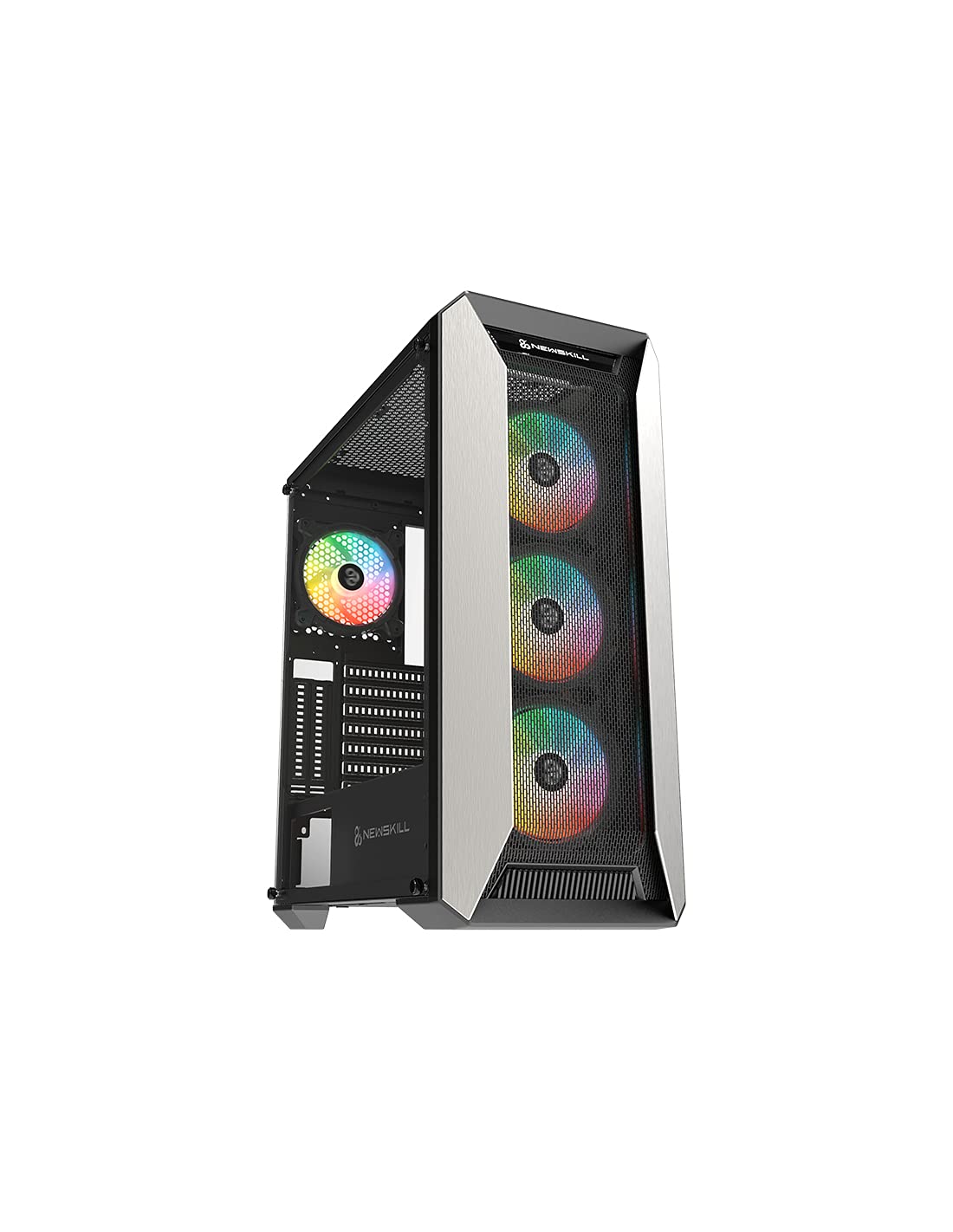
פיגורע 1: פראָנט view of the Newskill Manticore Gaming PC Case, highlighting the mesh front and tempered glass side panel.
שליסל פֿעיִקייטן:
- ATX Mid-Tower compatibility
- Mesh front panel for optimized airflow
- טעמפּערד גלאז זייַט טאַפליע
- Four pre-installed 120mm ARGB fans
- Two removable dust filters
- USB 3.0 connectivity on the front panel
סעטאַפּ און ינסטאַלירונג
1. ונפּאַקקינג
Carefully remove the PC case from its packaging. Inspect for any damage that may have occurred during shipping. Retain the packaging for future transport or warranty claims.
2. קאָמפּאָנענט לעגיטימאַציע
Before installation, familiarize yourself with the case components and included accessories:
- Newskill Manticore PC Case
- Accessory box (screws, cable ties, standoffs)
- באַניצער מאַנואַל (דעם דאָקומענט)
3. מאָטהערבאָאַרד ינסטאַללאַטיאָן
- אַראָפּנעמען די טעמפּערד גלאָז זייט פּאַנעל דורך אַנשרויפן די גראָבער פינגער שרויפן.
- Install the necessary motherboard standoffs into the motherboard tray.
- Carefully place your ATX motherboard onto the standoffs, aligning the screw holes.
- באַפֿעסטיקן די מאַדערבאָרד מיט די צוגעשטעלטע שרויפֿן.
4. מאַכט צושטעלן אַפּאַראַט (PSU) ינסטאַלירונג
- Locate the PSU mounting area at the bottom rear of the case.
- Slide your PSU into position from the rear of the case.
- Secure the PSU with screws from the exterior rear of the case.
5. סטאָרידזש דרייוו אינסטאַלאַציע
The case supports various storage configurations. Refer to your specific drive type for mounting instructions (e.g., 2.5" SSDs, 3.5" HDDs).
6. גראַפיקס קאַרטל און יקספּאַנשאַן קאַרטל ינסטאַלירונג
Remove the necessary PCIe slot covers and install your graphics card or other expansion cards, securing them with screws.
7. פראָנט פּאַנעל קאַנעקשאַנז
Connect the front panel cables (USB 3.0, HD Audio, Power Switch, Reset Switch, Power LED, HDD LED) to the corresponding headers on your motherboard. Consult your motherboard manual for exact pin layouts.
8. קאַבלע מאַנאַגעמענט
ניצט די קאַבל רוטינג אויסשניטן און טיי-דאַון פונקטן הינטער די מאַדערבאָרד טאַץ צו פאַרוואַלטן קייבאַלז. דאָס פֿאַרבעסערט לופטפלוס און עסטעטיק.
אַפּערייטינג ינסטראַקשאַנז
מאַכט אויף / אַוועק
Press the power button located on the top panel of the case to turn on your system. To shut down, use the operating system's power-off function or press and hold the power button for several seconds for a forced shutdown (not recommended for regular use).
ARGB לייטינג קאָנטראָל
The pre-installed ARGB fans can be controlled via your motherboard's ARGB software (if compatible) or a dedicated ARGB controller (if included or purchased separately). Refer to your motherboard or controller manual for specific instructions on changing lighting effects and colors.
וישאַלט
שטויב פילטער רייניקונג
The Newskill Manticore includes two removable dust filters (typically located on the top and bottom/front). Regularly clean these filters to maintain optimal airflow and prevent dust buildup inside your PC. Gently slide them out, clean with water and mild soap, or use a vacuum cleaner, and ensure they are completely dry before re-inserting.
עקסטעריאָר רייניקונג
ווישן די יקסטיריער סערפאַסיז מיט אַ ווייך, דamp cloth. Avoid abrasive cleaners or solvents that could damage the finish or tempered glass.
טראָובלעשאָאָטינג
קיין מאַכט
- Ensure the PSU is properly connected to the wall outlet and switched on.
- וועריפיצירט אז אלע מאכט קייבלס פון די PSU זענען ריכטיג פארבונדן צום מאדערבאָרד און קאָמפּאָנענטן.
- Check front panel power switch connections to the motherboard.
פעןס דרייען זיך נישט / ARGB צינדט זיך נישט אן
- Confirm fan power cables are securely connected to the motherboard or fan controller.
- Check ARGB connections to the motherboard's ARGB header or dedicated controller.
- Ensure ARGB software or controller settings are correctly configured.
Poor Airflow / Overheating
- רייניקט שטויב פילטערס רעגולער.
- Ensure no obstructions are blocking air intake or exhaust vents.
- Verify all fans are spinning correctly and oriented for optimal airflow.
For further assistance, please contact Newskill support.
ספּעסאַפאַקיישאַנז
| שטריך | דעטאַל |
|---|---|
| מאָדעל נאָמען | Manticore |
| מאָדעל נומער | 1102 |
| טיפּ פון קאַסטן | מיד טאַוער |
| מאָטהערבאָאַרד קאַמפּאַטאַבילאַטי | אַטקס |
| דימענסיעס (L X W X H) | 60 X 60 X 85 סענטימעטער |
| וואָג | 1 קג |
| מאַטעריאַל | טעמפּערד גלאָז, מעטאַל |
| קאָאָלינג אופֿן | Air (4x 120mm ARGB fans included) |
| פראָנט איך / אָ פּאָרץ | USB 3.0, Audio Jacks, Power, Reset |
| שטויב פילטערס | 2 (אַרויסנעמבאַר) |
| רעקאַמענדיד נוצן | גיימינג |
וואָראַנטי אינפֿאָרמאַציע
The Newskill Manticore PC Case comes with a 2-יאָר פאַבריקאַנט ס וואָראַנטי. This warranty covers defects in materials and workmanship under normal use. It does not cover damage caused by misuse, accident, modification, or unauthorized repair. Please retain your proof of purchase for warranty claims.
שטיצן און קאָנטאַקט
For technical support, troubleshooting assistance, or warranty inquiries, please visit the official Newskill website or contact their customer service department. You can find contact information on the Newskill webפּלאַץ: www.newskillgaming.com