
HOREVO B027-110V
HOREVO Retractable Ceiling Fan with Lights and Bluetooth Speaker Instruction Manual
סאָרט: HOREVO
מאָדעל: ב027-110וו
1. הקדמה און פּראָדוקט איבערview
This manual provides detailed instructions for the installation, operation, and maintenance of your HOREVO Retractable Ceiling Fan with Lights and Bluetooth Speaker. This innovative product combines a ceiling fan, lighting, and an integrated Bluetooth speaker, offering convenience and ambiance for various rooms.
- סמאַרט היים ינטעגראַטיאָן: Seamlessly control the fan and lights with Alexa and Google App for hands-free convenience.
- צוריקציענדיקע בליידז: Unique retractable design conceals the fan blades when not in use, providing a sleek and modern appearance.
- בלועטאָאָטה ספּיקער: Enjoy your favorite tunes directly from the built-in Bluetooth speaker, enhancing both function and ambiance.
- Kids Fan Light: 24W mini-size design, no noise, good choice for kid's room. Accompanied by starry lights, soft music and breeze, children will no longer be afraid of the dark night. Set a timer for the fan, so that no need to worry about catch cold.

Figure 1: HOREVO Retractable Ceiling Fan with Lights and Bluetooth Speaker. This image shows the fan with its blades extended and the light illuminated, with musical notes indicating the Bluetooth speaker function.
2. סעטאַפּ און ייַנמאָנטירונג
The HOREVO Retractable Ceiling Fan is designed for easy installation. It comes with all necessary installation materials and clear instructions. Ensure power is disconnected before beginning installation.
2.1 דימענשאַנז
The fan has a diameter of 36 inches when the fan blades are extended and 16 inches when the blades are retracted. Rods of 3.9 inches and 7.9 inches are included for adjustable hanging, allowing for flexible installation heights.

Figure 2: Detailed dimensions of the HOREVO Retractable Ceiling Fan, showing its height and width in both extended and retracted states.
2.2 ינסטאַללאַטיאָן סטעפּס
- דיסקאַנעקט מאַכט: איידער איר הייבט אן, זיכערט זיך אז די עלעקטרישע צושטעל צום אינסטאַלאַציע געגנט איז אויסגעלאָשן ביים קרייַז ברעיקער.
- אָנקלאַפּן די בראַקאַץ: זיכער באַפעסטיקט די מאַונטינג קלאַמער צו די סופיט דזשאַנקשאַן קעסטל.
- דראָט קאַנעקשאַנז: Connect the fan's electrical wires to your home's power supply wires according to local electrical codes. The fan is designed with three parts in one piece, simplifying wiring.
- צוטשעפּען ווענטילאַטאָר גוף: Carefully lift and attach the fan body to the mounted bracket.
- ינסטאַלירן לampשאָטן: Rotate and install the lampshade onto the fan body.
- ומקערן מאַכט: Once installation is complete, restore power and test the fan and light functions.
Note: Professional installation is recommended if you are unfamiliar with electrical wiring.
3. אַפּערייטינג ינסטרוקטיאָנס
Your HOREVO ceiling fan offers multiple control options for convenience.
3.1 רימאָוט קאָנטראָל אָפּעראַציע
The fan comes with a dedicated remote control for easy access to all functions.
Figure 3: The remote control for the HOREVO ceiling fan, showing various buttons for fan speed, light control, and other functions.
- פאַן גיכקייַט: Select from 3 fan speeds (low, medium, high) using the designated buttons.
- ליכט קאָנטראָל: Turn the light on/off, adjust brightness, and change light color (white, warm, neutral, or RGB colors) using the light control buttons.
- טיימער פֿונקציע: Set a timer for the fan to automatically turn off after 1, 2, or 3 hours.
- Blade Retraction: The blades automatically retract when the fan is turned off and extend when the fan is turned on.

Figure 4: Illustration of the fan's forward and reverse modes. Forward turn provides cool wind for summer, while reverse turn promotes warm air circulation for winter.
3.2 קלוגע היים אינטעגראציע (אַלעקסאַ/גוגל היים)
Control your fan and lights using voice commands through Alexa or Google Home. Ensure your fan is connected to your home Wi-Fi network and linked to the respective smart home app.
- קול קאַמאַנדז: Use commands like "Alexa, turn on the fan," "Google, set fan speed to 2," or "Alexa, change light color to blue."
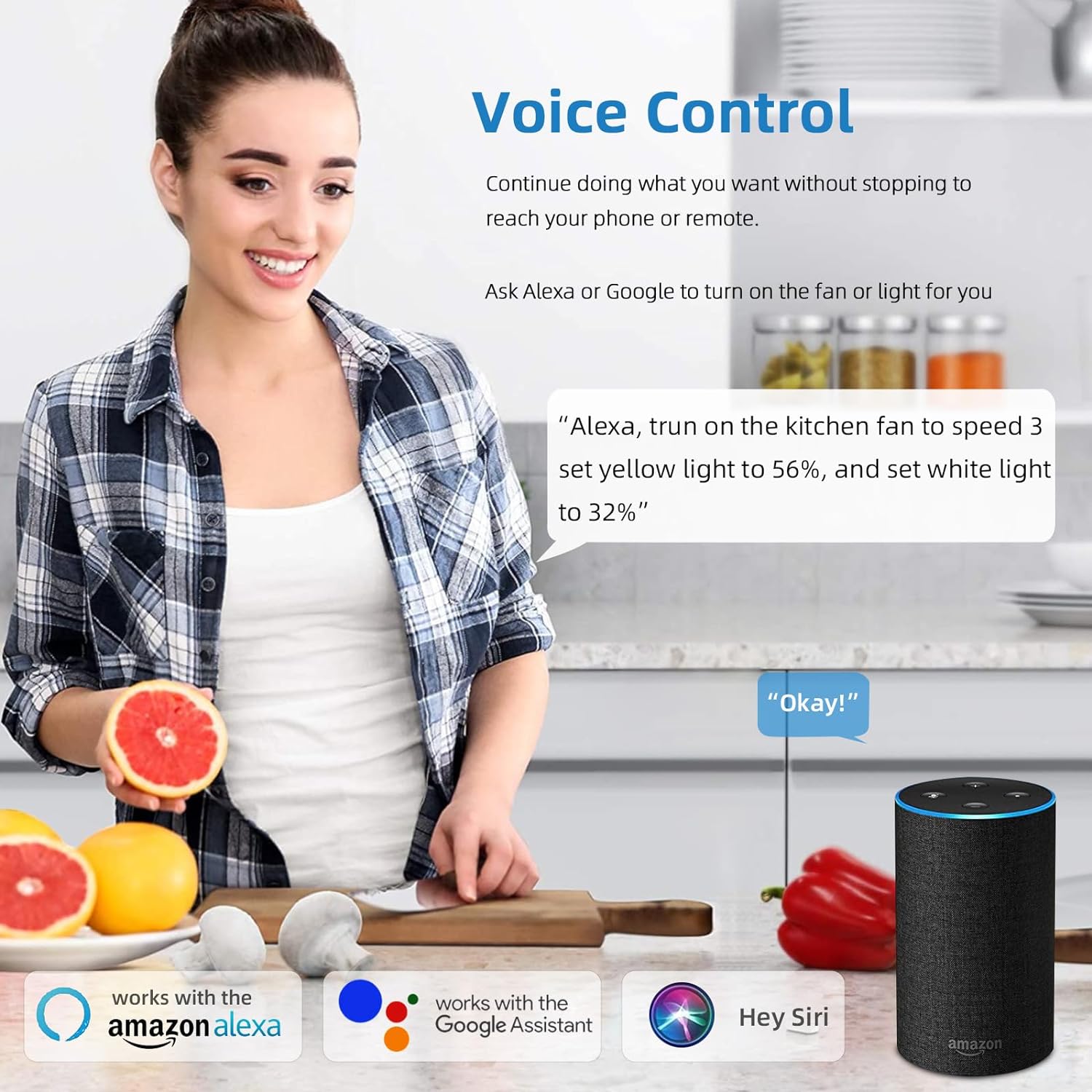
Figure 5: A user interacting with the HOREVO fan using voice commands via Alexa, demonstrating hands-free control.
3.3 בלועטוט רעדנער פונקציאָנאַליטעט
The integrated Bluetooth speaker allows you to play music directly from your smartphone or other Bluetooth-enabled devices.
- פּאָרינג: Enable Bluetooth on your device and search for the fan's Bluetooth name (usually "AnSLong" or similar). Select it to pair.
- מוזיק פּלייבאַק: Once paired, play music through your device, and it will stream through the fan's speaker.
- Light Synchronization: The lights can dance to the beat of the music, enhancing the ambiance.
Figure 6: Visual representation of the fan's Bluetooth connectivity, three-color light effect, colorful light options, music playback, and rhythm synchronization.
4. וישאַלט
Regular maintenance ensures the longevity and optimal performance of your HOREVO ceiling fan.
- רייניקונג:
- Before cleaning, ensure the fan is turned off and the power supply is disconnected.
- Wipe the fan blades and light fixture with a soft, damp שטאָף. פֿאַרמײַדט ניצן שאַרפֿע כעמיקאַלן אָדער אַברייסיוו רייניגער, ווײַל זיי קענען שאַטן די ענדיקונג.
- For crystal components, use a soft, lint-free cloth to gently polish.
- בלייד דורכקוק: Periodically check the retractable blades for any dust accumulation or obstructions. Ensure they move smoothly.
- ליכט מקור: The LED light source is designed for long-term use and typically does not require replacement. If issues arise, consult the troubleshooting section or contact support.
5. טראָובלעשאָאָטינג
If you encounter any issues with your HOREVO ceiling fan, refer to the following common troubleshooting steps:
| פּראָבלעם | מעגלעך סיבה | לייזונג |
|---|---|---|
| דער ווענטילאַטאָר צינדט זיך נישט אָן. | קיין שטראָם צושטעל; פרייַ דראָטן; ווייַט קאָנטראָל באַטאַרייע טויט. | Check circuit breaker; ensure all wires are securely connected; replace remote control batteries. |
| ליכט טוט נישט קער אויף. | Loose wiring; LED driver issue; remote control battery dead. | Check wiring connections; contact support if LED driver is suspected; replace remote control batteries. |
| בלועטוט רעדנער פֿאַרבינדט זיך נישט. | Device not in pairing mode; fan not discoverable; interference. | Ensure Bluetooth is enabled on your device and the fan is in pairing mode; try restarting both devices. |
| דער ווענטילאַטאָר מאַכט אַ נישט־געוויינטלעכן גערויש. | לויזע שרויפן; נישט-באַלאַנסירטע בליידס; מאָטאָר פּראָבלעם. | Check and tighten all screws; ensure blades are properly balanced; contact support if motor issue is suspected. |
| Blades do not retract/extend properly. | Obstruction; mechanism fault. | Check for any physical obstructions; contact support for mechanism issues. |
6. ספּעסאַפאַקיישאַנז
Detailed technical specifications for the HOREVO Retractable Ceiling Fan:
- סאָרט: HOREVO
- מאָדעל נומער: ב027-110וו
- קאָליר: 24w-crystal-36 inch
- מאַטעריאַל: אַקריליק
- סטייל: מאָדערן
- ליכט פיקסטור פאָרעם: סופיט
- צימער טיפּ: קינדער צימער, שלאָפצימער
- פּראָדוקט דימענשאַנז: 15.7"L x 3.2"W x 15.7"H (retracted)
- Extended Diameter: 36 אינטשעס
- מאַכט מקור: Corded Electric, Battery Powered (for remote)
- ינסטאַלירונג טיפּ: גלייַך בארג
- ספּעציעלע שטריך: ווייַט קאָנטראָל
- קאָנטראָל אופֿן: Remote, Alexa/Google App
- ליכט מקור טיפּ: געפירט
- ענדיקן טיפּ: פּאַלישט
- שאָטן מאַטעריאַל: אַקריליק
- נומער פון ליכט קוואלן: 1
- Voltage: 110 וואלטס
- טעמע: קידס
- ליכט קאָליר: White, RGB
- אַרייַנגערעכנט קאַמפּאָונאַנץ: ווייַט קאָנטראָל
- באַצירן: קריסטאַל
- לייטינג אופֿן: ווייַט
- נומער פון זאכן: 1
- וואָסtage: 24 וואטס
- קאָנטראָללער טיפּ: ווייַט קאָנטראָל
- באַשטימען טיפּ: ווייַט
- איינהייט ציילן: 1 גראף
- וואַסער קעגנשטעל מדרגה: ניט וואַסער קעגנשטעליק
- קאַנעקטיוויטי פּראָטאָקאָל: Wi-Fi (for smart home integration)
- ברייטקייט: 2160 לומען
- עפעקטיווקייַט: 90 לם / וו
- מאַונטינג טיפּ: סטעליע בארג
- שאָטן קאָליר: קריסטאַל
- פיקסטור טיפּ: ניט רימווואַבאַל
- אַסעמבלי פארלאנגט: ניין
- נומער וואָג: 18.96 פונט
- UPC: 696629191115
7. וואָראַנטי און שטיצן
HOREVO is committed to providing high-quality products. For any product-related inquiries, technical assistance, or warranty claims, please contact HOREVO customer support.
- שוץ פלענער: Extended protection plans are available for purchase separately to cover your product beyond the standard warranty period. Please refer to your purchase documentation for details on available plans and coverage.
- קאָנטאַקט אינפֿאָרמאַציע: For support, please visit the official HOREVO store on Amazon or refer to the contact details provided in your product packaging.
- אָנליין רעסורסן: Additional support and FAQs may be available on the HOREVO brand website or Amazon product page.
Ask a question about this manual
Ask about setup, troubleshooting, compatibility, parts, safety, or missing instructions. Manuals+ will review the question and use this page’s manual context to help answer it.