
הקדמה
Thank you for choosing the Goplus 88-Key Digital Piano. This portable electronic keyboard is designed for music enthusiasts, offering a full 88-key experience with the flexibility of a detachable design, allowing it to be split into two 44-key sections. It features MIDI and Bluetooth connectivity, a sustain pedal, and a built-in battery for extended use. This manual provides essential information for the safe and efficient operation of your digital piano.
Key features include 128 built-in tones, 128 rhythms, 15 demonstration songs, adjustable touch sensitivity, and recording/playback functions for learning and practice. Its compact and lightweight design, along with a convenient carry bag, makes it ideal for both home and outdoor use.

בילד: איבערview of the Goplus 88-Key Digital Piano's features, including 15 demos, 128 tones, 128 rhythms, Bluetooth, MIDI, teaching modes, adjustable speed, and adjustable touch sensitivity.
פּעקל אינהאַלט
ביטע קאָנטראָלירט דעם פּעקל קערפֿול צו זיכער מאַכן אַז אַלע זאַכן זענען דאָ און אין גוטן צושטאַנד. אויב עפּעס פֿעלט אָדער איז געשעדיגט, ביטע קאָנטאַקטירט קונה שטיצע.
- 1 x 88-Key Digital Piano
- 1 x Piano Carry Bag
- 1 x Charger (Power Adapter)
- 1 x Sustain Pedal
- 1 x באַניצער מאַנואַל (דאָס דאָקומענט)
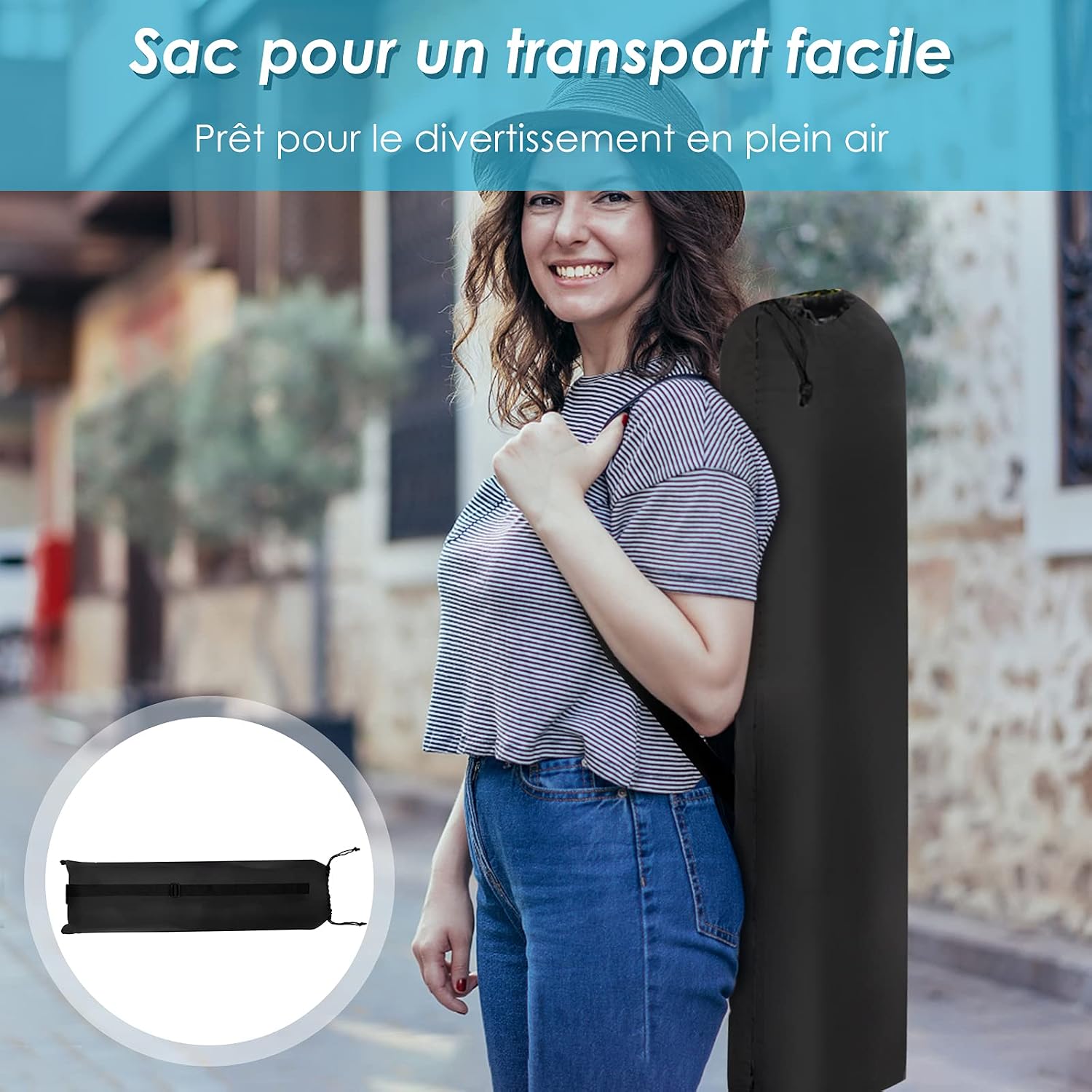
בילד: A person carrying the Goplus 88-Key Digital Piano in its included carry bag, highlighting its portability. An inset shows the folded carry bag.
זיכערקייַט אינסטרוקציעס
- לייענען אַלע ינסטראַקשאַנז איידער איר נוצן דעם פּראָדוקט.
- האַלטן די מאַנואַל פֿאַר צוקונפֿט דערמאָנען.
- Do not expose the piano to water, moisture, or extreme temperatures.
- ניצט נאָר דעם צוגעשטעלטן מאַכט אַדאַפּטער צום אָפּלאָדן.
- Avoid placing heavy objects on the piano.
- Do not attempt to disassemble or repair the piano yourself. Contact qualified service personnel.
- האַלטן אויסער דערגרייכן פון קליינע קינדער צו פאַרמייַדן דערשטיקונג געפאַרן פון קליינע טיילן.
סעטאַפּ
1. Assembling the Piano
The Goplus 88-Key Digital Piano features a detachable design, allowing it to be used as a full 88-key keyboard or split into two 44-key sections. To assemble, align the two sections and gently push them together until they click into place. Ensure the connection is secure.

בילד: נאָענט-אַרויף view of the Goplus 88-Key Digital Piano showing the two sections being connected, illustrating its easy assembly and detachable design.
2. פּאַוערינג אויף און טשאַרדזשינג
Connect the provided charger to the piano's power input port and then to a standard electrical outlet (220V input voltage). The piano has a built-in 1000 mAh battery. A full charge takes approximately 4 hours and provides 10 to 12 hours of playing time. Press the power button to turn the piano on or off.

בילד: Diagram illustrating the battery capacity (1000 mAh), charging time (4 hours), and playing duration (10-12 hours) of the Goplus 88-Key Digital Piano, along with the included charger.
3. Connecting the Sustain Pedal
Locate the sustain pedal input port on the piano (labeled "SUS"). Insert the pedal's cable firmly into this port. The sustain pedal allows you to prolong the sound of notes, similar to an acoustic piano.
4. Music Stand and Anti-slip Pads
The piano includes a practical music stand that can be attached to hold sheet music or a tablet. Ensure the anti-slip foot pads on the bottom of the piano are properly positioned to prevent movement during play.

בילד: נאָענט-אַרויף views of the Goplus 88-Key Digital Piano's accessories: the practical music stand, the sustain pedal, and the anti-slip foot pads on the underside of the piano.
אַפּערייטינג ינסטראַקשאַנז
1. גרונטלעכע ווידערשפּיל
Once powered on, the piano is ready for use. Simply press the keys to produce sound. Adjust the master volume using the dedicated controls.
2. Selecting Tones, Rhythms, and Demos
The piano features 128 built-in tones, 128 rhythms, and 15 demonstration songs. Use the control panel buttons to navigate and select your desired tone, rhythm, or demo track. Refer to the specific button labels on your piano for precise operation.
3. Adjusting Touch Sensitivity
The touch sensitivity of the keys can be adjusted to match your playing style and the emotional expression of the music. Consult your piano's control panel or specific function buttons for this adjustment.
4. רעקאָרדינג און פּלייַבאַקק
The recording function allows you to capture your performances, which can then be played back for review and improvement. Use the dedicated record and playback buttons on the control panel.
5. קאַנעקטיוויטי אָפּציעס
The Goplus 88-Key Digital Piano offers various connectivity options:
- בלועטאָאָטה: Connect wirelessly to compatible devices for audio playback or MIDI data transfer.
- MIDI: Connect to computers or other MIDI devices using a USB cable for advanced music production and software integration.
- כעדפאָון דזשאַק (3.5 מם): Connect headphones for private practice without disturbing others.
- מיקראָפאָן אַרייַנשרייַב: Connect a microphone for vocal accompaniment.
- וסב פּאָרט: For MIDI connectivity and potentially other data transfer.

בילד: נאָענט-אַרויף view of the Goplus 88-Key Digital Piano's interface, showing ports for headphones, MP3 input, microphone, sustain pedal, and USB connection.

בילד: A user playing the Goplus 88-Key Digital Piano, which is connected to a computer setup, demonstrating its use with external devices for music production or learning.
וישאַלט
רייניקונג
Wipe the piano's surface with a soft, dry, or slightly damp cloth. Do not use abrasive cleaners, solvents, or waxes, as these can damage the finish. Avoid spraying cleaning solutions directly onto the piano.
סטאָרידזש
When not in use, store the piano in a cool, dry place away from direct sunlight and extreme temperatures. Use the provided carry bag for protection during transport and storage.
טראָובלעשאָאָטינג
- קיין קול:
- Ensure the piano is powered on and charged.
- קאָנטראָלירן די באַנד מדרגה.
- If headphones are connected, disconnect them to hear sound from the built-in speakers.
- קנעפּלעך רעאַגירן נישט:
- Ensure the piano is fully assembled if using the 88-key configuration.
- Restart the piano.
- בלועטאָאָטה קאַנעקשאַן ישוז:
- Ensure Bluetooth is enabled on both the piano and your device.
- Move your device closer to the piano.
- פּרוּווט פּערינג ווידער.
- Sustain Pedal Not Working:
- Ensure the pedal is fully inserted into the "SUS" port.
For issues not covered here, please refer to the official Goplus support resources or contact customer service.
ספּעסאַפאַקיישאַנז
| מאָדעל נאָמען | GOPLUS 88-key Piano |
| נומער פון קיז | 88 (detachable into 2 x 44 keys) |
| קאָליר | שוואַרץ |
| דימענסיעס (L X W X H) | 137 X 16.5 X 5 סענטימעטער (53.9 X 6.5 X 2 אינטשעס) |
| נעץ וואָג | 3 קג (6.6 לבס) |
| באַטאַרייע קאַפּאַציטעט | 1000 מאַה |
| טשאַרדזשינג צייט | בעערעך. 4 שעה |
| פּלייַינג צייט | 10-12 שעה (אויף פול אָפּצאָל) |
| טשאַרדזשער אַרייַנשרייַב וואָלtage | 220V |
| קאַנעקטיוויטי | Bluetooth, MIDI (USB), Headphone Jack (3.5mm), Microphone Input, Sustain Pedal Input |
| געבויט-אין טאָנעס | 128 |
| Built-in Rhythms | 128 |
| דעמאַנסטריישאַן לידער | 15 |
| ספּעציעלע פֿעיִקייטן | Adjustable Touch Sensitivity, Recording/Playback, Teaching Function |
| רעקאַמענדיד עלטער | 3 years + (Beginner to Adult) |
| לאַנד פון אָריגין | כינע |

בילד: Diagram showing the dimensions of the Goplus 88-Key Digital Piano: 137 cm (length), 16.5 cm (width), and 5 cm (height). Also shows the carry bag dimensions.
וואָראַנטי און שטיצן
For warranty information, technical support, or service inquiries, please refer to the documentation included with your purchase or visit the official Goplus webזייטל. האַלט אייער קויף קוויטל ווי אַ באַווייַז פון קויפן.
An installation manual (PDF) is available for download דאָ.