
PIX-LINK LV-AC28
PIX-LINK WiFi Extender User Manual
Model: LV-AC28
הקדמה
The PIX-LINK WiFi Extender is designed to expand the coverage of your existing wireless network, eliminating Wi-Fi dead zones and providing a stable internet connection throughout your home or office. With a 300Mbps wireless expansion rate, it enhances signal strength and ensures seamless connectivity for multiple devices.

פראָנט view of the PIX-LINK WiFi Extender, a compact white device with a WPS button and LED indicators on top, showing wireless signals emanating from it.
פּעקל אינהאַלט
ביטע טשעק די פּאַקעט פֿאַר די פאלגענדע זאכן:
- PIX-LINK WiFi Extender Unit
- שנעל ינסטאַללאַטיאָן גייד
סעטאַפּ גייד
The PIX-LINK WiFi Extender can be easily configured using a web browser on your smartphone, tablet, or computer. Follow these steps for a quick and simple installation:
- Connect to the Extender's Wi-Fi: Plug in the WiFi Extender. On your device, search for available Wi-Fi networks and connect to the network named "PIX-LINK-2.4G".
- Access the Setup Page: עפענען א web browser (e.g., Chrome, Safari) and enter the default IP address
http://192.168.7.234in the address bar. You will be prompted to log in. The default password is "admin". - אויסקלייבן ריפּיטער מאָדע: Once logged in, navigate to the setup wizard and select "Repeater Mode" to extend your existing Wi-Fi network.
- קלייַבן דיין נעץ: The extender will scan for available Wi-Fi networks. Select your target network's SSID (your home Wi-Fi name) from the list and enter its security key (Wi-Fi password).
- גאַנץ ינסטאַלירונג: Confirm your settings. The extender will then apply the configuration and restart.
- Connect to the New SSID: After the extender restarts, connect your devices to the new extended Wi-Fi network. The new network name will typically be your original network name followed by "_EXT" or similar.
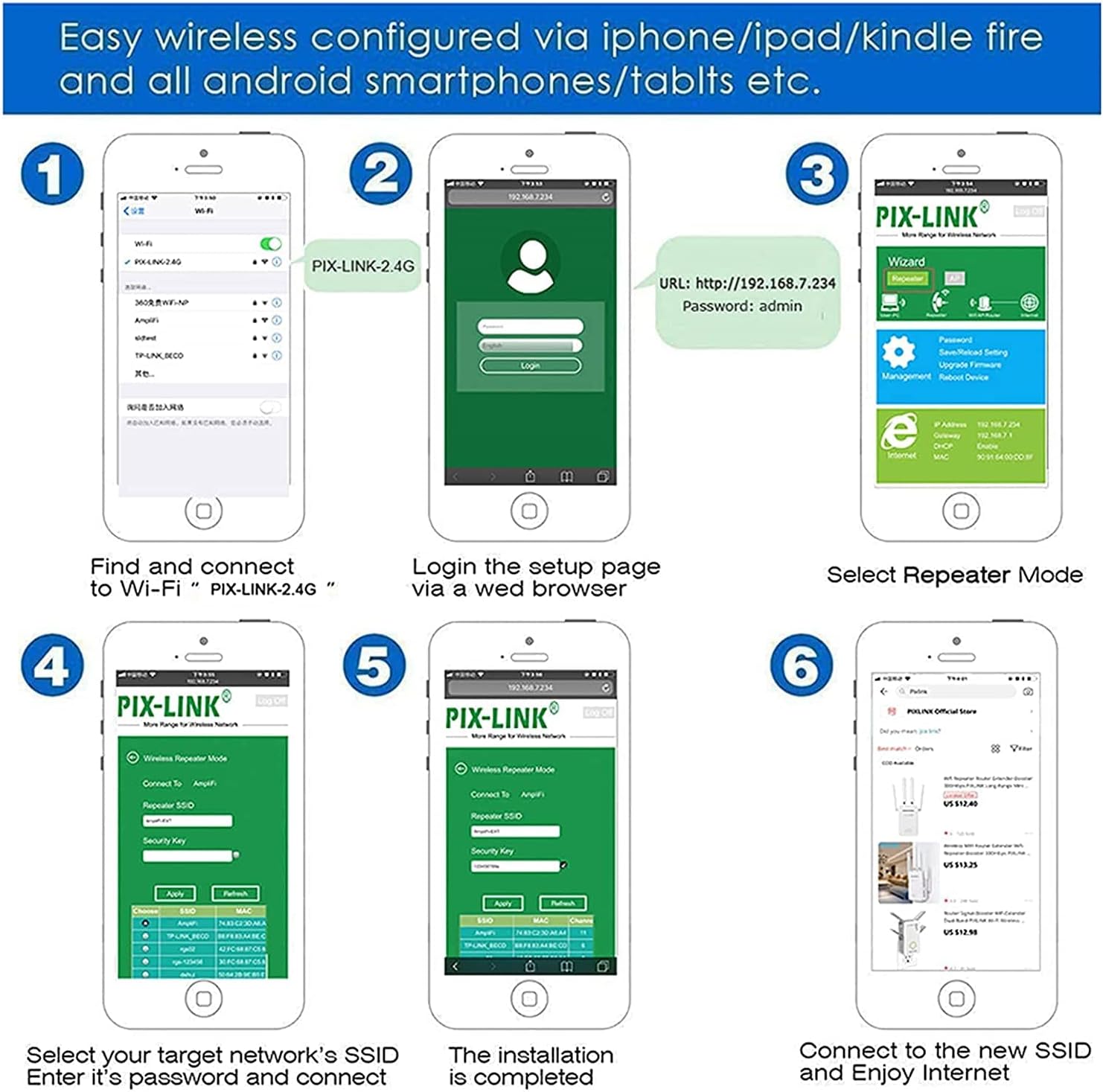
A series of six smartphone screens illustrating the step-by-step process of setting up the PIX-LINK WiFi Extender via a web browser, from connecting to its default network to selecting the repeater mode and entering the main Wi-Fi password.
אַפּערייטינג מאָדעס און פֿעיִקייטן
The PIX-LINK WiFi Extender offers robust features to enhance your wireless experience:
- ווירעלעסס רעפּעאַטער מאָדע: Extends the range of your existing Wi-Fi network, eliminating dead zones.
- שנעל ענקריפּשאַן: One-touch wireless security encryption using the WPS button for quick and secure connections.
- ינטויטיוו Web וי: באַניצער-פרייַנדלעך web interface for hassle-free setup and management.
- וניווערסאַל קאַמפּאַטאַבילאַטי: Works seamlessly with most standard Wi-Fi routers.
- הויך-גיכקייַט דאַטן אַריבערפירן: Supports up to 300 Megabits Per Second for smooth streaming and browsing.
- עטהערנעט פּאָרט: Includes an RJ45 port to connect wired devices, acting as a wireless adapter.

Three panels illustrating key features: a person using a smartphone with 'Intuitive Web UI' text, two people looking at a laptop with 'Ultimate Wireless Speed' text, and a person using a laptop with 'Reliable Connection' text.

Diagram showing the PIX-LINK WiFi Extender boosting Wi-Fi signals to various devices including smartphones, gaming consoles, laptops, and smart TVs, illustrating its multi-device support.
געפירט ינדיקאַטאָרס
The LED lights on your PIX-LINK WiFi Extender provide important status information:
| גראדן | סטאַטוס | באַשרייַבונג |
|---|---|---|
| מאַכט געפירט | On | מיטל איז פּאַוערד אויף. |
| ווי-פי געפירט | On | Wi-Fi signal is active. |
| LAN געפֿירט | אויף / בלינקינג | Ethernet port is connected/active. |
| WPS/Repeater LED | On | Repeater function is successfully established. |
| WPS/Repeater LED | בלינקינג | Repeater function failed or WPS pairing in progress. |

A combined image showing a floor plan illustrating how the wireless repeater extends Wi-Fi signal coverage from a router to previously weak areas, alongside a close-up of the extender's LEDs explaining 'Repeater Mode' status (On: Relay Successful, Blinking: Relay Failure).
טראָובלעשאָאָטינג
If you encounter issues with your WiFi Extender, consider the following common solutions:
- קיין מאַכט: Ensure the extender is properly plugged into a working power outlet.
- Cannot Access Setup Page: Double-check that you are connected to the extender's Wi-Fi network (e.g., "PIX-LINK-2.4G") and that you have entered the correct IP address (
http://192.168.7.234) and password ("admin"). Try clearing your browser's cache or using a different browser. - Weak Signal After Setup: Try repositioning the extender closer to your main router but still within the range of a strong signal. Obstacles like thick walls can interfere with the signal.
- Repeater Mode Failure (Blinking WPS/Repeater LED): This often indicates an incorrect Wi-Fi password for your main router or an issue connecting to it. Re-enter the password carefully during setup.
- קיין אינטערנעט אַקסעס: Verify that your main router has an active internet connection. Restart both your main router and the extender.
- פאַבריק באַשטעטיק: If problems persist, you may need to perform a factory reset. Locate the Reset/WPS button (often a small pinhole) and press and hold it for about 5-10 seconds until the LEDs flash. This will revert the extender to its default settings, and you will need to set it up again.
ספּעסאַפאַקיישאַנז
Detailed technical specifications for the PIX-LINK WiFi Extender (Model LV-AC28):
| קאַטעגאָריע | באַשרייַבונג |
|---|---|
| מאָדעל נומער | LV-AC28 |
| סאָרט | PIX-LINK |
| ווירעלעסס סטאַנדאַרד | 802.11bgn |
| דאַטאַ אַריבערפירן קורס | 300 מבפּס |
| אָפטקייַט באַנד | איין-באַנד (2.4 GHz) |
| עטהערנעט פּאָרט | 1x 10/100Mbps RJ45 Port |
| אַנטענע | 2 אינערלעכע אַנטענעס |
| קנעפּלעך | WPS / RESET קנעפּל |
| דימענסיעס (L X W X H) | 80 X 70 X 77 מם (בעערעך 3.15 X 2.76 X 3.03 אינטשעס) |
| פּונקט וואָג | 4.1 אונסעס |
| ASIN | B092YS82J1 |
| ערשטער בנימצא | 9 מאי 2021 |

An image displaying detailed specifications of the PIX-LINK WiFi Extender, categorized into Hardware, Wireless, and Others, including Ethernet port type, button details, antenna type, dimensions, wireless standards, signal rate, frequency, transmit power, reception sensitivity, wireless security protocols, and package contents.
וואָראַנטי און שטיצן
PIX-LINK offers a 1-יאָר וואָראַנטי covering any defects caused during product production and delivery. If you are not satisfied with your purchase, you may return or replace it without any problem.
For customer service and technical support, PIX-LINK provides 7*24 dedicated customer service to assist you with any issues or questions you may have regarding your WiFi Extender.
Please refer to the contact information provided in your product packaging or on the official PIX-LINK webזייטל פֿאַר דירעקטע שטיצע.
פֿאַרבונדענע דאָקומענטן - LV-AC28
 |
PIX-LINK WR22 300Mbps WiFi ריפּיטער סעטאַפּ און באַניצער גייד די גייד גיט אינסטרוקציעס פארן אויפשטעלן און ניצן דעם PIX-LINK WR22 300Mbps WiFi ריפּיטער, אריינגערעכנט פרטים וועגן LED אינדיקאַטאָרן, פּאָרץ, קנעפּלעך, און טראָובלעשווטינג פּראָסטע פּראָבלעמען. |
 |
PIX-LINK LV-WR12 Wi-Fi ריפּיטער שנעלע אינסטאַלאַציע גייד די אנווייזונג גיט שריט-ביי-שריט אינסטרוקציעס פארן אויפשטעלן און קאנפיגורירן דעם PIX-LINK LV-WR12 Wi-Fi ריפּיטער. לערנט ווי אזוי צו אינסטאלירן, פארבינדן, אויפשטעלן אין ריפּיטער אדער AP מאָדע, ניצן WPS, פירן סעטינגס, און טראבלושען געוויינלעכע פראבלעמען. |
 |
PIX-LINK LV-WR09 Wireless-N ריפּיטער/ראָוטער/AP שנעלע אינסטאַלאַציע גייד שנעלע אינסטאַלאַציע גייד פֿאַר די PIX-LINK LV-WR09 Wireless-N ריפּיטער, ראַוטער, און אַקסעס פּוינט. דעקט די אויסזען פון דיווייס, LED אינדיקאַטאָרן, קנעפּל פונקציעס, אָפּערייטינג מאָדעס, סעטאַפּ פּראָצעדורן דורך WPS און web בלעטערער, קאָנפיגוראַציע אָפּציעס, און אָפט געשטעלטע פֿראַגעס. |
 |
PIX-LINK LV-AC24 שנעלע אינסטאַלאַציע גייד א קורצע אנווייזונג פארן אויפשטעלן און ניצן דעם PIX-LINK LV-AC24 ווייערלעסן רעפּיטער אין ביידע רעפּיטער און AP מאָדעס. כולל LED דערקלערונגען, פּאָרט באַשרייַבונגען, אויפשטעלן אינסטרוקציעס דורך web בלעטערער און WPS, עצה וועגן איבערפירן ארבעט, און אָפט געשטעלטע פֿראַגעס וועגן פּראָבלעם געשטעלטע פֿראַגעס. |
 |
פּיקס-לינק וויי-פיי עקסטענדער שנעלע אינסטאַלאַציע גייד א קורצע אנווייזונג צו אויפשטעלן אייער PIX-LINK WiFi עקסטענדער אין ריפּיטער מאָדע אדער AP מאָדע ניצנדיק web בראַוזער אָדער WPS קנעפּל. כולל עצות פֿאַר פּראָבלעם־לייזונג. |
 |
ניצן Wi-Fi נעטוואָרקס PIX-LINK LV-WR01 ניצן Wi-Fi פֿאַרבינדונג פֿאַר פֿרייַ Wi-Fi נעטוואָרקס PIX-LINK LV-WR01. אויף WPS, אַפּערייטינג סיסטעם, אַפּערייטינג סיסטעם און אַקטואַליזיישאַן. |
Ask a question about this manual
Ask about setup, troubleshooting, compatibility, parts, safety, or missing instructions. Manuals+ will review the question and use this page’s manual context to help answer it.