
הקדמה
א דאנק פארן קויפןasing the LEDWOOD ACCESS100 Portable Bluetooth Speaker. This manual provides detailed instructions for setting up, operating, and maintaining your speaker to ensure optimal performance and longevity. Please read this manual thoroughly before using the product.

Image: The LEDWOOD ACCESS100 portable Bluetooth speaker, showcasing its cylindrical design and integrated carrying strap.
פּעקל אינהאַלט
זיכער מאַכן אַז אַלע די זאכן וואָס זענען אויסגערעכנט אונטן זענען פאַראַן אין דיין פּעקל:
- 1 x LEDWOOD ACCESS100 Bluetooth Speaker
- 1 x Charging Cable (USB-A to Micro-USB)
- 1 x Audio Cable (3.5mm AUX)
- 1 x באַניצער מאַנואַל
- 1 x קעריינג רימען

Image: The LEDWOOD ACCESS100 speaker shown within its retail packaging box.
פּראָדוקט איבערview
קאָנטראָלס און פּאָרץ
מאַכט זיך באַקאַנט מיט די רעדנער'ס קאָנטראָלן און פֿאַרבינדונג פּאָרץ:

בילד: א דעטאַלירטע view of the speaker's control panel, showing buttons and input ports.
- מיקראָסד קאָרט שפּעלטל: Insert a MicroSD card for direct music playback.
- וסב פּאָרט: Insert a USB flash drive for direct music playback.
- DC 5V טשאַרדזשינג פּאָרט: Connect the charging cable here.
- AUX אַרייַנשרייַב: Connect external audio devices using the 3.5mm audio cable.
- פריערדיגע ליד / באַנד אַראָפּ (V-): קורץ דריקן פֿאַר פֿריִערדיקן ליד, לאַנג דריקן צו פֿאַרמינערן די באַנד.
- נעקסטע טרעק / וואליום ארויף (V+): קורץ דריקן פֿאַר דער ווייַטער ליד, לאַנג דריקן צו פאַרגרעסערן די באַנד.
- מאַכט קנעפּל: Long press to power on/off. Short press to play/pause in Bluetooth/USB/MicroSD mode.
- מאָדע (M) קנעפּל: Short press to switch between Bluetooth, AUX, USB, MicroSD, and FM Radio modes.
- Play/Pause / TWS Button: Short press to play/pause. Long press to activate TWS pairing (in Bluetooth mode).
סעטאַפּ
טשאַרדזשינג די רעדנער
פארן ערשטן באַנוץ, לאָדן דעם רעדנער גאָר אויף.
- Connect the provided USB charging cable to the DC 5V port on the speaker.
- פֿאַרבינדט דעם אַנדערן עק פֿונעם USB קאַבל צו אַ USB מאַכט אַדאַפּטער (נישט אַרייַנגערעכנט) אָדער אַ קאָמפּיוטער'ס USB פּאָרט.
- די טשאַרדזשינג אינדיקאַטאָר ליכט וועט זיך אָנצינדן בעת טשאַרדזשינג און זיך אויסלעשן ווען עס איז גאָר אויפגעלאָדן.
מאַכט אויף / אַוועק
- צו אנצינדן, לאנג דריקן די מאַכט קנעפּל ביז איר הערט אַן אויפהערנדיקן פּראָמפּט.
- צו אויסלעשן, לאנג דריקן די מאַכט קנעפּל again until the speaker shuts down.
אַפּערייטינג ינסטראַקשאַנז
בלועטאָאָטה מאָדע
The speaker enters Bluetooth pairing mode automatically when powered on, or when selected via the Mode button.
- Ensure the speaker is powered on and in Bluetooth mode (indicated by an audible prompt).
- אַקטיווירן בלועטוט אויף דיין סמאַרטפאָון, טאַבלעט, אָדער אַנדער קאָמפּאַטיבל מיטל.
- זוכן פֿאַר "LEDWOOD ACCESS100" in your device's Bluetooth settings and select it to pair.
- Once paired, you will hear a confirmation sound. You can now play audio from your device through the speaker.
- קאָנטראָלס:
- קורץ דרוק מאַכט קנעפּל צו פּלייַ / פּאָז.
- קורץ דרוק V- for Previous Track.
- קורץ דרוק V+ for Next Track.
- לאנג דריקן V- to Decrease Volume.
- לאנג דריקן V+ to Increase Volume.

Image: An icon representing wireless connectivity, indicating Bluetooth functionality.
אמת ווירעלעסס סטערעאָ (TWS) פונקציע
The TWS function allows you to pair two LEDWOOD ACCESS100 speakers together for a stereo sound experience.
- Ensure both ACCESS100 speakers are powered on and in Bluetooth mode, but not yet connected to any device.
- אויף איינעם פון די רעדנערס (דאָס וועט זיין דער הויפּט רעדנער), לאַנג דריקן די Play/Pause / TWS Button. You will hear an indication sound.
- The two speakers will automatically search and pair with each other. Once successfully paired, you will hear a confirmation sound.
- Now, connect your smartphone or tablet to the primary speaker via Bluetooth as described in the "Bluetooth Mode" section.
- אַודיאָ וועט איצט שפּילן אין סטעריאָו דורך ביידע רעדנערס.

Image: An icon representing True Wireless Stereo (TWS) functionality, showing two interconnected loops.
AUX מאָדע
Use the AUX mode to connect devices without Bluetooth capability.
- פֿאַרבינדט איין עק פֿון דעם 3.5 מ״מ אַודיאָ קאַבל צום AUX אַרייַנגאַנג פּאָרט אויף דעם רעדנער.
- פֿאַרבינדט דעם אַנדערן עק צום אַודיאָ־אַרויסגאַנג פֿון אייער עקסטערנעם מיטל (למשל, MP3 שפּילער, קאָמפּיוטער).
- דרוק די מאָדע (ב) קנעפּל repeatedly until you hear the "AUX mode" prompt.
- קאָנטראָליר ווידערשפּיל און באַנד גלייך פֿון דיין פֿאַרבונדענעם מיטל.
USB / MicroSD Card Mode
Play music directly from a USB flash drive or MicroSD card.
- Insert a USB flash drive into the USB port or a MicroSD card into the MicroSD card slot.
- The speaker will automatically switch to the corresponding mode and begin playing music. If not, press the מאָדע (ב) קנעפּל to select USB or MicroSD mode.
- קאָנטראָלס:
- קורץ דרוק מאַכט קנעפּל צו פּלייַ / פּאָז.
- קורץ דרוק V- for Previous Track.
- קורץ דרוק V+ for Next Track.
- לאנג דריקן V- to Decrease Volume.
- לאנג דריקן V+ to Increase Volume.
עפעם ראַדיאָ מאָדע
הערט צו אייערע באַליבסטע FM ראַדיאָ סטאַנציעס.
- דרוק די מאָדע (ב) קנעפּל repeatedly until you hear the "FM Radio" prompt.
- To automatically scan and save available stations, long press the Play/Pause / TWS Button. The speaker will scan and store stations.
- To switch between saved stations, short press the V- or V+ קנעפּלעך.
- לאנג דריקן V- to Decrease Volume.
- לאנג דריקן V+ to Increase Volume.
וישאַלט
- רייניקונג: ניצט אַ ווייכע, טרוקענע שטאָף צו רייניקן די רעדנער'ס ייבערפלאַך. ניצט נישט קיין שרײַבנדיקע רייניגער אָדער סאָלווענטן.
- סטאָרידזש: האַלט דעם רעדנער אין אַ קיל, טרוקן אָרט אַוועק פון דירעקט זונשייַן און עקסטרעמע טעמפּעראַטורן.
- באַטערי זאָרגן: כדי צו פארלענגערן די לעבן פון די באַטעריע, זאָלט איר נישט אָפט אויסלאָדן דעם רעדנער. לאָדט עס אָפט אויף, אפילו אויב עס ווערט נישט גענוצט פאר לענגערע צייטן.
- וואַסער קעגנשטעל: דער רעדנער איז נישט וואַסערפּרוף. פֿאַרמייַדן אויסשטעלונג צו וואַסער אָדער איבעריקע פֿײַכטקייט.
טראָובלעשאָאָטינג
| פּראָבלעם | מעגלעך סיבה | לייזונג |
|---|---|---|
| דער רעדנער גייט נישט אן. | נידעריק באַטאַרייע. | לאָדט דעם רעדנער גאָר אויף. |
| קיין קלאַנג פֿון רעדנער. | קול צו נידעריג; אומרעכטער מאָדע; דעווייס נישט פארבונדן. | Increase volume on speaker and connected device. Ensure correct mode (Bluetooth, AUX, USB, MicroSD, FM). Re-pair Bluetooth device or check cable connection. |
| בלועטאָאָטה פּערינג פיילז. | רעדנער נישט אין פּערינג מאָדע; דעווייס צו ווייט; שטערונג. | Ensure speaker is in Bluetooth pairing mode. Move device closer to speaker (within 10 meters). Turn off other Bluetooth devices. |
| TWS פּאָרינג פיילז. | Speakers not in TWS pairing mode; too far apart. | Ensure both speakers are in Bluetooth mode and not connected to any device. Long press the TWS button on one speaker. Keep speakers close during pairing. |
| USB/MicroSD playback issues. | ניט געשטיצט file format; corrupted media; incorrect mode. | פאַרזיכערן אַודיאָ files are in a supported format (e.g., MP3). Try a different USB drive or MicroSD card. Press Mode button to select correct input. |
| שלעכטע FM ראַדיאָ אָפּנאַם. | שוואַך סיגנאַל; סביבה־אינטערפערענץ. | Move the speaker to a different location. Re-scan for stations. |
ספּעסאַפאַקיישאַנז
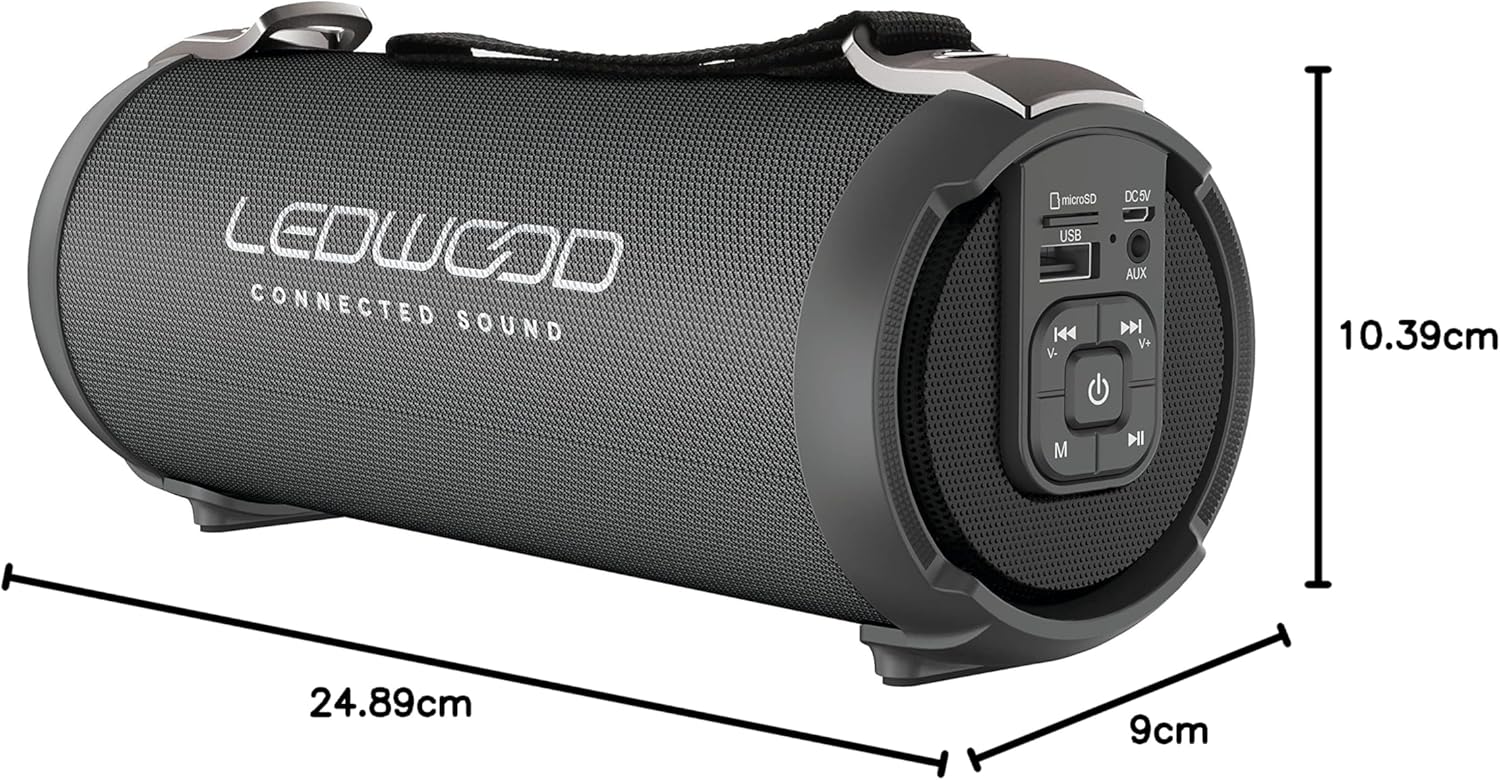
Image: The LEDWOOD ACCESS100 speaker with its length, width, and height dimensions indicated.
| שטריך | דעטאַל |
|---|---|
| מאָדעל נאָמען | אַקסעס 100 |
| סאָרט | Ledwood |
| קאַנעקטיוויטי טעכנאָלאָגיע | בלועטאָאָטה |
| ווירעלעסס ראַנגע | אַרויף צו 10 מעטער (33 פֿיס) |
| אַודיאָ רעזולטאַט מאָדע | סטערעאָ (2.0 קאַנאַל) |
| Speaker Output Power (RMS) | 8.5 וואטס |
| שפּיץ מאַכט רעזולטאַט | 100 וואטס |
| ספּעציעלע פֿעיִקייטן | USB Port, MicroSD Card Slot, AUX Input, FM Radio, TWS Function |
| מאַכט מקור | Battery Powered (rechargeable via USB cable) |
| פּראָדוקט דימענשאַנז (L x W x H) | 24.9 סענטימעטער X 9 סענטימעטער X 10.4 סענטימעטער (9.8 X 3.5 X 4.1 אינטשעס) |
| וואָג | 820 גראַמז (1.8 לבס) |
| קאָליר | שוואַרץ |
| וואָטערפּרוף | ניין |
| קאַמפּאַטאַבאַל דעוויסעס | סמאַרטפאָנעס, טאַבלאַץ |
זיכערקייַט אינפֿאָרמאַציע
- שטעלט נישט אויס דעם רעדנער צו עקסטרעמע טעמפּעראַטורן, דירעקטע זונשייַן, אדער הויכע פֿײַכטקייט.
- נעמט נישט אוועק, פאררעכט, אדער מאדיפיצירט נישט דעם רעדנער אליין. דאס וועט בטל מאכן די גאראנטיע.
- האַלטן די רעדנער אַוועק פון קינדער און פּעץ.
- ניצט נאָר דעם צוגעשטעלטן טשאַרדזשינג קאַבל אָדער אַ סערטיפיצירטן עקוויוואַלענט.
- ויסמיידן צוגעהערט אין הויך וואַליומז פֿאַר עקסטענדעד פּיריאַדז צו פאַרמייַדן געהער שעדיקן.
- אַוועקוואַרפן דעם פּראָדוקט און זײַן באַטאַרייע פאַראַנטוואָרטלעך לויט די לאָקאַלע רעגולאַציעס.
וואָראַנטי און שטיצן
This product comes with a standard manufacturer's warranty. For detailed warranty terms and conditions, please refer to the warranty card included in your package or contact Ledwood customer support.
For technical support, troubleshooting assistance, or general inquiries, please visit the official Ledwood webזייטל אדער קאנטאקטירן זייער קאסטומער סערוויס דעפארטמענט. קאנטאקט אינפארמאציע קען געווענליך געפונען ווערן אויף דער פראדוקט פאקאדזש אדער אויף דער באשטעטיגטער פירמע פון דער בראנד. webפּלאַץ.