
1. הקדמה
א דאנק פארן קויפןasing the QFX PBX-8080 Portable Bluetooth Speaker. This manual provides important information regarding the setup, operation, and maintenance of your device. Please read it thoroughly before use and retain it for future reference.
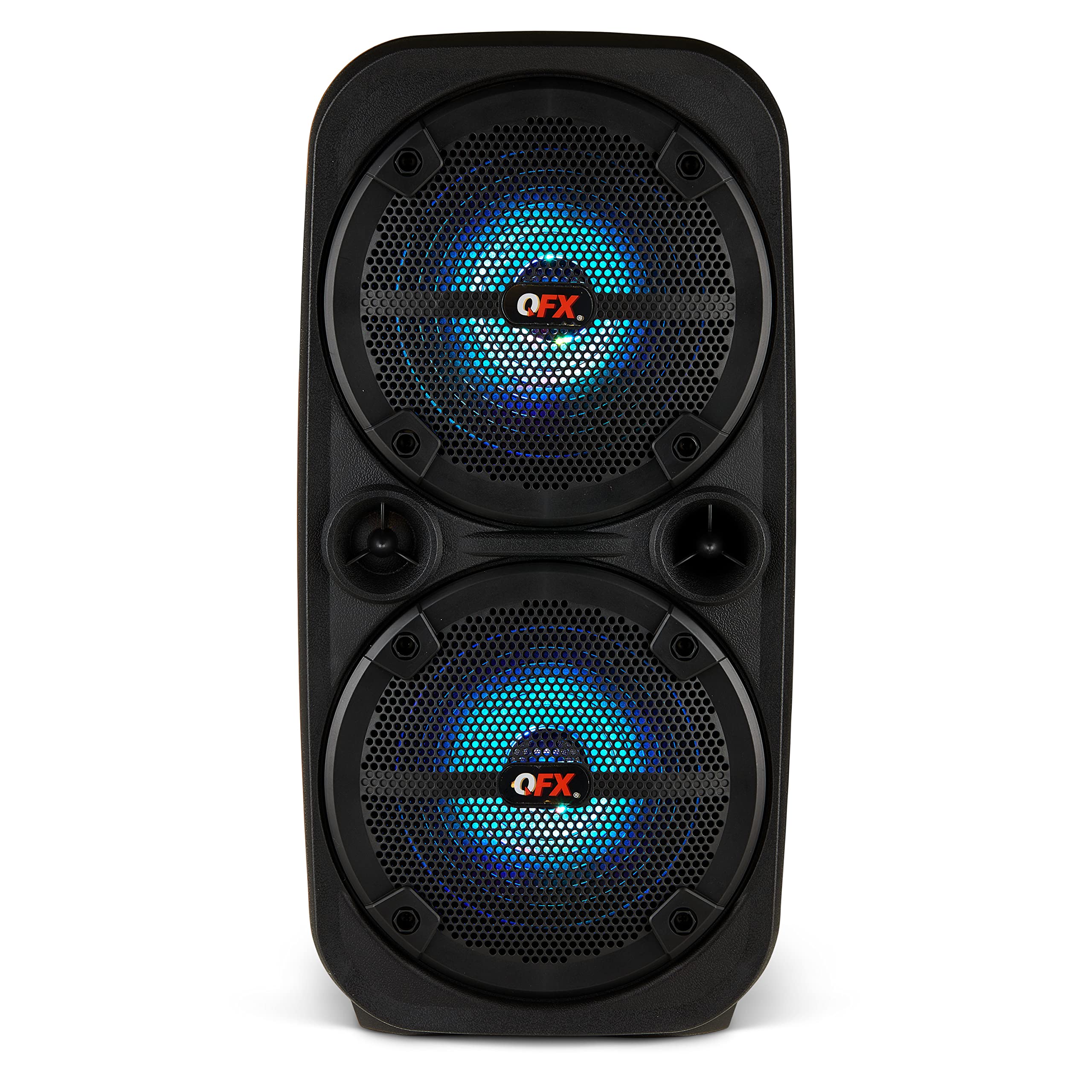
בילד 1.1: פראָנט view of the QFX PBX-8080 Portable Bluetooth Speaker. This image displays the speaker's robust design, featuring two 8-inch woofers, a central control panel, and illuminated LED party lights, indicating its readiness for use.
2. זיכערקייַט אינסטרוקציעס
- לייענען אינסטרוקציעס: Read all safety and operating instructions before using the product.
- האַלטן אינסטרוקציעס: האַלטן די זיכערקייַט און אַפּערייטינג ינסטראַקשאַנז פֿאַר צוקונפֿט רעפֿערענץ.
- היט וואָרנינגז: אַדכיר צו אַלע וואָרנינגז אויף דעם פּראָדוקט און אין די אַפּערייטינג ינסטראַקשאַנז.
- גיי אינסטרוקציעס: גיי אַלע אַפּערייטינג און נוצן ינסטראַקשאַנז.
- וואַסער און נעץ: דו זאלסט נישט נוצן דעם אַפּאַראַט לעבן וואַסער.
- רייניקונג: ריין בלויז מיט אַ טרוקן שטאָף.
- ווענטילאַטיאָן: בלאָקירט נישט קיין ווענטילאַציע עפענונגען. אינסטאַלירט לויט די אינסטרוקציעס פונעם פאַבריקאַנט.
- היץ: דו זאלסט נישט ינסטאַלירן לעבן קיין היץ קוואלן אַזאַ ווי ראַדיאַטאָרס, היץ רעדזשיסטערז, סטאָוווז אָדער אנדערע אַפּאַראַט (אַרייַנגערעכנט ampליפיערס) וואָס פּראָדוצירן היץ.
- מאַכט קאָרד שוץ: באַשיצן די מאַכט שנור פון גיין אויף אָדער פּינטשט, ספּעציעל אין די פּלאַגז, קאַנוויניאַנס רעסאַפּיז און די פונט ווו זיי אַרויסגיין פון די אַפּאַראַט.
- אַטאַטשמאַנץ: ניצן בלויז אַטאַטשמאַנץ / אַקסעסעריז ספּעסיפיעד דורך דער פאַבריקאַנט.
- בליץ: אָפּשטויסן דעם אַפּאַראַט בעשאַס בליץ סטאָרמז אָדער ווען אַניוזד פֿאַר לאַנג פּיריאַדז.
- סערוויס: אָפּשיקן אַלע סערוויסעס צו קוואַלאַפייד סערוויס פּערסאַנעל. סערוויס איז פארלאנגט ווען דער אַפּאַראַט איז דאַמידזשד אין קיין וועג, אַזאַ ווי מאַכט צושטעלן שנור אָדער צאַפּן איז דאַמידזשד, פליסיק איז ספּילד אָדער אַבדזשעקץ זענען געפאלן אין די אַפּאַראַט, דער אַפּאַראַט איז יקספּאָוזד צו רעגן אָדער נעץ, אַרבעט נישט נאָרמאַלי , אָדער האט שוין דראַפּט.
3. פּעקל אינהאַלט
ביטע אָפּהאַקן דאָס קעסטל פֿאַר די פֿאָלגנדיקע זאַכן:
- QFX PBX-8080 Portable Bluetooth Speaker
- וסב טשאַרדזשינג קאַבלע
- ינסטרוקטיאָן מאַנואַל (דעם דאָקומענט)
4. פּראָדוקט איבערview
The QFX PBX-8080 is a versatile portable speaker designed for powerful audio output and various connectivity options. It features dual 8-inch woofers, LED party lights, and multiple input methods.
שליסל קאַמפּאָונאַנץ:
- צוויי 8-אינטש וואָאָפערס: For powerful bass and clear audio.
- קאָנטראָל פּאַנעל: Located on the top or front, featuring buttons for power, mode selection, volume, playback control, and LED light control.
- געפירט פארטיי לייץ: Integrated lights that synchronize with music or can be set to various patterns.
- אַרייַנשרייַב פּאָרץ: USB, Aux-in (3.5mm), Microphone input.
- טשאַרדזשינג פּאָרט: פֿאַר פֿאַרבינדן דעם USB טשאַרדזשינג קאַבל.
- שעפּן: פֿאַר גרינג פּאָרטאַביליטי.
5. סעטאַפּ
5.1 אויפלאָדן דעם רעדנער
- געפינען די טשאַרדזשינג פּאָרט אויף די רעדנער.
- פֿאַרבינדט דעם צוגעשטעלטן USB טשאַרדזשינג קאַבל צום רעדנער'ס טשאַרדזשינג פּאָרט.
- Connect the other end of the USB cable to a compatible USB power adapter (not included) or a powered USB port.
- The charging indicator light (if present) will illuminate, typically red, during charging.
- Once fully charged, the indicator light may change color (e.g., turn off or turn green). A full charge typically takes several hours.
- The speaker supports "Charge & Play," allowing you to use it while it is charging.
5.2 פּאַוערינג אויף / אַוועק
- To power on the speaker, press and hold the Power button (usually marked with ⏻ or "POWER") for a few seconds until you hear an audible prompt or see the display/LEDs light up.
- צו אויסלעשן, דריק און האלט דעם פּאַוער קנעפּל ווידער ביז דער רעדנער שליסט זיך אויס.
6. אַפּערייטינג ינסטרוקטיאָנס
6.1 בלועטאָאָטה פּערינג
- Ensure the speaker is powered on and in Bluetooth mode. If not, press the "MODE" button until "Bluetooth" or "BT" is displayed/announced. The Bluetooth indicator will typically flash, indicating it's in pairing mode.
- אויף אייער מאָבילער מיטל (סמאַרטפאָן, טאַבלעט, אאז"וו), אַקטיווירט בלועטוט און זוכט פֿאַר פֿאַראַן דעוויסעס.
- Select "QFX PBX-8080" from the list of found devices.
- אַמאָל פּערד, וועט דער רעדנער אַרויסלאָזן אַן אָודאַבאַל באַשטעטיקונג, און די בלועטוט אינדיקאַטאָר ליכט וועט אויפהערן צו בלינקען און בלייבן פעסט.
- איר קענט איצט שפּילן אַודיאָ פֿון אייער דעווייס דורך דעם רעדנער.
6.2 אמתע ווירעלעס סטערעאָ (TWS) פונקציע
The TWS function allows you to connect two PBX-8080 speakers wirelessly for a stereo sound experience.
- Ensure both PBX-8080 speakers are powered on and in Bluetooth mode, but נישט פארבונדן צו יעדן מיטל.
- On one of the speakers, press and hold the "TWS" button (or a similar button, refer to speaker markings) for a few seconds.
- The speakers will attempt to connect to each other. Once connected, you will hear a confirmation tone.
- Now, connect your mobile device to one of the paired PBX-8080 speakers via Bluetooth (as described in section 6.1). Both speakers will play audio in stereo.
6.3 LED פּאַרטיי ליכט
The PBX-8080 features dynamic LED party lights. Use the "LIGHT" button (or similar) on the control panel to cycle through different light modes or to turn the lights off.
6.4 מיקראָפאָן אַרייַנשרייַב
- Connect a wired microphone (not included) to the "MIC IN" jack on the speaker.
- Adjust the microphone volume using the dedicated "MIC VOL" knob or buttons on the control panel.
- You can use the microphone while playing music from other sources.
6.5 אַוקס אַרייַנשרייַב
- Connect an external audio device (e.g., MP3 player, laptop) to the "AUX IN" jack using a 3.5mm audio cable (not included).
- Press the "MODE" button on the speaker until "AUX" mode is selected.
- Control playback and volume from your connected device or the speaker's main volume control.
6.6 וסב אַרייַנשרייַב
- Insert a USB flash drive (containing MP3 audio files) into the "USB" port.
- The speaker will automatically switch to USB mode and begin playing music from the drive. If not, press the "MODE" button to select "USB" mode.
- Use the playback controls (Play/Pause, Next/Previous Track) on the speaker to manage your music.
6.7 עפעם ראַדיאָ
- Press the "MODE" button until "FM" radio mode is selected.
- Press the "PLAY/PAUSE" button (or a dedicated scan button) to automatically scan and save available FM radio stations.
- Use the "NEXT/PREVIOUS" buttons to navigate between saved stations.
- For better reception, ensure the speaker is in an open area.
7. וישאַלט
- רייניקונג: ניצט אַ ווייכע, טרוקענע שטאָף צו רייניקן די אויסערלעכע זייט פון דעם רעדנער. ניצט נישט קיין שרײַבנדיקע רייניגער, וואַקסן, אדער סאָלווענטן.
- סטאָרידזש: ווען נישט אין באַנוץ פֿאַר לענגערע פּעריאָדן, זאָל מען דעם רעדנער אַוועקלייגן אין אַ קיל, טרוקן אָרט, אַוועק פֿון דירעקטער זון און עקסטרעמע טעמפּעראַטורן.
- באַטערי זאָרגן: כדי צו פארלענגערן די לעבן פון די באַטעריע, זאָלט איר נישט אָפט אויסלאָדן די באַטעריע. לאָדט דעם רעדנער רעגולער, אפילו אויב ער ווערט נישט גענוצט, כדי צו האַלטן די באַטעריע געזונט.
- ויסמיידן וואַסער: This speaker is not waterproof. Keep it away from water and moisture to prevent damage.
8. טראָובלעשאָאָטינג
| פּראָבלעם | מעגלעך לייזונג |
|---|---|
| דער רעדנער גייט נישט אן. |
|
| קיין געזונט פון די רעדנער. |
|
| בלועטאָאָטה פּערינג פיילז. |
|
| די FM ראַדיאָ אָפּנאַם איז שוואַך. |
|
9. ספּעסאַפאַקיישאַנז
| שטריך | דעטאַל |
|---|---|
| מאָדעל נאָמען | פּבקס -8080 |
| סאָרט | קפקס |
| רעדנער טיפּ | Woofer (2 x 8-inch) |
| קאַנעקטיוויטי טעכנאָלאָגיע | בלועטאָאָטה |
| ספּעציעלע פֿעיִקייטן | Bluetooth, True Wireless Stereo (TWS), LED Party Lights, Microphone Input, Aux Input, USB Input, FM Radio, Rechargeable, Handles |
| אַודיאָ רעזולטאַט מאָדע | סטערעאָ |
| מאַכט מקור | Corded Electric (for charging), Rechargeable Battery |
| פּונקט וואָג | 5.73 פונט (2.6 קג) |
| אַפּאַראַט דימענשאַנז (WxDxH) | 9.65 X 7.36 X 19.69 אינטשעס (בעערעך) |
| UPC | 606540039670 |
10. וואָראַנטי און שטיצן
QFX products are designed and manufactured to the highest quality standards. For specific warranty information, please refer to the warranty card included with your purchase or visit the official QFX website. If you encounter any issues or require technical assistance, please contact QFX customer support.
QFX קונה שטיצע:
- פֿאַר די מערסט אַרויף-צו-דאַטע שטיצע אינפֿאָרמאַציע, ביטע באַזוכט די QFX Store on Amazon or the official QFX webפּלאַץ.