
הקדמה
Thank you for choosing the Heyday Round Portable Bluetooth Speaker with Loop. This manual provides essential information for setting up, operating, and maintaining your speaker. Please read it thoroughly before use and retain it for future reference.
This portable speaker is designed for on-the-go audio, offering Bluetooth connectivity for seamless music streaming from your compatible devices. Its water-resistant construction makes it suitable for various environments, and the integrated loop provides convenient portability.
זיכערקייַט אינפֿאָרמאַציע
- שטעלט נישט אויס דעם רעדנער צו עקסטרעמע טעמפּעראַטורן אדער דירעקטער זון פֿאַר לענגערע פּעריאָדן.
- ויסמיידן דראַפּינג אָדער ונטערטעניק די רעדנער צו שטאַרק ימפּאַקץ.
- Do not disassemble, repair, or modify the speaker yourself. Contact qualified service personnel for any repairs.
- Keep the speaker away from water and liquids, despite its water-resistant design. Do not submerge it.
- ניצן בלויז די צוגעשטעלט וסב קאַבלע פֿאַר טשאַרדזשינג.
- Dispose of the battery and speaker according to local regulations.
פּעקל אינהאַלט
- Heyday Round Portable Bluetooth Speaker with Loop
- וסב טשאַרדזשינג קאַבלע
- באַניצער מאַנואַל (דעם דאָקומענט)
פּראָדוקט איבערview
Familiarize yourself with the speaker's components:
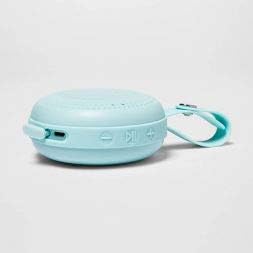
בילד: זייט view of the Heyday Round Portable Bluetooth Speaker. This image displays the USB charging port, the power button, and the volume/track control buttons on the side of the speaker.
- מאַכט קנעפּל: דריק און האלט אן צו אנצינדן אדער אויסלעשן דעם רעדנער.
- וסב טשאַרדזשינג פּאָרט: Connect the USB cable here to charge the speaker.
- באַנד אַראָפּ / פריערדיקע ליד קנעפּל: דריקן צו פֿאַרמינערן די באַנד. דריקן און האַלטן צו גיין צום פֿריִערדיקן ליד.
- שפּילן/פּויזע / רופן קנעפּל: Press to play or pause music. Press to answer or end a call. Press and hold to reject a call.
- באַנד אַרויף / ווייַטער ליד קנעפּל: דריק צו פארגרעסערן די קול. דריק און האלט צו גיין צום נעקסטן ליד.
- LED ינדיקאַטאָר: ווײַזט מאַכט, טשאַרדזשינג, און בלועטוט סטאַטוס.
- Integrated Loop: For convenient carrying or hanging.
סעטאַפּ
1. טשאַרדזשינג די ספּיקער
פארן ערשטן באַנוץ, לאָדן דעם רעדנער גאָר אויף.
- Connect the small end of the included USB charging cable to the USB charging port on the speaker.
- פֿאַרבינדט דעם גרויסן עק פֿונעם USB קאַבל צו אַ USB מאַכט אַדאַפּטער (נישט אַרייַנגערעכנט) אָדער אַ קאָמפּיוטער'ס USB פּאָרט.
- דער LED אינדיקאַטאָר וועט זיך אָנצינדן בעתן אויפלאָדן און זיך אויסלעשן ווען עס איז גאָר אויפגעלאָדן.
- א פולע אויפלאדונג נעמט געווענליך בערך 2-3 שעה.
2. פּאָווערינג אויף / אויסגעלאשן
- To turn on: Press and hold the Power Button for approximately 3 seconds. You will hear an audible prompt, and the LED indicator will flash.
- To turn off: Press and hold the Power Button for approximately 3 seconds. You will hear an audible prompt, and the LED indicator will turn off.
3. בלועטאָאָטה פּערינג
פֿאַרבינדט אייער רעדנער מיט אַ בלוטוט-ענייבאַלד מיטל (למשל, סמאַרטפאָון, טאַבלעט).
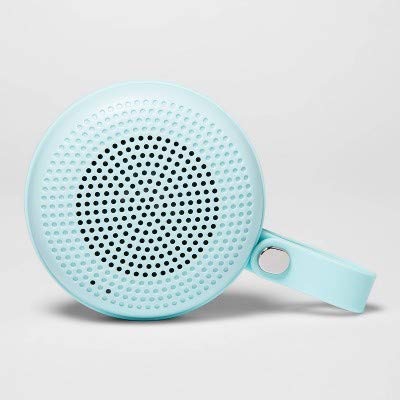
Image: The Heyday Round Portable Bluetooth Speaker in its light teal color, showcasing its compact, round design and integrated loop.
- Ensure the speaker is charged and powered on. The LED indicator will flash rapidly, indicating it's in pairing mode.
- אויף דיין מיטל, גיין צו די בלועטאָאָטה סעטטינגס און געבן בלועטאָאָטה.
- זוכן פֿאַר available devices. The speaker will appear as "HEYDAY SPEAKER" or similar.
- Select the speaker from the list to connect.
- Once successfully paired, the LED indicator will stop flashing and remain solid, and you will hear a confirmation tone.
- דער רעדנער וועט אויטאָמאַטיש פּרובירן זיך ווידער צו פֿאַרבינדן מיטן לעצטן פֿאַרבונדענעם מיטל ווען עס ווערט אָנגעצונדן.
אַפּערייטינג די רעדנער
פּלייַינג אַודיאָ
- After pairing, open your music app or audio source on your device and begin playback.
- דרוק די שפּיל / פּויזע קנעפּל צו פּויזע אָדער נעמענ זיכ ווידער פּלייבאַק.
- דרוק די באנד אַרויף (+) קנעפּל to increase volume. Press and hold to skip to the next track.
- דרוק די באַנד אַראָפּ (-) קנעפּל to decrease volume. Press and hold to go back to the previous track.
באַהאַנדלונג פון טעלעפאָן רופט
- When a call comes in, the music will pause. Press the שפּיל / פּויזע קנעפּל צו ענטפֿערן דעם רוף.
- צו ענדיקן אַ רוף, דריקן די שפּיל / פּויזע קנעפּל ווידער.
- דריקן און האַלטן די. צו אָפּוואַרפן אַ ינקאַמינג רופן שפּיל / פּויזע קנעפּל פֿאַר בעערעך 2 סעקונדעס.
וואַסער קעגנשטעל
The speaker features a water-resistant design, making it suitable for outdoor use and protection against splashes. However, it is נישט waterproof. Do not submerge the speaker in water or expose it to heavy rain for extended periods.
וישאַלט
- רייניקונג: Wipe the speaker with a soft, dry, or slightly damp cloth. Do not use abrasive cleaners, alcohol, or chemical solvents.
- סטאָרידזש: When not in use for extended periods, store the speaker in a cool, dry place away from direct sunlight.
- באַטערי זאָרגן: To prolong battery life, avoid fully discharging the speaker frequently. Recharge it regularly, even if not in constant use.
טראָובלעשאָאָטינג
| פּראָבלעם | לייזונג |
|---|---|
| דער רעדנער לאָזט זיך נישט אָנ. | זיכער מאַכן אַז דער רעדנער איז אויפגעלאָדן. פֿאַרבינדט עס צו אַ שטראָם-מקור מיטן USB קאַבל. |
| קענען ניט פאַרבינדן מיט בלועטאָאָטה מיטל. |
|
| קיין קלאַנג אָדער נידעריקע וואָלומען. |
|
| נעבעך אַודיאָ קוואַליטעט. |
|
ספּעסאַפאַקיישאַנז
| מאָדעל נאָמען | Round Portable Bluetooth Speaker with Loop |
| סאָרט | כיידיי |
| קאַנעקטיוויטי טעכנאָלאָגיע | בלועטאָאָטה, וסב |
| מאַכט מקור | באַטאַרייע פּאַוערד |
| באַטערי לעבן | בעערעך 5 שעה |
| טשאַרדזשינג צייט | בעערעך 2-3 שעה |
| וואַסער קעגנשטעל | Yes (Water-resistant) |
| ASIN | B091P75C5L |
| UPC/GTIN | 191907191868 |
וואָראַנטי אינפֿאָרמאַציע
Heyday products are designed for quality and reliability. For specific warranty details, please refer to the warranty card included with your purchase or visit the official Heyday website. Typically, a limited warranty covers manufacturing defects for a specified period from the date of purchase.
קונה שטיצן
If you encounter any issues or have questions not covered in this manual, please contact Heyday customer support. Refer to your product packaging or the official Heyday website for contact information, including phone numbers, email addresses, or support portals.
For online resources, you may visit the Heyday official page (Note: Heyday is a Target brand).