
1. הקדמה
This manual provides detailed instructions for the safe installation, operation, and maintenance of your Lumi LPA36-463A Full-Motion TV Wall Mount. Please read this manual thoroughly before installation and retain it for future reference. This wall mount is designed to securely hold most LED and LCD televisions ranging from 37 to 70 inches, with a maximum weight capacity of 45 kg (99 lbs).
The full-motion design allows for maximum extension, tilt, and rotation of your television, providing optimal viewing angles from various positions within a room. The mount can extend up to 475 mm from the wall and retract to a slim profile פון 95 מם.
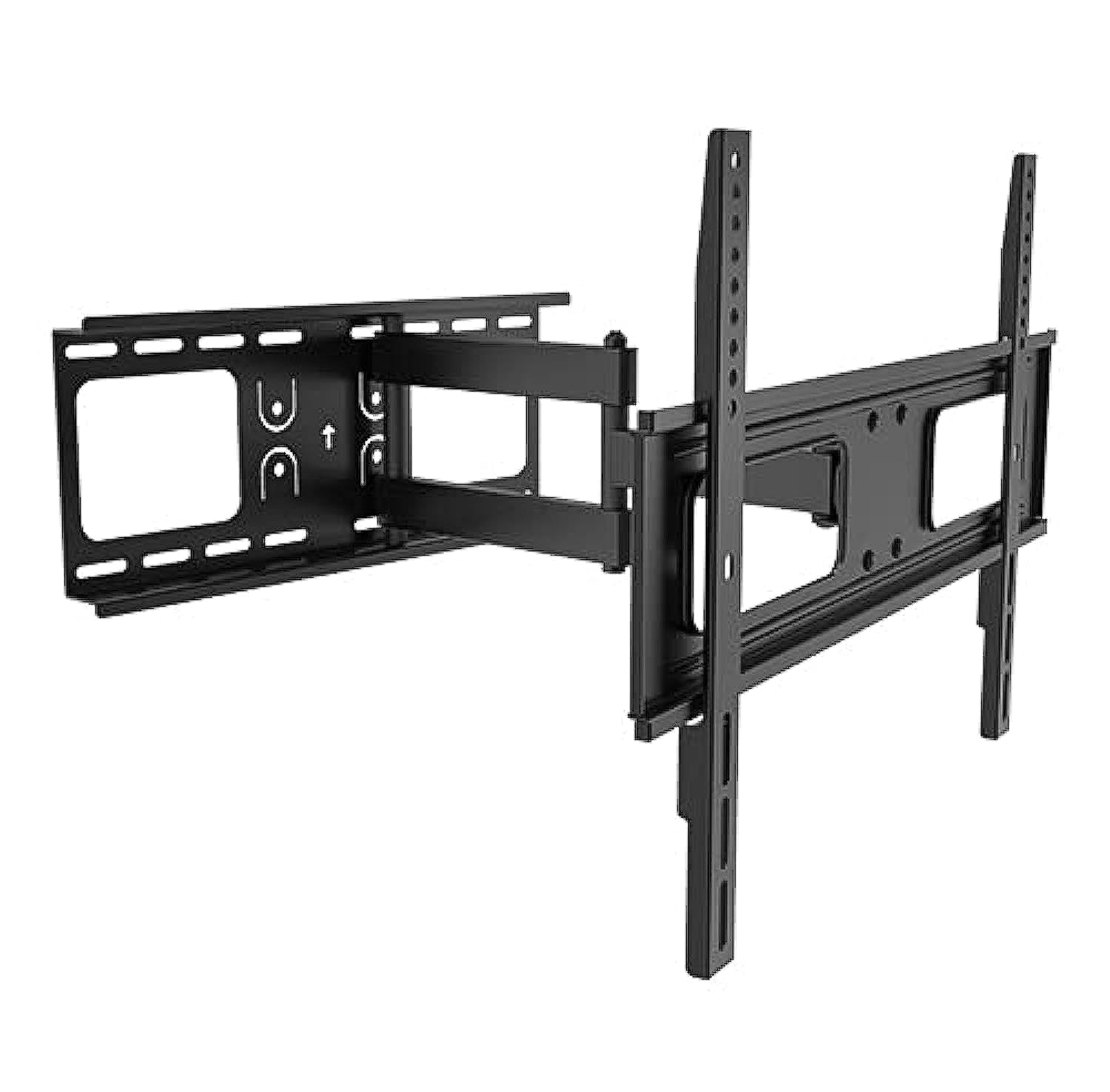
Image 1.1: The Lumi LPA36-463A Full-Motion TV Wall Mount, showing its articulated arm and VESA plate.
2. זיכערקייַט אינפֿאָרמאַציע
ווארענונג: Failure to read and follow these instructions may result in serious personal injury, property damage, or voiding of your warranty. If you do not understand these instructions or have doubts about the safety of the installation, please contact a qualified installer.
- נישט איבערשטייגן די מאקסימום וואָג קאַפּאַציטעט פון 45 ק"ג (99 פונט).
- This mount is designed for installation on solid concrete walls, brick walls, or wood stud walls. Do not install on drywall alone.
- זיכער מאַכן אַז די וואַנט סטרוקטור קען זיכער שטיצן דאָס קאָמבינירטע וואָג פֿון דער מאַונטינג און דעם טעלעוויזיע.
- Use only the mounting hardware provided. Do not use power tools to tighten screws, as this may strip threads.
- האַלטן אַלע קליין טיילן אַוועק פון קינדער.
- שטענדיק האָבן לפּחות צוויי מענטשן פֿאַר דער אינסטאַלאַציע צו פאַרמייַדן שאָדן אָדער שעדיקן.
- קאָנטראָלירט אַלע פֿאַרבינדונגען פֿון צייט צו צייט צו זיכער מאַכן אַז זיי בלייבן זיכער.
3. פּעקל אינהאַלט
Verify that all components are present and undamaged before beginning installation. If any parts are missing or defective, contact your retailer for assistance.
| טייל | באַשרייַבונג | קוואַנטיטי |
|---|---|---|
| וואַנט פּלאַטע פֿאַרזאַמלונג | Main wall mounting bracket with articulated arm. | 1 |
| TV Bracket (VESA Plate) | Bracket that attaches to the back of the TV. | 1 |
| מאַונטינג ייַזנוואַרג קיט | Includes various screws, washers, and anchors for wall and TV attachment. | 1 שטעלן |
| מדרגה | For ensuring horizontal alignment during installation. | 1 |
| ינסטראַקשאַנז מאַנואַל | דעם דאָקומענט. | 1 |
4. סעטאַפּ און ייַנמאָנטירונג
Before you begin, ensure you have the necessary tools: pencil, drill, stud finder (for wood studs), measuring tape, and a Phillips head screwdriver. It is highly recommended to have two people for installation.
4.1. באַשטימען די מאָנטירונג אָרט
- Choose a location on the wall that can support the weight of the TV and mount.
- For wood stud walls, locate the center of the studs using a stud finder.
- For concrete or brick walls, ensure there are no hidden pipes or electrical wires.
- Mark the desired height for the top of your TV.
4.2. Attach Wall Plate to Wall
- Position the wall plate assembly against the wall at the desired height. Use the integrated level to ensure it is perfectly horizontal.
- Mark the drill holes through the wall plate onto the wall with a pencil.
- בויער פּילאָט האָלעס:
- For wood studs: Use a 5.5mm (7/32") drill bit.
- For concrete/brick: Use a 10mm (3/8") masonry drill bit and insert wall anchors.
- באַפעסטיקט די וואַנט פּלאַטע צו דער וואַנט מיט די צוגעשטעלטע לעג באָלץ און וואַשערס. פֿעסט אָנציִען אָבער נישט צו שטאַרק אָנציִען.
4.3. באַפעסטיקט טעלעוויזיע קלאַמערן צום טעלעוויזיע
- לייגט פֿאָרזיכטיק אייער טעלעוויזאָר מיטן פּנים אַראָפּ אויף אַ ווייכער, ריינער ייבערפֿלאַך.
- Identify the VESA mounting holes on the back of your TV. This mount supports VESA patterns up to 400x400 mm.
- Select the appropriate screws (M4, M6, or M8) and washers from the hardware kit that fit your TV's mounting holes.
- Attach the TV brackets to the back of your TV, ensuring they are centered and securely fastened. Do not overtighten.
4.4. מאָנטירן טעלעוויזיע צו וואַנט פּלאַטע
- With assistance, carefully lift the TV and hook the TV brackets onto the wall plate assembly.
- זיכער מאַכן אַז דער טעלעוויזאָר איז זיכער אַרײַנגעזעצט אויף דער וואַנט פּלאַטע.
- Engage any safety locking mechanisms (if present) to prevent accidental dislodgement.
5. אַפּערייטינג ינסטרוקטיאָנס
The Lumi LPA36-463A mount offers full-motion capabilities for optimal viewינג בייגיקייט.
5.1. Adjusting Extension and Retraction
- Gently pull the TV away from the wall to extend the arm. The mount can extend up to 475 mm.
- Push the TV back towards the wall to retract the arm. The mount can retract to a minimum distance of 95 mm from the wall.
- Always move the TV smoothly and avoid sudden jerks.
5.2. Adjusting Tilt
- The mount allows for vertical tilt adjustment. Loosen the tilt adjustment knobs (if present, refer to diagram in physical manual) on the TV brackets.
- Adjust the TV to the desired upward or downward angle.
- Tighten the tilt adjustment knobs to secure the TV in position.
5.3. Adjusting Swivel (Rotation)
- The articulated arm allows for horizontal swivel of the TV up to 90 degrees left and right.
- Gently push or pull the side of the TV to rotate it to your preferred viewינג ווינקל.
- No locking mechanism is typically required for swivel; the friction of the joints holds the position.
6. וישאַלט
רעגולערע אויפהאלטונג גאראנטירט די לאנגעוויטי און זיכערע אפעראציע פון אייער טעלעוויזיע וואנט מאונט.
- רייניקונג: ווישט אָפּ דעם מאָונט מיט אַ ווייכן, טרוקענעם שטאָף. ניצט נישט קיין שרײַבנדיקע רייניגער אָדער סאָלווענטן.
- פּעריאָדיש דורכקוק: Every 3-6 months, check all screws and bolts to ensure they are tight and secure. Retighten if necessary.
- שלאָס לובריקאַציע: If the arm movement becomes stiff, a small amount of silicone-based lubricant can be applied to the pivot points. Avoid oil-based lubricants.
- שעדיקן טשעק: Inspect the mount for any signs of damage, wear, or corrosion. If any damage is found, discontinue use and contact customer support.
7. טראָובלעשאָאָטינג
If you encounter issues with your Lumi LPA36-463A TV mount, refer to the following common problems and solutions.
| פּראָבלעם | מעגלעך סיבה | לייזונג |
|---|---|---|
| דער טעלעוויזאר איז נישט גלייך נאך דער אינסטאלאציע. | Wall plate not perfectly horizontal. | Carefully loosen wall plate bolts, adjust with a level, and retighten. Some mounts have post-installation leveling adjustments; check your specific model. |
| דער באַרג פילט זיך לויז אָדער וואָקלדיק. | Mounting bolts are not tight enough or incorrect wall anchors were used. | Ensure all wall bolts and TV attachment screws are securely tightened. Verify correct anchors for your wall type. If problem persists, consult a professional. |
| TV cannot tilt or swivel smoothly. | Joints are too tight or require lubrication. | Check if any adjustment knobs are overtightened. Apply a small amount of silicone-based lubricant to the moving joints. |
| דער טעלעוויזיע פּאַסט נישט צום מאָונט. | אומרעכטע VESA מוסטער אדער טעלעוויזיע גרייס/וואָג. | Verify your TV's VESA pattern and weight against the mount's specifications. This mount supports VESA up to 400x400mm and TVs up to 45kg (99lbs). |
8. ספּעסאַפאַקיישאַנז
| שטריך | דעטאַל |
|---|---|
| מאָדעל נומער | LPA36-463A |
| סאָרט | לומי |
| בארג טיפּ | פול-באַוועגונג וואַנט מאָונט |
| מאַטעריאַל | מעטאַל |
| סקרין גרייס קאַמפּאַטאַבילאַטי | 37" - 70" |
| וואָג קאַפּאַסיטי | 45 קג (99 לבס) |
| VESA קאַמפּאַטאַבילאַטי | Up to 400x400 mm |
| פארלענגערונג פון וואנט | 95 mm (retracted) to 475 mm (extended) |
| טילט ראַנגע | Adjustable (vertical) |
| סוויוואַל ראַנגע | Up to 90 degrees left/right |
| שיפּינג דימענשאַנז | 51.4 X 22.2 X 7 סענטימעטער; 2.52 קג |
9. וואָראַנטי און שטיצן
Lumi products are manufactured with quality and durability in mind. For specific warranty details, please refer to the warranty card included with your product or visit the official Lumi webזייטל. האַלט אייער קויף קוויטל ווי אַ באַווייַז פון קויפן.
For technical support, missing parts, or any questions regarding the installation or operation of your Lumi LPA36-463A TV Wall Mount, please contact your local retailer or Lumi customer service.
קאָנטאַקט אינפֿאָרמאַציע: (Please refer to your product packaging or Lumi's official webוועבזייטל פֿאַר די מערסט אַקטועלע קאָנטאַקט דעטאַלן.)