
1. הקדמה
This manual provides detailed instructions for the HEAD Digital Watch Sydney series (models H140200, H140201, H140202, H140203). The Sydney watch is designed for versatility, offering both digital and analog time display, chronograph functions, and water resistance suitable for various activities. Please read this manual thoroughly before using your watch to ensure proper operation and longevity.
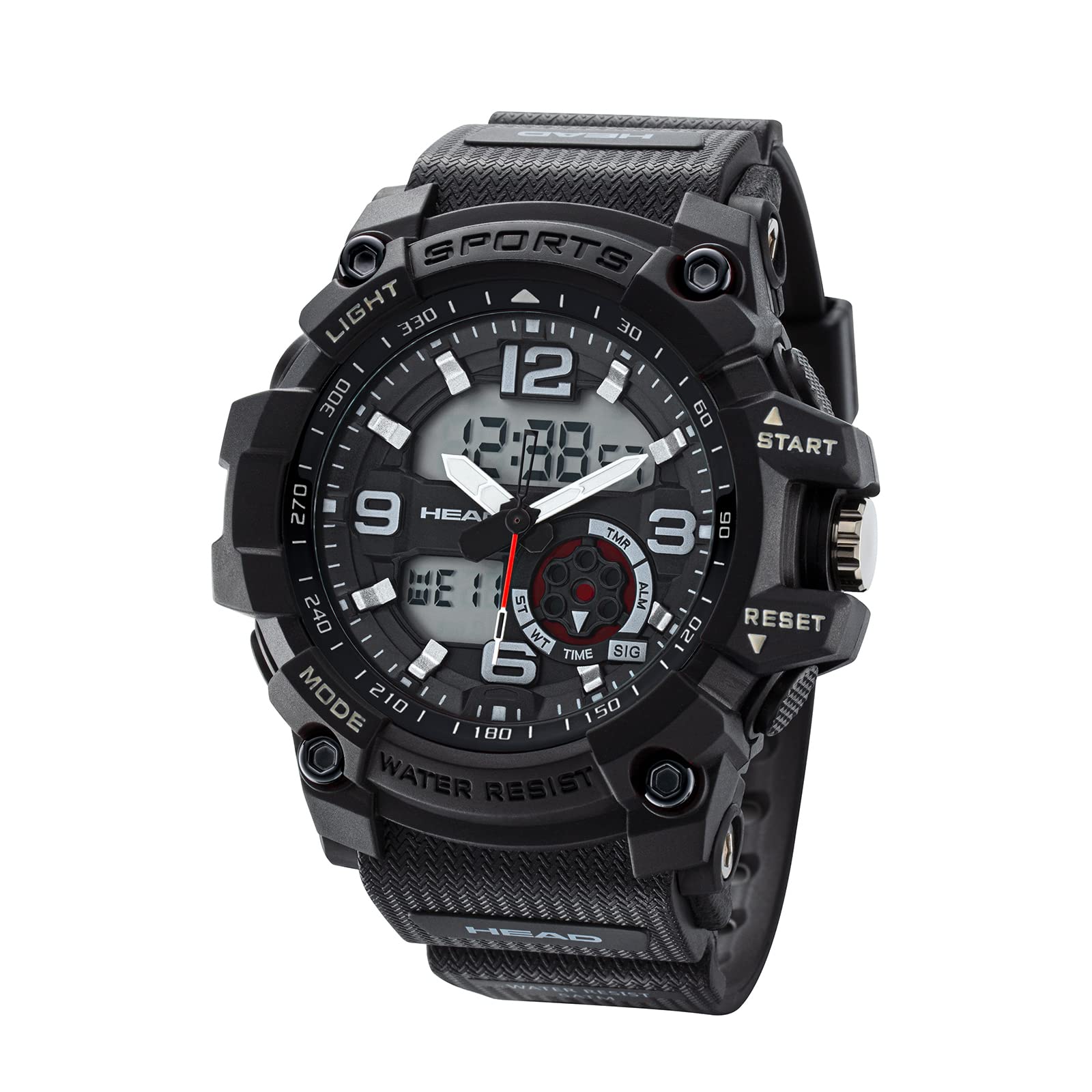
פיגורע 1: פראָנט view of the HEAD Digital Watch Sydney H140200.
2. זיכערקייַט אינפֿאָרמאַציע
- וואַסער ויסשטעלן: The watch has a water resistance rating of 5 ATM (50 meters). This means it is suitable for everyday use, showering, and swimming in shallow water. It is נישט suitable for high-impact water sports, diving, or prolonged submersion.
- רייניקונג: Do not wash the watch with strong detergents or abrasive materials. Refer to the Maintenance section for proper cleaning instructions.
- טעמפּעראַטור: Avoid exposing the watch to extreme temperatures (hot or cold) for extended periods, as this may affect its accuracy and battery life.
- פּראַל: While robust and shock-resistant, avoid severe impacts or dropping the watch to prevent damage.
3. פּראָדוקט איבערview
The HEAD Sydney watch features a durable case, a comfortable silicone strap, and a dual analog-digital display. Key components include:
- ווייַז: Analog hands for traditional timekeeping and a digital display for additional functions.
- קנעפּלעך: Multiple buttons on the side for mode selection, setting adjustments, and chronograph control.
- קרוין: A crown for setting analog time.
- רימען: A flexible silicone strap with a buckle clasp for secure and comfortable wear.
- קעיס צוריק: Stainless steel case back indicating water resistance.

פיגורע 2: זייַט view illustrating the watch buttons (START, RESET, Mode, Light).

פיגורע 3: צוריק view showing the stainless steel case and water resistance marking.
4. סעטאַפּ
4.1 איינשטעלן אנאלאגע צייט
- Pull the crown (located on the right side of the watch) out to the first position.
- דרייען די קרוין צו סטרויערן די שעה און מינוט הענט צו די ריכטיק צייט.
- Push the crown back into its normal position to start the analog timekeeping.
4.2 שטעלן דיגיטאַלע צייט און דאַטע
The digital display allows for precise time and date settings.
- In normal timekeeping mode, press the מאָדע button (usually bottom-left) repeatedly until the digital time setting mode is displayed (often indicated by flashing digits).
- ניצן די באַשטעטיק button (usually bottom-right) to select the digit or setting you wish to adjust (e.g., seconds, hours, minutes, year, month, day).
- ניצן די אָנהייב button (usually top-left) to increase the selected value. Hold it down for faster adjustment.
- אַמאָל אַלע סעטטינגס זענען ריכטיק, דריקן די מאָדע button again to exit the setting mode and return to normal timekeeping.
5. אפערירן די זייגער
5.1 צייט-מעכטן מאָדע
In the default timekeeping mode, the watch displays the current time digitally, along with the day of the week and date. The analog hands also show the current time.
5.2 ניצן דעם כראָנאָגראַף (סטאָפּוואַטש)
- From normal timekeeping mode, press the מאָדע button until the chronograph mode is displayed (often indicated by "00:00:00").
- דרוק די אָנהייב קנעפּל צו אָנהייבן טיימינג.
- דרוק די אָנהייב קנעפּל ווידער צו פּויזירן די צייט.
- דרוק די באַשטעטיק button to reset the chronograph to zero.
- To exit chronograph mode, press the מאָדע קנעפּל.
5.3 שרעק פֿונקציע
Your watch may include an alarm function. To set and activate the alarm:
- דרוק די מאָדע קנעפּל ביז דער אַלאַרם סעטטינג מאָדע ווערט געוויזן.
- ניצן די באַשטעטיק button to select the hour or minute digits.
- ניצן די אָנהייב קנעפּל צו סטרויערן די אַלאַרם צייט.
- דרוק די מאָדע button to confirm and activate the alarm. An alarm icon will typically appear on the display.
- To turn off the alarm sound when it rings, press any button. To deactivate the alarm function, navigate back to the alarm setting mode and toggle it off.
5.4 באַקלייט
To illuminate the digital display in low-light conditions, press the ליכט button (usually top-right). The backlight will typically stay on for a few seconds.
6. וישאַלט
6.1 רייניקן דיין זייגער
- ווישט אָפּ דעם זייגער־קעסטל און רימען מיט אַ ווייכן, טרוקענעם שטאָף.amp שטאָף.
- For stubborn dirt, use a mild soap solution and rinse thoroughly with a damp cloth. Ensure no water enters the watch.
- Dry the watch completely with a soft, dry cloth.
- וויכטיק: Do not use chemical cleaners, solvents, or abrasive materials, as these can damage the watch's finish and seals. Do not wash the watch under running water or submerge it for cleaning.
6.2 באַטערי פאַרבייַט
The watch is powered by a battery. When the display becomes dim or functions become erratic, it may be time to replace the battery. Battery replacement should ideally be performed by a qualified watch technician to ensure the water resistance seal is properly maintained. Attempting to replace the battery yourself may void the warranty and compromise water resistance.
6.3 וואַסער קעגנשטעל זאָרג
- זיכער מאַכן אַז די קרוין איז גאָר אַרײַנגעשטופּט איידער קיין קאָנטאַקט מיט וואַסער.
- ניצט נישט די קנעפלעך בשעת די זייגער איז נאַס אדער אונטערגעטובלט.
- נאך אויסשטעלן זיך צו זאלץ-וואסער, שווענקט אויס די זייגער מיט פריש וואסער און טריקנט עס גוט אויס.
- Water resistance is not a permanent condition and may decrease over time due to wear and tear or impact. It is recommended to have the water resistance checked periodically by a professional, especially after battery replacement.
7. טראָובלעשאָאָטינג
| פּראָבלעם | מעגלעך סיבה | לייזונג |
|---|---|---|
| די דיגיטאַלע אַרויסווייַז איז טונקל אָדער ליידיק. | נידעריק באַטאַרייע. | טוישט אויס די באַטעריע (רעקאָמענדירט דורך אַ פאַכמאַן). |
| אנאלאגישע צייגערס רירן זיך נישט. | קרוין איז ארויסגעצויגן; נידריגע באַטעריע. | שטופּ צוריק אַרײַן די קרוין. אויב עס רירט זיך נאָך אַלץ נישט, טוישט די באַטעריע. |
| די צייט איז נישט ריכטיק. | Time not set correctly; impact. | Re-set the analog and digital time as per Section 4. If problem persists after impact, seek professional service. |
| וואַסער אינעווייניק פון דער זייגער. | Crown not fully pushed in; buttons operated underwater; damaged seal. | נעמט גלייך די זייגער צו א פראפעסיאנאל פאר א דורכקוק און פארריכטונג כדי צו פארמיידן ווייטערדיגע שאדן. |
8. ספּעסאַפאַקיישאַנז
- מאָדעל נאָמען: סידני
- מאָדעל נומער: H140200 (also H140201, H140202, H140203 variants)
- סאָרט: קאָפּ
- ווייַז טיפּ: Digital-Analog
- באַוועגונג טיפּ: קוואַרץ
- קאַסטן מאַטעריאַל: נישט-ראַסטיק שטאָל (קעסטל הינטערשטער טייל)
- Dial Window Material Type: פּלאַסטיק
- באַנד מאַטעריאַל טיפּ: סיליקאָנע
- קלעפּיק טיפּ: Buckle (Tang Buckle)
- קאַסע דיאַמעטער: 55 מילאַמיטערז
- קאַסטן גרעב: 12 מילאַמיטערז
- באַנד ברייט: 2
- וואַסער קעגנשטעל טיפקייַט: 50 מעטער (5 אַטם)
- ספּעציעלע פֿעיִקייטן: Chronograph, Water Resistant
- מאַכט מקור: באַטאַרייע פּאַוערד
- נומער פאָרעם: קייַלעכיק
- נומער וואָג: 210 גראַמז
9. וואָראַנטי אינפֿאָרמאַציע
Specific warranty details for the HEAD Digital Watch Sydney H140200 are not provided in this document. Please refer to the warranty card included with your purchase or visit the official HEAD Watches website for comprehensive warranty terms and conditions. Keep your proof of purchase for any warranty claims.
10. שטיצן
For further assistance, technical support, or service inquiries regarding your HEAD Digital Watch Sydney H140200, please contact HEAD customer service through their official webזייטל אדער די קאָנטאַקט אינפֿאָרמאַציע וואָס איז צוגעשטעלט מיט אייער פּראָדוקט פּאַקאַדזשינג.