
הקדמה
Welcome to the user manual for your AWOW Funtab 701 Kids Tablet. This guide provides essential information on setting up, operating, maintaining, and troubleshooting your device to ensure a safe and enjoyable experience for your child. Please read this manual thoroughly before using the tablet.
פּעקל אינהאַלט
ביטע באַשטעטיקן אַז אַלע זאכן וואָס זענען ליסטעד אונטן זענען אַרייַנגערעכנט אין דיין פּעקל:
- AWOW Funtab 701 Kids Tablet (7 inch)
- Exclusive Kid-Proof Case
- אַקטיוו פּען
- באַניצער מאַנואַל (דעם דאָקומענט)
- מאַכט אַדאַפּטער
פּראָדוקט איבערview
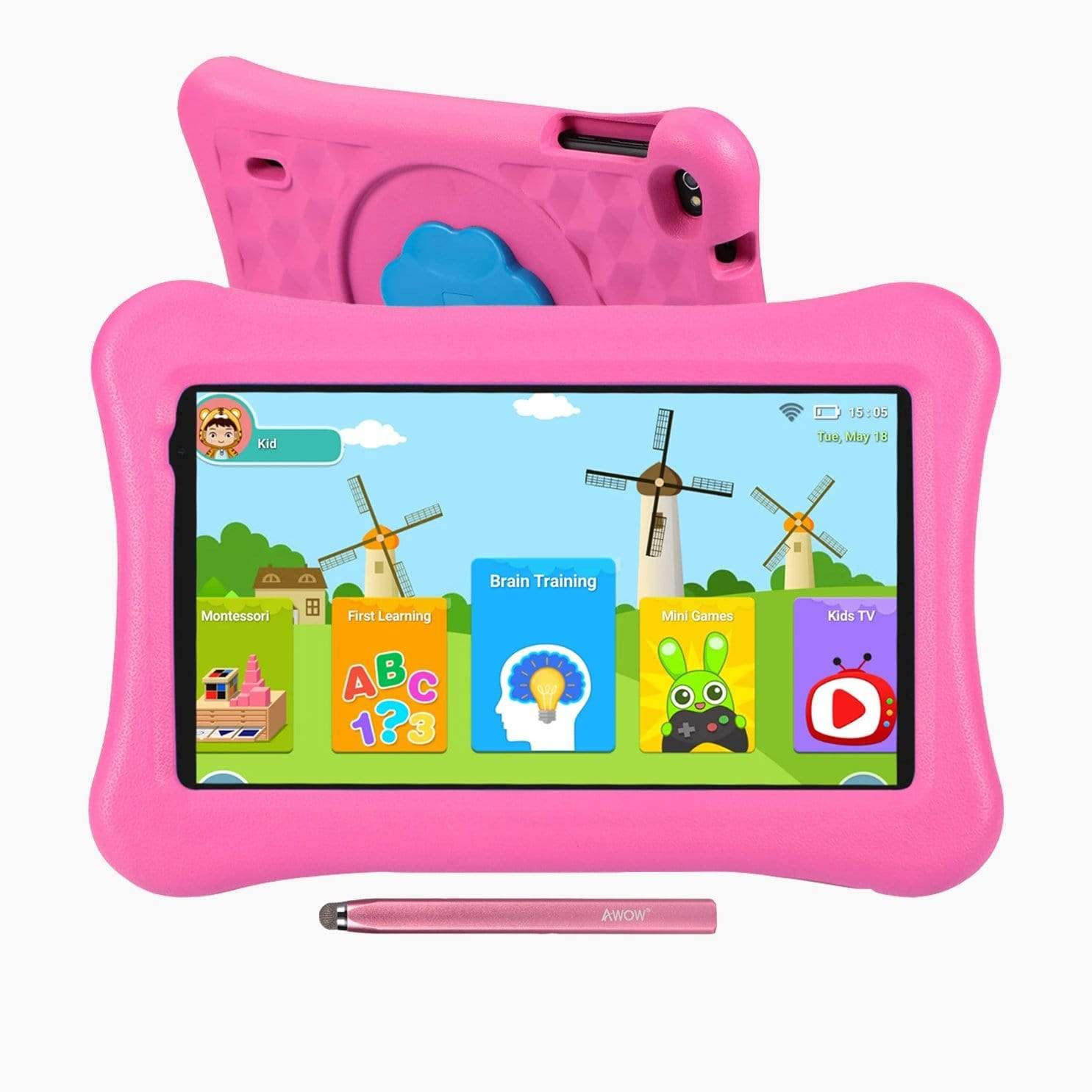
Image: The AWOW Funtab 701 Kids Tablet, shown with its protective pink kid-proof case and the accompanying active pen. The tablet features a 7-inch display.
The AWOW Funtab 701 is a 7-inch kids tablet designed for educational and entertainment purposes. It runs on Android 10 Go, powered by a 1.5GHz Quad-core processor, with 2GB RAM and 16GB ROM. It features a 1024x600 IPS HD display and supports 2.4G Wi-Fi connectivity. The tablet comes with a durable kid-proof case and an active pen for interactive learning and creativity.
סעטאַפּ
1. טשאַרדזשינג די טאַבלעט
Before first use, fully charge the tablet. Connect the provided power adapter to the tablet's charging port and plug it into a wall outlet. The charging indicator will typically light up. A full charge may take several hours.
2. פּאָווערינג אויף / אויסגעלאשן
- צו מאַכט אויף: Press and hold the Power button (usually located on the side or top edge) until the screen lights up.
- צו מאַכט אַוועק: Press and hold the Power button until a power-off menu appears on the screen. Select 'Power off' and confirm.
3. ערשט סעטאַפּ
ביים ערשטן מאָל אנצינדן, וועט די טאַבלעט אייך פירן דורך דעם ערשטן סעטאַפּ פּראָצעס:
- שפּראַך סעלעקציע: קלייַבן דיין בילכער שפּראַך.
- Wi-Fi קאַנעקשאַן: Select your 2.4G Wi-Fi network from the list and enter the password.
- גוגל אקאונט: Sign in with an existing Google account or create a new one. This is necessary for accessing the Google Play Store and other Google services.
- טאָג און צייט: שטעלט איין דעם ריכטיקן דאטום און צייט, אדער לאזט דעם נעץ עס אויטאמאטיש שטעלן.
4. iWawa App and Parental Controls
The AWOW Funtab 701 comes with the iWawa app pre-installed, offering a safe environment for children and robust parental controls.
- קריייטינג פּראָfiles: Open the iWawa app to create individual profiles for each child.
- אינהאַלט פאַרוואַלטונג: Within the parental control mode, you can hand-pick specific apps, games, videos, and websites that your child can access.
- Screen Time Control: Set daily time limits for tablet usage and specific play periods.
- זיכער בראַוזינג: Ensure children browse only safe and approved webזייטלעך.
- אַדזשאַסטינג סעטטינגס: Parental control settings can be adjusted as your child grows to tailor content to their age and development.
אַפּערייטינג די טאַבלעט
1. יקערדיק נאַוויגאַציע
The tablet uses a touchscreen interface. Common gestures include:
- צאַפּן: צו אויסקלײַבן אַן אייטעם אָדער עפֿענען אַן אַפּ.
- לאַקכענען: צו סקראָלן דורך בלעטער אדער מעניוז.
- קניפּ: צו פארגרעסערן אדער פארקלענערן בילדער און web בלעטער.
- לאנג פּרעס: צו צוקומען צו קאנטעקסטועלע מעניוס אדער באוועגן אפליקאציע אייקאנען.
2. Using the Active Pen
The included active pen allows for more precise interaction, drawing, and writing. Simply touch the pen to the screen as you would with your finger. No pairing is typically required for basic functionality.
3. פאַרוואַלטן אַפּליקאַציעס
- דאַונלאָודינג אַפּפּס: Access the Google Play Store to download new applications. Ensure parental controls are set to manage app downloads for children.
- אַראָפּנעמען אַפּפּס: Long-press an app icon on the home screen or in the app drawer, then drag it to the 'Uninstall' option that appears. Alternatively, go to Settings > Apps & notifications > See all apps, select the app, and tap 'Uninstall'.
4. קאַנעקטינג צו ווי-פי
To connect or reconnect to a Wi-Fi network:
- גיין צו סעטטינגס > נעץ און אינטערנעט > ווי-פי.
- זיכער מאַכן אַז Wi-Fi איז אַקטיווירט On.
- Select your desired 2.4G network from the list of available networks.
- אַרייַן די נעץ פּאַראָל אויב געבעטן, און דאַן צאַפּן פאַרבינדן.
וישאַלט
1. רייניקונג
צו רייניקן דעם טאַבלעט עקראַן, ניצט אַ ווייכן, לינט-פֿרייע שטאָף. פֿאַר שווערע פֿלעקן, אַ ביסל ווישןampen the cloth with water or a screen-specific cleaning solution. Avoid harsh chemicals or abrasive materials. The kid-proof case can be cleaned with mild soap and water.
2. באַטערי קער
צו פאַרלענגערן די באַטאַרייע לעבן:
- פֿאַרמײַדט אויסשטעלן די טאַבלעט צו עקסטרעמע טעמפּעראַטורן (הייס אָדער קאַלט).
- לאָזט נישט די באַטאַרייע זיך אָפט גאָר אויסלאָדן.
- ניצט נאָר דעם צוגעשטעלטן מאַכט אַדאַפּטער צום אָפּלאָדן.
- Reduce screen brightness and close unused apps to conserve power.
3. סטאָרידזש
When not in use for extended periods, store the tablet in a cool, dry place away from direct sunlight. Ensure the battery has at least a 50% charge before storing.
טראָובלעשאָאָטינג
If you encounter issues with your AWOW Funtab 701, refer to the solutions below:
- טאַבלעט טוט זיך נישט אנצינדן: Ensure the tablet is fully charged. Connect it to the power adapter and wait a few minutes before attempting to power it on again. If it still doesn't turn on, try holding the power button for 10-15 seconds.
- ווי-פי קשר ישוז: Check if your Wi-Fi router is working correctly. Restart both the tablet and the router. Ensure you are connecting to a 2.4G network and have entered the correct password.
- Apps are slow or crashing: Close unused applications. Clear the cache of problematic apps (Settings > Apps & notifications > App info > Storage & cache > Clear cache). If the issue persists, consider uninstalling and reinstalling the app.
- באַטעריע ווערט שנעל אויסגעשעפּט: The average battery life is approximately 4 hours. To optimize, reduce screen brightness, disable Wi-Fi when not needed, and close background apps. Avoid running multiple demanding applications simultaneously.
- דער עקראַן רעאַגירט נישט: Try restarting the tablet. If the issue persists, ensure the screen is clean and free of debris.
ספּעסאַפאַקיישאַנז
| שטריך | דעטאַל |
|---|---|
| סאָרט | AWOW |
| מאָדעל נאָמען | Funtab 701 |
| אָפּערייטינג סיסטעם | אַנדרויד 10 גיין |
| פאַרשטעלן גרייס | 7 אינטשעס |
| ווייַז האַכלאָטע | 1024 X 600 בילדצעלן |
| פּראַסעסער | 1.5 GHz Quad-core (Qualcomm) |
| באַראַן | 2 גיגאבייט |
| אינערלעכער סטאָרידזש | 16 גיגאבייט |
| יקספּאַנדאַבאַל סטאָרידזש | Micro SD slot (up to 512GB) |
| דערציען אַפּאַראַט | 2.0 מפּ |
| פראָנט אַפּאַראַט | 2.0 מפּ |
| ווירעלעסס קאַנעקטיוויטי | 2.4G Wi-Fi (802.11b) |
| דורכשניטלעך באַטאַרייע לעבן | 4 שעה |
| פּראָדוקט דימענשאַנז | 18.5 X 10.5 X 1 סענטימעטער |
| פּונקט וואָג | 453.59 ג |
וואָראַנטי און שטיצן
For warranty information, please refer to the documentation provided at the time of purchase. This typically includes details on coverage duration and terms. For technical assistance or further inquiries, please contact AWOW customer service through their official support channels.